
Secondary DNS After the 2025-2026 Outages: What Broke and What Helps
Between July 2025 and May 2026, four DNS failures took services offline for one to three hours each, and only one of them was the kind a second DNS provider prevents.
Secondary DNS means a second, independent set of nameservers that answers for your domain when the first set goes quiet. It is cheap to add and widely recommended after every large outage, yet it only covers one of the places where DNS can break. If you own a domain that customers, email or an API depend on, it helps to know which failures sit within your reach and which do not. Hostry’s free DNS hosting can serve as either the primary or the backup provider, and we come back to setup at the end.
This article is for site owners and administrators who manage their own zones. It maps four recent incidents to the layer of DNS that failed and ends with a checklist.
Four DNS outages, four different failure points
Each DNS outage below has a public report from the operator involved, and the dates and times come from those reports.
AWS us-east-1, October 19-20, 2025: automation emptied a record
At 11:48 PM PDT on October 19, systems in AWS’s N. Virginia region started failing to resolve dynamodb.us-east-1.amazonaws.com, the regional DynamoDB endpoint. The AWS post-event summary traces this to a latent race condition in the automation that manages DynamoDB’s DNS records: it left the endpoint with an empty record and could not repair it on its own. Engineers restored the DNS information by 2:25 AM, and clients recovered as cached records expired between 2:25 and 2:40 AM. AWS then disabled that DNS automation worldwide.
Many AWS services depend on DynamoDB, so the damage spread widely. For a domain owner, the useful detail is the 15-minute cache tail: the correct answer was back at the source, and resolvers kept handing out the broken one until its TTL ran out.
Cloudflare 1.1.1.1, July 14, 2025: a public resolver vanished
Cloudflare’s public resolver was unreachable for 62 minutes, from 21:52 to 22:54 UTC. According to Cloudflare’s incident report, a configuration error made on June 6 sat dormant until an unrelated change on July 14 triggered a global refresh, which withdrew the resolver’s IP prefixes from the internet. Cloudflare states it was not an attack. Queries over UDP, TCP and DNS over TLS dropped, while DNS over HTTPS through cloudflare-dns.com stayed mostly available because that hostname uses different addresses.
This was a resolver incident. Authoritative zones everywhere kept answering normally; devices set to use only 1.1.1.1 could not resolve any name until the prefixes were announced again.
DENIC (.de), May 5, 2026: the TLD’s signatures broke
During a routine zone signing key rollover, a bug in DENIC’s in-house rollover software produced DNSSEC signatures that validating resolvers could not verify. Those resolvers returned SERVFAIL for .de names for about three hours. Domains that never enabled DNSSEC failed as well, because a validating resolver could no longer trust the .de zone’s own answers about where those domains are delegated. Non-validating resolvers kept working, and some large operators briefly switched off validation for .de. DENIC’s final report, published June 11, 2026, found no signs of an attack or compromise.
If the registry layer is unfamiliar, our overview of top-level domain types explains who runs a TLD and what it publishes.
Clerk’s DNS provider, February 10, 2026: every nameserver at once
At 17:06 UTC, authoritative DNS for Clerk, an authentication platform, stopped answering and stayed down for 2 hours 32 minutes. Clerk’s own services were healthy. The failure sat with its DNS provider, which is unnamed in Clerk’s postmortem, and this account is the only public source for the event. The provider ran four nameservers across two autonomous systems, with a different architecture on each, and all four failed together. Email suffered too, since receivers could not look up the SPF and DKIM records for Clerk’s authentication emails.
Clerk drew its own conclusions: prepare a second DNS provider, stop using the same company as registrar and DNS host for a critical domain (that pairing blocked an emergency nameserver change), and monitor authoritative nameservers directly, since long TTLs had hidden the outage from its uptime checks.
Resolver, authoritative or registry: where each failure sat
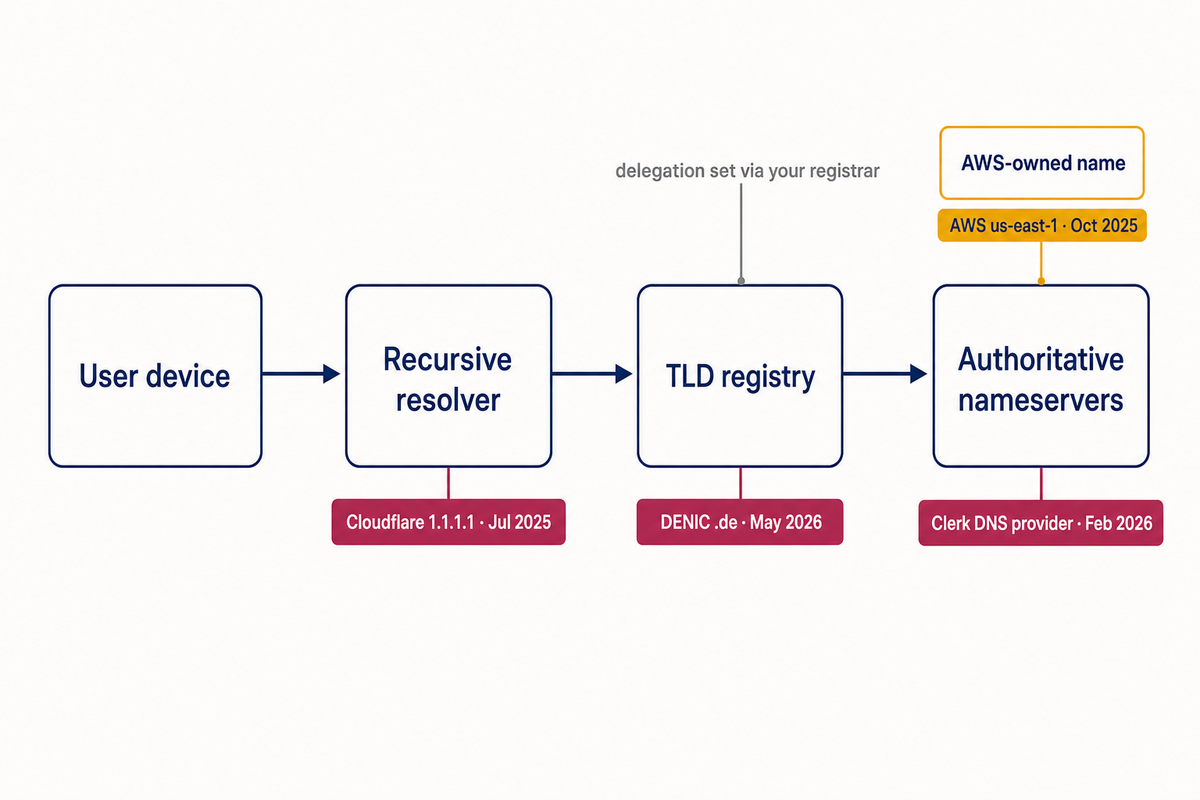
A lookup for www.example.com passes through three kinds of systems. The recursive resolver (your ISP’s, your office’s or a public one) asks the questions and caches the answers. The registry runs the TLD zone and publishes the delegation, the NS records that say which nameservers are responsible for example.com; you change those through your registrar. The authoritative nameservers at your DNS host hold the zone itself and give the final answer. Our older primer on what DNS is and what it is used for covers the basics if you need them.
| Incident | Layer that failed | Were your own records affected? | Who could fix it |
|---|---|---|---|
| AWS us-east-1, Oct 2025 | Authoritative data for an AWS-owned name | No; only applications that called that endpoint failed | AWS |
| Cloudflare 1.1.1.1, Jul 2025 | Public recursive resolver | No; users of that resolver could not look up anything | Cloudflare; users by switching resolvers |
| DENIC .de, May 2026 | TLD registry signing | Yes, for .de domains on validating resolvers | DENIC; resolver operators as a stopgap |
| Clerk’s provider, Feb 2026 | Authoritative DNS provider | Yes, completely | The domain owner, if a second provider was ready |
What secondary DNS is and how it works
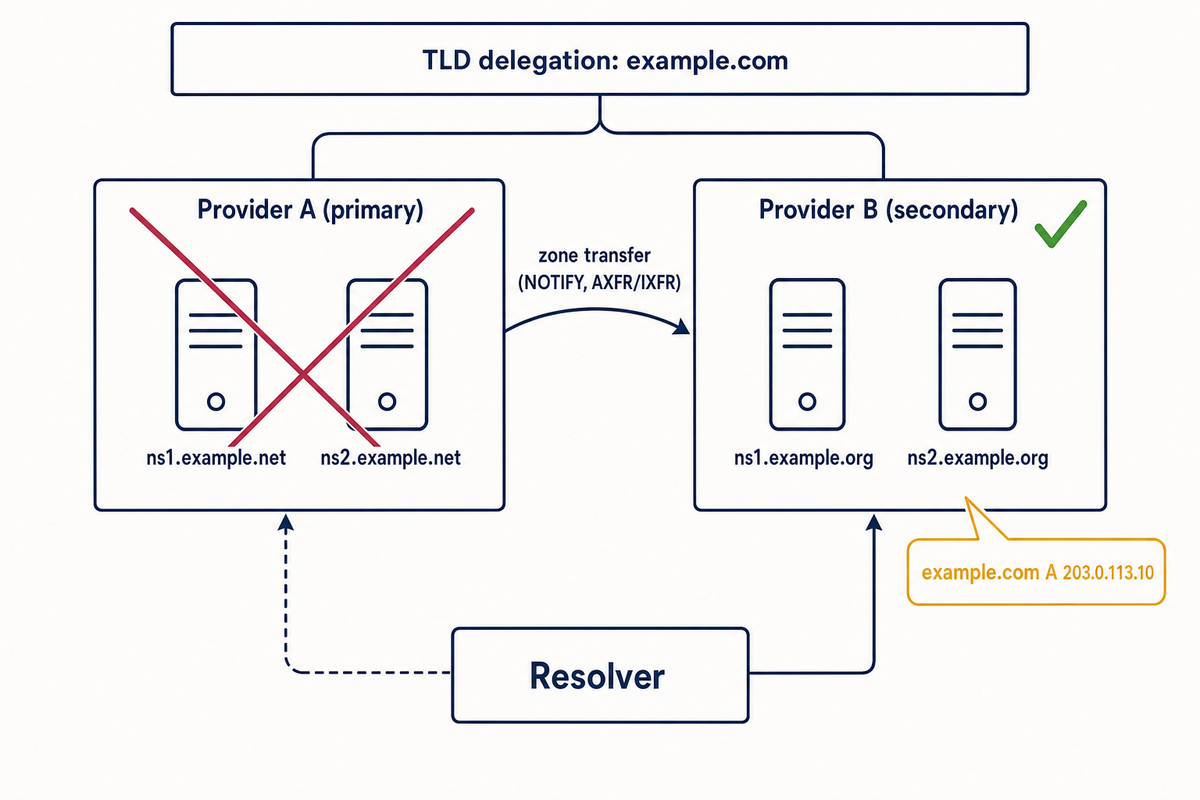
With secondary DNS, the delegation for your domain lists nameservers run by two independent operators. A resolver receives the whole NS set from the TLD, and if one nameserver does not reply in time it tries another. As long as either operator answers, the domain resolves, although the first lookup after a failure can be slower while the resolver waits out the dead servers.
Primary and secondary with zone transfers
In the classic setup you edit records at one provider, the primary, and the secondary copies the zone by zone transfer: a full copy (AXFR) or only the changes (IXFR). When the zone changes, the primary sends a NOTIFY message, defined in RFC 1996, and the secondary checks the SOA serial and pulls the update if the serial went up. The secondary also polls on the SOA refresh interval in case a NOTIFY is lost.
Two details matter during an outage. If the secondary cannot reach the primary for longer than the SOA expire value, it stops serving the zone, so a very short expire undermines the whole point. And provider-specific features such as ALIAS records, CNAME flattening or geographic steering are computed by the primary’s software, so they usually arrive at the secondary as plain records or not at all.
Two primaries kept in sync by your own tooling
When one provider does not support transfers, or you want each provider’s own features, you can run multi-provider DNS as primary-primary: push the same records to both through their APIs, zone file imports or an infrastructure-as-code tool. Each side then writes its own SOA, so serials can differ even when the records match. Keeping the zones identical becomes your job, and a record added at one provider and forgotten at the other gives answers that change depending on which nameserver a resolver happened to ask.
DNSSEC with two providers
If the primary signs the zone and transfers it already signed, the secondary only serves those signatures, and signing stays with one company. If each provider signs with its own keys, every provider’s DNSKEY set must include the other’s zone signing keys and the DS records at the registry must cover the key signing keys in use, as described in RFC 8901 (Multi-Signer DNSSEC Models). Not every provider supports that. Confirm which model both of yours support before you turn DNSSEC on, because a mismatch produces the same SERVFAIL errors seen in the .de case, only for your domain.
What a second DNS provider would and would not have changed
Here is how the four incidents would have looked with secondary DNS already in place:
- Clerk’s provider: this is the case secondary DNS exists for. With nameservers from another operator in the delegation, resolvers would have moved on to them when all four of the provider’s servers stopped answering. It has to be set up beforehand, because a delegation change made mid-outage still waits for cached NS records to expire.
- AWS us-east-1: no help. The name that broke belonged to AWS, and your own zone was answering correctly the whole time.
- Cloudflare 1.1.1.1: no help, since your zone kept answering. Networks configured with resolvers from two different operators kept working.
- DENIC: no help. Every nameserver for a .de domain could answer correctly and validating resolvers still refused, because the fault was in the parent zone. The only lever a domain owner had was keeping a status page or support address on a domain under a different TLD, which costs an extra domain and some confusion for users.
Secondary DNS protects the authoritative layer only. That is still the layer you choose and pay for, which is why it is worth having, but it does nothing for resolver diversity or a TLD failure.
A DNS redundancy checklist for site owners
Add a backup DNS provider
Pick a secondary DNS operator with separate infrastructure, decide between zone transfers and primary-primary, and list both providers’ nameservers at the registrar. Update the apex NS records on both providers so they match the delegation.
Choose TTLs on purpose
Long TTLs (hours to a day) let resolvers keep serving cached answers while your provider is down. They also hide the outage: a monitor that checks through a caching resolver keeps getting good answers, as happened to Clerk, and any fix takes just as long to reach users. Very short TTLs, under a minute, do the opposite and make every visitor depend on a live answer from your nameservers. Medium TTLs for records you may need to change, and longer ones for stable records such as MX, are a reasonable compromise. The NS records in the TLD zone carry the registry’s TTL, which you do not control.
Monitor the authoritative nameservers directly
First list the nameservers the world sees for your domain. The names below are examples; replace example.com and the nameserver hostnames with your own:
dig NS example.com +short
dig +trace example.com
The +trace output walks from the root through the TLD to your nameservers, showing whether the delegation lists both providers. Then query every nameserver directly, without recursion, and compare the SOA serials:
for ns in ns1.example.net ns2.example.net ns1.example.org ns2.example.org; do
  printf '%s  ' "$ns"
  dig @"$ns" example.com SOA +short +norecurse +time=2 +tries=1
done
dig @ns1.example.org example.com A +norecurse
A timeout message means that nameserver did not answer; an empty result means it answered without serving the zone, for example with REFUSED. In a secondary DNS setup with zone transfers the serials should match within minutes of a change; in primary-primary they may differ by design, so compare records instead. Run the check on a schedule from outside your network and alert on it.
Keep the registrar separate from the DNS host
When one company both hosts your DNS and holds your domain, its outage can block the nameserver change that would get you out of it. If your DNS stays where it is, registering domains with a different company, for example through Hostry domain registration, keeps the two roles apart. If you move DNS to a provider, leave the domain registered elsewhere.
Keep an offline copy of the zone
Export the zone in standard zone file format, or keep it in version control as the source your tooling pushes from. If a provider fails for good or an account gets locked, you can rebuild every record elsewhere in minutes.
Lock the registrar account
Turn on the registrar lock so the domain cannot be transferred without your action, and protect the registrar login with two-factor authentication. Whoever controls that account controls the delegation, and with it every nameserver your domain uses.
Using Hostry free DNS as primary or backup DNS
Hostry’s DNS hosting is free, with DDoS-protected, globally distributed nameservers and no limits on records or queries. It works with domains registered at any registrar and can act as your main DNS or as a backup to another provider. Setup takes a few minutes in the customer portal:
- Create the zone for your domain in the customer portal.
- Add your records: A and AAAA, CNAME, MX, and the TXT records for SPF, DKIM and DMARC. Compare them with your current nameservers using dig @, since a missing TXT record shows up as failed email.
- As primary DNS: at your registrar, replace the existing nameservers with Hostry’s.
- As secondary DNS (backup): at your registrar, list both providers’ nameservers, set the same full NS set in both zones, and keep the zones identical. How they stay in sync depends on what each provider supports, so confirm it with both (Hostry support answers tickets 24/7) before you change the delegation.
- Run the monitoring loop from the checklist and keep the old zone untouched until cached NS records have expired.
DNS redundancy at a glance
| Action | What it protects against | Effort |
|---|---|---|
| Secondary DNS at a second provider | A whole DNS provider going dark (the Clerk case) | An afternoon, plus ongoing sync |
| Registrar separate from DNS host | Being unable to change nameservers during that outage | Low |
| Deliberate TTLs | Outages hidden by caches, slow fixes | Low |
| Direct nameserver monitoring | Learning about the outage from customers | Low to medium |
| Offline zone export | Losing records with a provider or account | Low |
| Registrar lock and 2FA | Someone else changing your delegation | Minutes |
| Two resolvers from different operators | A public resolver outage (the 1.1.1.1 case) | Minutes per network |
What to do next
- Run dig NS for every domain you depend on, including the ones used only for email or APIs, and write down which company answers for each.
- Check where each domain is registered and whether that company also hosts its DNS.
- Export every zone today and store the files with your other backups; our article on why backups matter covers where to keep them.
- Set up secondary DNS for the domain whose outage would hurt most, then schedule the direct nameserver check.
FAQ
What is the difference between primary and secondary DNS?
The primary is where you edit the zone. A secondary holds a copy, usually received by zone transfer, and answers queries just like the primary. Resolvers do not prefer one over the other; they see a list of nameservers and use whichever responds.
Does secondary DNS slow down my website?
In normal operation, no. Many resolvers track response times and favor faster nameservers, and answers are cached anyway. You may see a short delay only when one provider is down and a resolver first tries one of its servers before moving on.
Can I use two DNS providers at the same time without zone transfers?
Yes, as primary-primary: you push the same records to both providers yourself, by API, zone import or automation. It works with providers that do not support transfers, but every change has to reach both sides, so automate it if your records change often.
Would secondary DNS have kept my .de domain online on May 5, 2026?
No. The invalid signatures were in the .de zone itself, above your own nameservers, so validating resolvers failed no matter how many providers you used. Only resolvers that did not validate, or that temporarily disabled validation for .de, kept answering.
Want a second set of nameservers for your domain? Hostry Free DNS works with any registrar, has no limits on records or queries, and can run as your primary DNS or as the backup next to your current provider.