
Game Server UDP Port Not Reachable on a VPS: Firewall Checklist

nc -zu printing "succeeded" does not mean a game server UDP port is reachable. In a lab run it printed exactly that, with exit code 0, for a UFW drop, a provider-side drop and a listener that never answers. Trust only a reply received outside the VPS.
Players get “timed out” or “Unable to connect to world” and the server console logs no join. The checks assume UFW is enabled with default deny incoming and an SSH allow rule, as in UFW defaults and SSH rules for a new server; run them as root on the VPS and from one outside machine.
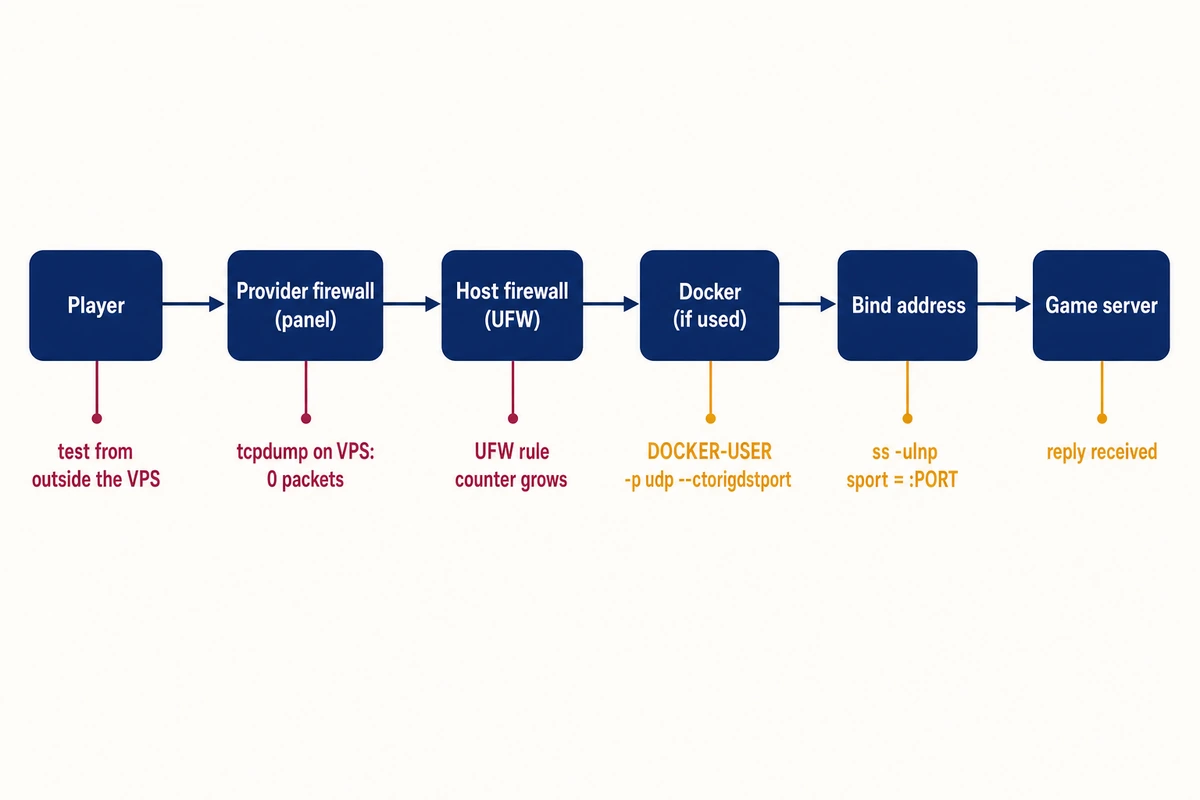
Game server UDP port not reachable: check in packet order
Start at the provider edge and move inward, stopping at the first layer that fails.
- Provider firewall in the control panel. A drop there leaves tcpdump on the VPS with 0 packets.
- UFW, for a game running on the host: the port’s counter in
sudo iptables -L ufw-user-input -v -ngrows with each attempt. A game in Docker leaves that counter at 0 even while traffic flows, so container users go to check 3. - Docker:
docker port <container>lists the port with/udp, and the firewall backend decides which rules apply. - Bind address:
ss -ulnp 'sport = :PORT'shows 0.0.0.0 or the public IP, never 127.0.0.1. - The game replies or logs the join attempt.
- A machine outside the VPS gets a reply.
Reproduced with UDP stand-ins (Python and socat listeners, a small echo container) on the default game ports in Linux network namespaces: Ubuntu 24.04.5, ufw 0.36.2, nmap 7.94, OpenBSD netcat 1.226, socat 1.8.0.0, Docker Engine 29.9.2. A router namespace stood in for the provider firewall. The games did not run there; their behavior comes from their documentation. In transcripts, g- names are lab names, pong: replies come from the stand-in (it answers “pong:” plus what it received), and udpprobe.py is the probe script printed under “When the game stays silent”. 198.51.100.20 is the VPS and 192.0.2.50 a player, so swap in your addresses.
Before you change any rule
Test from a second VPS or from a laptop on a phone hotspot. A probe from the VPS to its own public IP travels over the loopback interface, which UFW accepts, so in the lab that self-test got a reply while the provider-edge rule dropped every player datagram.
Check that your provider’s console works before you begin (the Hostry panel has a VNC console); it keeps working when a UFW change cuts SSH. ufw ships with Ubuntu; install the rest on both machines:
sudo apt update && sudo apt install nmap socat tcpdump netcat-openbsd python3Ports for Minecraft, Geyser, Palworld and Hytale
Open each port for the protocol the game uses. The sources below were read on 2026-11-16.
| Server | Default port | Source | Note |
|---|---|---|---|
| Minecraft Java Edition | 25565/TCP | server-port default in server.properties; also in GeyserMC’s port-forwarding example | TCP tests give clear answers |
| Geyser for Bedrock clients (NetherNet) | 19132/TCP for signaling and 19132/UDP for gameplay | GeyserMC NetherNet post (2026-10-08) and GeyserMC port-forwarding page (undated) | With RakNet also enabled, the webrtc-port needs UDP too |
| Palworld dedicated server | 8211/UDP | Pocketpair’s server arguments (v1.0.4) give -port=8211 but no protocol; UDP per hosting guides | RCON 25575/TCP and REST API 8212/TCP only if you enable them (hosting guides); -publicport does not change the listening port |
| Hytale | 5520/UDP (QUIC) | Hytale dedicated server manual | Default bind 0.0.0.0:5520, changed with --bind; TCP forwarding not required |
Palworld needs sudo ufw allow 8211/udp. Hytale needs sudo ufw allow 5520/udp, the command its manual gives. An extra TCP rule opens nothing for a UDP-only game: with ufw allow 8211, nmap’s 8211/tcp only moved from filtered to closed.
Rust, ARK and Counter-Strike, also on Hostry’s game server page, go through the same checks with their own ports, as does a vanilla Bedrock Dedicated Server with the ports in its version notes.
Minecraft Java on TCP 25565
When Minecraft port 25565 is not working on a VPS, trust the TCP test. Against a TCP stand-in on 25565, nc -vz -w3 gave three distinct results:
== ufw allow 25565/tcp
$ nc -vz -w3 198.51.100.20 25565
Connection to 198.51.100.20 25565 port [tcp/*] succeeded!
[time 0.002s]
[...]
== ufw reject 25565/tcp
$ nc -vz -w3 198.51.100.20 25565
nc: connect to 198.51.100.20 port 25565 (tcp) failed: Connection refused
[time 0.002s]
[...]
== ufw deny 25565/tcp
$ nc -vz -w3 198.51.100.20 25565
nc: connect to 198.51.100.20 port 25565 (tcp) timed out: Operation now in progress
[time 3.006s]
A timeout points at a firewall dropping the SYN. Connection refused means the packet arrived and nothing took it, either a REJECT rule or no listener on that address, which ss -ltnp "sport = :25565" settles.
Provider firewall: zero packets on the VPS
A provider-side drop happens before your server. tcpdump on the VPS captures 0 packets, while ss lists the listener and a self-test to the public IP still gets its reply. Hostry VPS plans have a firewall in the control panel, a second layer in front of the server’s own, so a game server UDP port has to get through both.
ip -br addr                                  # find the interface with the public IP
sudo tcpdump -n -i ens3 'udp port 8211'      # use that interface; press Ctrl-C after the player's attempts to see the count
With a DROP rule on the router namespace, everything on the VPS side looked healthy:
=================== upstream DROP udp/8211 ===================
-A FORWARD -p udp -m udp --dport 8211 -m comment --comment g-lab -j DROP
--- g-srv (VPS): ss -ulpn 'sport = :8211'
UNCONN 0      0            0.0.0.0:8211      0.0.0.0:*    users:(("python3",pid=21773,fd=3))
--- g-srv (VPS): local test to its own public IP: udpprobe.py 198.51.100.20 8211
REPLY b'pong:g-lab-probe' in 0.000s
--- g-cli (player): udpprobe.py 198.51.100.20 8211 2
TIMEOUT after 2.002s (no reply, no ICMP)
--- g-cli (player): nmap -n -sU -Pn -p 8211 --reason 198.51.100.20
8211/udp open|filtered unknown no-response
--- tcpdump on the VPS interface g-s0:
0 packets captured
--- tcpdump on the provider edge, player side g-rc:
10:52:27.395631 IP 192.0.2.50.40062 > 198.51.100.20.8211: UDP, length 11
[...]
3 packets captured
A UFW deny on the VPS looks the same to the player, but the capture shows the datagrams, because tcpdump reads them before netfilter’s INPUT hook:
=================== host DROP (ufw deny 8211/udp) ===================
--- g-srv (VPS): local test: REPLY b'pong:g-lab-probe' in 0.000s
--- g-cli (player): TIMEOUT after 2.002s (no reply, no ICMP)
--- tcpdump on the VPS interface g-s0:
10:52:38.668677 IP 192.0.2.50.49022 > 198.51.100.20.8211: UDP, length 11
[...]
3 packets captured
Packets captured with no reply point past the provider, at UFW, Docker, the bind address or a silent program. A provider firewall that rejects names its router in nmap (admin-prohibited from 192.0.2.1) while nc -zu still reports success. Open the game’s port and protocol in the provider firewall, then capture again.
UFW: allow the UDP port with its protocol
ufw allow 8211/udp creates one UDP rule, while ufw allow 19132 with no protocol creates a TCP rule and a UDP rule. ufw deny is a silent DROP and ufw reject on UDP answers with ICMP port unreachable. Either one on a port that has an allow rule replaces it (“Rule updated”), so a deny with a mistyped port closes a working game port. Read this lab transcript; it mixes allow, deny and reject, so do not paste it:
$ ufw allow 8211/udp; ufw deny 5520/udp; ufw reject 25565/tcp; ufw allow 19132
Rule added
Rule added
Rule added
Rule added
$ ufw status verbose
[...]
8211/udp                   ALLOW IN    Anywhere
5520/udp                   DENY IN     Anywhere
25565/tcp                  REJECT IN   Anywhere
19132                      ALLOW IN    Anywhere
[...]
$ iptables -S ufw-user-input
[...]
-A ufw-user-input -p udp -m udp --dport 8211 -j ACCEPT
-A ufw-user-input -p udp -m udp --dport 5520 -j DROP
-A ufw-user-input -p tcp -m tcp --dport 25565 -j REJECT --reject-with tcp-reset
-A ufw-user-input -p tcp -m tcp --dport 19132 -j ACCEPT
-A ufw-user-input -p udp -m udp --dport 19132 -j ACCEPT
When the capture shows datagrams arriving and the player still times out, read the counters:
$ (server) iptables -L ufw-user-input -v -n -x
Chain ufw-user-input (1 references)
    pkts      bytes target     prot opt in     out     source               destination
       0        0 ACCEPT     17   --  *      *       0.0.0.0/0            0.0.0.0/0            udp dpt:8211
       3      117 DROP       17   --  *      *       0.0.0.0/0            0.0.0.0/0            udp dpt:5520
[...]
$ (server) ss -ulpn "sport = :5520"   (Recv-Q 0: nothing reached the socket)
State  Recv-Q Send-Q Local Address:Port Peer Address:PortProcess
UNCONN 0      0            0.0.0.0:5520      0.0.0.0:*    users:(("python3",pid=18892,fd=3))
$ (server) cat stand-in log
standin udp echo listening on 0.0.0.0:5520
A port with no rule at all falls through to default deny incoming and gave the same results as an explicit deny.
Add game ports through ufw, which reloads /etc/ufw/user.rules at boot. A rule added with iptables -I lives only in the kernel and was gone after an emulated reboot; iptables-save only prints.
Keep IPV6=yes in /etc/default/ufw: IPV6=no sets all ip6tables policies to DROP except loopback (ufw-init-functions), though IPv6 traffic was not tested.
Minecraft Bedrock port 19132 in UFW: Geyser needs TCP and UDP
For Geyser with NetherNet, allow 19132 without a protocol. A UDP-only rule leaves the TCP half filtered, and per GeyserMC that half is how players find the server:
== B) replace with "ufw allow 19132/udp" only (UDP-only rule) ==
19132/udp                  ALLOW       Anywhere
$ nmap -n -Pn -sU -sS -p 19132 --reason 198.51.100.20
19132/tcp filtered unknown no-response
19132/udp open     unknown udp-response ttl 63
[...]
$ nc -vz -w2 198.51.100.20 19132
nc: connect to 198.51.100.20 port 19132 (tcp) timed out: Operation now in progress
sudo ufw allow 19132
sudo ufw status | grep 19132With the no-protocol rule, nmap read both stand-ins as open.
Bedrock 26.60 was released on October 27, 2026; GeyserMC’s post says its clients stop connecting over RakNet, and the Dedicated Server notes in Mojang’s 26.60 changelog turn the NetherNet warning into an error “as RakNet is deprecated”. At the time of the post, NetherNet still had to be switched on in Geyser’s config.
GeyserMC’s pages disagree on the protocol. Fixing Unable to Connect to World still says Bedrock “uses UDP” and that a TCP-only forward “will not work”, with no word on NetherNet. The post and the port-forwarding page ask for TCP and UDP on 19132, so go by those two; with external signaling such as Warden, GeyserMC says only UDP is needed.
Docker and UFW with a UDP port: bypassed or blocked, by backend
Whether Docker bypasses UFW depends on its firewall backend. With the default iptables backend, a port published as -p 19132:19132/udp reaches the container whatever UFW says; with the nftables backend in Docker 29, UFW’s routed policy blocks it. Both runs started UFW before dockerd; UFW enabled after Docker, and ufw reload with containers running, were not tested. Check which backend runs:
$ docker info --format '{{.FirewallBackend.Driver}}'
iptables
iptables backend: the INPUT rule never sees the packet
Docker rewrites the destination in nat PREROUTING and the packet goes through FORWARD, so UFW’s INPUT rules do not apply. This lab transcript uses the echo image as the game, with ufw deny 19132/udp set before dockerd started:
19132/udp                  DENY IN     Anywhere
$ docker run -d --name g-echo1 --network g-net -p 19132:19132/udp g-udpecho:1
g-echo1   g-udpecho:1   0.0.0.0:19132->19132/udp
UNCONN 0      0            0.0.0.0:19132      0.0.0.0:*    users:(("docker-proxy",pid=24806,fd=9))
$ (player) udpprobe.py 198.51.100.20 19132 2
REPLY b'pong:g-lab-probe' in 0.000s
19132/udp open  unknown udp-response ttl 62
$ iptables -L ufw-user-input -v -n | grep 19132   (the DENY rule was never hit)
    0     0 DROP       17   --  *      *       0.0.0.0/0            0.0.0.0/0            udp dpt:19132
$ iptables -S FORWARD
-P FORWARD DROP
-A FORWARD -j DOCKER-USER
-A FORWARD -j DOCKER-FORWARD
-A FORWARD -j ufw-before-logging-forward
[...]
-A DOCKER -d 172.18.0.2/32 ! -i br-96b58afeb851 -o br-96b58afeb851 -p udp -m udp --dport 19132 -j ACCEPT
$ iptables -t nat -S DOCKER
-A DOCKER ! -i br-96b58afeb851 -p udp -m udp --dport 19132 -j DNAT --to-destination 172.18.0.2:19132
$ docker logs g-echo1
got 11 bytes from 192.0.2.50:50309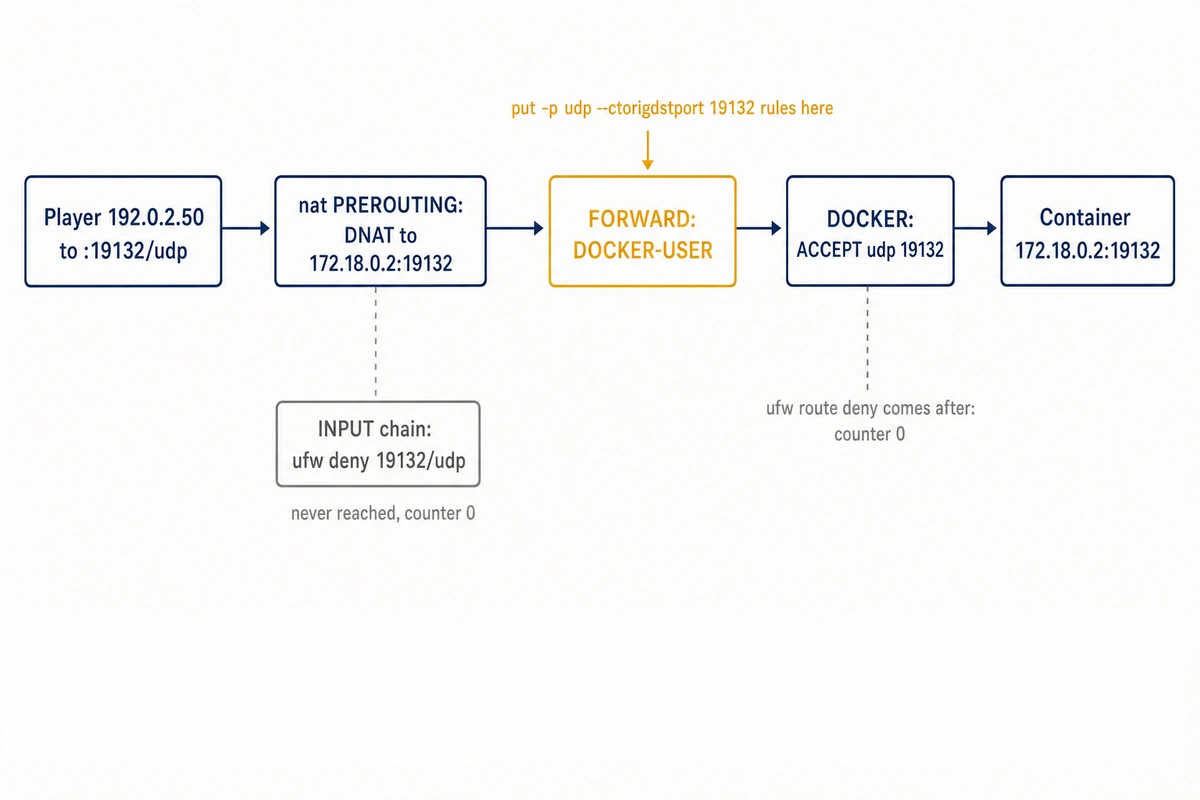
ufw route deny does not help either, because Docker’s chains accept the packet earlier in FORWARD. Filter in DOCKER-USER, which FORWARD calls first, and match the original destination port with -p udp; the TCP form from Docker-and-UFW guides does nothing for UDP:
== ufw route deny proto udp from any to any port 19132
19132/udp                  DENY FWD    Anywhere
REPLY b'pong:g-lab-probe' in 0.000s          (still reachable; ufw-user-forward counter 0)
== DOCKER-USER: -p tcp -m conntrack --ctorigdstport 19132 --ctdir ORIGINAL -j DROP   (copied TCP example)
REPLY b'pong:g-lab-probe' in 0.000s          (still reachable)
== DOCKER-USER: -p udp -m conntrack --ctorigdstport 19132 --ctdir ORIGINAL -j DROP
TIMEOUT after 2.002s (no reply, no ICMP)
19132/udp open|filtered unknown no-response
    3    95 DROP       17   --  *      *       0.0.0.0/0            0.0.0.0/0            ctorigdstport 19132 ctdir ORIGINAL /* g-lab */
Leaving out -p also worked. To admit only friends, drop every other source; with this rule 192.0.2.50 got its reply and 192.0.2.51 timed out:
sudo iptables -I DOCKER-USER ! -s 192.0.2.50/32 -p udp -m conntrack --ctorigdstport 19132 --ctdir ORIGINAL -j DROP
sudo iptables -L DOCKER-USER -v -n
Like any iptables rule added by hand, it is gone after a reboot.
Two Docker mistakes look like firewall problems. With a remapped port, -p 19232:19132/udp, a DOCKER-USER rule on --dport 19232 never matched (counter 0), because FORWARD already sees 19132. --ctorigdstport 19232 blocked that container alone; --dport 19132 blocked every container using 19132 inside.
Without /udp, -p 19132:19132 publishes TCP only, while docker ps still prints 19132/udp from the image’s EXPOSE line. The REFUSED below needs ufw allow 19132/udp; under the deny, a repeat run timed out:
== D3: docker run -d --name g-echo3 --network g-net -p 19132:19132 g-udpecho:1   (no /udp suffix)
NAMES     PORTS
g-echo3   19132/udp, 0.0.0.0:19132->19132/tcp
$ docker port g-echo3
19132/tcp -> 0.0.0.0:19132
[...]
$ (player) udpprobe.py 198.51.100.20 19132 2
REFUSED (ICMP port unreachable) in 0.000s
For Geyser, publish both (-p 19132:19132 -p 19132:19132/udp, per GeyserMC) and confirm with docker port, which lists only published ports.
nftables backend: UFW route rules decide
Docker 29.9.2 with "firewall-backend": "nftables" in /etc/docker/daemon.json, a mode Docker calls experimental since it arrived in 29.0.0, flips the result. Docker’s own nft rule accepted the player’s packets, and UFW’s FORWARD policy dropped them:
 Firewall Backend: nftables
$ docker run -d --name g-echo5 --network g-net -p 19132:19132/udp g-udpecho:1
$ iptables -S DOCKER-USER
iptables: Incompatible with this kernel.
== ufw deny 19132/udp, Default: deny (routed)
$ (player) udpprobe.py 198.51.100.20 19132 2      TIMEOUT after 2.001s (no reply, no ICMP)
Chain FORWARD (policy DROP 3 packets, 95 bytes)
== N1: ufw allow 19132/udp instead of deny       TIMEOUT after 2.002s
== N2: + ufw route allow proto udp from any to any port 19132
19132/udp                  ALLOW FWD   Anywhere
REPLY b'pong:g-lab-probe' in 0.000s
== N3: route allow kept, ufw deny 19132/udp again   REPLY b'pong:g-lab-probe' in 0.004s
== N4: route deny instead of route allow            TIMEOUT after 2.001s
$ nft list table ip docker-bridges
[...]
		ip daddr 172.18.0.2 udp dport 19132 counter packets 7 bytes 251 accept
Here INPUT rules and DOCKER-USER do not apply, so open the published port with sudo ufw route allow proto udp from any to any port 19132. Docker’s documentation explains the drop:
An iptables chain with FORWARD policy DROP will drop packets that have been accepted by Docker’s nftables rules.
Docker docs: firewall with nftables
This backend does not switch on IPv4 forwarding. In a repeat run, docker network create failed with “IPv4 forwarding is disabled” until net.ipv4.ip_forward was 1. Make it permanent with echo 'net.ipv4.ip_forward=1' | sudo tee /etc/sysctl.d/60-ip-forward.conf, load it with sudo sysctl --system, then restart Docker, which otherwise kept printing a stale forwarding warning.
Bind address: 0.0.0.0 or the public IP
A game server listening on 127.0.0.1 answers on the VPS itself and sends ICMP port unreachable to everyone else. For Minecraft Java, use the TCP ss -ltnp check from the 25565 section. Read the Local Address column with a port filter:
== listener A: 127.0.0.1:5520 (stand-in);  unrelated listener B: 0.0.0.0:55201
$ ss -ulnp | grep 5520
UNCONN 0      0          127.0.0.1:5520       0.0.0.0:*    users:(("python3",pid=22363,fd=3))
UNCONN 0      0            0.0.0.0:55201      0.0.0.0:*    users:(("python3",pid=22364,fd=3))
$ ss -ulnp "sport = :5520"
UNCONN 0      0          127.0.0.1:5520      0.0.0.0:*    users:(("python3",pid=22363,fd=3))
$ (on the VPS) udpprobe.py 127.0.0.1 5520         REPLY b'pong:g-lab-probe' in 0.000s
$ (on the VPS) udpprobe.py 198.51.100.20 5520     REFUSED (ICMP port unreachable) in 0.000s
$ (player) udpprobe.py 198.51.100.20 5520         REFUSED (ICMP port unreachable) in 0.000s
== listener C: 0.0.0.0:5520
$ (player) udpprobe.py 198.51.100.20 5520         REPLY b'pong:g-lab-probe' in 0.000s
Use the sport filter, since grep 5520 also matches 55201. The users column names the process holding the port. Hytale binds 0.0.0.0:5520 unless --bind says otherwise, per its manual, and a stand-in bound to the VPS’s second address refused probes sent to the main one. In Docker, -p 127.0.0.1:19132:19132/udp answered on the VPS and was refused from outside while UFW allowed 19132/udp.
On a second IP, a 0.0.0.0 stand-in replying with plain sendto() answered from 198.51.100.20, so connected clients, nc -u included, saw nothing until it was bound to 198.51.100.21. Only the stand-in was run; tcpdump shows which source a game replies from:
10:53:51.779266 IP 192.0.2.50.54469 > 198.51.100.21.5520: UDP, length 11
10:53:51.779650 IP 198.51.100.20.5520 > 192.0.2.50.54469: UDP, length 16
How to test a UDP port from outside the VPS
Only a reply that reaches a machine outside the VPS proves a game server UDP port open. A probe TIMEOUT and nmap’s open|filtered are inconclusive, because a firewall drop and a game that ignores the probe produce both. nc -zu does not look for a reply at all. Games are not expected to echo test bytes, so prove the path with an echo stand-in. Against a UFW deny, the usual checks looked like this:
8211/udp                   DENY        Anywhere
$ nc -zu 198.51.100.20 8211
Connection to 198.51.100.20 8211 port [udp/*] succeeded!
[exit=0 time=3.01s]
$ nmap -n -sU -Pn -p 8211 --reason 198.51.100.20
8211/udp open|filtered unknown no-response
Nmap done: 1 IP address (1 host up) scanned in 2.16 seconds
$ udpprobe.py 198.51.100.20 8211 2
TIMEOUT after 2.002s (no reply, no ICMP)
$ echo ping | nc -u -w2 198.51.100.20 8211
(nc rc=0)            [time=2.03s]
$ echo ping | socat -t2 - UDP:198.51.100.20:8211
(socat rc=0)         [time=2.02s]
Across ten cases, each tool reported this:
| Case (8211/udp) | nc -zu: exit, text, time | nmap -sU –reason | udpprobe.py | tcpdump on the VPS |
|---|---|---|---|---|
| Open, echo stand-in | 0, succeeded, 3.01 s | open, udp-response | REPLY | in and reply |
ufw reject | 1, no text, 0.01 s | closed, port-unreach | REFUSED | in and ICMP |
ufw deny | 0, succeeded, 3.01 s | open|filtered, no-response | TIMEOUT | in only |
| No rule (default deny) | 0, succeeded, 3.03 s | open|filtered, no-response | TIMEOUT | in only |
| Listening on 127.0.0.1 | 1, no text, 0.03 s | closed, port-unreach | REFUSED | in and ICMP |
| Bound to the second IP | 1, no text, 0.01 s | closed, port-unreach | REFUSED | in and ICMP |
| Silent listener | 0, succeeded, 3.02 s | open|filtered, no-response | TIMEOUT | in only |
| Nothing listening | 1, no text, 0.01 s | closed, port-unreach | REFUSED | in and ICMP |
| Provider DROP | 0, succeeded, 3.00 s | open|filtered, no-response | TIMEOUT | nothing |
| Provider reject | 0, succeeded, 3.00 s | filtered, admin-prohibited from 192.0.2.1 | ICMP ERROR, errno 113 | nothing |
OpenBSD netcat 1.226 sent five 1-byte datagrams over 3 s (2 s with -w2) and reported success unless ICMP port unreachable came back; then it exited 1 within 0.03 s and printed nothing, even with -v. echo ping | nc -u -w2 exited 0 in all nine rows where it was run (all but the provider reject), so only a printed reply means anything.
socat makes a better client. echo ping | socat -t2 - UDP:198.51.100.20:8211 printed Connection refused with exit 1 for the reject, wrong-bind and no-listener rows, No route to host for the provider reject, and nothing with exit 0 for every drop.
From the outside machine, point nmap at your own VPS only and add -n: sudo nmap -n -sU -Pn -p 8211 --reason 198.51.100.20. Without -n, reverse DNS to an unreachable resolver took 13.0 s of a 13.16 s scan. This build sent empty UDP probes, so a game that ignores them shows open|filtered. nc -vz without -u tests only TCP.
Leave a few seconds between probes. Linux rate-limits ICMP port unreachable replies, and in a repeat run, back-to-back probes against a refused port sometimes came back as TIMEOUT.
When the game stays silent
This test takes the game offline for a minute or two. The games were not run in the lab and are not expected to answer arbitrary bytes, so the probe proves the path only with an echo stand-in. Save it as udpprobe.py on the outside machine, with a copy on the VPS for the self-test:
#!/usr/bin/env python3
"""Real UDP request/reply test. Usage: udpprobe.py <host> <port> [timeout_s]
Sends one datagram on a connected UDP socket and waits for a reply.
Prints one of: REPLY (bytes), REFUSED (ICMP port unreachable came back), TIMEOUT (nothing came back).
Exit code: 0 = reply, 1 = refused, 2 = timeout, 3 = other ICMP error.
"""
import socket, sys, time

host, port = sys.argv[1], int(sys.argv[2])
timeout = float(sys.argv[3]) if len(sys.argv) > 3 else 2.0
s = socket.socket(socket.AF_INET, socket.SOCK_DGRAM)
s.settimeout(timeout)
s.connect((host, port))  # connected socket: ICMP errors are reported to us
t0 = time.monotonic()
try:
    s.send(b"g-lab-probe")
    data = s.recv(2048)
    print(f"REPLY {data!r} in {time.monotonic()-t0:.3f}s")
    sys.exit(0)
except ConnectionRefusedError:
    print(f"REFUSED (ICMP port unreachable) in {time.monotonic()-t0:.3f}s")
    sys.exit(1)
except socket.timeout:
    print(f"TIMEOUT after {time.monotonic()-t0:.3f}s (no reply, no ICMP)")
    sys.exit(2)
except OSError as e:  # other ICMP errors, e.g. host/admin prohibited -> EHOSTUNREACH
    print(f"ICMP ERROR errno={e.errno} ({e.strerror}) in {time.monotonic()-t0:.3f}s")
    sys.exit(3)
Run it as python3 udpprobe.py 198.51.100.20 8211 2, with the seconds to wait last. With the game stopped, put an echo on its port and test from outside:
$ (VPS) socat UDP4-LISTEN:8211,fork,reuseaddr EXEC:cat &
$ (player) echo hello-8211 | nc -u -w2 198.51.100.20 8211
hello-8211
rc=0           [time 2.011s]
If the text comes back, the network path is fine and the cause sits in the game’s config or version. Stop the game first, or socat fails with “Address already in use”, or, if the game set SO_REUSEADDR, binds beside it and takes its traffic:
== holder SO_REUSEADDR=1 ; socat UDP4-LISTEN:8211,fork EXEC:cat      (no reuseaddr option given)
UNCONN 0 0 0.0.0.0:8211 0.0.0.0:* users:(("socat",pid=26725,fd=5))
UNCONN 0 0 0.0.0.0:8211 0.0.0.0:* users:(("python3",pid=26702,fd=3))
$ (player) echo probe | nc -u -w1 198.51.100.20 8211
probe
holder log: (nothing)
Then stop the echo with every child it forked, check that the port is free, start the game again and retry with a real client. kill %1 stops only the parent; the children keep the port and the game fails with “Address already in use”. ss -ulnp misses the children’s connected sockets, so check with -a:
sudo pkill -f 'UDP4-LISTEN:8211'
ss -uanp 'sport = :8211'
A repeat run printed:
$ pkill -f 'UDP4-LISTEN:8211'
2026/11/16 11:56:44 socat[27844] W exiting on signal 15
2026/11/16 11:56:44 socat[27853] W exiting on signal 15
pkill rc=0
--- processes after pkill:
--- ss after pkill:
State Recv-Q Send-Q Local Address:Port Peer Address:PortProcess
For a game in Docker, an echo on the host receives through INPUT, a path the container’s packets never take. Publish a UDP echo container with the game’s -p mapping instead.
Locked out after a firewall change
Use the panel’s VNC console. Find the rule that blocks SSH in sudo ufw status numbered and delete it with sudo ufw delete and its number; delete asks for y. With IPv6 on, list the rules again and delete its (v6) copy too, since the numbers shift after each delete. If no SSH allow rule is left, add sudo ufw allow OpenSSH (22/tcp only; allow your own port if SSH listens elsewhere), or run sudo ufw disable while you sort it out. A self-reverting timer like the ten-minute rollback in the SSH over WireGuard guide saves that trip next time.
Check the control-panel firewall of a Hostry VPS before you change UFW. The plans come with full root for UFW and Docker and start at $6.00/mo with 1 vCPU and 1 GB of RAM on NVMe storage, up to 32 GB RAM.