
Stale DNS Records After Deleting a VPS: Find and Remove Them

Once the IP of a VPS you deleted goes to another customer, plain HTTP to its old subdomain can return their site with status 200. If the server is already gone, list your records, run the audit below and confirm each flag before removing anything. For a server you still run, remove DNS first and delete the server last.
Stale DNS records point at a server or service you no longer control; the audit below works with any DNS provider, Hostry free DNS hosting included.
Every output block below was reproduced with NSD 4.8.0, unbound 1.19.2, curl 8.5.0 and OpenSSL 3.0.13 on Ubuntu 24.04.5 LTS, in network namespaces on one machine. Timings reflect Linux defaults there and will differ elsewhere. Names and addresses are documentation examples; put your own zone and IPs in their place.
What a stale A record does after the server is gone
A DNS record pointing to an old IP keeps resolving as if nothing had changed. Resolvers answer NOERROR with the address, and the failure appears only when a client opens a TCP connection, in a form that depends on what now sits at that IP.
$ dig api.example.com A
;; ->>HEADER<<- opcode: QUERY, status: NOERROR, id: 53350
;; ANSWER SECTION:
api.example.com.    230    IN    A    198.51.100.41
Security write-ups call a stale DNS record a dangling DNS record. The CNAME variant is an alias whose target, such as a hosted docs site, was deleted. For a VPS the usual leftover is an A record, because deleting a server does nothing to a zone hosted elsewhere.
| What sits at the old IP | curl result | Time to fail |
|---|---|---|
| Nothing, packets dropped, curl defaults | exit 28 | 134.4 s |
| Nothing, packets dropped, –connect-timeout 5 | exit 28 | 5.0 s |
| Closed port or a firewall REJECT | exit 7, connection refused | under 1 ms |
| Another customer’s server, HTTPS, valid certificate for its own name | exit 60, certificate name mismatch | 4 ms |
| The same server, plain HTTP | status 200 with their page | no failure |
In the first three rows, nothing serves content for your name yet. The last two follow once the provider hands the IP to someone else, who then receives the traffic meant for you, as a 2019 APNIC blog post on stale DNS records describes. Reassignment speed depends on the provider’s pool, so treat the record as a live risk from the moment the server is deleted.
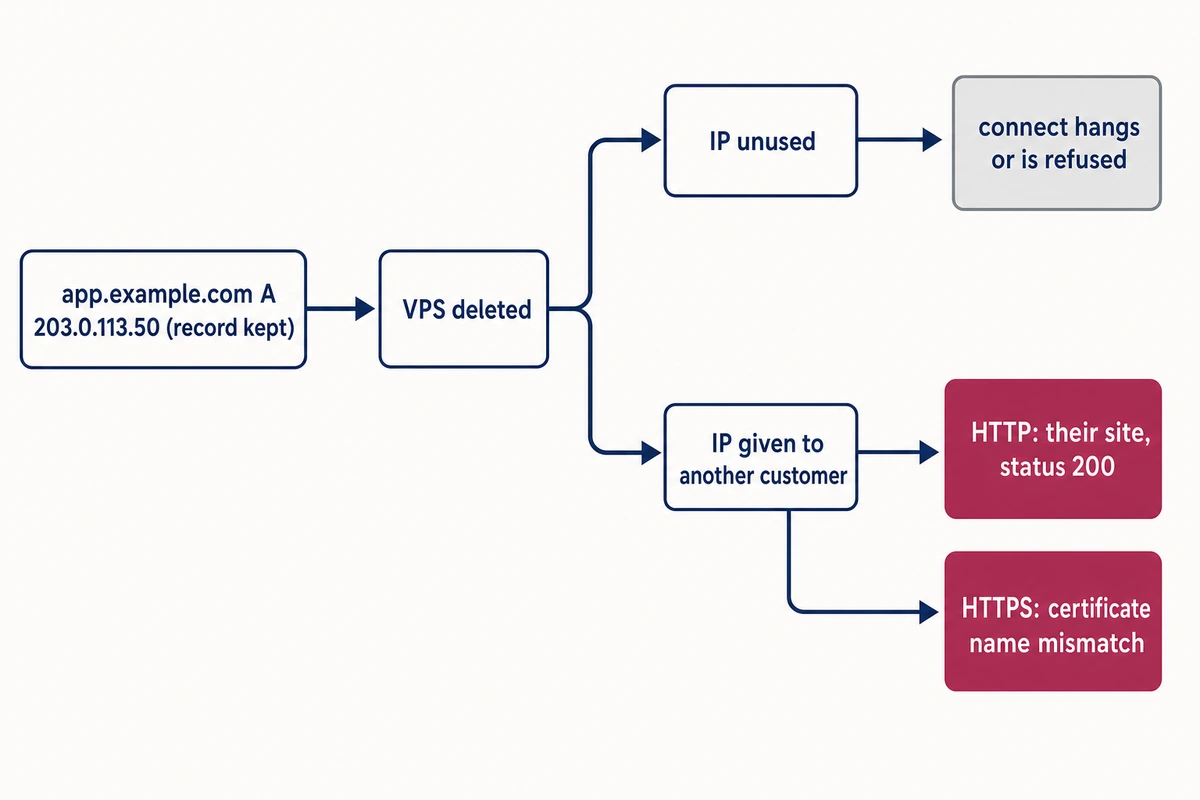
That 134.4-second hang in the first row is the kernel retransmitting the SYN: with net.ipv4.tcp_syn_retries at its default of 6, the kernel’s ip-sysctl documentation puts the final timeout at about 131 seconds. Set the curl –connect-timeout option in health checks that might call an old name, and branch on the exit code: curl printed “Couldn’t connect to server” for exit 7 and for the 134-second exit 28.
Put every record in one list first
Give the audit a plain text file with one record per line, written as name type value with full names. Copy the records from your panel into records.txt; subdomains nobody wrote down are the ones missed at teardown, so take the names from the panel itself. Lines starting with # or ; are skipped, and any run of spaces separates the columns. Hostry free DNS has no limits on the number of records or queries, so test and staging names can share the production zone and this one list.
# pasted from the DNS panel of example.com
example.com          NS     ns1.example.com
example.com          A      198.51.100.17
www.example.com      A      198.51.100.17
api.example.com      A      198.51.100.41
staging.example.com  A      198.51.100.62
grafana.example.com  A      203.0.113.88
docs.example.com     CNAME  example-docs.pages.example.net
uptime.example.com   CNAME  uptime-page.example.net
example.com          MX     10 mail.example.com
example.com          MX     20 mx-old.example.com
mail.example.com     A      198.51.100.17
mx-old.example.com   A      198.51.100.62
example.com          TXT    "v=spf1 mx a:mail.example.com ip4:198.51.100.17 ip4:198.51.100.40/29 ip6:2001:db8:41::/48 include:_spf.example.net -all"
_sip._tcp.example.com SRV   10 5 5060 api.example.com
MX and SRV lines keep priority, weight and port before the target; the script takes the last field as the host. TXT values keep their quotes. A long SPF record split into two quoted strings is joined before checking.
A BIND-style zone export is not read as is, because its TTL or IN column lands in the type field. This awk line cuts each record down to the three fields and writes @ and relative names out in full; put your domain after -v o=. Records that span several lines in parentheses are not joined, so check those by hand.
awk -v o=example.com. '$1=="$ORIGIN"{o=$2;next} $1~/^[;$]/||NF<2{next} {sub(/[ \t]+;.*/,""); i=1; if(/^[^ \t]/){n=$1; i=2; if(n=="@")n=o; else if(n!~/\.$/)n=n"."o} while($i~/^[0-9]/||toupper($i)=="IN")i++; if($i!~/^[A-Za-z]/)next; v=$(i+1); for(k=i+2;k<=NF;k++)v=v" "$k; print n, $i, v}' example.com.zone > records.txtYour second input is the retired list: the IPv4 and IPv6 addresses of every server you have deleted, as far back as billing history or old notes go.
A file saved on Windows needs no conversion, and a last line with no newline after it is read too. In the reproduction, the carriage return at each line end (shown as ^M) made every A record look dead until the script was changed to strip it:
www.example.com A 198.51.100.17^M
  dns     !! listed 198.51.100.17^M, DNS answers '198.51.100.17' (NOERROR)
  tcp     !! 22 unreachable, 80 unreachable, 443 unreachable: nothing answers, server gone?
Find stale DNS records with an 80-line script
Run audit-dns.sh with the record list and the retired addresses as arguments. For each A or AAAA record it compares DNS with the list, tries ports 22, 80 and 443, reads the certificate name and looks up the PTR. CNAME targets are checked for NXDOMAIN and NODATA, and every value is matched against the retired IPs.
It needs bash, dig (the bind9-dnsutils package on Ubuntu 24.04), openssl and timeout from coreutils; ports are tested through bash’s own /dev/tcp. It only reads: name lookups, one TCP connection per port, one TLS handshake.
sudo apt install bind9-dnsutils opensslIt suits a zone of a few dozen records, because checks run one after another. A host that listens only on 25 or 5060 is reported as nothing answering; add its port to the for p in 22 80 443 loop. The IPv6 connection test is unverified: the reproduction had no IPv6, so every AAAA came back unreachable. The TLS check reads the certificate name and expiry only and skips chain verification.
#!/usr/bin/env bash
# audit-dns.sh - find DNS records that still point at servers you deleted.
# Usage: ./audit-dns.sh records.txt [retired-ip ...]
#   records.txt: one record per line, "name type value", full names, copied from your DNS panel:
#     www.example.com A 198.51.100.17
#     example.com TXT "v=spf1 ip4:198.51.100.40/29 -all"
#   retired-ip: addresses of servers you deleted; every A, AAAA, MX, SRV, CNAME and TXT value is checked.
# Env: TIMEOUT (seconds per check, default 3), RESOLVER (e.g. 1.1.1.1; default: system resolver).
# Read-only: it resolves names, opens TCP connections to the listed IPs and reads TLS certificates.
# Exit: 0 nothing flagged, 1 something flagged, 2 no arguments, or records file missing, unreadable or without records.
set -uf    # no globbing: SPF tokens like ?all stay literal
(( $# )) || { echo "usage: ${0##*/} records.txt [retired-ip ...]" >&2; exit 2; }
list=$1; shift; retired=("$@")
[[ -r $list && ! -d $list ]] || { echo "cannot read records file: $list" >&2; exit 2; }
T=${TIMEOUT:-3}; at=${RESOLVER:+@$RESOLVER}; flags=0 seen=0
say()  { printf '  %-7s %s\n' "$1" "$2"; }
flag() { say "$1" "!! $2"; flags=$((flags+1)); }
ip4n() { local IFS=.; set -- $1; echo $(( ($1<<24)|($2<<16)|($3<<8)|$4 )); }
ip6x() { local a=${1,,} l r i out=(); l=$a; r=""          # IPv6 -> 32 hex digits
  [[ $a == *::* ]] && { l=${a%%::*}; r=${a#*::}; }
  IFS=: read -ra L <<<"$l"; IFS=: read -ra R <<<"$r"; out=("${L[@]}")
  for ((i=${#L[@]}+${#R[@]}; i<8; i++)); do out+=(0); done
  for i in "${out[@]}" "${R[@]}"; do printf '%04x' "0x$i"; done; }
in_net() { local ip=$1 net=${2%/*} len=""; [[ $2 == */* ]] && len=${2#*/}   # is IP inside NET[/LEN]?
  if [[ $ip == *:* && $net == *:* ]]; then
    local a b n; a=$(ip6x "$ip"); b=$(ip6x "$net"); len=${len:-128}; n=$((len/4))
    [[ ${a:0:n} == "${b:0:n}" ]] || return 1
    (( len%4 == 0 || (0x${a:n:1} >> (4-len%4)) == (0x${b:n:1} >> (4-len%4)) ))
  elif [[ $ip != *:* && $net =~ ^[0-9]+\.[0-9]+\.[0-9]+\.[0-9]+$ ]]; then
    len=${len:-32}; local m=$(( len ? (0xFFFFFFFF << (32-len)) & 0xFFFFFFFF : 0 ))
    (( ($(ip4n "$ip") & m) == ($(ip4n "$net") & m) ))
  else return 1; fi; }
retired_in() { local r; for r in "${retired[@]}"; do in_net "$r" "$2" && flag retired "$1 $2 covers retired IP $r"; done; }
q() { local out; out=$(dig $at +noall +comments +answer "$1" "$2" 2>&1)   # sets $st and $ans
  st=$(grep -o 'status: [A-Z]*' <<<"$out"); st=${st#status: }; st=${st:-NO-REPLY}
  ans=$(awk -v t="$2" '$4==t {print $5}' <<<"$out" | tr '\n' ' '); ans=${ans% }; }
port() { local err; err=$(timeout "$T" bash -c ": </dev/tcp/$1/$2" 2>&1)
  case $? in 0) echo open;; 124) echo timeout;; *) [[ $err == *refused* ]] && echo refused || echo unreachable;; esac; }
tls() { local hp=$2:443 pem san; [[ $2 == *:* ]] && hp="[$2]:443"
  pem=$(timeout "$T" openssl s_client -connect "$hp" -servername "$1" </dev/null 2>/dev/null | openssl x509 2>/dev/null)
  [[ -z $pem ]] && { flag tls "port 443 is open but no certificate came back"; return; }
  san=$(openssl x509 -noout -ext subjectAltName <<<"$pem" | tail -n +2 | tr -d ' ')
  if ! openssl x509 -noout -checkhost "$1" <<<"$pem" | grep -q 'does match'; then flag tls "certificate is for ${san:-?}, not $1"
  elif ! openssl x509 -noout -checkend 0 <<<"$pem" >/dev/null; then flag tls "certificate for $1 has expired"
  else say tls "ok: certificate covers $1"; fi; }

while read -r name type value <&3 || [[ -n $name ]]; do   # || ...: last line without a newline
  name=${name%$'\r'}; [[ -z $name || $name == [\#\;\$]* ]] && continue; seen=$((seen+1))
  value=${value%$'\r'}; name=${name%.}; type=${type^^}; value=${value%.}; echo "$name $type $value"   # \r: Windows line ends
  case $type in
  A|AAAA) q "$name" "$type"
    [[ " $ans " == *" $value "* ]] && say dns "ok: resolves to $value" || flag dns "listed $value, DNS answers '${ans:-nothing}' ($st)"
    r=""; up=0; for p in 22 80 443; do s=$(port "$value" $p); r+="$p $s, "; [[ $s == open ]] && up=1; done
    (( up )) && say tcp "${r%, }" || flag tcp "${r%, }: nothing answers, server gone?"
    [[ $r == *"443 open"* ]] && tls "$name" "$value"
    ptr=$(dig $at +short -x "$value" 2>/dev/null | head -1); say ptr "${ptr:-none}"
    retired_in "$type" "$value";;
  CNAME) q "$name" CNAME; [[ ${ans%.} == "$value" ]] || flag dns "listed $value, DNS answers '${ans:-nothing}' ($st)"
    q "$value" A; [[ $st == NOERROR && -z $ans ]] && q "$value" AAAA
    case $st in
      NXDOMAIN) flag cname "target $value does not exist (NXDOMAIN): dangling";;
      NOERROR) if [[ -n $ans ]]; then say cname "ok: target resolves to $ans"; for a in $ans; do retired_in "target" "$a"; done
               else flag cname "target $value exists but has no A/AAAA (NOERROR, empty answer)"; fi;;
      *) flag cname "target lookup failed: $st";; esac;;
  MX|SRV) tgt=${value##* }; tgt=${tgt%.}; q "$tgt" A; a4=$ans; s4=$st; q "$tgt" AAAA; ans=$(echo $a4 $ans)
    [[ -n ${ans// } ]] && say "${type,,}" "$tgt -> $ans" || flag "${type,,}" "target $tgt has no address ($s4)"
    for a in $ans; do retired_in "$type $tgt ->" "$a"; done;;
  TXT) v=$(sed 's/" *"//g; s/"//g' <<<"$value"); n=0
    for tok in $v; do t=${tok#[-+~?]}
      case ${t,,} in
        ip4:*|ip6:*) retired_in "${t%%:*}" "${t#*:}";;
        include:*|a|a[:/]*|mx|mx[:/]*|ptr|ptr:*|exists:*|redirect=*) n=$((n+1));;
        [0-9]*.*.*.*) retired_in TXT "$t";;
      esac; done
    [[ $v == v=spf1* ]] && say spf "$n DNS-lookup terms at this level (limit 10, nested includes count too)";;
  *) say skip "type $type not checked";;
  esac
done 3< "$list"
(( seen )) || { echo "no records read from $list" >&2; exit 2; }
echo; echo "$flags item(s) need attention"; (( flags == 0 ))   # exit 1 if anything was flagged (for cron)
On line 11, set -uf stops ?all in an SPF record from expanding as a shell glob.
chmod +x audit-dns.sh
./audit-dns.sh records.txt 198.51.100.41 198.51.100.62 2001:db8:41::41
TIMEOUT (3 seconds per check) and RESOLVER come from the environment. RESOLVER must name a recursive resolver, because an authoritative-only server answers REFUSED for zones it does not serve.
RESOLVER=1.1.1.1 ./audit-dns.sh records.txt 198.51.100.41 198.51.100.62 2001:db8:41::41Against the sample zone, served by a local NSD, the first command reported 15 findings for 14 records in 10.5 seconds. About 9 of those seconds went to the one address that drops packets: three ports at three seconds each. The 15 are three hosts where nothing answers, two certificates for another name, two CNAME problems and eight retired-IP matches. One match is the AAAA record of api.example.com, which the SRV check found in the zone though records.txt does not list it, so totals depend on the zone too.
[...]
api.example.com A 198.51.100.41
  dns     ok: resolves to 198.51.100.41
  tcp     !! 22 timeout, 80 timeout, 443 timeout: nothing answers, server gone?
  ptr     api.example.com.
  retired !! A 198.51.100.41 covers retired IP 198.51.100.41
staging.example.com A 198.51.100.62
  dns     ok: resolves to 198.51.100.62
  tcp     !! 22 refused, 80 refused, 443 refused: nothing answers, server gone?
  ptr     none
  retired !! A 198.51.100.62 covers retired IP 198.51.100.62
grafana.example.com A 203.0.113.88
  dns     ok: resolves to 203.0.113.88
  tcp     22 open, 80 open, 443 open
  tls     !! certificate is for DNS:cp.example.net, not grafana.example.com
  ptr     none
docs.example.com CNAME example-docs.pages.example.net
  cname   !! target example-docs.pages.example.net does not exist (NXDOMAIN): dangling
uptime.example.com CNAME uptime-page.example.net
  cname   !! target uptime-page.example.net exists but has no A/AAAA (NOERROR, empty answer)
[...]
example.com MX 20 mx-old.example.com
  mx      mx-old.example.com -> 198.51.100.62
  retired !! MX mx-old.example.com -> 198.51.100.62 covers retired IP 198.51.100.62
mail.example.com A 198.51.100.17
  dns     ok: resolves to 198.51.100.17
  tcp     22 open, 80 open, 443 open
  tls     !! certificate is for DNS:www.example.com,DNS:example.com, not mail.example.com
  ptr     www.example.com.
[...]
example.com TXT "v=spf1 mx a:mail.example.com ip4:198.51.100.17 ip4:198.51.100.40/29 ip6:2001:db8:41::/48 include:_spf.example.net -all"
  retired !! ip4 198.51.100.40/29 covers retired IP 198.51.100.41
  retired !! ip6 2001:db8:41::/48 covers retired IP 2001:db8:41::41
  spf     3 DNS-lookup terms at this level (limit 10, nested includes count too)
[...]

15 item(s) need attention
Look at grafana.example.com first. Its address was left off the retired list on purpose, playing a server the owner forgot, and the audit flagged it anyway because the IP now serves a certificate for cp.example.net. Its DNS answer and open ports looked healthy. Without the certificate check, that stale DNS record would have passed.
The mail.example.com flag is harmless, because that shared web server returns its default certificate for a name it does not host. The PTR line is informational; the provider controls it. The expiry test (-checkend 0) also catches a renewal job that quietly stopped, which matters more as Let’s Encrypt moves to 45-day certificates.
Remove a stale DNS record only after confirming that its host is retired:
| Flag | Next step |
|---|---|
| retired: a value covers a retired IP | Delete the A or AAAA record; for SPF and MX, see the SPF section below. |
| tls: certificate for another name | Rule out a shared server’s default certificate (mail.example.com); for a name nobody hosts, like grafana, add its IP to the retired list. |
| cname: NXDOMAIN or no address | Read the status line (dig checks below), then delete the alias or restore its target. |
| tcp: nothing answers | Confirm in the provider’s panel or billing that the server is gone. |
Two checks that mislead: dig +short and x509 -checkhost
dig +short prints nothing both for NXDOMAIN and for NODATA (the name exists but has no A record), so it cannot tell a deleted target from one that only lost its address. Pointed at the alias of a dangling CNAME, it prints the target and looks healthy, while the full answer’s status line says NXDOMAIN:
$ dig +short docs.example.com A
example-docs.pages.example.net.
$ dig docs.example.com A | grep status
;; ->>HEADER<<- opcode: QUERY, status: NXDOMAIN, id: 28988
openssl x509 -checkhost fails in the opposite direction. In OpenSSL 3.0.13 it exits 0 whether or not the name matches, so a script that tests its return code passes every certificate:
$ openssl s_client -connect 203.0.113.88:443 -servername grafana.example.com </dev/null 2>/dev/null \
    | openssl x509 -noout -checkhost grafana.example.com; echo "x509 exit=$?"
Hostname grafana.example.com does NOT match certificate
x509 exit=0
$ openssl s_client -connect 198.51.100.17:443 -servername www.example.com </dev/null 2>/dev/null \
    | openssl x509 -noout -checkhost www.example.com; echo "x509 exit=$?"
Hostname www.example.com does match certificate
x509 exit=0
That is why the script greps for “does match”. If you need a result code, use openssl s_client with -verify_hostname; in the reproduction, with the lab CA trusted, it printed “Verify return code: 62 (hostname mismatch)” for grafana and “0 (ok)” for www.example.com. Without a locally trusted chain a chain error can take its place, such as code 21 (unable to verify the first certificate). Even on a mismatch, s_client exits 0 unless you add -verify_return_error.
SPF and MX: where an old IP address keeps working
An SPF record with an old IP address keeps authorizing that address after the server is gone, and a stale MX record does the same through the mx mechanism. In the reproduction, the deleted server 198.51.100.41 sat inside ip4:198.51.100.40/29, and both pyspf 2.0.14 and libspf2 1.2.10 returned pass for it. Both tools are in Ubuntu’s universe repository (sudo apt install python3-spf spfquery); spf.py may also print a SyntaxWarning.
$ python3 /usr/lib/python3/dist-packages/spf.py 198.51.100.41 postmaster@example.com mail.example.com
result: ('pass', 250, 'sender SPF authorized') ip4:198.51.100.40/29
$ python3 /usr/lib/python3/dist-packages/spf.py 198.51.100.62 postmaster@example.com mail.example.com
result: ('pass', 250, 'sender SPF authorized') mx
$ spfquery -ip 198.51.100.41 -sender postmaster@example.com -helo mail.example.com
pass
[...]
Address 198.51.100.62 appears in no ip4 entry at all. It passes because the MX record for mx-old.example.com still resolves to it and the SPF record starts with mx. Whoever is assigned either address next can send mail that passes SPF for your domain. For each retired address:
- Shrink any ip4: or ip6: range that covers it to the addresses still in use. An entry without a prefix length means /32 for IPv4 and /128 for IPv6 (RFC 7208, section 5.6).
- A retired mail host loses its MX and A records in the same edit; any a: or mx: term naming a host that no longer exists goes with them.
- If a sending service is no longer in use, its include: goes too.
Trimming ip4 or ip6 entries does not help with the 10-lookup limit, which counts only terms that make the receiver query DNS:
The following terms cause DNS queries: the “include”, “a”, “mx”, “ptr”, and “exists” mechanisms, and the “redirect” modifier.
RFC 7208, section 4.6.4
Removing a stale mx, a: or include: is what lowers the count. If you send mail over IPv6, put ip6: first. With mx and a: ahead of it, pyspf returned permerror after three void lookups (the RFC limit is two), where libspf2 passed; with ip6: first, pyspf passed too.
Decommission order: DNS first, server last
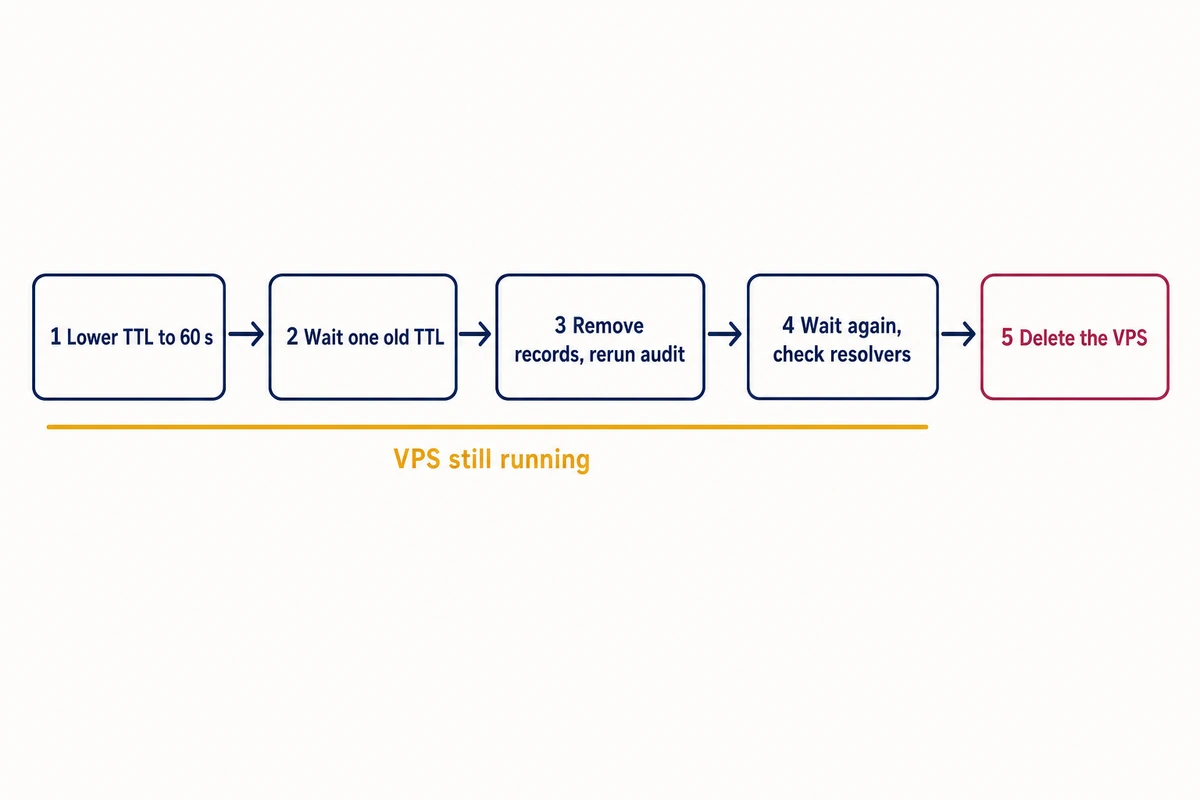
Remove a server’s records while you still hold its IP address. Delete the server last. Until then a stale DNS record is harmless, because cached answers still reach your own machine. The DNS records to remove when decommissioning a server are every A and AAAA record with its address, MX and SRV records whose targets resolve to it, SPF entries that cover it and CNAMEs pointing at names it hosted.
1. Lower the TTL to 60 seconds before the DNS change
Do it at least one old TTL ahead. With resolvers that honor the TTL, that caps the stale window after removal at about a minute. In the reproduction, a record at TTL 60 lowered to 10 after unbound had cached it was still served until about t=60 s, as if unchanged.
2. Wait one old TTL
A record that sat at 7200 needs the lowering at least two hours before removal. In the reproduction, lowered to 10 and then left for more than one old TTL, the record’s stale window after removal shrank to 6.3 seconds.
3. Remove the records and rerun the audit
Take out everything listed above, SPF ip4 entries included. Copy the records out of the panel again and rerun audit-dns.sh with the address on the retired list; nothing should be flagged for it.
4. Wait again, then query the resolvers you can reach
Resolver policy can outlast your TTL. With unbound’s cache-min-ttl at 30, a 10-second record stayed cached for 30 seconds, and with serve-expired enabled the expired address went out once more carrying a 30-second TTL. Public resolvers were outside the reproduction, so query the ones you can reach (dig @1.1.1.1 staging.example.com A) until they return NXDOMAIN.
Meanwhile, remove the address from firewall allowlists on other servers, and from monitoring checks and webhook targets.
5. Delete the VPS
Do it once nothing resolves to the address and nothing outside DNS names it. If the server has a successor, such as a new Hostry VPS, bring it up first, point the records at it in step 3 instead of removing them, and keep the old one running until the caches drain.
Run the audit on a schedule
Because the script exits 1 when it flags anything and 0 when the list is clean, cron can run it every week and send mail only when there is a finding. It exits 2, with the reason on stderr, when called without arguments or when the records file is missing, unreadable, a directory, empty or only comments; that is non-zero too, so a typo in a path sends a mail with the error.
Cron re-checks the saved records.txt, not the live zone, so copy the list again whenever the zone changes. A record added in the panel after the last copy is never checked. Put audit-dns.sh and records.txt in /opt/dns-audit/ and add the line to your user crontab with crontab -e (it has no user field). It assumes the host can already send mail with the mail command (from mailutils or bsd-mailx).
# m h dom mon dow  command
41 6 * * 1  /opt/dns-audit/audit-dns.sh /opt/dns-audit/records.txt 198.51.100.41 198.51.100.62 2001:db8:41::41 > /var/tmp/dns-audit.txt 2>&1 || mail -s "DNS audit findings" admin@example.com < /var/tmp/dns-audit.txt
New stale DNS records appear whenever a server is deleted without the cleanup, and the weekly run also flags listed records changed in the panel but not in records.txt:
www.example.com A 198.51.100.18
  dns     !! listed 198.51.100.18, DNS answers '198.51.100.17' (NOERROR)
To keep both lists current, note a new server’s names and addresses on the day you set it up, alongside the first half hour of hardening a new Linux VPS, and add its IPs to the retired list when you delete it. For the opposite failure, a zone that stops answering, see keeping a zone answering through a DNS provider outage.