n8n 3.0 Upgrade on a VPS: Back Up So the Restore Actually Works

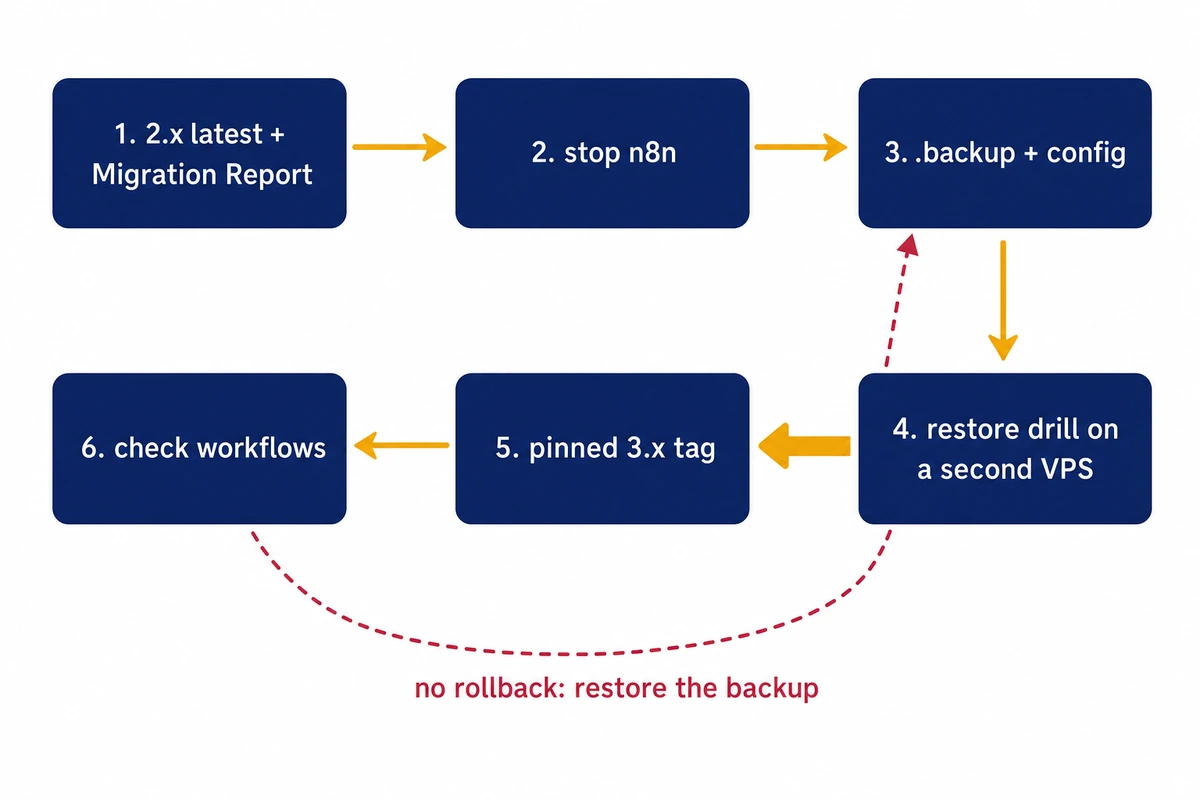
You run self-hosted n8n 2.x on a VPS, and n8n calls the n8n 3.0 upgrade one way. Stable is due in early December, and the route back to 2.x is a backup taken before the first 3.x start. On n8n 2.48.6 with the default SQLite database, a copy of database.sqlite alone restored an empty instance, so back up with sqlite3 .backup plus ~/.n8n/config and prove the restore first.
Scope: the SQLite backup, the key behaviour and the restore drill come from n8n 2.48.6 installed from npm, with Node.js 24.22.3 as the runtime and Ubuntu 24.04.5 as the OS. Docker and everything about 3.x follow n8n’s docs and announcement and were not run, since npm carries no 3.x package and no container was started.
Preparation, on 2.x
- Check what you run:
n8n --version, plus the Node.js version of the service on an npm install. The Migration Report needs 2.39 or later; the npm package of 2.48.6 needs Node.js 24. - Find the encryption key in ~/.n8n/config and keep a copy off the server.
- Back up the database in a form that restores:
sqlite3 .backupplusconfig, or the whole.n8nfolder with n8n stopped. - On npm, move to Docker on the same 2.x version, with the data folder owned by uid 1000 and the service’s environment carried over.
- Update to the latest 2.x and work through the Migration Report until nothing blocks the upgrade.
Staging trial
- Prove the restore on a separate VPS: owner login, workflow count, and one workflow that uses a credential. Repeat it after every version change, the Docker move included.
- Upgrade staging to a pinned 3.x tag and let it run a week of normal workflows.
Production cutover
- Stop, back up, start the same pinned 3.x tag, run the drill checks, and keep the 2.x copy for a week.
What the n8n 3.0 upgrade changes, and when
n8n 3.0 makes Docker the only supported way to self-host, changes several defaults and turns on encryption key rotation, and there is no downgrade path. The n8n 3.0 announcement of October 23, 2026 set the beta for October 27 and the stable 3.x release for early December, with no day given. Support for 1.x ends on December 31, 2026. For a year after 3.x stable, 2.x still gets security fixes and fixes for critical bugs. On direction the post leaves no room: “There’s no going back to 2.x afterwards.”
On a single VPS, waiting on 2.x for the first 3.x point release is the sensible default. The fixes keep coming for a year, so December sets no deadline.
All n8n 3.0 breaking changes are listed on the v3.0 breaking changes page, starting with the end of support for installing with npm or running npx n8n. Three more matter on a small VPS. Code node tasks time out after 60 seconds by default instead of 300; the guide to n8n memory and timeout failures on a VPS shows how long runs end. On first start 3.0 moves ~/.n8n/binaryData to ~/.n8n/storage; a fresh 2.48.6 install already uses storage, as the listing below shows, while older installs still have binaryData. And 100.64.0.0/10 joins the default SSRF block list, which affects workflows that call hosts on a Tailscale network.
The encryption key rotation docs say 3.0 turns rotation on for you and that “Older versions of n8n can’t read this format,” so after 3.x has written data, only the pre-upgrade backup takes you back to 2.x.
The announcement’s first step is to update to the latest 2.x and open Settings > Migration Report, available from 2.39. It lists workflow issues and instance issues, each with an impact level; anything marked Upgrade blocked has to be fixed on 2.x. On the npm install, the report’s instance results included this line: “This instance appears to run outside a container (e.g. installed via npm).”
Where the n8n encryption key lives
The n8n encryption key sits in ~/.n8n/config, in the home folder of the user n8n runs as, as a small JSON file with one encryptionKey field. If N8N_ENCRYPTION_KEY is not set, n8n generates a random key on the first start and saves it there with mode 600. In the official image the same file ends up at /home/node/.n8n/config on the data volume. A fresh 2.48.6 folder:
No encryption key found - Auto-generating and saving to: /opt/n8n3-lab/n8n3-home-a/.n8n/config

~/.n8n:
-rw------- 1 root root      56 config
-rw-r--r-- 1 root root 2469888 database.sqlite
-rw-r--r-- 1 root root   32768 database.sqlite-shm
-rw-r--r-- 1 root root 4202432 database.sqlite-wal
-rw-r--r-- 1 root root     530 n8nEventLog.log
drwxr-xr-x 2 root root    4096 nodes
drwxr-xr-x 2 root root    4096 storage
Every credential in the database is encrypted with that key, and nothing else can replace it. Copy the file into a password manager or a vault that does not live on the same VPS.
Setting the key in the environment as well does not give either source priority. When N8N_ENCRYPTION_KEY differs from the file, n8n start and the CLI commands, exports included, exit with code 1, as n8n’s breaking-changes notes for 1.25.0 announced for the main instance (lab path in the message):
Error: Failed to load command "start"
UserError: Mismatching encryption keys. The encryption key in the settings file /opt/n8n3-lab/n8n3-k1/.n8n/config does not match the N8N_ENCRYPTION_KEY env var. Please make sure both keys match. More information: https://docs.n8n.io/deploy/host-n8n/configure-n8n/basic-configuration/configuration-examples/set-a-custom-encryption-key
exit=1
With only the variable set, 2.48.6 writes its value into ~/.n8n/config without a log line. From then on both places hold the key and both have to stay identical, which matters when someone later edits a systemd unit or a compose file. Queue mode runs on PostgreSQL and is out of scope here; the queue-mode troubleshooting post covers the worker side.
Back up n8n’s SQLite database the way it restores
n8n 2.48.6 runs SQLite in WAL mode (PRAGMA journal_mode returns wal), so new writes land in database.sqlite-wal and reach database.sqlite only at a checkpoint. After the lab created an owner, a credential and a workflow, the main file still had its old timestamp and the 4.2 MB -wal held all of it. A backup therefore needs sqlite3 .backup, or the whole folder copied with n8n stopped; the main file alone missed everything.
Each copy below was restored next to the original config and checked for the owner login and for the one workflow and one credential the lab had created:
| Method | n8n at copy time | Owner login | Workflows / credentials |
|---|---|---|---|
database.sqlite only (b1) | running | no, setup screen | 0 / 0 |
database.sqlite only (b5) | stopped with SIGTERM | no, setup screen | 0 / 0 |
main file + -wal + -shm (b2) | running | yes | 1 / 1 |
sqlite3 .backup (b3) | running | yes | 1 / 1 |
whole .n8n folder, cp -a | stopped | yes | 1 / 1 |
== b1-cp-main:        ok  users=1 workflows=0 credentials=0 migrations=307
== b2-cp-all:         ok  users=1 workflows=1 credentials=1 migrations=344
== b3-sqlite-backup:  ok  users=1 workflows=1 credentials=1 migrations=344
== live:                  users=1 workflows=1 credentials=1

stop: kill -TERM <n8n start> -> "Stopping n8n..." stopped after 9.3 s, exit 0
after clean stop: database.sqlite 2469888 (12:56), database.sqlite-wal 4202432 still present
== b5-cp-main-after-stop: ok  workflows=0 credentials=0 migrations=307 owner email=<NULL>
The ok in each line is PRAGMA integrity_check, and it passed for the useless copies too. The stop made no difference because the WAL was still un-checkpointed afterwards, which is why the familiar habit of stopping n8n and copying the .sqlite file can produce an empty instance. The live three-file copy (b2) worked here, but that is an observation from one run, not a guarantee; take the folder with n8n stopped.
The online backup needs no downtime and took 0.01 s on the 2.8 MB lab database. Run it as the user n8n runs as. The paths here are examples; swap in your own:
sudo apt install sqlite3
mkdir -p -m 700 ~/n8n-backup
sqlite3 ~/.n8n/database.sqlite ".backup $HOME/n8n-backup/database.sqlite"
cp -p ~/.n8n/config ~/n8n-backup/
Since integrity_check cannot tell a stale copy from a good one, count rows instead. Each number should match what the editor shows; zero owners with an email means the copy will open on the setup screen.
sqlite3 ~/n8n-backup/database.sqlite \
  "select count(*) from workflow_entity;" \
  "select count(*) from credentials_entity;" \
  "select count(*) from \"user\" where email is not null;"
For the folder method, stop n8n and run cp -a ~/.n8n ~/n8n-backup/n8n-folder. That copy also takes storage/ with any binary data, and nodes/ if you installed community nodes; the .backup method covers only the database and config. Then copy ~/n8n-backup to another machine, for example the staging VPS (replace the host with yours):
scp -rp ~/n8n-backup admin@staging.example.com: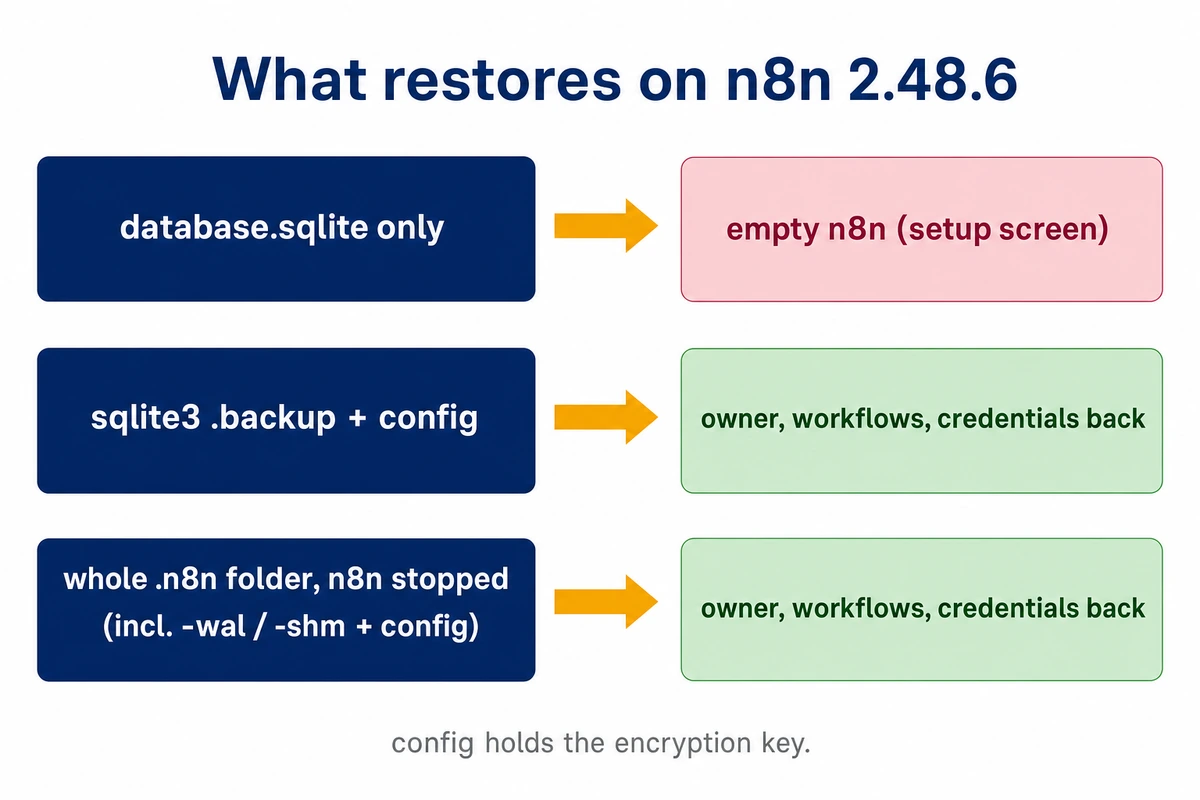
CLI exports are a second copy, not the backup
The export commands suit a git history of workflows:
n8n export:workflow --all --output=workflows.json
n8n export:credentials --all --output=credentials.json
n8n export:credentials --all --decrypted --output=credentials-decrypted.json
As a restore source they fell short: an instance rebuilt from them opened on the setup screen, without the owner account. With --decrypted, the credentials file holds every secret in plain text, and it was written world-readable:
-rw-r--r-- 1 root root 392 Nov 19 12:58 credentials-decrypted.jsonIf a move needs one, delete it right after the import, and never leave it in a web root or a synced folder.
Prove the restore before you upgrade
A restore counts as proven when the owner can log in, the workflow count matches, and a workflow that uses a credential runs on a machine that has never seen production. Use the same n8n version as production. The restored copy carries every production workflow and credential, so start it where it cannot reach production databases or APIs, and away from the production hostname so no live webhook lands on it.
A separate staging VPS matched to production in size gives the drill and the later 3.x trial realistic timings; a fresh folder on another machine still proves the backup. A Hostry Linux VPS gives full root and resources that scale up or down, from 1 GB RAM up to 32 GB, so the staging box can match production for the trial and shrink afterwards; the entry plan is $6.00/mo (1 vCPU, NVMe).
On an npm staging box, with ~/n8n-backup copied over from production:
# as the user n8n will run as; ~/.n8n must not exist yet
# .backup method:
mkdir -p -m 700 ~/.n8n
cp -p ~/n8n-backup/database.sqlite ~/n8n-backup/config ~/.n8n/
# or the folder method:
cp -a ~/n8n-backup/n8n-folder ~/.n8n

n8n start
Sign in with the production owner’s email; a setup screen means the copy is stale. When the editor is bound to the loopback address, as in the docker run lines below, open a tunnel from your workstation and browse to http://localhost:5678:
ssh -N -L 5678:127.0.0.1:5678 admin@staging.example.comFor the credential test, use a workflow with a Manual Trigger whose HTTP Request sends the credential to a listener on the staging box’s 127.0.0.1, as the lab did with a local echo server, and run it from the editor or, with n8n stopped, from the CLI (the ID is the one in the workflow’s URL). With the key restored, the request arrived with the stored header token:
$ n8n execute --id=nV6KKZT5GXgPZ3Hq
[...]
Execution was successful:
[...]
exit=0
Leave config out and 2.48.6 refuses to start at all. It first writes a new random key into ~/.n8n/config, then finds that the deployment keys stored in the database cannot be read with it:
No encryption key found - Auto-generating and saving to: /opt/n8n3-lab/n8n3-drill-nokey/.n8n/config
Initializing n8n process
n8n ready on 127.0.0.1, port 5678
UnexpectedError: Deployment key 'signing.hmac' cannot be read with this instance encryption key
Exiting due to an error.
n8n exited before ready (exit status 1)
The failed start did not touch the database: its deployment_key rows were identical before and after. Copying the original config over the generated one brought the same folder back, with the owner login, the workflow and a successful run. The generated file looks exactly like a real key file, so a folder backed up after such a start pairs a good database with the wrong key, and nobody notices until the next restore. If a restored n8n exits with that signing.hmac line, look for a newer config than the database before anything else.
Rebuilding from exports hides the same mismatch for longer. Encrypted credentials imported into an instance with a different key reported success:
$ n8n import:credentials --input=credentials.json
No encryption key found - Auto-generating and saving to: /opt/n8n3-lab/n8n3-imp-encrypted/.n8n/config
[...]
Successfully imported 1 credential.
exit=0
The error came only when the workflow ran, as a CredentialDataError blaming a different encryption key. After any import, run a workflow that uses the imported credential to confirm it decrypts. The drill validates the backup that a rollback needs; the rollback steps themselves are under upgrade day.
Move n8n from npm to Docker
An npm install cannot take the n8n 3.0 upgrade in place, because on November 19, 2026 the registry has no 3.x n8n at all. Of 1263 published versions none starts with 3, and latest and stable both point to 2.48.6:
$ npm view n8n dist-tags
{
  beta: '2.49.2',
  rc: '1.123.99',
  latest: '2.48.6',
  stable: '2.48.6',
  next: '2.49.2'
}
$ npm view n8n@3.0.0
npm error code E404
npm error 404 No match found for version 3.0.0
npm error 404
npm error 404  'n8n@3.0.0' is not in this registry.
So npm update -g n8n keeps you on 2.x, which still gets fixes for a year after 3.x stable. n8n 3.0 no longer supports npm installs, yet nothing breaks in December; the support window becomes your deadline for moving from npm to Docker.
Staying on npm meanwhile has its own catch. The 2.48.6 package declares { node: '>=24.0.0' }, while Ubuntu 24.04’s apt install nodejs gives 18.19.1 and no npm. With the apt npm 9.2.0, npm install n8n@2.48.6 --package-lock-only resolved the package with only EBADENGINE warnings and exit code 0 (a full install on Node 18 was not run). The failure shows at start, on Node 22 too:
Your Node.js version 18.19.1 is currently not supported by n8n.
Please use a Node.js version that satisfies the following version range: >=24.0.0
exit=1

Your Node.js version 22.23.4 is currently not supported by n8n.
Please use a Node.js version that satisfies the following version range: >=24.0.0
exit=1
n8n --version printed 2.48.6 and exited 0 under both of those Node versions, so check the service log after any npm update.
Move to Docker on the version you already run, and take 3.x as a separate step, so a failure has one possible cause. The container side below was not run for this article: the volume layout follows the n8n Docker installation docs, which mount the data at /home/node/.n8n, and the image’s Dockerfile sets USER node, a user that community reports put at uid 1000. The folder side was reproduced with npm n8n running as uid 1000.
First, while the npm service keeps running, install Docker Engine from Docker’s apt repository for Ubuntu and pull the image, so a slow or failed download never leaves n8n down. Then list the environment the running service uses, from its systemd Environment= lines, its env file or, as below, the live process:
sudo docker pull n8nio/n8n:2.48.6
sudo cat /proc/$(pgrep -f '^n8n start')/environ | tr '\0' '\n' | grep -E '^(N8N_|WEBHOOK_URL|GENERIC_TIMEZONE|DB_)' \
  | sed 's/^\(N8N_ENCRYPTION_KEY=\).*/\1(hidden)/'
Put the settings you need into /srv/n8n/n8n.env, one KEY=value per line, for --env-file, which Docker describes as reading “a file of environment variables”. Behind a reverse proxy the one that matters most is N8N_WEBHOOK_URL, the base URL for test and production webhooks; n8n’s endpoint docs list WEBHOOK_URL as its deprecated alias since 2.35.0. The key travels inside config, so leave N8N_ENCRYPTION_KEY out, or make sure it matches the file. /home/n8n below stands for the home of the account your npm install ran as:
sudo systemctl stop n8n          # or pm2 stop, whatever supervises it
sudo systemctl disable n8n
sudo mkdir -p /srv/n8n
sudo cp -a /home/n8n/.n8n /srv/n8n/.n8n
sudo chown -R 1000:1000 /srv/n8n/.n8n
sudo docker run -d --name n8n --restart unless-stopped \
  -p 127.0.0.1:5678:5678 \
  --env-file /srv/n8n/n8n.env \
  -v /srv/n8n/.n8n:/home/node/.n8n \
  n8nio/n8n:2.48.6
Skip the chown and the copy stays root-owned, which fails on the first file n8n opens. Run as uid 1000 against such a copy (lab paths):
Error: Failed to load command "start"
Error: EACCES: permission denied, open '/opt/n8n3-lab/n8n3-dock/home/node/.n8n/config'
exit=1
After chown -R 1000:1000 the same folder started as uid 1000, the owner logged in, and the credential decrypted in a workflow run. Run the drill checks on the container before you go further.
Upgrade day with a pinned 3.x tag
Run the n8n 3.0 upgrade on the staging copy first, as the announcement advises, and give it a week of normal runs before production gets the same steps. On production, stop n8n, take the backup from the stopped folder, copy it off the server, then start an exact 3.x version:
sudo docker stop n8n
sudo cp -a /srv/n8n/.n8n /srv/n8n/backup-2.48.6
sudo docker rm n8n
sudo docker run -d --name n8n --restart unless-stopped \
  -p 127.0.0.1:5678:5678 \
  --env-file /srv/n8n/n8n.env \
  -v /srv/n8n/.n8n:/home/node/.n8n \
  n8nio/n8n:3.x.y
sudo docker logs -f n8n
Replace 3.x.y with the exact stable version from n8n’s release notes. A moving tag can pull a newer 3.x on the next restart, and then the version you tested is not the one you run. Repeat the drill checks once it is up: owner login, workflow count, one run with a credential.
A failed 3.x start can already change the schema, so restore the backup folder instead of only switching the tag. A test of a pre-beta 3.0 nightly on PostgreSQL reported seven migrations applied and two tables dropped in a start that failed; the measurement is theirs and was not reproduced here. The way back:
sudo docker stop n8n && sudo docker rm n8n
sudo mv /srv/n8n/.n8n /srv/n8n/failed-3x
sudo cp -a /srv/n8n/backup-2.48.6 /srv/n8n/.n8n
sudo docker run -d --name n8n --restart unless-stopped \
  -p 127.0.0.1:5678:5678 \
  --env-file /srv/n8n/n8n.env \
  -v /srv/n8n/.n8n:/home/node/.n8n \
  n8nio/n8n:2.48.6
Keep backup-2.48.6 until 3.x has handled a full week of normal traffic. Restoring it loses whatever was created on 3.x after the upgrade, so decide early. Keep the failed folder too, for the bug report.