
GitHub Actions Deploy to a VPS: Limit What a Stolen SSH Key Can Do

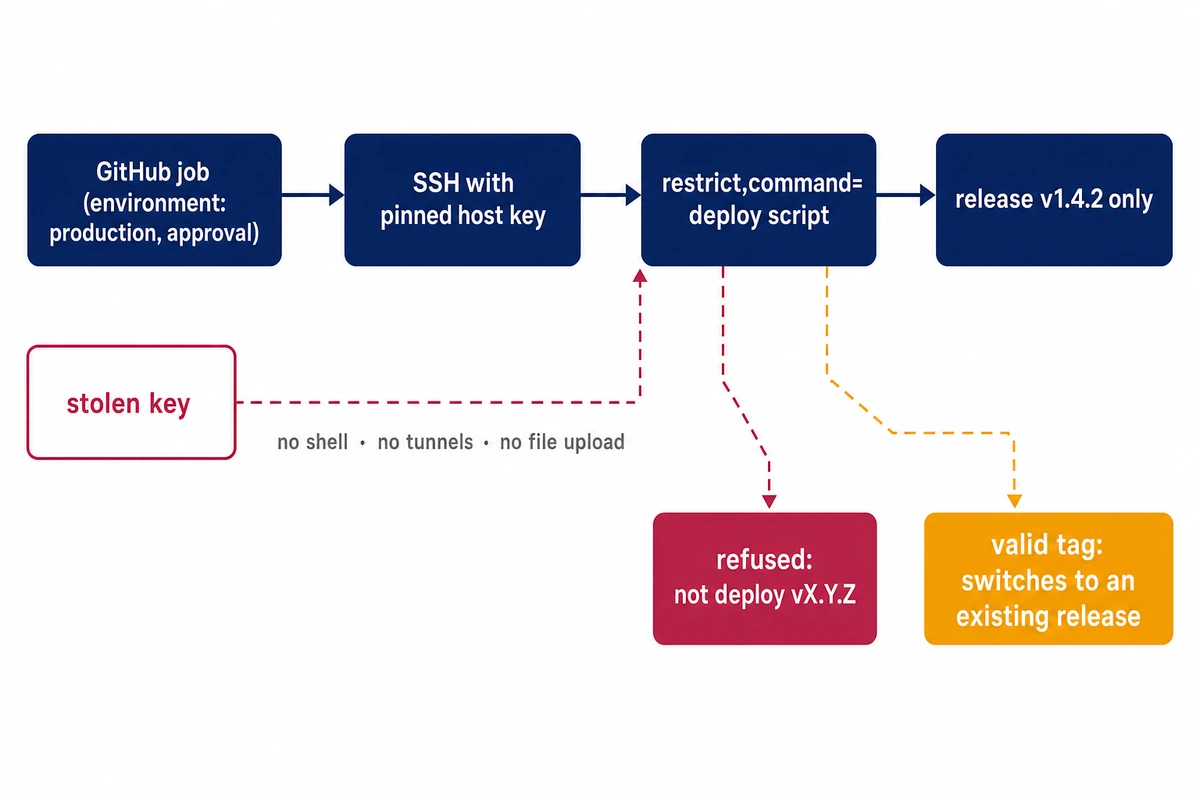
If your GitHub Actions deploy to a VPS uses an SSH key from a repository secret, check that key's line in authorized_keys. Most guides add it as a bare line, which gives anyone holding the private key a shell, file access and tunnels. With restrict,command= in front of the line, the same stolen key runs one deploy script that accepts one release tag.
The script in this setup switches the VPS to a release that is already on the server, and the restricted key cannot upload one. We recommend adding a fetch step to that script yourself: the server downloads the release for the validated tag from a release artifact or a read-only source it already trusts, so the CI key never needs write access.
If the key in your deploy secret may have been read by someone else, through the wfx-loot campaign or any other leak, these six steps replace it with a key that can do one job:
- Create a new ed25519 key and a dedicated user on the VPS, with no sudo wildcard and no docker group membership.
- Add the public key with restrict,command= pointing at a root-owned script, plus an expiry-time that ends in Z.
- Install the allow-list script, which accepts only
deploy vX.Y.Zand checks it with bash’s[[ =~ ]], because grep lets a newline through. - Pin the server’s host key in a secret and connect with
StrictHostKeyChecking=yes; removessh-keyscanandStrictHostKeyChecking=nofrom the workflow. - Move both secrets into a protected environment that only release tags can deploy to.
- Rotate the old key out and search the SSH log for its fingerprint to see what it was used for.
Outputs below were reproduced with OpenSSH 9.6p1 (Ubuntu package 1:9.6p1-3ubuntu13.20) on Ubuntu 24.04, server and runner in separate network namespaces, with the runner also playing the thief. Output blocks keep the lab’s port 2222, user gha-deployer and /opt/gha-lab paths. Nothing in the lab contacted GitHub, so GitHub’s side comes from its documentation.
What a stolen GitHub Actions deploy key can do on your VPS
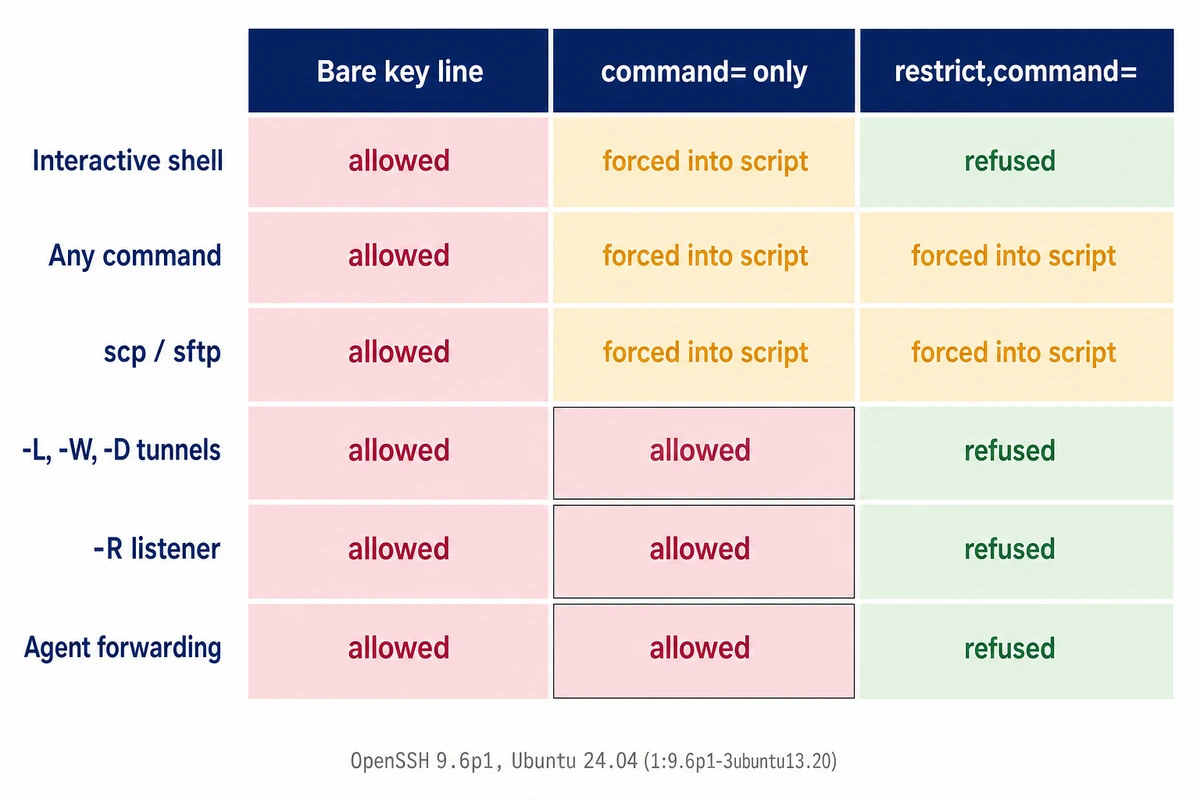
With a bare authorized_keys line the key in the secret is a full login, and a forced command on its own removes the shell but leaves the tunnels open.
That key is what wfx-loot went after. From about 12:45 UTC on November 10, 2026, the campaign used stolen GitHub credentials to push code that ran in repositories’ workflows and collected the secrets and variables those workflows could read, with SSH material on its target list. The Cloud Security Alliance research note on the wfx campaign cites StepSecurity: the attack “exploits no vulnerability in GitHub Actions itself”; the tokens were real, just stolen.
To make a GitHub Actions SSH deploy secure, first see what a thief gets. The table shows one private key, used from the runner against three versions of the key line.
| What the thief tries | Bare key line | command= only | restrict,command= |
|---|---|---|---|
Interactive shell (ssh -tt) | Shell on /dev/pts/0 | Forced command runs on /dev/pts/0 | PTY allocation request failed on channel 0 |
Any command (id; echo CMD_RAN) | Runs | Forced into the script | Forced into the script |
| scp upload, sftp | File lands in /tmp | Forced into the script, fails | Forced into the script, fails, no file written |
| -L, -W, -D to 127.0.0.1:8080 | HTTP 200 | HTTP 200 | administratively prohibited, HTTP 000 |
| -R listener on the VPS | Listening on 127.0.0.1:19090 | Listening on 127.0.0.1:19090 | remote port forwarding failed for listen port 19090 |
| Agent forwarding (-A) | Runner’s agent key listed | SSH_AUTH_SOCK set | SSH_AUTH_SOCK unset |
The middle column matters to anyone who adds only a forced command. With command= alone, an HTTP request through each tunnel type reached the test service on the VPS’s 127.0.0.1:8080 with HTTP 200, and ssh -N -R opened a listener on the VPS at 127.0.0.1:19090. The sshd(8) manual in this package warns about it:
the client may specify TCP and/or X11 forwarding unless they are explicitly prohibited
sshd(8), openssh-server 1:9.6p1-3ubuntu13.20
You can check what the server granted from the client side. After authentication, ssh -v prints a key options line: agent-forwarding port-forwarding pty user-rc x11-forwarding for the bare line in the lab, only command for restrict,command=.
A new key and a user that owns nothing else
Start with a fresh key pair and a user that exists only for deploys. Options on the old key’s line would limit its future logins, but a copy of that key may already be elsewhere. A comment naming the repository and purpose will show up next to the fingerprint later.
# on your workstation
ssh-keygen -t ed25519 -N '' -C 'ci: example-org/shop-api deploy' -f shop-ci-ed25519

# on the VPS, as root
useradd --create-home --shell /bin/bash shopci
install -d -m 700 -o shopci -g shopci /home/shopci/.ssh
The name shopci, the address 192.0.2.10 and the key comment are stand-ins for your own. Keep the account out of the docker group: Docker’s Linux post-installation guide warns that “the docker group grants root-level privileges to the user”. Key-only login and the base setup are in our notes on locking a new server down to SSH keys. If a restart needs root, give sudoers one exact command line, since a trailing * also matches extra units and flags:
# visudo -f /etc/sudoers.d/shopci
shopci ALL=(root) NOPASSWD: /usr/bin/systemctl restart shop-api.service

# what the rule permits
sudo -l -U shopci /usr/bin/systemctl restart shop-api.service
The restrict,command= line in authorized_keys
The changes from here on are root work on the server. On a Hostry Linux VPS you hold root for all of it, and if a LogLevel edit or a key change locks out your SSH login, open the panel’s VNC console and undo the last change from there.
Write one line to /home/shopci/.ssh/authorized_keys, owned by shopci with mode 600. Paste the full contents of shop-ci-ed25519.pub after the options:
restrict,expiry-time="20270301Z",command="/usr/local/bin/shop-release" ssh-ed25519 AAAAC3Nza...rest-of-the-public-key... ci: example-org/shop-api deployrestrict turns off port, agent and X11 forwarding, PTY allocation and ~/.ssh/rc, including any restriction added in future versions. command= runs the script whatever the client asked for. Since no PTY is allowed, keep -t and -tt out of the workflow’s ssh call: the lab’s ssh -tt got PTY allocation request failed on channel 0, exit 255, and the script never ran.
expiry-time as a rotation deadline
expiry-time= arrived in OpenSSH 7.7 (April 2018), and 9.6p1 honors it, so a key you forget to rotate stops working on a date you pick. The man page reads times in the system time zone unless they end in Z, and in practice that meant the sshd process’s zone. Three debug sshd instances, differing only in environment, got the same line expiry-time="202611191125" without Z at 10:55 UTC:
### debug sshd started with: env -i                       -> deployed v1.4.2
### debug sshd started with: env -i TZ=Europe/Chisinau    -> Permission denied (publickey).
                                                             debug1: ...authorized_keys:1: entry expired at 2026-11-19T11:25:00
### debug sshd started with: env -i TZ=UTC                -> deployed v1.4.2
Under Europe/Chisinau, two hours ahead of UTC, 11:25 had already passed. Write the value with Z, as in 20270301Z.

An allow-list script for SSH_ORIGINAL_COMMAND
The forced command receives the client’s request as one string in SSH_ORIGINAL_COMMAND. Its job is to match the whole string against one pattern, refuse everything else and never hand any part of it to a shell. This script accepts deploy plus a version such as v1.4.2, rebuilds the tag from the captured numbers and switches a current symlink to a release already on the server.
#!/bin/bash
# /usr/local/bin/shop-release: forced command for the CI key.
# Accepts exactly "deploy vMAJOR.MINOR.PATCH". Everything else is refused.
set -euo pipefail
umask 027
PATH=/usr/local/sbin:/usr/local/bin:/usr/sbin:/usr/bin:/sbin:/bin
APP=/home/shopci/app
LOG=/home/shopci/log/release.log
req="${SSH_ORIGINAL_COMMAND-}"
log() { printf '%s %s from=[%s] req=%q\n' "$(date -u +%FT%TZ)" "$1" "${SSH_CONNECTION%% *}" "$req" >> "$LOG"; }

re='^deploy v(0|[1-9][0-9]{0,3})\.(0|[1-9][0-9]{0,3})\.(0|[1-9][0-9]{0,3})$'
if [[ ! "$req" =~ $re ]]; then
  log REJECT
  echo "refused: expected 'deploy vX.Y.Z'" >&2
  exit 64
fi
tag="v${BASH_REMATCH[1]}.${BASH_REMATCH[2]}.${BASH_REMATCH[3]}"
if [[ ! -d "$APP/releases/$tag" ]]; then
  log NO_SUCH_RELEASE; echo "refused: release $tag not present" >&2; exit 65
fi
ln -sfn "releases/$tag" "$APP/current.new"
mv -T "$APP/current.new" "$APP/current"
log OK
echo "deployed $tag"
install -o root -g root -m 755 shop-release /usr/local/bin/shop-release
install -d -o shopci -g shopci /home/shopci/app /home/shopci/app/releases /home/shopci/logThe script is root-owned so the deploy user cannot edit it, and it sets PATH because a non-interactive session starts with a minimal one. ln and mv sit on separate lines because set -e ignores a failure on the left of &&, and the script would report a deploy that never happened. The lab staged releases/v1.4.2 beforehand; if your script fetches releases, it should use $tag, rebuilt from the matched digits.
Check the result from your workstation with the new key; a request the script refuses is enough. With expiry-time in the line, the options read commandexpires, and the line appears twice:
ssh -v -i shop-ci-ed25519 -o IdentitiesOnly=yes shopci@192.0.2.10 'check' 2>&1 | grep 'key options'debug1: Remote: /opt/gha-lab/home/gha-deployer/.ssh/authorized_keys:1: key options: commandexpires
debug1: Remote: /opt/gha-lab/home/gha-deployer/.ssh/authorized_keys:1: key options: commandexpiresThe lab’s probes against this script ran through this client config, where gha-vps stands for the full connection:
Host gha-vps
  HostName 192.0.2.10
  Port 2222
  User gha-deployer
  IdentityFile /opt/gha-lab/runner/ci_deploy_ed25519
  IdentitiesOnly yes
  UserKnownHostsFile /opt/gha-lab/runner/known_hosts
  StrictHostKeyChecking yes
  BatchMode yes
The probes returned these results, condensed to one row per request:
### ssh gha-vps deploy\ v1.4.2            deployed v1.4.2                        exit=0
### ssh gha-vps deploy\ v9.9.9            refused: release v9.9.9 not present    exit=65
### ssh gha-vps deploy\ v1.4.2\;\ id      refused: expected 'deploy vX.Y.Z'      exit=64
### ssh gha-vps deploy\ \$\(id\)          refused: expected 'deploy vX.Y.Z'      exit=64
### ssh gha-vps deploy\ \`id\`            refused ...                            exit=64
### ssh gha-vps deploy\ v1.4.2\ \&\&\ id  refused ...                            exit=64
### ssh gha-vps deploy\ v1.4.2\|id        refused ...                            exit=64
### ssh gha-vps deploy\ v01.4.2           refused ...                            exit=64
### ssh gha-vps 'deploy v1.4.2 '          refused ...                            exit=64
### ssh gha-vps deploy\ ../../../etc      refused ...                            exit=64
### ssh gha-vps $'deploy v1.4.2\nid'      refused ...                            exit=64
### ssh gha-vps (no command)              refused ...                            exit=64
Thanks to %q, the script’s log shows a newline as $'...\n...' instead of splitting the entry:
2026-11-19T10:52:20Z OK from=[192.0.2.20] req=deploy\ v1.4.2
2026-11-19T10:52:21Z REJECT from=[192.0.2.20] req=deploy\ v1.4.2\;\ id
2026-11-19T10:52:23Z REJECT from=[192.0.2.20] req=$'deploy v1.4.2\nid'
2026-11-19T10:52:24Z REJECT from=[192.0.2.20] req=''
Why grep is the wrong validator
A common shortcut pipes the variable into grep -qE '^deploy v[0-9]+\.[0-9]+\.[0-9]+$'. The anchors look strict, but grep matches line by line, and ssh delivers a newline inside the command string to the server unchanged. The lab’s comparison script printed a verdict and executed nothing; it was fed deploy v1.4.2; id, then $'deploy v1.4.2\nid', then $'id\ndeploy v1.4.2':
naive grep check: rejected
naive grep check: ACCEPTED ... d e p l o y   v 1 . 4 . 2 \n i d
naive grep check: ACCEPTED ... i d \n d e p l o y   v 1 . 4 . 2
A script that passed such a request on to a shell would run the extra line. Bash’s [[ =~ ]] anchors to the whole string, so the script’s pattern refused both multi-line requests above.
StrictHostKeyChecking in GitHub Actions: pin the host key
Store the server’s host key line as a secret and connect with StrictHostKeyChecking=yes. In the lab that setup refused an impostor server, as did accept-new with the same pinned file; StrictHostKeyChecking=no and an ssh-keyscan at job start both connected to it and ran the deploy.
For the test, a second sshd with a different host key replaced the real one on the same address and port. It held the deploy key so the command could complete; a real machine in the path could accept any key or relay. An empty known_hosts with StrictHostKeyChecking=no simply added the impostor and deployed. The other cases:
### 5b ssh-keyscan at job start, then StrictHostKeyChecking=yes
[192.0.2.10]:2222 ssh-ed25519 AAAAC3NzaC1lZDI1NTE5AAAAIGmNfOQGEgsZdEi4X/ayBVQtUFmRsL8QTuFmejleSFxj
deployed v1.4.2
exit=0
### 5c pinned real key in known_hosts, but StrictHostKeyChecking=no
@    WARNING: REMOTE HOST IDENTIFICATION HAS CHANGED!     @
[...]
Password authentication is disabled to avoid man-in-the-middle attacks.
Keyboard-interactive authentication is disabled to avoid man-in-the-middle attacks.
deployed v1.4.2
exit=0
### 5d pinned real key from secret, StrictHostKeyChecking=yes
@    WARNING: REMOTE HOST IDENTIFICATION HAS CHANGED!     @
[...]
Host key for [192.0.2.10]:2222 has changed and you have requested strict checking.
Host key verification failed.
exit=255
Case 5b looks careful, but a fresh runner has nothing to compare against, so the scan trusted whoever answered. In case 5c the client printed the warning banner, disabled password and keyboard-interactive login, then authenticated with the key and deployed with exit 0.
Take the line from the server itself, over a session you already trust or the VPS console, and compare the fingerprint before you store it:
# on the VPS
ssh-keygen -lf /etc/ssh/ssh_host_ed25519_key.pub
printf '192.0.2.10 %s\n' "$(cut -d' ' -f1,2 /etc/ssh/ssh_host_ed25519_key.pub)"
The second command prints the value for the secret. If sshd listens on a port other than 22, write the host as [192.0.2.10]:2222; the lab’s mismatch tests used that bracketed form.
The workflow and a protected environment
Move the private key and the host key line from repository secrets to an environment’s secrets, and allow only release tags to deploy to that environment. GitHub’s secure use reference spells out why repository secrets are a weak spot: “Any user with write access to your repository has read access to all secrets”. Environment secrets are released to a job only after the environment’s protection rules pass.
name: release
on:
  push:
    tags: ['v*.*.*']
jobs:
  ship:
    runs-on: ubuntu-24.04
    environment: production
    steps:
      - name: Ask the VPS to switch to this tag
        env:
          CI_KEY: ${{ secrets.SHOP_CI_ED25519 }}
          HOST_LINE: ${{ secrets.SHOP_VPS_HOST_LINE }}
        run: |
          install -d -m 700 "$HOME/.ssh"
          printf '%s\n' "$CI_KEY" > "$HOME/.ssh/shop-ci"
          chmod 600 "$HOME/.ssh/shop-ci"
          printf '%s\n' "$HOST_LINE" > "$HOME/.ssh/shop-known-hosts"
          ssh -i "$HOME/.ssh/shop-ci" -p 22 -o IdentitiesOnly=yes -o BatchMode=yes \
              -o StrictHostKeyChecking=yes \
              -o UserKnownHostsFile="$HOME/.ssh/shop-known-hosts" \
              shopci@192.0.2.10 "deploy $GITHUB_REF_NAME"
The tag travels in $GITHUB_REF_NAME, an environment variable, so it is never pasted into the script text, and the forced command checks it again. Change -p 22 if sshd listens on another port.
Environments and required reviewers depend on your plan. In a private repository, environments need GitHub Pro, Team or Enterprise, and GitHub’s guide to managing environments notes that on Free, Pro and Team required reviewers “are only available for public repositories”. In the environment’s settings, limit deployment branches and tags to tags matching v*.*.*. If your plan offers required reviewers, add them with Prevent self-review and clear the Allow administrators to bypass configured protection rules box.
Anyone who can create a release tag or push to the deployed branch still ships code through this script. Control who creates release tags and, where your plan allows, keep a reviewer on the environment, which is also where the CSA note wants deploy-capable secrets.
GitHub Actions runner IP allowlist: where from= fits
Add from= only when the deploy comes from a self-hosted runner or one with a fixed address. GitHub’s hosted runner reference says its address list is updated weekly and “we do not recommend that you use these as allowlists”, pointing to larger runners with static IPs or self-hosted runners. A self-hosted runner can also reach sshd over a private tunnel, as in our guide to reaching sshd only through WireGuard.
Where it fits, restrict,from="192.0.2.20",command=... refused the same key from a second address on the runner. The client cannot tell that refusal from a wrong key, while sshd’s log names the reason:
gha-deployer@192.0.2.10: Permission denied (publickey).

/opt/gha-lab/home/gha-deployer/.ssh/authorized_keys:1: Authentication tried for gha-deployer with correct key but not from a permitted host (host=192.0.2.21, ip=192.0.2.21, required=192.0.2.20).
Refused by key options
Rotate a leaked deploy key and check the SSH log
Rotate in this order so deploys keep working, then read the log for what the old key did:
- Install the new restricted line and the new secret, then let one tagged release go through.
- Delete the old key’s line from every authorized_keys file it sits in.
- Search the log for the old fingerprint, and treat each login you cannot match to a workflow run as the thief’s.
Every successful login prints the key’s SHA256 fingerprint, even at Ubuntu’s default LogLevel INFO. That is all INFO records, though. In the baseline run, the log did not show which command ran. Interactive shells, sftp uploads and -L, -R, -D or agent forwards had no separate entries.
FP=$(ssh-keygen -lf old-ci-key.pub | awk '{print $2}')    # or run ssh-keygen -lf on the server's authorized_keys
sudo journalctl -u ssh --since 2026-11-10 | grep -F "$FP" | grep -oE '(Accepted|Failed) publickey for [^ ]+ from [^ ]+' | sort | uniq -c
ssh-keygen -lf also reads a whole authorized_keys file, options and all, if the old public key is gone. The count matches on the message text, so the timestamp and sshd[pid]: prefix of journald or /var/log/auth.log lines do not break it; the lab logged to a plain file, so journald itself was not checked. At INFO the search finds successful logins only: the refused from= attempt from 192.0.2.21 wrote no Failed line with the fingerprint.
For the new key, put LogLevel VERBOSE into /etc/ssh/sshd_config.d/60-loglevel.conf and run sudo sshd -t && sudo systemctl reload ssh. VERBOSE adds a Failed line with the fingerprint for refused uses, the authorized_keys line that matched, and a line for each forced command:
Accepted key ED25519 SHA256:MagTN5...jA4 found at /opt/gha-lab/home/gha-deployer/.ssh/authorized_keys:1
Accepted publickey for gha-deployer from 192.0.2.20 port 51218 ssh2: ED25519 SHA256:MagTN5...jA4
User child is on pid 2698
Starting session: forced-command (key-option) '/opt/gha-lab/bin/gha-probe.sh' for gha-deployer from 192.0.2.20 port 51218 id 0
At VERBOSE, the lab’s plain sshd -E log counted the refused attempt too:
$ grep -F "$FP" sshd.log | grep -E '^(Accepted|Failed) publickey' | awk '{print $1,$6,$7}' | sort | uniq -c
      3 Accepted 192.0.2.20 port
      1 Failed 192.0.2.21 port
A tunnel-only login with ssh -N never starts the forced command, so the script’s log misses it. Under command= without restrict such a tunnel worked and left no other trace. In VERBOSE it still appears as an Accepted line with no “Starting session” for that source port, which this awk lists:
$ awk -v fp="$FP" '
/Accepted publickey/ && index($0, fp) { for (i = 1; i < NF; i++) if ($i == "port") login[$(i-1) " port " $(i+1)] = 1 }
/Starting session:/ { for (i = 1; i < NF; i++) if ($i == "port") cmd[$(i-1) " port " $(i+1)] = 1 }
END { for (k in login) print k, (k in cmd ? "-> session: forced-command" : "-> NO SESSION (no command, no shell)") }' 06-verbose-sshd.log | sort
192.0.2.20 port 51218 -> session: forced-command
192.0.2.20 port 51220 -> NO SESSION (no command, no shell)
192.0.2.20 port 51224 -> NO SESSION (no command, no shell)
Port 51220 was a tunnel that restrict refused, also logged as refused local port forward; port 51224 was allowed under command= alone and carried HTTP traffic.