
AI Agent Exposed to the Internet? What UFW Misses on a VPS

On a lab host where UFW allowed only 22, 80 and 443, a Docker-published port 8188 still answered from a second machine; scanning just the ports that ss listed found it in 1.22 seconds, while a full sweep took 104.85 seconds. Whether an AI agent is exposed to the internet comes down to two questions: what answers on your public address from outside, and which of those answers without credentials.
On a Linux VPS you hold every layer that decides this: the bind address of each agent, Docker’s own forwarding rules, the host firewall and the reverse proxy in front. The check takes about ten minutes and changes nothing until you start closing ports.
Every command and output here was reproduced with Docker 29.9.2 (iptables and nftables firewall backends) on Ubuntu 24.04.5, with n8n 2.47.7 and OpenClaw 2026.11.4 in a locally built container.
ufw 0.36.2 ran in an isolated network namespace, and the outside probes came from a second machine on the same network segment, not over the internet, so real scan times are longer. In the output the server is 203.0.113.10, the other machine 203.0.113.20, and 198.51.100.10 the second lab host used for the nftables backend; all are documentation addresses, so use your own.
Find an AI agent exposed to the internet in ten minutes
A Mysterium VPN scan published on September 10, 2026, counted 36,769 self-hosted AI endpoints reachable from the internet, and only 741 of them (2.02%) answered with an HTTP authentication challenge, according to eSecurity Planet’s report on the scan; some of the rest may still show their own login page, which is why step 4 reads what each open port returns.
Run steps 1 to 3 as root on the VPS and step 4 from a laptop or a second server.
1. List every listener and its process
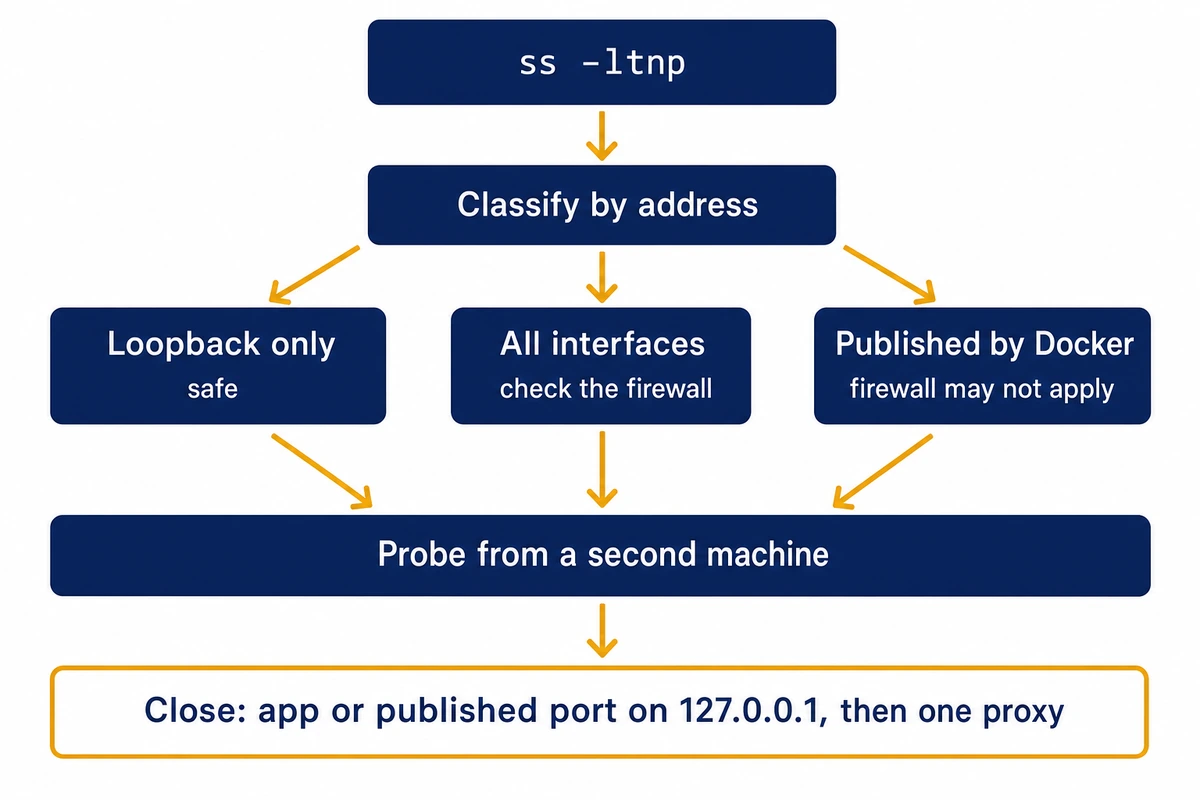
ss -ltnp prints the TCP listeners with the owning process; ss -lunp does the same for UDP, which an AI panel rarely uses. On the lab host it showed six listeners, five of them on 0.0.0.0:
$ ss -ltnp
LISTEN 0 511      0.0.0.0:18789   0.0.0.0:*   users:(("openclaw-gatewa",pid=916,fd=79))
LISTEN 0 4096     0.0.0.0:8188    0.0.0.0:*   users:(("docker-proxy",pid=1669,fd=9))
LISTEN 0 5        0.0.0.0:8081    0.0.0.0:*   users:(("python3",pid=22916,fd=3))
LISTEN 0 511      0.0.0.0:80      0.0.0.0:*   users:(("nginx",pid=32060,fd=5),("nginx",pid=32059,fd=5))
LISTEN 0 511      0.0.0.0:443     0.0.0.0:*   users:(("nginx",pid=32060,fd=6),("nginx",pid=32059,fd=6))
LISTEN 0 4096   127.0.0.1:5678    0.0.0.0:*   users:(("docker-proxy",pid=728,fd=9))
2. Classify each listener by its address
A local address of 127.0.0.1 or ::1 is loopback and safe on its own. 0.0.0.0, * or :: means every interface, so the host firewall is the only thing between it and the internet. A listener owned by docker-proxy was published by Docker, the case the host firewall may not cover. This one-liner labels each line:
$ ss -ltnpH | awk '{a=$4; p=$6; sub(/^users:\(\("/,"",p); sub(/".*/,"",p);
    if (a ~ /^(127\.|\[::1\]|\[::ffff:127\.)/) c="loopback only";
    else if (a ~ /^(0\.0\.0\.0|\*|\[::\]):/) c="ALL INTERFACES";
    else c="one address";
    if (p=="docker-proxy") c=c", published by Docker";
    printf "%-22s %-16s %s\n", a, p, c}'
0.0.0.0:18789          openclaw-gatewa  ALL INTERFACES
0.0.0.0:8188           docker-proxy     ALL INTERFACES, published by Docker
0.0.0.0:8081           python3          ALL INTERFACES
0.0.0.0:80             nginx            ALL INTERFACES
0.0.0.0:443            nginx            ALL INTERFACES
127.0.0.1:5678         docker-proxy     loopback only, published by Docker
3. Read the firewall backend, then match published ports to containers
Read Docker’s firewall backend first: the nat-table command below works on the iptables backend and errors on nftables, where nft list chain ip docker-bridges nat-prerouting-and-output shows the same DNAT rules. Then compare what Docker published with what ufw status allows:
$ docker info | grep 'Firewall Backend'
 Firewall Backend: iptables
$ docker ps --format "table {{.Names}}\t{{.Ports}}"
NAMES       PORTS
ai-web      0.0.0.0:8188->8000/tcp
ai-n8n-c5   127.0.0.1:5678->5678/tcp
$ iptables -t nat -S DOCKER | grep DNAT     # published ports: these skip the INPUT chain
-A DOCKER -d 127.0.0.1/32 ! -i docker0 -p tcp -m tcp --dport 5678 -j DNAT --to-destination 172.17.0.2:5678
-A DOCKER ! -i docker0 -p tcp -m tcp --dport 8188 -j DNAT --to-destination 172.17.0.3:8000
$ ufw status
22/tcp                     ALLOW       Anywhere
80/tcp                     ALLOW       Anywhere
443/tcp                    ALLOW       Anywhere
UFW lists 22, 80 and 443. The 8188 container is not in that list, yet its DNAT rule has no loopback restriction, so it is forwarded from any source.
4. Probe the public address from outside
Only a connection from off the box tells you what the internet sees, and a full TCP sweep is slow against a host that drops instead of rejecting. Build PORTS on the VPS, then use that value for the targeted scan on the second machine:
$ nmap -Pn -sT -p- --open 203.0.113.10
Not shown: 65531 filtered tcp ports (no-response), 1 closed tcp port (conn-refused)
80/tcp   open  http
443/tcp  open  https
8188/tcp open  unknown
Nmap done: 1 IP address (1 host up) scanned in 104.85 seconds

# faster: scan only the ports ss listed (PORTS built on the server)
$ PORTS=$(ss -ltnH | awk '{n=split($4,a,":"); print a[n]}' | sort -un | paste -sd,)   # -> 80,443,5678,8081,8188,18789
$ nmap -Pn -sT -p $PORTS 203.0.113.10
80/tcp    open     http
443/tcp   open     https
5678/tcp  filtered rrac
8081/tcp  filtered blackice-icecap
8188/tcp  open     unknown
18789/tcp filtered unknown
Nmap done: 1 IP address (1 host up) scanned in 1.22 seconds
Both scans give the same answer: 8188 is open from outside. The 8081 and 18789 listeners show filtered because UFW drops them today, but both bind all interfaces, so they are one firewall edit away from public. Finish by curling each open port and reading the status and content type:
$ curl -sk -m 5 -o /dev/null -w "%{http_code} %{content_type}" http://203.0.113.10:8188/ -> 200 text/htmlBefore you close anything
From here on the commands change the server, and the firewall ones need root or sudo. Open the provider console first and confirm you can log in there; in the Hostry control panel that is the VNC console, which gets you a login prompt even with SSH cut off. For firewall edits, consider a self-reverting rollback like the systemd timer armed in the guide to closing port 22 behind WireGuard; SSH keys, a sudo user and UFW defaults come from the first-30-minutes setup for a new Linux server.
n8n listens on every interface by default
n8n’s documented default for N8N_LISTEN_ADDRESS is ::, which Node.js on most systems also opens on 0.0.0.0, so n8n answers on every interface (not reproduced: the lab kernel had IPv6 off). If you expose n8n before creating the owner account, the first visitor gets the setup screen.
A fresh instance reachable from the second machine answered anonymous requests on 2.47.7 like this, each line one curl -s -o /dev/null -m 5 -w '%{http_code}' for the path:
# n8n 2.47.7 bare, N8N_LISTEN_ADDRESS=0.0.0.0; from the second machine (no auth)
/setup                   200
/healthz                 200
/metrics                 404
/rest/settings           200
/rest/workflows          401
[...]
showSetupOnFirstLoad: {"showSetupOnFirstLoad":true,"authenticationMethod":"email"}
Create the owner account over a tunnel or a trusted network before the port is public, and bind the service to loopback in the meantime. On the lab’s IPv6-disabled kernel the :: default would not even start, exiting six seconds in; N8N_LISTEN_ADDRESS=127.0.0.1 gave a clean loopback listener, reachable on the host and not from outside:
# N8N_LISTEN_ADDRESS=127.0.0.1 (port 5688 here only because 5678 was busy; yours stays 5678)
n8n ready on 127.0.0.1, port 5688
LISTEN 0 511  127.0.0.1:5679  0.0.0.0:*  users:(("n8n start",pid=5234,fd=27))
LISTEN 0 511  127.0.0.1:5688  0.0.0.0:*  users:(("n8n start",pid=5234,fd=22))
from the second machine: http://203.0.113.10:5688/healthz -> 000
on the host:             http://127.0.0.1:5688/healthz    -> 200
OpenClaw is loopback on a host but 0.0.0.0 in a container
On a host, 2026.11.4 started with openclaw gateway and no gateway.bind in ~/.openclaw/openclaw.json listens on 127.0.0.1:18789 and generates a runtime token that changes on every restart. The same release inside a container, detected through /.dockerenv, switches to auto, which resolves to 0.0.0.0, and refuses to start at all without a token or password. With a token and -p 18789:18789, the Control UI answers from outside:
# host, { gateway: { mode: "local" } }, bind unset
LISTEN 0 511  127.0.0.1:18789  0.0.0.0:*  users:(("openclaw-gatewa",pid=5477,fd=75))
from the second machine: 000 ; on the host: 200

# container, same config, no token
Refusing to bind gateway to auto without auth.
Container environment detected [...] the gateway defaults to bind=auto (0.0.0.0) for port-forwarding compatibility.

# container, same config, OPENCLAW_GATEWAY_TOKEN set, -p 18789:18789
LISTEN 0 4096  0.0.0.0:18789  0.0.0.0:*  users:(("docker-proxy",pid=3439,fd=9))
from outside: 200 ; on the host: 200
The configuration docs bundled with 2026.11.4 describe the opposite default:
The default loopback bind listens on 127.0.0.1 inside the container. With Docker bridge networking (-p 18789:18789), traffic arrives on eth0, so the gateway is unreachable.
OpenClaw docs bundled with 2026.11.4 (config-gateway.md)
Inside a detected container the code and the behavior both use auto, so do not rely on that note. The live OpenClaw network-exposure guide matches the code: loopback on a host, auto in a container, non-loopback fails closed without auth. A bare host alias is rejected as a bind value:
# bind: "lan" with no auth
### result: exited rc=78 after 6 s
Refusing to bind gateway to lan without auth.

# bind: "127.0.0.1"
gateway.bind: Invalid input (allowed: "auto", "lan", "loopback", "custom", "tailnet"), got: "127.0.0.1"
For an explicit loopback-only gateway use bind: "loopback", or bind: "custom" with gateway.customBindHost: "127.0.0.1" when you want to name the address. In a container, bind: "loopback" with the port still published as -p 18789:18789 leaves ss on the host showing docker-proxy on 0.0.0.0:18789 while nothing answers (outside gets no connection, the host gets a reset). Our comparison of Hermes Agent with OpenClaw covers choosing and sizing either one.
Do Docker published ports bypass UFW? Yes on iptables, no on nftables
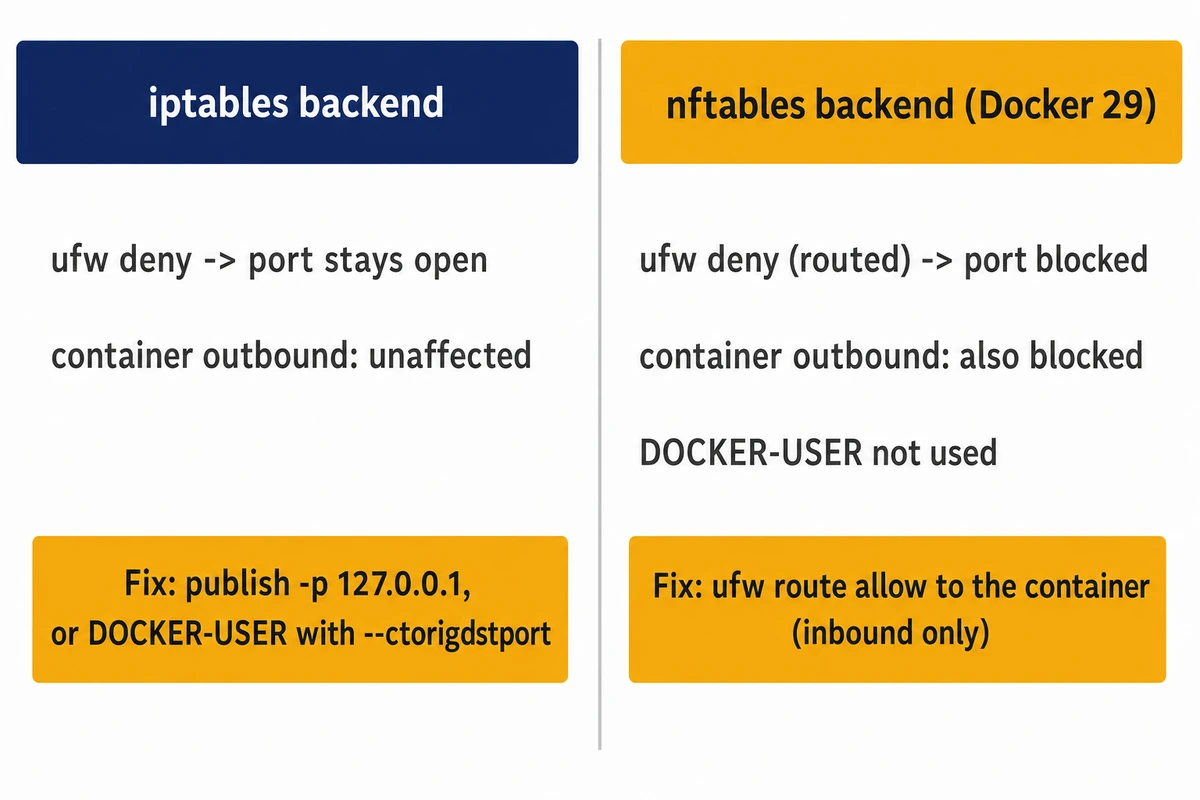
On Docker’s default iptables backend they do: Docker rewrites the destination in the nat table, so a published port is forwarded and never reaches the INPUT chain that holds UFW’s allow and deny rules. Switch Docker 29 to its nftables backend and the result flips: the published port falls under UFW’s routed rules and a routed deny closes it; step 3 shows which backend you run.
With the default iptables backend on 29.9.2, a port published as -p 5678:5678 answered from the second machine while a bare listener on 8081 was dropped, and ufw deny 5678/tcp changed nothing:
$ ufw deny 5678/tcp
$ nmap -sT -Pn -p 22,5678,8081 203.0.113.10   # from the second machine
22/tcp   closed   ssh
5678/tcp open     rrac
8081/tcp filtered blackice-icecap
ufw route deny proto tcp from any to any port 5678 left the port reachable as well. So did a plain iptables -A INPUT -j DROP without UFW, with loopback, established traffic and SSH accepted above it; Docker’s DNAT rule counted the 5678 packets, which went through FORWARD instead of INPUT:
port 8081 -> 000
port 5678 -> 200
4 240 DNAT 6 -- !docker0 * 0.0.0.0/0 0.0.0.0/0 tcp dpt:5678 to:172.17.0.2:5678| Docker backend | UFW on a published port | DOCKER-USER | What to use |
|---|---|---|---|
| iptables (default) | ufw deny and ufw route deny: port stays open | Exists; FORWARD jumps to it first | -p 127.0.0.1:PORT:PORT; DOCKER-USER with –ctorigdstport for a port that must stay public |
| nftables (Docker 29) | deny (routed) blocks the port and container outbound | Not used by Docker | -p 127.0.0.1:PORT:PORT; ufw route allow to the container for a public port |
The fix: loopback for the app or for the published port
For an agent that runs on the host, bind the app itself to 127.0.0.1, as N8N_LISTEN_ADDRESS and gateway.bind do above. For an agent in a container, restrict the host side of the publish flag, -p 127.0.0.1:PORT:PORT, and let the app inside listen the way the container needs; the OpenClaw case shows that loopback inside the container leaves nothing answering. With -p 127.0.0.1:5678:5678, docker-proxy binds 127.0.0.1 alone:
$ docker ps
127.0.0.1:5678->5678/tcp
LISTEN 0 4096  127.0.0.1:5678  0.0.0.0:*  users:(("docker-proxy",pid=25308,fd=9))
# from the second machine, UFW active
5678/tcp filtered rrac
# from the second machine, UFW off
5678/tcp closed rrac
on the host:              {"status":"ok"} 200
Docker 29.9.2 also adds a raw-table drop for every container address, so a neighbor that routed the container subnet through the host timed out.
nftables backend: UFW’s routed policy decides
Docker 29 can run an nftables backend: add "firewall-backend": "nftables" to the daemon config, /etc/docker/daemon.json, and restart dockerd; the docs call it experimental since 29.0.0, though 29.9.2 needed no experimental flag and printed no warning. Docker does not switch on forwarding itself in this mode, and dockerd refused to start while net.ipv4.ip_forward was 0:
failed to start daemon: [...] IPv4 forwarding is disabled: [...] set sysctl net.ipv4.ip_forward=1Docker does not use DOCKER-USER here. On a host switched from the iptables backend with a daemon restart, the old chain and the FORWARD jump to it were still there, empty and no longer managed by Docker:
Firewall Backend: nftables
$ iptables -S DOCKER-USER
-N DOCKER-USER
Before switching, delete any ufw deny or ufw route deny rules you added for published ports (ufw status numbered, then ufw delete with the number): a leftover route deny above a later route allow keeps the port closed. With deny (routed) the published port and the container’s outbound traffic were both blocked; a ufw route allow to the container’s address, which docker inspect shows and which can change when the container is recreated, restored inbound only:
# Default: deny (incoming), allow (outgoing), deny (routed)
to 198.51.100.10:5678 : 000          # published port blocked
container outbound    : FAILED
$ ufw route allow proto tcp from any to 172.17.0.2 port 5678
to 198.51.100.10:5678 : 200          # inbound restored
container outbound    : FAILED        # still blocked
The Docker nftables docs give the cause: a FORWARD chain whose policy is DROP, which is what UFW’s routed deny sets, discards traffic Docker’s own rules have already let through. Rules of your own belong in a separate nftables table with a forward hook; a drop there blocked the published port in the lab.
Put nginx basic auth in front of n8n and keep the webhooks public
Once the agent is on loopback, the only thing that should answer the internet is a reverse proxy. With n8n on 127.0.0.1:5678 and nginx basic auth on /, the public locations are the two webhook prefixes. /webhook/ is the production path, registered when you publish a workflow; n8n registers /webhook-test/ only after you select Listen for Test Event or Execute workflow in the editor, so it needs to be public only while you build and test.
Create the password file with sudo apt install apache2-utils and sudo htpasswd -c -B /etc/nginx/htpasswd-n8n admin. The map line goes in a .conf file under /etc/nginx/conf.d/, which Ubuntu includes inside the http block, and the rest in a server block under /etc/nginx/sites-available/ linked into sites-enabled:
# in the http block
map $http_upgrade $connection_upgrade { default upgrade; '' close; }

# in the server block for n8n.example.com (listen 443 ssl, certificate lines [...])
proxy_http_version 1.1;
proxy_set_header Host $host;
proxy_set_header X-Forwarded-For $proxy_add_x_forwarded_for;
proxy_set_header X-Forwarded-Proto $scheme;

# everything (editor, /rest/, /healthz, /setup ...) needs the password
location / {
  auth_basic "n8n";
  auth_basic_user_file /etc/nginx/htpasswd-n8n;
  proxy_set_header Host $host;
  proxy_set_header X-Forwarded-For $proxy_add_x_forwarded_for;
  proxy_set_header X-Forwarded-Proto $scheme;
  proxy_set_header Upgrade $http_upgrade;
  proxy_set_header Connection $connection_upgrade;
  proxy_pass http://127.0.0.1:5678;
}
# public: production and test webhooks only
location /webhook/      { proxy_pass http://127.0.0.1:5678; }
location /webhook-test/ { proxy_pass http://127.0.0.1:5678; }
The three header lines repeat inside location / on purpose: nginx passes server-level proxy_set_header lines only to a location that sets none of its own. Without them, n8n with NODE_ENV=production refused the editor’s push websocket:
Origin header does NOT match the expected origin. (Origin: "https://n8n.example.com" -> "n8n.example.com", Expected: "127.0.0.1:5678" -> "127.0.0.1:5678", Protocol: "https")From the second machine with no credentials (traversal rows sent with curl --path-as-is):
| Request (no credentials) | Through the proxy |
|---|---|
| GET / (editor) | 401 |
| GET /setup | 401 |
| GET /rest/settings | 401 |
| GET /healthz | 401 |
| GET /webhook/../rest/settings | 401 |
| GET /webhook/%2e%2e/rest/settings | 401 |
| GET /webhook/..%2frest/settings | 401 |
| POST /webhook/lab-hook | 200 |
| POST /webhook/unknown | 404 |
nginx normalizes .. and the %2e and %2f escapes before it matches a location, so the public prefix does not open a path to the editor. Set N8N_WEBHOOK_URL to the public base and N8N_PROXY_HOPS=1 so webhook URLs and client addresses are right behind the proxy; the older WEBHOOK_URL still works but logs a deprecation warning on 2.47.7. Add the form, mcp or webhook-waiting locations only if a workflow uses those nodes. The n8n endpoints reference lists the form and waiting paths; the mcp prefix is in the 2.47.7 source but not on that page.
Set NODE_ENV=production too, which drops the stacktrace field. With it unset, as a plain npm install leaves it, the 404 body for an unknown public webhook on 2.47.7 carries a stack trace with your install paths:
{"code":404,"message":"The requested webhook \"POST unknown\" is not registered.","hint":"The workflow must be active for a production URL [...]","stacktrace":"ResponseError: [...] (/opt/n8n/node_modules/n8n/src/webhooks/live-webhooks.ts:296:10) [...]"}When a container port must stay public
On the iptables backend, filter a port that has to answer the internet in DOCKER-USER: the FORWARD chain jumps there before Docker’s own rules run. DNAT has already rewritten the destination by then, so match the port the client dialed with --ctorigdstport, as the Docker iptables docs show. With a container published as -p 15678:5678:
$ iptables -I DOCKER-USER -p tcp --dport 15678 -j DROP                      # 0 packets, still reachable
$ iptables -I DOCKER-USER -p tcp -m conntrack --ctorigdstport 15678 -j DROP  # blocks it (matches the original port)
To let one client through, replace that DROP rule with the form below rather than adding a second rule. A plain ! -s also blocked the allowed client, because --ctorigdstport matches the container’s replies too; -i <ext-if> and --ctorigsrc avoid that. ip route get 1.1.1.1 names <ext-if> after dev:
iptables -I DOCKER-USER -i <ext-if> -p tcp -m conntrack --ctorigdstport 15678 ! --ctorigsrc <allowed> -j DROPWhat not to do is a blanket -j DROP in DOCKER-USER: it blocked inbound, but also cut the container’s own outbound and the traffic between containers, even with an ESTABLISHED,RELATED accept above it. An interface-scoped, state-matched rule keeps those working:
                                                   inbound  outbound  container-to-container
-j DROP                                            blocked  FAILED    FAILED
-i <ext-if> -m conntrack --ctstate NEW -j DROP     blocked  ok        ok
That NEW-only rule blocks new connections to every published port on the interface, a proxy container on 443 included, so put a RETURN for each public port above it:
iptables -I DOCKER-USER -i <ext-if> -m conntrack --ctstate NEW -j DROP
iptables -I DOCKER-USER -i <ext-if> -p tcp -m conntrack --ctorigdstport 15678 -j RETURN
# inbound peer -> :15678 : 200 ; inbound peer -> :8188 : 000 ; outbound ok ; c2c ok
Rules added with iptables directly are gone after a reboot. A hook appended to /etc/ufw/after.rules is read again every time UFW starts, boot included, but on a running system it takes effect only after ufw reload, and the block must declare the ufw chain it uses; without that line, reload fails and leaves the firewall worse than before:
$ ufw reload
ERROR: problem running ufw-init
iptables-restore v1.8.10 (nf_tables): Chain 'ufw-user-forward' does not exist
# ufw.conf now reads ENABLED=no, while the old rules stay loaded in the kernel:
$ ufw reload
Firewall not enabled (skipping reload)
After that failed reload ufw status still prints active, but the firewall is marked disabled and will not reload until you enable it again. A block that declares both chains reloaded cleanly and did not duplicate on a second reload; the allowed client got 200, any other 000, and 8188 still answered:
*filter
:ufw-user-forward - [0:0]
:DOCKER-USER - [0:0]
-A DOCKER-USER -i <ext-if> -p tcp -m conntrack --ctorigdstport 15678 ! --ctorigsrc <allowed> -j DROP
COMMIT
Scanner paths in your access log, and why a 200 is not a leak
A SANS diary from July 13, 2026, Someone Is Scanning for Your MCP Servers and AI Assistant Credentials, pulled 14 days of one host’s logs and found requests for paths such as /mcp, /sse, /.claude/mcp.json, /v1/models and /api/tags. Replaying that path list against the lab’s own services, with nothing beyond a plain MCP initialize call, showed why the status code alone misleads:
| Path | Behind basic auth | Static nginx (bare IP) | n8n 2.47.7 direct | OpenClaw 2026.11.4 direct |
|---|---|---|---|---|
| POST /mcp | 401 | 404 | 404 | 404 |
| GET /sse | 401 | 404 | 200 | 200 |
| GET /.claude/mcp.json | 401 | 404 | 200 | 404 |
| GET /v1/models | 401 | 404 | 200 | 404 |
| GET /api/tags | 401 | 404 | 200 | 404 |
n8n answered 200 to most of those paths because it serves its 1708-byte editor page for any unknown GET, and OpenClaw answered 200 on /sse with its Control UI HTML. Neither has those files. In a combined-format log the number after the status code is the response size, so a 200 of 1708 bytes (n8n 2.47.7) or 21699 bytes (OpenClaw 2026.11.4) on these paths matches one of those pages sent uncompressed, while a body of another size deserves a closer look.
/api/tags is Ollama’s model list. Ollama was not run in the lab; its FAQ says the server binds 127.0.0.1 by default and that OLLAMA_HOST changes the bind address, and it documents no authentication for the API. A JSON answer on /api/tags from outside therefore means anyone can list your models and call the API: set the bind address back to 127.0.0.1, or put Ollama behind the same nginx basic auth.
One grep pulls the recon requests out of an nginx combined log, and the second keeps only the 2xx responses worth inspecting:
$ grep -E '"[A-Z]+ /(mcp|sse|v1/models|api/tags|\.(claude|cursor|vscode)/)[^ ]* HTTP/' access.log | wc -l
17
# the line to worry about: any 2xx on those paths?
$ grep -E '"[A-Z]+ /(mcp|sse|v1/models|api/tags|\.(claude|cursor|vscode)/)[^ ]* HTTP/[0-9.]+" 2[0-9][0-9] ' access.log | wc -l
0
The replay sent eight SANS paths (these five plus /.cursor/mcp.json, /.vscode/mcp.json and a HEAD request for Claude’s credentials file) to each nginx site, and the first pattern found all 16 lines in a 46-line log plus the lab’s earlier /mcp/x request; nothing else matched. Behind the basic-auth setup the second count was zero; if yours returns lines, check their size and content type as above. For rotated logs, zgrep -E takes the same pattern.
If a firewall rule locks you out
If SSH stops answering after a rule change, the panel’s VNC console still reaches the server; remove the rule you added last from there. Hostry’s panel firewall sits outside the server as a second layer, so a Docker-published port that slips past UFW still meets it, and a rule set there that admits only SSH and the proxy would have stopped the 8188 case above. Both live in the Hostry Linux VPS panel.
Run the four steps again after any change to a container, a bind address or a firewall rule, since each of those can reopen what you closed. Every layer checked here needs root, which a Hostry Linux VPS gives you from $6.00/mo; the entry plan has one vCPU, a gigabyte of RAM and NVMe storage, and larger plans reach 32 GB RAM.