
Hermes Agent vs OpenClaw: Which AI Agent to Self-Host on a VPS

Both projects have hundreds of thousands of GitHub stars, both install with one curl command, and both can run shell commands on whatever server you give them.
The Hermes Agent vs OpenClaw choice usually comes down to three questions: which chat apps you live in, how tightly you want to fence in the agent’s shell access, and whether you already have an OpenClaw setup worth keeping. Both run on a small Linux KVM VPS with full root access and send the heavy thinking to a cloud LLM API, so the server needs no GPU.
This comparison is for developers and small teams who want a self-hosted AI agent on a VPS, with Ubuntu 24.04 install steps checked against each project’s docs in October 2026. Both projects change quickly, so check the linked docs before you copy a command.
What each agent is and who builds it
OpenClaw
OpenClaw is a personal assistant built by Peter Steinberger and a large community of contributors. It started in late 2025 as Clawdbot, was briefly called Moltbot and became OpenClaw in early 2026. Its core is the Gateway, a long-running Node.js service that holds your sessions, workspace and channel connections, with a browser-based Control UI on top.
The README lists more than twenty chat channels, including Telegram, WhatsApp, Discord, Slack, Teams, Signal, iMessage and Google Chat. Models are pluggable: you can reuse a Claude Code or Codex CLI login or supply a provider API key. Third-party skills come from a public registry called ClawHub, and the code is MIT-licensed.
Hermes Agent
Hermes Agent comes from Nous Research. It is written in Python, ships a CLI and a messaging gateway, and describes itself as a self-improving agent with a built-in learning loop.
It gives you a wide choice of where commands run: six built-in terminal backends (local, Docker, SSH, Modal, Daytona and Vercel Sandbox) plus plugin backends such as Singularity, so the chat side can live on one machine and the agent’s shell somewhere disposable. It works with Nous Portal, OpenRouter, OpenAI and custom endpoints, is MIT-licensed, and can import an existing OpenClaw setup. That last point makes it the usual OpenClaw alternative for people who want to switch without starting over.
Hermes Agent vs OpenClaw side by side
Rows come from each project’s README and docs as of late October 2026; “None” means no published figure.
| Feature | OpenClaw | Hermes Agent |
|---|---|---|
| Maintainer | OpenClaw Foundation; created by Peter Steinberger with the community | Nous Research |
| Runtime | Node.js 24.22.1+ or 26.12.1+ (26 recommended) | Python 3.14 for first-party installs; installer also adds Node.js, ripgrep and FFmpeg |
| Published RAM minimum | None for a host install; 6 GB to build the Docker image locally | None |
| Chat channels | Telegram, WhatsApp, Discord, Slack, Teams, Signal, iMessage, Google Chat and many more | Telegram, Discord, Slack, WhatsApp, Signal, Email, Matrix, Mattermost, Teams, Google Chat, iMessage (via BlueBubbles) and more |
| LLM backends | Hosted and local providers; Claude Code or Codex login, or an API key | Nous Portal, OpenRouter, OpenAI, custom endpoints and others |
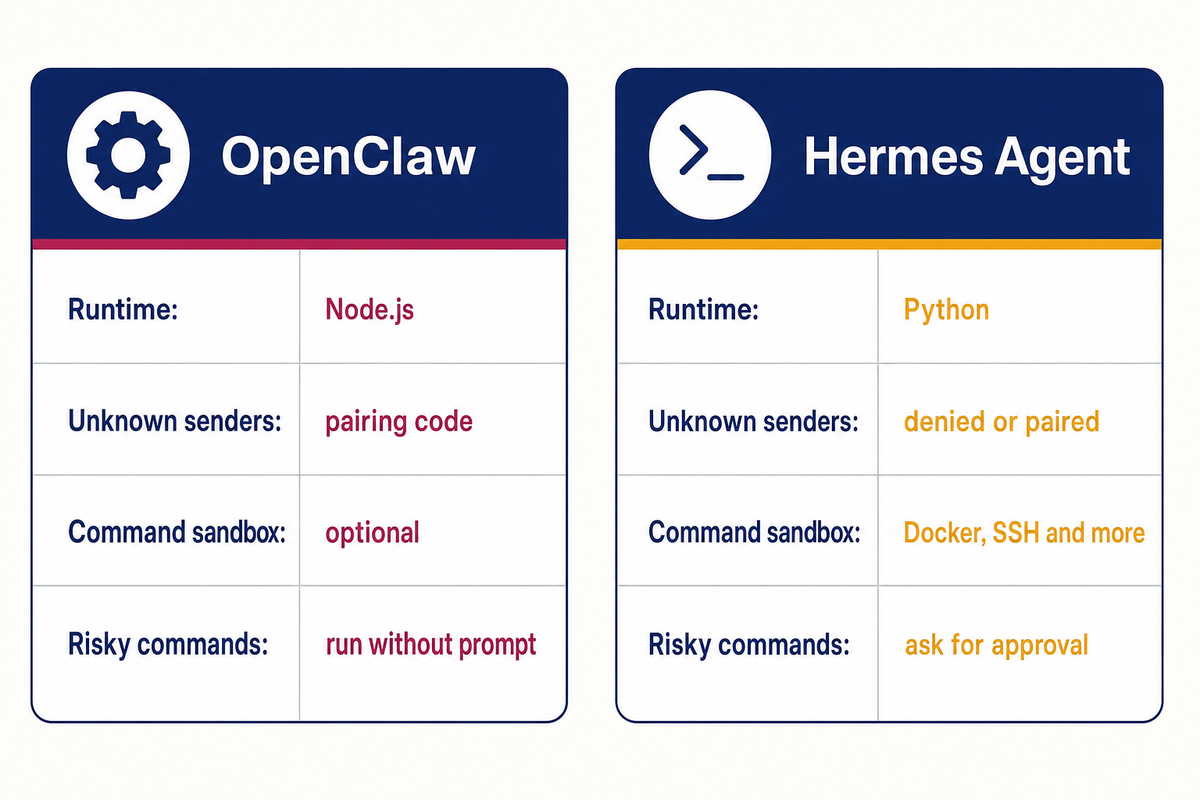
| Where commands run | On the host unless you enable sandboxing (Docker, Podman, SSH, OpenShell or Crabbox backend) | Local by default; Docker, SSH, Modal, Daytona or Vercel Sandbox, plus Singularity as a plugin |
| Unknown chat senders | Pairing code by default on DM channels | Denied unless allow-listed or paired |
| Network default | Gateway on loopback, port 18789 (host install) | No listening port documented for the messaging gateway; optional web dashboard on 127.0.0.1:9119 |
| Audit tooling | openclaw security audit, openclaw doctor | hermes doctor, hermes pairing list |
| License | MIT | MIT |
| Migration | Can import a Hermes setup | Can import an OpenClaw setup |
Before you install: size and harden the VPS
Neither project publishes a minimum RAM figure for a plain host install, so this sizing is our own suggestion for an agent that calls a cloud model API:
- 2 GB RAM: the floor for one person, light use, one chat channel.
- 4 GB RAM: what we would start with, because it leaves room for updates, a few skills and processes that grow over weeks of uptime.
- More if you plan heavy browser automation or several agents on one host.
At the time of writing, the Hostry VPS catalog lists 1 vCPU / 1 GB from $6/mo, 2 vCPU / 2 GB from $7/mo and 4 vCPU / 4 GB from $20/mo. Prices vary by location. A local model on a CPU-only VPS is possible but slow; both agents work best with a cloud API.
Harden the server before the agent arrives, since an agent with shell access inherits every weakness of its host. Our checklist to secure a new Linux VPS in the first 30 minutes covers the sudo user, SSH keys, UFW, Fail2ban and unattended upgrades. The examples below use the user deploy and the server 203.0.113.10; replace both with your own. Do not open any agent port in UFW.
How to install OpenClaw on a VPS (Ubuntu 24.04)
Log in as your sudo user, not root. Apart from Node.js, OpenClaw needs a way to reach a model: an existing Claude Code or Codex CLI login, or an API key from a provider. Create that key with a spending limit before you paste it anywhere.
Run the installer and onboarding
curl -fsSL https://openclaw.ai/install.sh | bashOn Linux the script installs Node 24 LTS if no supported version is present, then starts onboarding, which asks for your model provider. To onboard later, end the command with bash -s — –no-onboard and run openclaw onboard –install-daemon when ready.
Run the Gateway as a service
openclaw gateway install
sudo loginctl enable-linger $(whoami)
openclaw gateway status
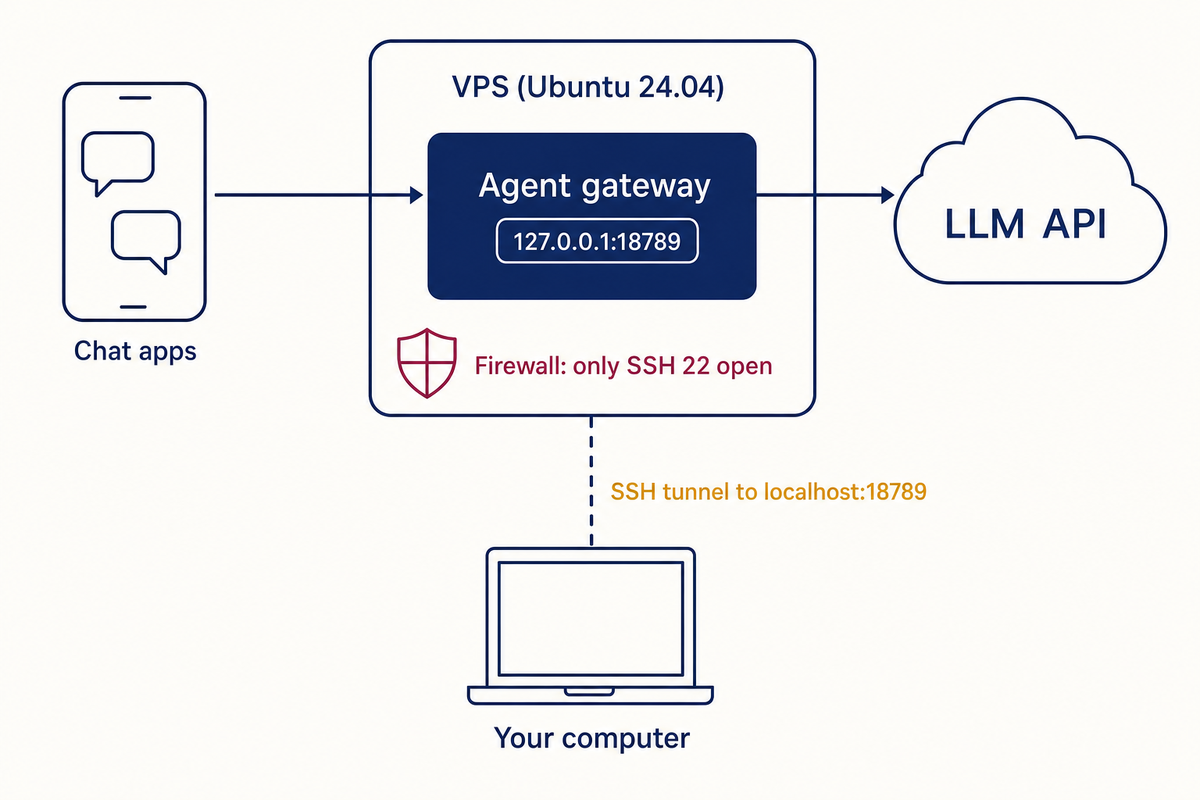
If onboarding left the Gateway running in your terminal, stop it with Ctrl+C first. The install creates a systemd user unit, and lingering keeps it running after you log out of SSH. The status output names the port, 18789 unless you changed it. Then check what the outside world can see with sudo ss -tulpn: on a host install the 18789 line should begin with 127.0.0.1, and 0.0.0.0 there would mean the Gateway answers on every interface.
Connect Telegram and approve yourself
Create a bot with @BotFather (/newbot), copy the token, then register it and probe the channel:
openclaw channels add --channel telegram --token YOUR_BOT_TOKEN
openclaw channels status --probe
Telegram’s default DM policy is pairing: message your bot, and it replies with a code instead of acting. Approve your own request on the server:
openclaw pairing list telegram
openclaw pairing approve telegram YOUR_CODE
Codes expire after one hour. If a stranger’s request appears in that list, leave it unapproved.
Reach the Control UI through an SSH tunnel
ssh -N -L 18789:127.0.0.1:18789 deploy@203.0.113.10Run this on your own computer, keep it open and browse to http://127.0.0.1:18789/. Binding it to lan or tailnet requires a shared secret in gateway.auth.token or gateway.auth.password.
How to install Hermes Agent on Ubuntu 24.04
The installer needs git, curl, tar and SHA-256 tools. Add git and curl if your image lacks them:
sudo apt update && sudo apt install -y git curl
curl -fsSL https://hermes-agent.nousresearch.com/install.sh | bash
source ~/.bashrc
You do not need to preinstall Python or Node.js, because the installer brings its own toolchain. The browser and computer-use extras are switched on by default too, and they add download size and disk use that a headless chat bot rarely needs, so check the installation docs for the options that leave them out. Everything Hermes keeps goes under ~/.hermes/.
Pick a model and check the install
hermes model
hermes doctor
hermes
The first command chooses provider and model, hermes doctor reports anything missing, and plain hermes opens the CLI for a test chat.
Add Telegram with an allow-list
Create the bot with BotFather as above, get your numeric user ID (not your username) from @userinfobot, and add both to the env file:
cat >> ~/.hermes/.env <<'EOF'
TELEGRAM_BOT_TOKEN=YOUR_BOT_TOKEN
TELEGRAM_ALLOWED_USERS=YOUR_TELEGRAM_USER_ID
EOF
chmod 600 ~/.hermes/.env
hermes gateway setup asks for the same values interactively. Other users who DM the bot get a one-hour pairing code that you approve with hermes pairing approve telegram CODE. The docs warn against GATEWAY_ALLOW_ALL_USERS=true on any bot with terminal access.
Run the gateway as a system service
On a VPS the docs recommend the system service, which starts at boot and still runs as your user:
sudo hermes gateway install --system
sudo hermes gateway start --system
sudo hermes gateway status --system
Message the bot to confirm it answers. The docs do not document a listening port for this setup, so run sudo ss -tulpn and check that anything new is bound to 127.0.0.1. The optional web dashboard (hermes dashboard) binds to 127.0.0.1:9119 by default and can edit your keys, so reach it only through an SSH tunnel.
Security defaults compared
OpenClaw’s popularity drew attackers early. At the end of January 2026 the maintainers fixed a high-severity one-click remote code execution flaw, CVE-2026-25253, which could leak the Gateway’s authentication token; 2026.1.29 and later are patched. In February, SecurityScorecard’s STRIKE team counted more than 40,000 internet-facing OpenClaw deployments, mostly misconfigured or outdated, and Koi Security reported 341 malicious skills among 2,857 audited on ClawHub. More advisories have followed through 2026.
The OpenClaw security guide is blunt about its trust model: everyone who can talk to one Gateway is effectively the same operator. Put a colleague you would never give your SSH key on your Gateway, and they can steer an agent that holds your API keys, your workspace and your chat history, and OpenClaw makes no promise to keep the two of you apart. One Gateway per person or per group that already shares those secrets is the fix, preferably under its own Linux account or on its own server. The Docker images need extra care, because they listen beyond loopback out of the box: set Gateway auth before the first start.
Hermes is stricter from the first start. A gateway with no allow-list turns every sender away and prints a warning, and the default approval mode, smart, pauses for your answer before a shell command it judges dangerous; in cron jobs and other sessions nobody watches, such commands are refused outright. On a server, the Hermes security docs want more: move command execution to the Docker backend (hermes config edit), cap its CPU, memory and disk, run the gateway under a normal user account and schedule hermes update. That backend needs Docker Engine on the VPS, and its default limits (container_memory 5120 MB, container_disk 51200 MB) exceed what a 2-4 GB plan has, so lower both in the Hermes config to fit your server.
Shared hardening checklist for either agent
- Harden the VPS first.
- Keep the gateway and any UI on loopback and reach them over an SSH tunnel or Tailscale. Never add a UFW rule for 18789.
- Use pairing or explicit allow-lists on every chat channel.
- Give the agent its own API key with a hard monthly spending cap at the provider, so a leaked key or a runaway loop has a ceiling.
- Vet skills and plugins before installing: read the code and skip anything that asks for broad credentials without a reason.
- Sandbox tool execution where supported: OpenClaw’s sandboxing settings, or the Hermes Docker or SSH backend.
- Back up ~/.openclaw/ or ~/.hermes/ like a password vault, encrypted and off the server, because they hold bot tokens and API keys. Our article on why backups matter covers the basics.
- Rerun the built-in checks after every change: openclaw security audit –deep or hermes doctor, which also lists active supply-chain advisories.
How to migrate from OpenClaw to Hermes
To migrate OpenClaw to Hermes, install Hermes on the same server and follow the Hermes migration guide. The importer now ships as a plugin; the older hermes claw migrate spelling still works once it is installed. Preview first:
hermes plugins install agent-importers
hermes import-agent openclaw --dry-run
The importer reads ~/.openclaw/ and carries over memory, skills, model settings, MCP servers, and tokens and allow-lists for Telegram, Discord, Slack and several other platforms. API keys move only with –migrate-secrets, and conflicts stop the run unless you add –overwrite.
Cron jobs, plugins and hooks are archived for manual work rather than converted, and WhatsApp has to be paired again. Hermes writes a restore-point zip to ~/.hermes/backups/ before applying. Once Hermes answers, stop the OpenClaw Gateway so two bots do not poll the same Telegram token. Going the other way, OpenClaw’s docs describe openclaw migrate hermes –dry-run.
Which one should you pick?
- Solo tinkerer: either will do. OpenClaw’s larger community makes answers easier to find, and Hermes takes fewer settings to lock down.
- If privacy comes first, pick Hermes. It asks before dangerous shell commands out of the box, whereas OpenClaw’s host exec runs without prompts until you tighten its exec settings. Whichever you install, push tool execution into a Docker or SSH sandbox and read what your model provider does with prompts.
- Small team: the layout matters more than the brand, so run one gateway per group that already shares the same files and keys. Between the two, Hermes is easier when several people message one bot, since every sender must be allow-listed or paired and risky commands still wait for approval.
- If you are invested in OpenClaw, stay while you depend on cron jobs, plugins or hooks, because the importer archives them for manual work. If your setup is mostly memory, skills and a couple of channels, a dry-run import shows how much would carry over.
For a single-user agent on a fresh VPS we would start with Hermes, mainly because approval for risky commands is already on and there are fewer defaults to remember to change. OpenClaw is the better pick when you want its native companion apps or rely on a skill that only exists on ClawHub.
Cost and effort at a glance
For either agent the software is free and the monthly bill is the VPS plus LLM API spend. API spend depends on the model and your usage, so set a hard limit at the provider.
| Item | OpenClaw | Hermes Agent |
|---|---|---|
| Suggested VPS | 2 GB minimum, 4 GB recommended | 2 GB minimum, 4 GB recommended |
| Runtime to keep updated | Node.js | Python, plus bundled Node.js |
| Remote access | SSH tunnel or Tailscale to port 18789 | Chat apps; dashboard via SSH tunnel |
| Lock-down effort | Moderate: confirm loopback, review pairing, set up sandboxing | Lower: command approval on by default; switch to the Docker backend |
| Health check | openclaw security audit, openclaw doctor | hermes doctor |
What to do next
- Deploy a 4 GB VPS near you and run the VPS hardening checklist before installing anything.
- Create a dedicated API key with a spending limit.
- Install one agent with a single chat channel and use it for a week before adding skills.
- Schedule a monthly check: update the agent, rerun its audit or doctor command and review who is paired. A periodic Lynis audit catches drift in the operating system underneath.
FAQ
Is Hermes Agent better than OpenClaw?
For one person who wants safe defaults, usually yes: Hermes asks before risky shell commands with no extra configuration and offers more sandbox backends, including hosted ones. OpenClaw counters with native companion apps, a larger community and the ClawHub skill registry. Both are MIT-licensed and need the same size of server, so the Hermes Agent vs OpenClaw decision rests on those trade-offs.
How much RAM does OpenClaw need on a VPS?
The docs give no minimum for a host install, only 6 GB for building the Docker image locally, which pre-built images avoid. With a cloud LLM API, 2 GB works for light personal use and 4 GB is a comfortable start.
Can I run OpenClaw and Hermes Agent on the same VPS?
Yes, and that is the normal way to migrate. Give each its own bot token so they do not compete for messages, then stop the one you are leaving.
Is it safe to self-host OpenClaw?
It is reasonable if you keep it updated, keep the Gateway on loopback, use pairing and vet every skill. Most exposed instances counted in 2026 were reachable from the internet or out of date.
Ready to settle Hermes Agent vs OpenClaw on your own server? Spin up a 4 GB Hostry VPS in the location nearest to the people who will message the bot, run the hardening checklist, then install one agent and live with it for a week before you decide.