
What Is LangGraph? Architecture, Core Concepts and Google ADK Compared
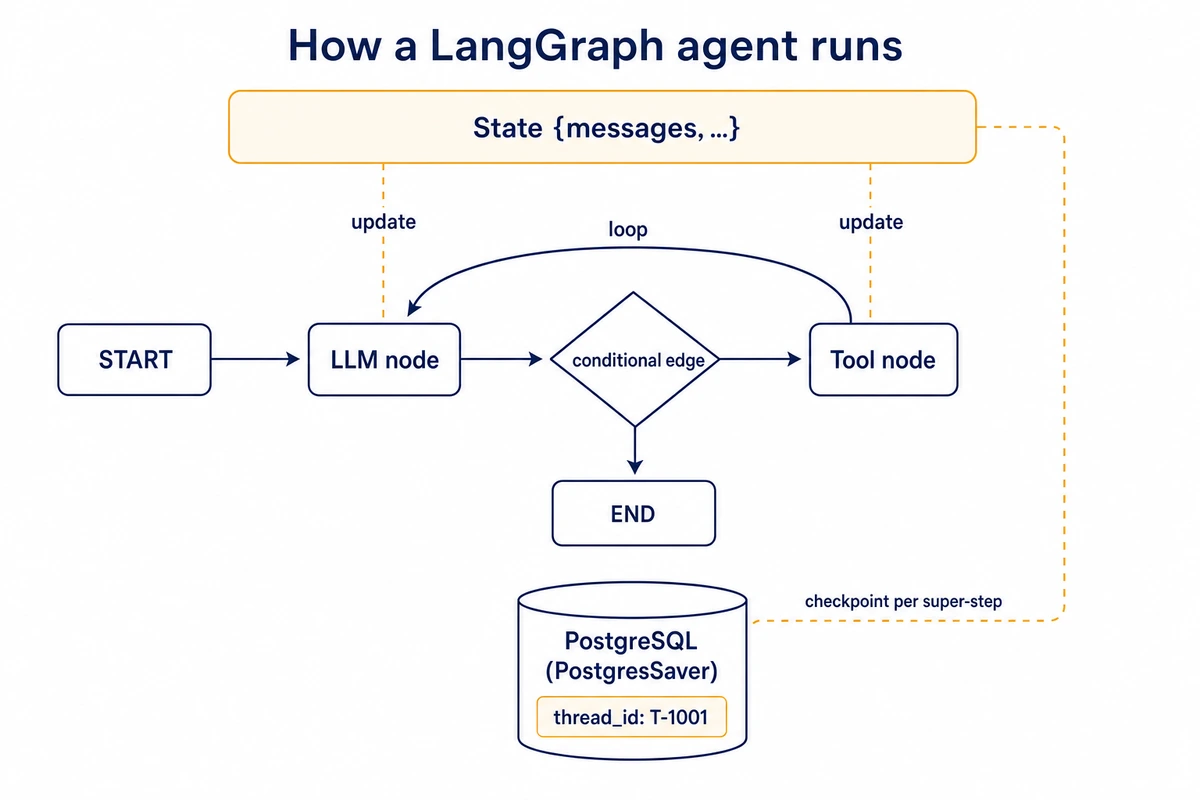
LangGraph is an MIT-licensed library from LangChain Inc that runs an AI agent as a graph: one typed state object, nodes that update it and edges that choose the next node. A checkpointer stores the state after every step, so a run can stop, wait for a person and continue later from the same point.
If you are picking an agent framework in late 2026, the other name on the shortlist is usually Google’s Agent Development Kit, which added graph workflows of its own in ADK 2.0. Neither framework needs a GPU on your side: the model runs at the provider, and a CPU-only KVM VPS with root access is enough to host the agent and its database.
What is LangGraph, and what it is not
The LangGraph overview calls it a low-level orchestration framework and runtime for long-running, stateful agents. In practice it is a Python package (with a JavaScript twin) that executes a graph you define and keeps the graph’s state between steps and between requests. It ships no prompts and no agent architecture: a node can call an LLM or run three lines of plain Python, and one graph can mix both.
The short answer on LangGraph vs Google ADK: choose LangGraph when the job is a business process with some LLM steps inside and you want one explicit, typed state you can inspect after every step. Choose ADK when the job is mainly an LLM agent with tools and delegation, when you deploy on Google Cloud, or when part of the team works in Go, Java or Kotlin.
LangGraph is not a model and not a hosted service, and it is separate from LangChain, the same company’s older library of model wrappers; the docs say LangGraph works without it.
Its README credits Google’s Pregel and Apache Beam for the execution model and NetworkX for the shape of the public API. LangSmith, the company’s commercial tracing and deployment platform, is optional.
How LangGraph works: state, nodes and edges
A LangGraph program has three parts, and the API names match them closely.
- State is a schema, usually a TypedDict, that every node reads. Each key has a reducer that decides how an update merges in. Without one, a new value overwrites the old; Annotated[list, operator.add] appends instead, and the prebuilt add_messages appends chat messages and replaces any with a matching ID.
- Nodes are functions that take the current state and return a partial update, a dict with only the keys they changed.
- Edges decide what runs next. A normal edge always goes to the same node; a conditional edge calls a routing function and follows whichever node name it returns. START and END mark the entry and exit.
You add these to a StateGraph builder and call compile(), which the docs make mandatory: compiling checks the structure and is where you attach a checkpointer. The example below routes support tickets without any model; the keyword test in classify stands in for what would be an LLM call in a real agent. This and every other Python snippet here ran on November 9, 2026 with langgraph 1.2.20, langgraph-checkpoint-postgres 3.2.0, google-adk 2.14.0, Python 3.13 and PostgreSQL 16 on Ubuntu 24.04, and none needs a model API key.
import operator
from typing import Annotated, TypedDict

from langgraph.graph import StateGraph, START, END


class TicketState(TypedDict):
    text: str
    priority: str
    log: Annotated[list[str], operator.add]  # reducer: append, do not overwrite


def classify(state: TicketState) -> dict:
    urgent = "down" in state["text"].lower()
    return {"priority": "high" if urgent else "normal", "log": ["classify"]}


def page_on_call(state: TicketState) -> dict:
    return {"log": ["page_on_call"]}


def queue_ticket(state: TicketState) -> dict:
    return {"log": ["queue_ticket"]}


def route(state: TicketState) -> str:
    return "page_on_call" if state["priority"] == "high" else "queue_ticket"


builder = StateGraph(TicketState)
builder.add_node("classify", classify)
builder.add_node("page_on_call", page_on_call)
builder.add_node("queue_ticket", queue_ticket)
builder.add_edge(START, "classify")
builder.add_conditional_edges("classify", route, ["page_on_call", "queue_ticket"])
builder.add_edge("page_on_call", END)
builder.add_edge("queue_ticket", END)
graph = builder.compile()

print(graph.invoke({"text": "API is down in eu-west", "log": []}))
print(graph.invoke({"text": "Typo on the pricing page", "log": []}))
Output:
{'text': 'API is down in eu-west', 'priority': 'high', 'log': ['classify', 'page_on_call']}
{'text': 'Typo on the pricing page', 'priority': 'normal', 'log': ['classify', 'queue_ticket']}
In that output, the log key shows the reducer at work: each node returned a one-item list and the runtime concatenated them. Without the operator.add annotation you would see only the last node’s entry.
Super-steps: how the runtime executes the graph
Under the builder sits a message-passing engine modeled on Pregel. Execution advances in super-steps. A node becomes active when a new state update arrives on one of its incoming edges; all active nodes run within that super-step, parallel branches included, and their updates are merged through the reducers before the next super-step starts. The run ends when no node is active and no update is in transit. A recursion limit in the run config stops a graph whose loop never reaches END, which matters once an LLM decides whether to loop again.
A conditional edge can also return a list of Send objects, one per item, to fan work out when the number of branches is only known at run time (map-reduce). A node can return a Command that updates state and names the next node in one value, which is how agent handoffs are usually written.
Persistence, memory and human-in-the-loop
Compile with a checkpointer and pass a thread_id in the config, and LangGraph saves a checkpoint of the whole state at every super-step of that thread. The LangGraph checkpointer is the base for most of the framework’s other features. A crashed run resumes from the last saved step instead of starting over. A conversation continues when the next request arrives with the same thread ID. graph.get_state(config) shows the current values and which node runs next; get_state_history lists earlier checkpoints, and you can resume or fork from any of them.
Three savers cover most needs. InMemorySaver (the old name MemorySaver still works as an alias) keeps everything in RAM and loses it on restart. SqliteSaver, from the separate langgraph-checkpoint-sqlite package, writes to a local file and suits development. PostgresSaver and its async twin AsyncPostgresSaver come in the separate langgraph-checkpoint-postgres package and are what the docs mean by a persistent checkpointer for production. Keep thread IDs under 255 characters with Postgres. Checkpoints pile up over long threads, so plan a retention job; the Postgres saver can trim a thread to its newest checkpoint or delete it outright (async code uses aprune and adelete_thread):
from langgraph.checkpoint.postgres import PostgresSaver

DB_URI = "postgresql://agent:change-me@127.0.0.1:5432/langgraph"

with PostgresSaver.from_conn_string(DB_URI) as checkpointer:
    checkpointer.prune(["T-1001"], strategy="keep_latest")  # keep only the newest checkpoint
    checkpointer.delete_thread("T-1002")  # drop a closed ticket completely
That is short-term memory, scoped to one thread. Long-term memory across threads, such as facts about a user that every conversation should see, goes into a store (InMemoryStore for tests, a database-backed store in production), which nodes read and write explicitly. Items live under a namespace tuple:
from langgraph.store.memory import InMemoryStore

store = InMemoryStore()
store.put(("users", "u-77"), "contact", {"channel": "email"})
print(store.search(("users", "u-77"))[0].value)  # {'channel': 'email'}
Pausing for a person with interrupt()
Human-in-the-loop is built on the same checkpoints. Calling interrupt() inside a node saves the state and stops the run; the payload you pass appears under __interrupt__ in the result. Invoking the graph again on the same thread with Command(resume=value) continues it, and value becomes the return value of interrupt(). Here a refund waits for approval:
from typing import TypedDict

from langgraph.checkpoint.memory import InMemorySaver
from langgraph.graph import StateGraph, START, END
from langgraph.types import Command, interrupt


class RefundState(TypedDict):
    order_id: str
    amount: float
    approved: bool


def ask_human(state: RefundState) -> dict:
    answer = interrupt({"question": f"Refund {state['amount']} for {state['order_id']}?"})
    return {"approved": answer == "yes"}


def issue_refund(state: RefundState) -> dict:
    print("refund sent" if state["approved"] else "refund declined")
    return {}


builder = StateGraph(RefundState)
builder.add_node("ask_human", ask_human)
builder.add_node("issue_refund", issue_refund)
builder.add_edge(START, "ask_human")
builder.add_edge("ask_human", "issue_refund")
builder.add_edge("issue_refund", END)
graph = builder.compile(checkpointer=InMemorySaver())

config = {"configurable": {"thread_id": "refund-1042"}}
first = graph.invoke({"order_id": "A-1042", "amount": 89.0, "approved": False}, config)
print(first["__interrupt__"][0].value)
print(graph.get_state(config).next)

graph.invoke(Command(resume="yes"), config)
print(graph.get_state(config).values)
{'question': 'Refund 89.0 for A-1042?'}
('ask_human',)
refund sent
{'order_id': 'A-1042', 'amount': 89.0, 'approved': True}With a durable checkpointer, the approval can arrive a day later from a web form, after a restart, and nothing is lost. The interrupts documentation sets four rules:
- On resume, the node runs again from its first line, so anything before interrupt() executes twice. Keep writes and API calls after it or in a separate node, or make them idempotent.
- Do not wrap interrupt() in a bare try/except: the pause is raised as an exception and a broad handler swallows it.
- With several interrupts in one node, resume values are matched by position, so keep their order the same on every run.
- Pass only simple, JSON-serializable values to interrupt(); a function or other complex object may not survive the checkpointer’s serializer.
Static breakpoints (interrupt_before, interrupt_after) are meant for debugging. A reviewer can also edit the saved state with update_state before letting the run continue.
Multi-agent patterns in LangGraph
At its simplest, an agent is still a loop: a model node decides whether to call a tool, a tool node runs it, and a conditional edge sends control back to the model until it answers without a tool call. langgraph.prebuilt keeps ToolNode and tools_condition for writing that loop by hand, and LangChain’s create_agent builds it for you. Both need a model provider key, so neither is run here. The lineage runs both ways: LangChain 1.0’s create_agent is built on LangGraph, and langgraph.prebuilt.create_react_agent carries a deprecation warning that points to it. Deep Agents, the company’s harness for planning and subagents, sits on LangGraph too.
For LangGraph multi-agent systems, the building block is the subgraph: a compiled graph used as a node of another graph. If parent and child share state keys, pass the compiled subgraph straight to add_node. If their schemas differ, call it from inside a node function and map the state in and out. A subgraph inherits the parent’s checkpointer and keeps its own checkpoint namespace, so interrupts inside a sub-agent still work. LangChain’s multi-agent guide names the patterns built on top:
- Subagents as tools, the supervisor shape: one main agent calls specialized agents the way it calls tools, and all routing passes through it.
- Handoffs, where the active agent passes control to another through a tool call, usually a Command.
- A router step that classifies the input and merges the answers of the agents it picked.
- Skills, where one agent stays in charge and loads extra prompts on demand.
- A custom workflow, your own graph in which any of the above can be a node.
Our advice is to begin with one agent and a good tool set and split it only when prompts or tools for different jobs start to interfere with each other, because every extra agent adds model calls and one more prompt to debug.
What Google ADK is, and what changed in ADK 2.0
Google’s Agent Development Kit is an open-source, Apache 2.0 framework for building and deploying agents, with SDKs for Python, TypeScript, Go, Java and Kotlin. Its README says it is optimized for Gemini yet model-agnostic and deployment-agnostic. The Python package is google-adk; 2.14.0 was released on November 7, 2026 and needs Python 3.11 or newer.
ADK starts from the agent. An LlmAgent (exported as Agent too) is configured with a model and an instruction, then given tools and optional sub_agents; the model decides when to transfer control to a sub-agent, and AgentTool wraps an agent so another can call it like a function. Tools can be Python functions, OpenAPI specs or MCP servers; the Model Context Protocol is an open standard for connecting AI applications to outside tools and data. Remote agents are reached over A2A, the Agent2Agent protocol, an open standard for calls between agents.
According to the ADK 2.0 release page, ADK Python 2.0 became generally available on May 19, 2026, Go on June 30 and TypeScript on August 21. The headline change is a workflow runtime in which agents and plain functions run as graph nodes. The ADK graph workflows guide shows the Python API: a Workflow with an edges list, function nodes that return Event(route=…), and a dict that maps each route to the next node, with DEFAULT_ROUTE as the fallback. A node that yields RequestInput pauses for human input, and RetryConfig sets retries per node. The ticket router from the first example, rewritten for ADK, ran with an InMemoryRunner and no model:
Workflow(name=”ticket_router”, edges=[(“START”, classify), (classify, {“high”: page_on_call, “normal”: queue_ticket})])
Here classify returns Event(route=”high”, output=node_input), and each node’s output becomes the next node’s input; nothing is written to a shared state schema. Code written for ADK 1.x can need changes, among them:
- BaseAgent now subclasses BaseNode, and custom session stores must save the new event fields.
- A broad except Exception inside a tool hides failures from the new automatic retries, and catching BaseException breaks human-input pauses.
In google-adk 2.14.0, SequentialAgent, ParallelAgent and LoopAgent are marked deprecated in favor of Workflow, and the deprecation notice adds that a Workflow cannot yet be an LlmAgent sub-agent.
Persistence works through sessions. A session holds the event history and a state dict for one conversation, and a session service stores it: InMemorySessionService for tests, DatabaseSessionService for PostgreSQL, MySQL or SQLite through an async SQLAlchemy URL (install google-adk[db]), or VertexAiSessionService on Google Cloud. The CLI adds adk web (a dev UI), adk api_server, adk eval and adk deploy, with targets agent_engine, cloud_run, gke and docker. Tracing uses OpenTelemetry, which is a core dependency.
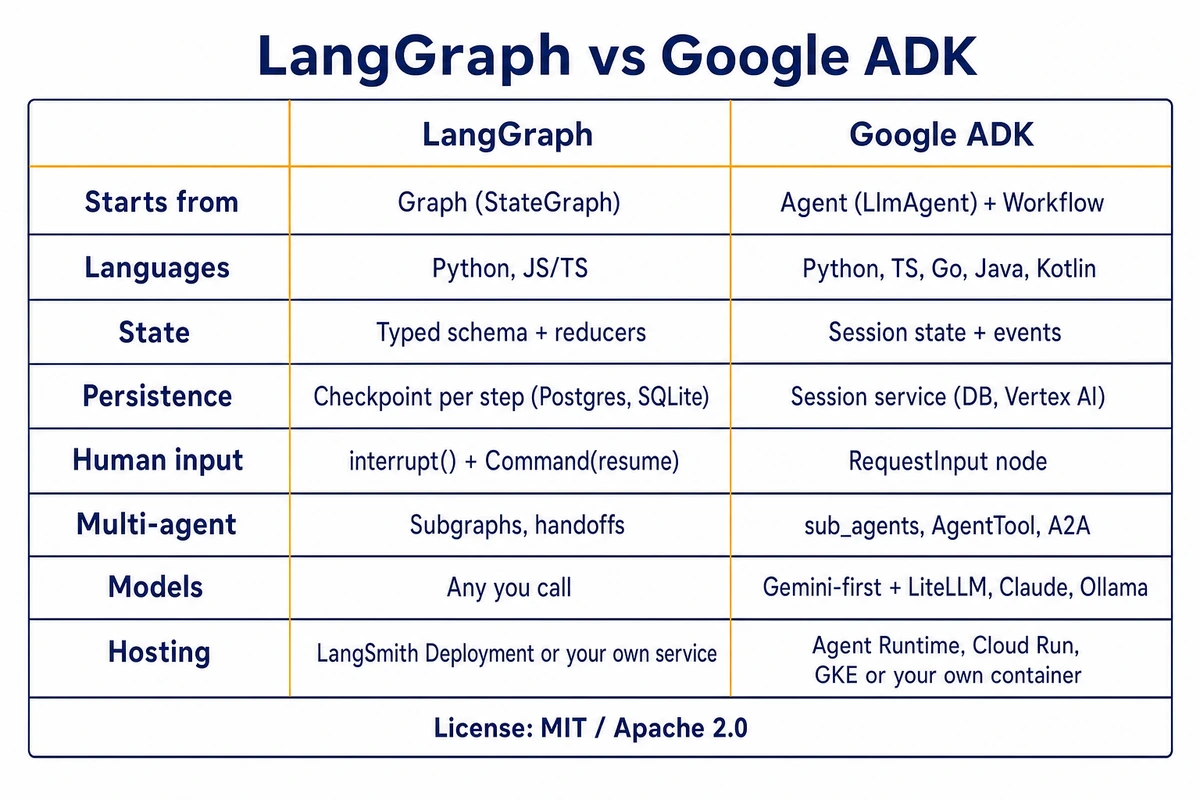
LangGraph vs Google ADK side by side
Every row was checked against the installed packages and the official docs on November 9, 2026.
| Dimension | LangGraph | Google ADK |
|---|---|---|
| License | MIT | Apache 2.0 |
| Version checked | langgraph 1.2.20 (Nov 5, 2026); 1.0.0 was Oct 17, 2025 | google-adk 2.14.0 (Nov 7, 2026); Python 2.0 GA May 19, 2026 |
| Languages | Python 3.10+, JavaScript/TypeScript | Python 3.11+, TypeScript, Go, Java, Kotlin |
| Starting point | A graph: StateGraph, nodes, edges | An agent: LlmAgent with tools and sub-agents; Workflow for graphs |
| Control flow | Normal and conditional edges, cycles, Send fan-out, Command | Workflow edges with routes and DEFAULT_ROUTE, join nodes, per-node retries; LLM-driven transfer between agents |
| State | One typed schema with per-key reducers | Session state dict plus event history; node output feeds the next node |
| Persistence | Checkpoint per super-step per thread_id: InMemorySaver, SqliteSaver, PostgresSaver | Session service: in-memory, database (SQLAlchemy async URL) or Vertex AI; workflows resume from events |
| Human-in-the-loop | interrupt() anywhere in a node, Command(resume=…), state editable before resuming | RequestInput node in workflows; confirmation step for tool actions |
| History and replay | get_state_history, resume or fork from any checkpoint | Session rewind |
| Multi-agent | Subgraphs, subagents as tools, handoffs, routers | sub_agents with transfer, AgentTool, A2A |
| Models | Whatever your node calls; no model layer of its own | Gemini, and Claude on Google’s Agent Platform, by name; LiteLLM, Ollama, vLLM and others via connectors |
| Dev tooling and tracing | LangSmith tracing and Studio (opt-in) | adk web, adk eval, OpenTelemetry |
| Vendor hosting | LangSmith Deployment: cloud, hybrid, self-hosted | Agent Runtime on Google Cloud, Cloud Run, GKE |
| Self-hosting without the vendor | Your own service around invoke/stream; the standalone Agent Server needs a license key | adk api_server or a container from adk deploy docker |
In LangGraph you describe the control flow and the state first, then decide which nodes call a model. ADK hands you an agent with model calls and delegation already wired, and graph workflows are the newer layer for the parts that must be deterministic. An LLM-with-tools agent takes less code in ADK, whereas a business process with a few LLM steps inside maps more directly onto LangGraph’s explicit state and edges. The two ticket routers show the consequence: in LangGraph each node returned a partial update that the reducer merged into the shared log, while in ADK classify handed its output straight to the next node.
Persistence follows from that. LangGraph stores a full state snapshot per step, so inspecting, editing or forking a run is a database read and a write. ADK stores the event stream of a session, and the 2.14.0 source rebuilds a workflow’s node runs from those events on resume. Both survive restarts with a database behind them, and both let a run wait for a person. LangGraph’s model is easier to reason about when you need to debug “what did the state look like before step 7”.
ADK’s paved roads lead to Google Cloud, although adk api_server and the Docker target run anywhere; note that its help text says the server’s endpoints are unauthenticated and belong behind your own auth layer. LangGraph’s paved road is LangSmith Deployment, whose self-hosted options are tied to paid plans. The library itself is free, but serving it yourself means you own the HTTP layer, authentication, TLS, connection pooling, backups and checkpoint retention. We recommend that route to readers who are willing to run that stack.
When LangGraph is the right choice (and when it is not)
Restart recovery and human approval do not separate the two, since both frameworks resume from a database and both can pause for a person. State, agent design and deployment do.
- Pick LangGraph when you want one typed state schema with per-key reducers that every step reads and writes, and when you need to inspect, edit or fork a run at any checkpoint. It also suits teams that want to own the serving layer, since the library has no hosting tie-in.
- Pick ADK when the work is a configured agent (model, instruction, tools) that delegates to sub-agents, when part of the team writes Go, Java or Kotlin, or when you plan to deploy on Agent Runtime, Cloud Run or GKE.
- For a single model call with one or two tools, skip both and use the provider’s SDK; a framework adds a dependency tree without adding control.
- If you already use LangChain’s model wrappers and retrievers, LangGraph is the natural next layer, and create_agent already runs on it.
For a Python team that self-hosts and has no Google Cloud commitment, we would choose LangGraph, for its checkpoint model and a self-hosted path that needs only Postgres. A team already on Vertex AI with Gemini quotas should start with ADK.
Where CrewAI, AutoGen and n8n fit
CrewAI works one level higher: you describe agents by role and goal, group them into crews, and use its event-driven Flows for the state and control around them. It gets a role-based team running quickly, at the cost of the step-level control LangGraph exposes. Microsoft’s AutoGen has agents talk to each other in two-agent or group chats. Its README now says the project is archived and no longer maintained, with no bug or security fixes, and sends new users to Microsoft Agent Framework (agent-framework 1.25.0 on PyPI, November 7, 2026), which adds graph-based workflows and state for long-running, human-in-the-loop runs in .NET and Python. Evaluate that successor when your team writes .NET or works on Azure. n8n is a visual workflow tool with AI agent nodes, suited to integrations that a non-developer should be able to edit.
Self-host LangGraph without LangSmith on a VPS
A LangGraph agent is ordinary Python plus HTTPS calls to a model API, so the server needs CPU and RAM, never a GPU. A small local model on CPU works but is slow, so an agent that answers people should call a hosted API.
There are two ways to self-host LangGraph without the LangSmith platform. The first is LangChain’s Agent Server in standalone mode: langgraph build produces a Docker image, and the container needs DATABASE_URI (Postgres) and REDIS_URI. Per the standalone server docs, you also need LANGGRAPH_CLOUD_LICENSE_KEY, checked once at startup. Per the CLI reference, langgraph dev needs no key but is for development only, and langgraph up needs a license key in production.
Route two is a small web app with the Postgres checkpointer behind it. On Ubuntu 24.04, as the sudo user deploy (replace the user and password with your own):
sudo apt update && sudo apt install -y postgresql python3-venv
sudo -u postgres psql -c "CREATE USER agent WITH PASSWORD 'change-me';"
sudo -u postgres createdb -O agent langgraph
mkdir -p ~/agent && python3 -m venv ~/agent/.venv
~/agent/.venv/bin/pip install langgraph langgraph-checkpoint-postgres "psycopg[binary]" fastapi uvicorn
Ubuntu 24.04 installs PostgreSQL 16. On Ubuntu 22.04 the same command gives PostgreSQL 14, which reaches end of life on November 12, 2026, so a new checkpoint database there is worth starting on a supported release; our PostgreSQL 14 to 18 upgrade steps cover moving an existing one. Save the first example’s graph code without the last four lines as ~/agent/tickets.py, then add app.py, a demo that runs on a single database connection:
import os
from contextlib import asynccontextmanager

from fastapi import FastAPI
from langgraph.checkpoint.postgres.aio import AsyncPostgresSaver
from pydantic import BaseModel

from tickets import builder  # the StateGraph from the first example

DB_URI = os.environ["DB_URI"]  # postgresql://agent:...@127.0.0.1:5432/langgraph


@asynccontextmanager
async def lifespan(app: FastAPI):
    async with AsyncPostgresSaver.from_conn_string(DB_URI) as saver:
        await saver.setup()
        app.state.graph = builder.compile(checkpointer=saver)
        yield


app = FastAPI(lifespan=lifespan)


class Ticket(BaseModel):
    text: str


@app.post("/tickets/{ticket_id}")
async def run_ticket(ticket_id: str, ticket: Ticket):
    config = {"configurable": {"thread_id": ticket_id}}
    result = await app.state.graph.ainvoke({"text": ticket.text, "log": []}, config)
    return {"priority": result["priority"], "steps": result["log"]}
setup() creates four tables on first start (checkpoints, checkpoint_blobs, checkpoint_writes and checkpoint_migrations). Start it with DB_URI=… ~/agent/.venv/bin/uvicorn app:app –host 127.0.0.1 –port 8000 from ~/agent and post the same ticket ID twice; the second answer carries the steps of both runs, read back from Postgres:
curl -s -X POST http://127.0.0.1:8000/tickets/T-1001 -H 'Content-Type: application/json' -d '{"text": "Checkout is down"}'
{"priority":"high","steps":["classify","page_on_call"]}
curl -s -X POST http://127.0.0.1:8000/tickets/T-1001 -H 'Content-Type: application/json' -d '{"text": "Still down after restart"}'
{"priority":"high","steps":["classify","page_on_call","classify","page_on_call"]}
AsyncPostgresSaver runs each database call under an asyncio.Lock, so within one process overlapping requests take turns on checkpoint reads and writes, whether it holds one connection or a pool; for more parallel throughput, run several uvicorn workers. A pool still matters for real traffic, because a connection that breaks, for example after a PostgreSQL restart, is discarded and replaced instead of failing every later request. Create a psycopg AsyncConnectionPool with open=False, open it in the FastAPI lifespan and close it on shutdown, as the psycopg connection pool docs show, then pass it to AsyncPostgresSaver(pool) with the kwargs that from_conn_string uses: autocommit=True, prepare_threshold=0 and row_factory=dict_row. To keep the service running across reboots, a systemd unit is enough:
# /etc/systemd/system/langgraph-agent.service
[Unit]
Description=LangGraph ticket agent
Wants=network-online.target
After=network-online.target postgresql.service

[Service]
User=deploy
WorkingDirectory=/home/deploy/agent
EnvironmentFile=/home/deploy/agent/.env
ExecStart=/home/deploy/agent/.venv/bin/uvicorn app:app --host 127.0.0.1 --port 8000
Restart=on-failure

[Install]
WantedBy=multi-user.target
Put DB_URI and the model provider key in .env, chmod 600 it, then run sudo systemctl enable –now langgraph-agent.
Exposure, sizing and running costs
Uvicorn binds to loopback and Ubuntu’s PostgreSQL listens on localhost by default, so neither is reachable from outside. Put Caddy or Nginx in front for TLS on 443 and add authentication there or in FastAPI, because the example endpoint has none and anyone who reaches it spends your tokens. In the panel firewall or ufw, open 443, plus 80 if your certificate client answers the HTTP challenge, limit 22 to your own address, and block everything else.
LangChain publishes no RAM figure for a self-built service. In a test container, one uvicorn process running the demo measured about 95 MB RSS after a few requests, with PostgreSQL on top of that. Our estimate is 2 GB of RAM for one such service plus PostgreSQL, and 4 GB for several worker processes or for the standalone Agent Server, which adds Redis and its own queue. Disk grows with checkpoint history, so schedule the retention calls shown earlier and a nightly pg_dump to storage off the server. Expect the API bill, not the server, to dominate the monthly cost, so set a spending limit on the provider key before the agent goes live.
This FastAPI service and its Postgres checkpointer fit a Hostry KVM VPS with Ubuntu 24.04, deployed within seconds in one of 18+ locations; scale it up when you add workers. The Agent Server route also needs its separate license key.
Related reading: our fixes for n8n workers that stop taking jobs, and Hermes Agent and OpenClaw compared on a VPS for a ready-made assistant instead of a framework.
FAQ
Is LangGraph free?
Yes, the library is free and MIT-licensed, including commercial use. What costs money is LangSmith: its docs list a Plus plan or above for cloud deployment and the Enterprise plan for the self-hosted control plane.
Do I need LangChain to use LangGraph?
No. You can call any model SDK, such as OpenAI’s or Anthropic’s, directly inside a node. The package installs langchain-core for shared types, but you never have to import LangChain’s chains, prompt templates or model wrappers.
Can LangGraph run without LangSmith?
Yes. Tracing to LangSmith only starts when you set LANGSMITH_TRACING=true with an API key; without those variables the bundled langsmith client sends nothing. For observability without it, log state transitions from your own service or use the stream() API, which emits each node’s update as it happens.
Does Google ADK only work with Gemini?
No. Gemini models, and Claude models on Google’s Agent Platform, can be named directly; the Anthropic API, OpenAI and other providers go through the LiteLlm wrapper, which needs pip install google-adk[extensions], and local servers through the Ollama or vLLM connectors. The managed Agent Runtime, VertexAiSessionService and Claude models named directly need Google Cloud; DatabaseSessionService and adk api_server run on any server.