
PostgreSQL 14 End of Life on November 12: Upgrade to 18 on a VPS

As of November 2, 2026, PostgreSQL 14 has 10 days of upstream support left, with its final minor release due on November 12. After that release, the PostgreSQL project publishes no more fixes for version 14, security fixes included, so the database should be on PostgreSQL 18 before the next round of advisories lands.
Nothing shuts down on November 13. PostgreSQL 14 end of life means the installed binaries keep serving queries, and every bug or vulnerability found afterwards stays unpatched on your machine. On an unmanaged Hostry KVM VPS you run the major upgrade yourself, and on Ubuntu or Debian the tools for it ship with the PostgreSQL packages. The steps assume one server with one 14 cluster.
PostgreSQL 14 end of life: what stops on November 12
The PostgreSQL versioning policy gives each major five years, so the PostgreSQL 14 EOL date is November 12, 2026. A server still on an older 14.x minor than 14.24 also lacks security fixes that have already been published.
| Major version | Latest minor (November 2, 2026) | Final release |
|---|---|---|
| 18 | 18.6 | November 14, 2030 |
| 17 | 17.11 | November 8, 2029 |
| 16 | 16.15 | November 9, 2028 |
| 15 | 15.19 | November 11, 2027 |
| 14 | 14.24 | November 12, 2026 |
| 13 | 13.23 | Ended November 13, 2025 |
Those are the PostgreSQL supported versions as the project lists them. Ubuntu 22.04 also carries 14 in its own archive (build 14.24-0ubuntu0.22.04.1); unless your distribution has committed to patching it after PostgreSQL 14 end of life, plan as if it will not.
Inventory the PostgreSQL 14 cluster first
The output of a few commands decides which method is possible. Start with the cluster list, the exact version and whether data checksums are on:
pg_lsclusters
sudo -u postgres psql -Atc "SELECT version();"
sudo -u postgres psql -Atc "SHOW data_checksums;"
A 14 cluster answers off to the last query unless someone enabled checksums at initdb time, since they were opt-in until version 18. Write that answer down; it matters in the upgrade step.
Next, list the extensions in every database and the PostgreSQL packages installed for 14. Each extension package, such as postgresql-14-postgis-3, needs a matching 18 package before an in-place upgrade can work:
for db in $(sudo -u postgres psql -Atc "SELECT datname FROM pg_database WHERE datallowconn"); do
  echo "== $db"
  sudo -u postgres psql -d "$db" -Atc "SELECT extname || ' ' || extversion FROM pg_extension"
done
dpkg -l 'postgresql-14*' | grep ^ii
Then size and free space, plus any roles that still log in with MD5 hashes:
sudo -u postgres psql -c "SELECT datname, pg_size_pretty(pg_database_size(datname)) FROM pg_database ORDER BY pg_database_size(datname) DESC;"
sudo du -sh /var/lib/postgresql/14/main
df -h /var/lib/postgresql
sudo -u postgres psql -Atc "SELECT rolname FROM pg_authid WHERE rolpassword LIKE 'md5%';"
Compare the du figure with the free space from df. If free space is smaller than the data directory, only link mode fits on this disk as it stands. Hostry VPS resources can be scaled up, so check whether the next plan’s disk covers a second copy; we would rather scale for the window than clear room on a live database server, where hurried deletions cause their own outages.
Upgrade PostgreSQL 14 to 18 or stop at 17?
You can go from 14 straight to 18 without installing 15, 16 or 17 in between: the pg_upgrade documentation for version 18 supports upgrades from 9.2.X and later, and a dump from 14 restores into 18 as well.
Before you pick the target, do two checks. First, read “Migration to Version 18” in the PostgreSQL 18 release notes against your application. Two examples from that list: VACUUM and ANALYZE now also process inheritance children unless you add ONLY, and COPY FROM no longer treats \. as end-of-file in CSV files. Second, confirm every extension has an 18 package with apt-cache policy postgresql-18-postgis-3 (with your extension’s name) once the repository from step 1 below is added.
If both checks pass, go to 18. It is supported until November 2030, a year longer than 17, and 18.6 is its sixth minor release. Two changes in 18 also make the upgrade itself easier: pg_upgrade now carries most optimizer statistics over, and its database checks run in parallel under –jobs. Pick 17 if an extension you depend on has no 18 package yet or the application is not ready for an 18 change.
As of November 2, PostgreSQL 19 is at release candidate stage: RC 1 shipped on October 15, and the project plans general availability for November 19, 2026, a week after PostgreSQL 14 end of life. A .0 release is a poor target for a deadline upgrade. Once 19 has had a few minor releases, the step from 18 to 19 can be planned like any other maintenance job.
Back up off the server and test the restore
Every rollback path below ends in “restore from backup” at some point, so make the backup before touching packages. Run these as your login user (examples use deploy and appdb; substitute your own). The shell redirect writes the files as that user, so postgres needs no write access to your home directory:
mkdir -p ~/pg14-backup && chmod 700 ~/pg14-backup
sudo -u postgres pg_dumpall --globals-only > ~/pg14-backup/globals.sql
sudo -u postgres pg_dump -Fc appdb > ~/pg14-backup/appdb.dump
sudo -u postgres psql -d appdb -Atc "SELECT count(*) FROM orders;"
rsync -av ~/pg14-backup/ deploy@203.0.113.10:pg14-backup/
globals.sql holds roles with their password hashes, so keep it as private as the dump. Repeat the pg_dump line for each database, and keep the row counts of a few large tables to compare later. Swap 203.0.113.10 for your second machine.
Before you rely on the backup, restore it on a second VPS. On that test server:
- Install PostgreSQL 18 from the PGDG repository, as in step 1 below.
- Keep port 5432 off the internet: leave listen_addresses at its default localhost and allow only SSH in the firewall, as in our UFW and SSH key setup for a fresh Ubuntu server.
- Restore the globals, then the database, and compare the row count:
sudo -u postgres psql -q < ~/pg14-backup/globals.sql
sudo -u postgres pg_restore --create -d postgres < ~/pg14-backup/appdb.dump
sudo -u postgres psql -d appdb -Atc "SELECT count(*) FROM orders;"
An ERROR: role “postgres” already exists line from the globals file is expected and harmless. Time the restore: it is the real downtime figure for the dump method on your data. Point a staging copy of the application at this server too.
pg_upgrade –link vs dump and restore
| Method | Downtime | Extra disk on the server | Rollback |
|---|---|---|---|
| Dump and restore (pg_upgradecluster default) | The whole run; grows with data size, since every row is reloaded and every index rebuilt | A full second copy of the data in the new cluster | Old cluster untouched; drop the new one and start 14 again |
| pg_upgrade in copy mode | Time to copy the data files | A second copy of the data files | Old cluster untouched |
| pg_upgrade –link | Mostly the schema dump and restore; data files are hard-linked | Little; both data directories must be on one filesystem | Only until the new cluster first starts; after that, from backup |
| Logical replication to a second VPS | A switchover of several seconds, per the docs | None on the old server; the copy lives elsewhere | 14 keeps running until you switch |
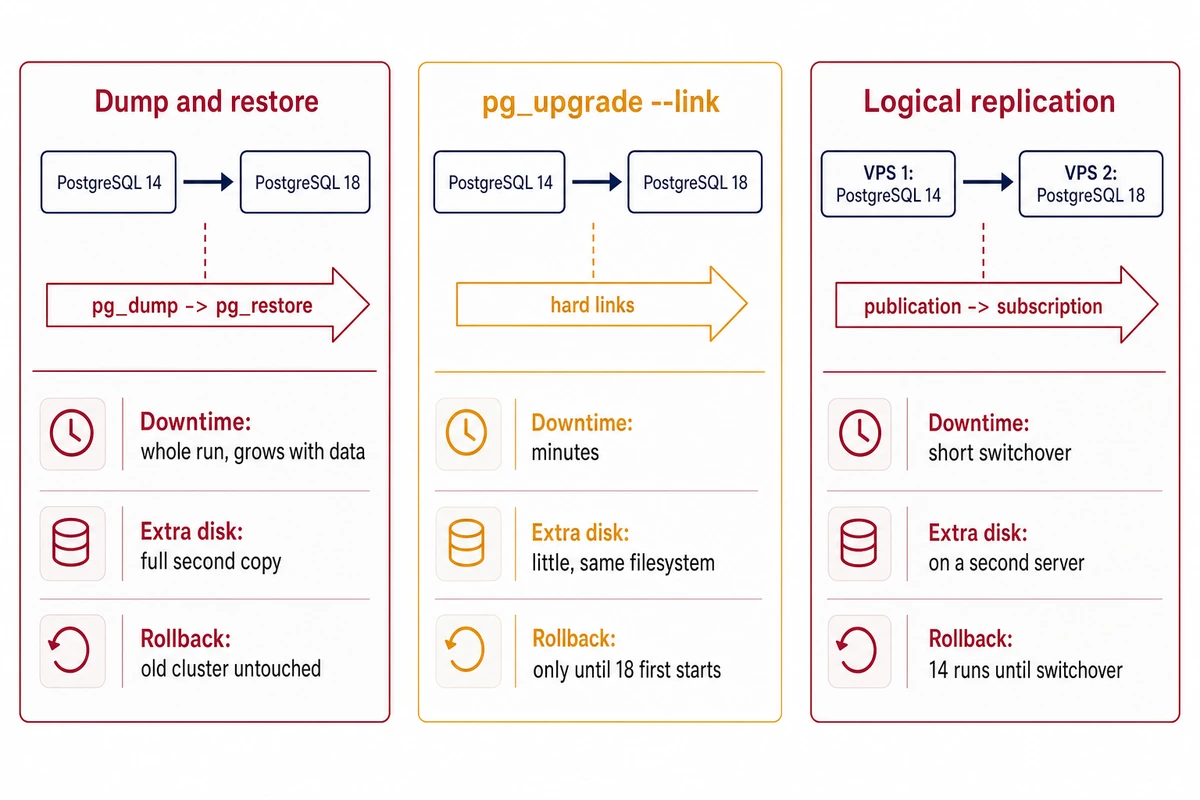
For one VPS, our default is the dump method whenever the timed test restore fits inside your maintenance window. It is slower, the old cluster stays intact, and with postgresql-common it turns data checksums on in the 18 cluster. Use –link when the database is too large for that window or the disk cannot hold a second copy, and accept that the backup is then your rollback.
–clone would give link-mode speed while keeping the old cluster usable, but on Linux the pg_upgrade documentation lists only Btrfs and XFS created with reflink support. On an ext4 root disk, common on VPS images, the run errors out.
Logical replication is the near-zero-downtime option, and the upgrading chapter of the PostgreSQL manual describes it as a standby on the new version that you switch to once it catches up. Schema changes, sequence values and large objects are not replicated, so sequences must be moved forward on the new primary before the application writes to it, either from the publisher’s values or from the tables, for example SELECT setval(pg_get_serial_sequence(‘orders’, ‘id’), (SELECT max(id) FROM orders)); for each serial or identity column.
How to upgrade PostgreSQL 14 to 18 on Ubuntu or Debian
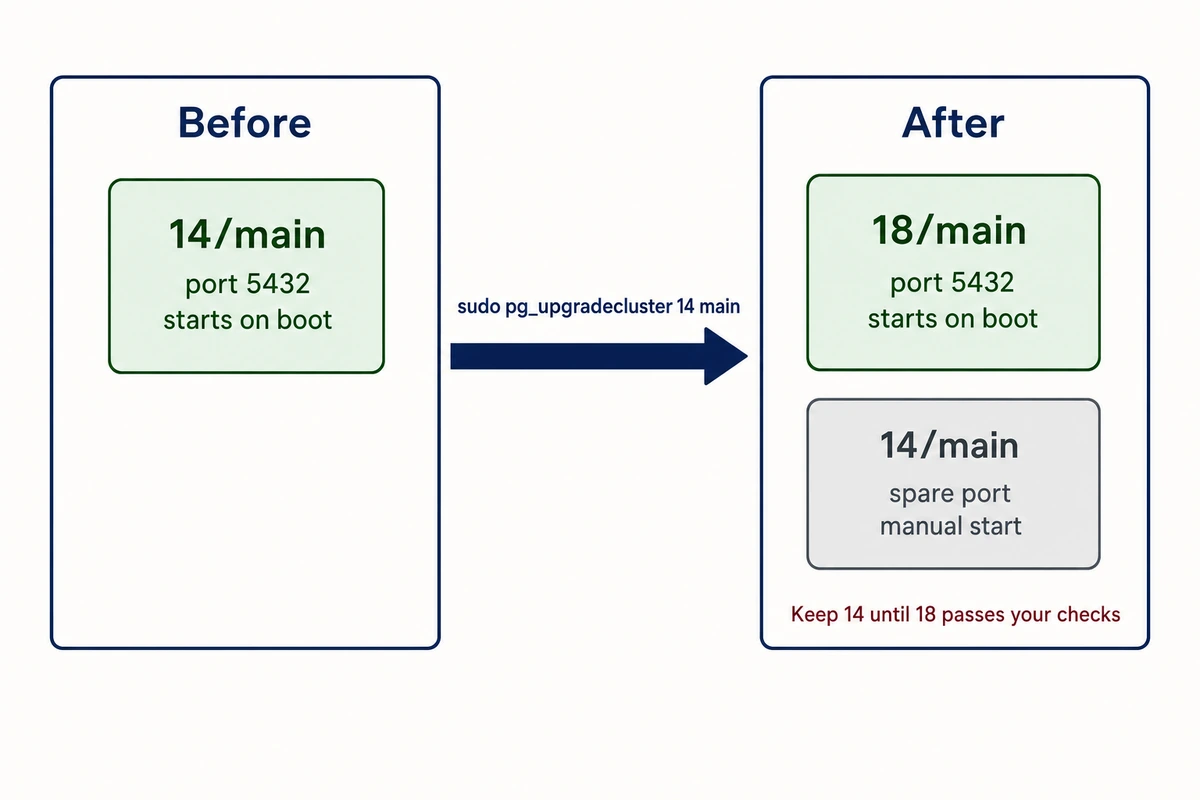
On Ubuntu and Debian, upstream pg_upgrade comes wrapped in pg_upgradecluster, which also copies the configuration from /etc/postgresql/14/main, moves the old cluster to a spare port and gives the new one the original port. Use it unless you built PostgreSQL yourself.
1. Add the PGDG repository and install PostgreSQL 18
Ubuntu 22.04 and 24.04 do not ship 18, so take it from the project’s own apt repository, as the PostgreSQL download page for Ubuntu describes. The script adds the repository under /etc/apt/sources.list.d/ (as pgdg.list on 22.04, pgdg.sources on 24.04) and asks you to press Enter:
sudo apt install -y postgresql-common
sudo /usr/share/postgresql-common/pgdg/apt.postgresql.org.sh
sudo apt install -y postgresql-18
pg_lsclusters
Install the 18 builds of every extension package from your inventory in the same command. The package creates an empty 18/main cluster, which pg_lsclusters now shows on the next free port, usually 5433.
2. Run the checks while 14 is still serving
pg_upgradecluster –check only confirms that every postgresql-14-* package has an 18 counterpart. For the real compatibility checks, run upstream pg_upgrade –check against an 18 cluster whose checksum setting matches the old one. With checksums off on 14, that means recreating 18/main:
sudo pg_dropcluster 18 main --stop
sudo pg_createcluster 18 main -- --no-data-checksums
cd /tmp
sudo -u postgres /usr/lib/postgresql/18/bin/pg_upgrade --check --link \
  -b /usr/lib/postgresql/14/bin -B /usr/lib/postgresql/18/bin \
  -d /etc/postgresql/14/main -D /etc/postgresql/18/main -p 5432
sudo pg_dropcluster 18 main
sudo pg_upgradecluster --check -v 18 14 main
Leave out — –no-data-checksums if 14 already had checksums on. -p is the port of the running 14 cluster; the new cluster is started on pg_upgrade’s default 50432. The pg_upgrade run should end with *Clusters are compatible*. The second pg_dropcluster matters, because pg_upgradecluster refuses to run, even with –check, while 18/main exists.
3. Upgrade in the maintenance window
Decide first whether you want a pause before 18 starts. pg_upgradecluster starts the new cluster by default when 14 was running or upgrade hooks are present. With link mode, that first start ends the cheap rollback, so add –no-start if you want to inspect the result before committing.
Then stop whatever writes to the database, take a fresh dump if data changed since the backup, and run one of these:
sudo systemctl stop myapp
# dump method (default):
sudo pg_upgradecluster -v 18 14 main
# or link mode:
sudo pg_upgradecluster -v 18 -m upgrade --link 14 main
Per the pg_upgradecluster man page, the old cluster moves to another port with startup set to manual, and the new one takes port 5432 and starts. For the upgrade method, postgresql-common 293 creates the 18 cluster with –no-data-checksums when 14 had none.
4. Refresh statistics and extensions
Current postgresql-common runs both vacuumdb commands below from its analyze hook when it starts the new cluster. Run them by hand only after –no-start or a plain pg_upgrade run. The first fills in statistics pg_upgrade could not carry over, such as extended statistics, and the second updates the counters autovacuum relies on:
sudo -u postgres /usr/lib/postgresql/18/bin/vacuumdb --all --analyze-in-stages --missing-stats-only
sudo -u postgres /usr/lib/postgresql/18/bin/vacuumdb --all --analyze-only
Extensions are a separate step. With the upgrade method, pg_upgrade may leave update_extensions.sql in the log directory, with lines such as ALTER EXTENSION “pgcrypto” UPDATE;. Find it, apply it with sudo -u postgres psql -f and the file’s path, then start the application:
sudo ls /var/log/postgresql/pg_upgradecluster-14-18-main.*/Verify the upgrade before deleting anything
pg_lsclusters
sudo -u postgres psql -Atc "SELECT version();"
sudo -u postgres psql -d appdb -Atc "SELECT count(*) FROM orders;"
sudo tail -n 50 /var/log/postgresql/postgresql-18-main.log
pg_lsclusters should show 18 online on 5432 and 14 down on another port. Compare the row counts with the ones you saved, then have the application write a record and read it back.
If the MD5 query from the inventory returned roles, PostgreSQL 18 still accepts them, but MD5 is deprecated for removal in a future major, and setting an MD5 password now raises a warning. Reset those passwords while password_encryption is at its default scram-sha-256, then switch the matching pg_hba.conf lines from md5 to scram-sha-256.
Keep the old cluster for a few days if you used the dump method; it costs only disk. Then remove it and the 14 packages with sudo pg_dropcluster 14 main and sudo apt purge ‘postgresql-14*’. After link mode the old cluster is unusable anyway, so drop it once 18 has been checked.
If pg_upgrade fails
The messages quoted below were reproduced with PostgreSQL 14.24, PostgreSQL 18.6 and postgresql-common 293.
Data checksums do not match
pg_upgrade stops with old cluster does not use data checksums but the new one does when the 18 cluster came from a default initdb, which turns checksums on since version 18. Recreate it with –no-data-checksums as in step 2. You can enable checksums later with sudo -u postgres /usr/lib/postgresql/18/bin/pg_checksums –enable -D /var/lib/postgresql/18/main while the cluster is stopped; it rewrites every block, so budget downtime for it.
Missing extension libraries
Your installation references loadable libraries that are missing from the new installation means a .so file used by 14 has no 18 build. The message points to loadable_libraries.txt under the new data directory, which names the library and the database.
Install the matching postgresql-18-* package, or drop the extension on 14 if nothing uses it. Do not run CREATE EXTENSION in the new cluster yourself, since pg_upgrade copies the definitions.
Cluster exists, port in use or server still running
- Error: target cluster 18/main already exists comes from pg_upgradecluster; run sudo pg_dropcluster 18 main –stop on the empty cluster first.
- When checking a live server, the old and new port numbers must be different appears if -p and -P are equal during –check.
- There seems to be a postmaster servicing the old cluster means a real run started while 14 was up; stop it with sudo pg_ctlcluster 14 main stop.
Locale, encoding and an OS upgrade at the same time
An 18 cluster created with a different locale and encoding still passes –check with 18.6, because pg_upgrade sets the new databases’ locale and encoding from the old cluster. The bigger risk is index ordering: the man page warns that a new libc or libicu can change collation and require index rebuilds after an upgrade method. Do the PostgreSQL upgrade and the Ubuntu release upgrade in separate windows.
Rolling back
Decide on rollback before the application writes to 18. Until then, going back to 14 loses nothing. After writes resume, the new rows exist only in 18, and a rollback discards them unless you export and reload them by hand, which usually means a second outage. When in doubt, keep the application stopped until the verify checks pass.
After the dump method or copy mode, 14 is intact. Drop the new cluster, give 14 its port back and set it to start on boot:
sudo pg_dropcluster 18 main --stop
sudo pg_conftool 14 main set port 5432
echo auto | sudo tee /etc/postgresql/14/main/start.conf
sudo pg_ctlcluster 14 main start
Link mode leaves a narrow window. If pg_upgrade failed before linking, 14 is unmodified. If linking ran but 18 never started, rename global/pg_control.old back to pg_control in the 14 data directory and start it. Once 18 has started, the old files are unsafe and the off-server backup is the way back. With pg_upgradecluster, that window stays open only if you passed –no-start in step 3.
Rehearse the upgrade on a spare server first. Size a Hostry KVM VPS from the inventory you took at the start, with disk for the data directory plus the dump, then restore the backup, time it and run pg_upgradecluster end to end. Plans in the Hostry VPS catalog start from $6/mo at the time of writing, billed monthly.