

Your self-hosted n8n sits behind Nginx or Caddy, and now its log shows ERR_ERL_UNEXPECTED_X_FORWARDED_FOR, the editor keeps losing its connection, or the Webhook node offers a localhost:5678 link. In an n8n reverse proxy setup, the trust proxy error goes away when you set N8N_PROXY_HOPS to the number of proxies in front of n8n. Use 1 for nginx alone and 2 with a front proxy such as Cloudflare. If the editor shows Connection lost, forward the Upgrade and Connection headers and raise nginx’s 60-second read timeout. If webhook links show localhost, set N8N_WEBHOOK_URL.
The trust proxy message is a log line, and n8n keeps serving while it appears: login still returned 200 in the lab. Variables such as N8N_TRUST_PROXY do not exist in n8n 2.48.8 and are ignored without a warning. Only N8N_PROXY_HOPS changes the behaviour.
A reverse proxy is the web server that stands in front of n8n, accepts the visitor’s secure connection and passes each request on. Unless n8n is told how many such servers stand in front of it, every request looks as if it came from the proxy itself. It also has to be told its public address, and the proxy has to keep the editor’s live connection open. When one of these is missing, n8n still starts, so the fault can go unnoticed.
Find your symptom, then go to its section:
| What you see | Cause | Fix |
|---|---|---|
| ERR_ERL_UNEXPECTED_X_FORWARDED_FOR in the n8n log | N8N_PROXY_HOPS unset or 0 behind a proxy | N8N_PROXY_HOPS=1 |
| No error, but every visitor shares one IP, or any IP is accepted | Wrong non-zero hop count | Count the proxies |
| 401 Unauthorized on /rest/push, editor without live updates | Upgrade and Connection headers not forwarded | Add the two headers |
| “Connection lost” now and then, close code 1006 | nginx’s 60 s read timeout races n8n’s 60 s ping | proxy_read_timeout 3600s |
| “Invalid origin!” right after a 101, close code 1008 | Proxy sends the wrong Host | Forward Host or X-Forwarded-Host |
| Webhook URL shows localhost:5678 or :5678 | No public URL set | N8N_WEBHOOK_URL |
Every message and number below was reproduced with n8n 2.48.8 (npm, Node.js 24.22.3) behind nginx 1.24.0 and Caddy 2.6.2 on Ubuntu 24.04, in network namespaces with test addresses. n8n ran with NODE_ENV=production, the production mode that the official Docker image sets. The front proxy was an nginx that appends to the forwarding header the way Cloudflare does; Cloudflare itself was not tested. With no browser in the lab, the editor’s live connection was tested with ws 8.20.1, the WebSocket library bundled with n8n, and with curl. Where the commands say n8n.example.com, 203.0.113.x or 198.51.100.x, put your own domain and addresses.
ERR_ERL_UNEXPECTED_X_FORWARDED_FOR: the trust proxy message in the n8n log
The message comes from n8n’s rate limiter, the part that caps how many attempts one visitor address can make in a time window. It warns that n8n cannot see real visitor addresses. n8n ignores the X-Forwarded-For header, the list of addresses a request passed through, until N8N_PROXY_HOPS says how many proxies to trust.
Fix
N8N_PROXY_HOPS=1Set the hop count as a number in n8n’s environment and restart n8n. The next section shows which number, and the configs section shows the Docker block. Without Docker, the usual places are the systemd service that starts n8n (an Environment=N8N_PROXY_HOPS=1 line) or the shell that runs n8n start. The lab passed the variables on the command line. The n8n deployment variables page lists N8N_PROXY_HOPS with a default of 0.
Use a number. N8N_PROXY_HOPS=one or =true prints Invalid number value for N8N_PROXY_HOPS: one at startup and then behaves as 0. A related code, ERR_ERL_INVALID_IP_ADDRESS, means the proxy writes an address with a port into X-Forwarded-For, as IIS ARR does.
Without the fix, the rate limiter logs this:
ValidationError: The 'X-Forwarded-For' header is set but the Express 'trust proxy' setting is false (default). This could indicate a misconfiguration which would prevent express-rate-limit from accurately identifying users. See https://express-rate-limit.github.io/ERR_ERL_UNEXPECTED_X_FORWARDED_FOR/ for more information.
    at Object.xForwardedForHeader (/opt/rp-lab/app/node_modules/express-rate-limit/dist/index.cjs:187:13)
    [...]
  code: 'ERR_ERL_UNEXPECTED_X_FORWARDED_FOR',
The same nine requests went through nginx, counting error lines after each one. With N8N_PROXY_HOPS unset, login returned 200 and the process kept running:
=== b-prod-nohops: NODE_ENV=production
GET /healthz 200  errors so far: 0
GET / 200  errors so far: 0
GET /rest/settings 200  errors so far: 0
GET /webhook/rp-lab-hook 200  errors so far: 0
POST /rest/login #1 200  errors so far: 1
POST /rest/login #2 200  errors so far: 1
POST /rest/login #3 200  errors so far: 1
GET /rest/resolve-password-token #1 400  errors so far: 2
GET /rest/resolve-password-token #2 400  errors so far: 2
n8n process: still running
=== d-prod-hops1: NODE_ENV=production N8N_PROXY_HOPS=1   -> errors so far: 0 for all 9 requests
The line is printed once per rate-limited route: once for login, once more for the password-reset token check. Health checks, the editor page and webhooks never trigger it. It cannot appear at startup either, because it needs an incoming request.
It also needs NODE_ENV=production, the setting that switches on n8n’s production-only checks, such as the IP rate limits and the origin check. The official Docker image sets it in its Dockerfile, while a plain npm install does not, and without it n8n mounts no IP rate limiter at all. In 2.48.8, /rest/login allows 1000 requests per 5 minutes per IP plus 5 per minute per login e-mail. Routes such as /rest/resolve-password-token allow 5 per 5 minutes per IP.
Forum answers suggest N8N_TRUST_PROXY, EXPRESS_TRUST_PROXY, N8N_USE_X_FORWARDED_HOST or N8N_DISABLE_ORIGIN_CHECK. None of the four appears anywhere in the 2.48.8 source, and none is mentioned at startup. The only place that sets trust proxy is this:
n8n/dist/abstract-server.js:59:        const proxyHops = this.globalConfig.proxy_hops;
n8n/dist/abstract-server.js:60:        if (proxyHops > 0)
n8n/dist/abstract-server.js:61:            this.app.set('trust proxy', proxyHops);
N8N_TRUST_PROXY: 0 files ; EXPRESS_TRUST_PROXY: 0 files ; N8N_USE_X_FORWARDED_HOST: 0 files ; N8N_DISABLE_ORIGIN_CHECK: 0 files
How many hops to set in N8N_PROXY_HOPS
In an n8n reverse proxy setup, a hop is one proxy on the way from the visitor to n8n. Each one adds the address it received the request from to the end of X-Forwarded-For. n8n reads the list from the right and skips as many entries as N8N_PROXY_HOPS says.
The right number is the count of proxies that append to X-Forwarded-For between the internet and n8n. A wrong number above zero logs nothing.
| Path | N8N_PROXY_HOPS | Also needed |
|---|---|---|
| Visitor -> Nginx -> n8n | 1 | nothing |
| Visitor -> Front proxy (e.g. Cloudflare) -> Nginx -> n8n | 2 | a front proxy that appends to X-Forwarded-For |
| Visitor -> Caddy -> n8n | 1 | nothing |
| Visitor -> Front proxy -> Caddy -> n8n | 2 | trusted_proxies with the front proxy’s ranges |
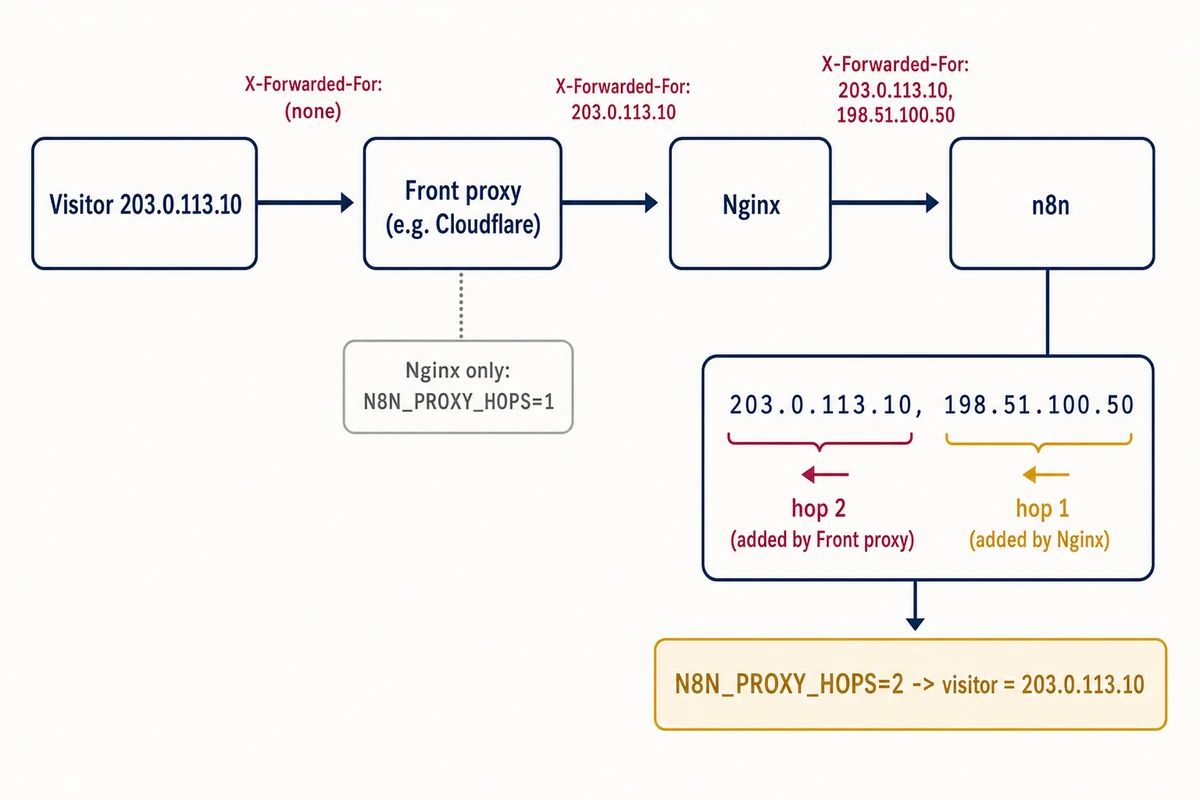
The lab watched n8n’s own X-RateLimit-Remaining header for two visitors, A (203.0.113.10) and B (203.0.113.20), plus A sending a forged X-Forwarded-For. A shared counter means n8n sees both as one address:
client -> nginx -> n8n, N8N_PROXY_HOPS=1
A 203.0.113.10               ip=203.0.113.10  remaining=4
B 203.0.113.20               ip=203.0.113.20  remaining=4
A forged XFF 198.51.100.66   ip=203.0.113.10  xff="198.51.100.66, 203.0.113.10"  remaining=3   <- forgery ignored
client -> nginx -> n8n, N8N_PROXY_HOPS=2   (one hop too many)
A forged XFF 198.51.100.66   ip=198.51.100.66  remaining=4   <- spoofed, fresh bucket
ValidationError lines in n8n log: 0

client -> front proxy -> nginx -> n8n, N8N_PROXY_HOPS=1   (one hop too few)
A 203.0.113.10   ip=198.51.100.50  xff="203.0.113.10, 198.51.100.50"  remaining=4
B 203.0.113.20   ip=198.51.100.50  remaining=3     <- every visitor = the front proxy
ValidationError lines in n8n log: 0
One hop too few makes every visitor look like the front proxy at 198.51.100.50. They share one rate-limit bucket, so one visitor’s password-reset attempts count against everyone. One hop too many lets a visitor choose their own address by sending a forged header, and each forged value gets a fresh bucket. That weakens the login protection, so check your own server for it (the routine at the end does).
The hop count works only if the front proxy appends the visitor’s address to X-Forwarded-For. Cloudflare’s HTTP headers reference says it appends to an existing header; for any other front proxy, check its documentation. The lab used an nginx stand-in, and Cloudflare Tunnel was not covered.
Caddy discards X-Forwarded-For from senders it does not trust, so Caddy alone stayed safe even with a hop count too high. Behind a front proxy, that default turned every visitor into 198.51.100.50 at any hop count. Adding trusted_proxies with the front proxy’s ranges and N8N_PROXY_HOPS=2 fixed it. The Caddy reverse_proxy reference describes the same default.
n8n Connection lost behind nginx: the WebSocket headers
The editor keeps a WebSocket, a long-lived two-way connection, open to n8n on /rest/push to show executions as they run. nginx does not pass on the upgrade request that opens it unless told to, and the editor then gets no live updates.
Fix: forward the upgrade
# http context
map $http_upgrade $connection_upgrade {
    default upgrade;
    ''      close;
}
# inside location /
proxy_http_version 1.1;
proxy_set_header Upgrade    $http_upgrade;
proxy_set_header Connection $connection_upgrade;
This is the pattern from nginx’s WebSocket proxying page. Caddy needs nothing extra: its reverse_proxy handles the upgrade. The full file is in the configs section.
The “Connection lost” banner itself was not observed in the lab. With a valid login cookie, through an nginx config that forwarded Host and X-Forwarded-* but not Upgrade and Connection, the push request got:
HTTP/1.1 401 Unauthorized
Unauthorized
ws: 0.1s handshake refused: HTTP 401 "Unauthorized"
access log: 203.0.113.10 "GET /rest/push?pushRef=curlcheck HTTP/1.1" 401 up=401
The 401 points at the login, yet the same cookie got 101 Switching Protocols once the headers were added. Without the upgrade, n8n takes the request for its other push transport and refuses it. With only proxy_pass, the request failed earlier with a 500 and “Invalid origin!” in the log.
N8N_PUSH_BACKEND=sse is a fallback for a proxy that cannot upgrade; with the headers above you do not need it.
Why Connection lost comes and goes: the 60-second race
With the headers right, the editor can still drop its connection within minutes. nginx closes a proxied connection when nothing arrives for 60 seconds, and n8n sends its keep-alive ping every 60 seconds. Two equal timers decide whether the connection survives, so it fails at random.
The ping interval is a fixed timer in n8n’s source (setInterval(() => this.pingAll(), 60 * 1000)). The 60 s default for proxy_read_timeout is in the ngx_http_proxy_module reference. Eight idle connections ran for 6 minutes with nginx defaults, four direct and four through the front proxy:
run 2 (default 60 s):
default-direct-1.txt   6 pings, last: 360.0s closed code=1000
default-direct-2.txt   1 pings, last: 63.7s closed code=1006      (ping at 3.7s, drop at 63.7s)
default-direct-3.txt   6 pings, last: 360.1s closed code=1000
default-direct-4.txt   6 pings, last: 360.0s closed code=1000
default-front-1.txt    6 pings, last: 360.0s closed code=1000
default-front-2.txt    2 pings, last: 123.7s closed code=1006
default-front-3.txt    1 pings, last: 116.7s closed code=1006
default-front-4.txt    1 pings, last: 109.7s closed code=1006     (ping at 49.7s, drop at 109.7s)
  "upstream timed out" lines: front error.log 3, vps error.log 1
Counting an earlier two-connection run, 5 of 10 idle connections were cut within 6 minutes. Every drop came exactly 60.0 s after the previous ping, at the moment the next one was due. Close code 1006 means the connection ended without a WebSocket close frame, the normal goodbye message. The nginx error log names it:
upstream timed out (110: Connection timed out) while proxying upgraded connection, client: 198.51.100.50, [...] request: "GET /rest/push?pushRef=[...]"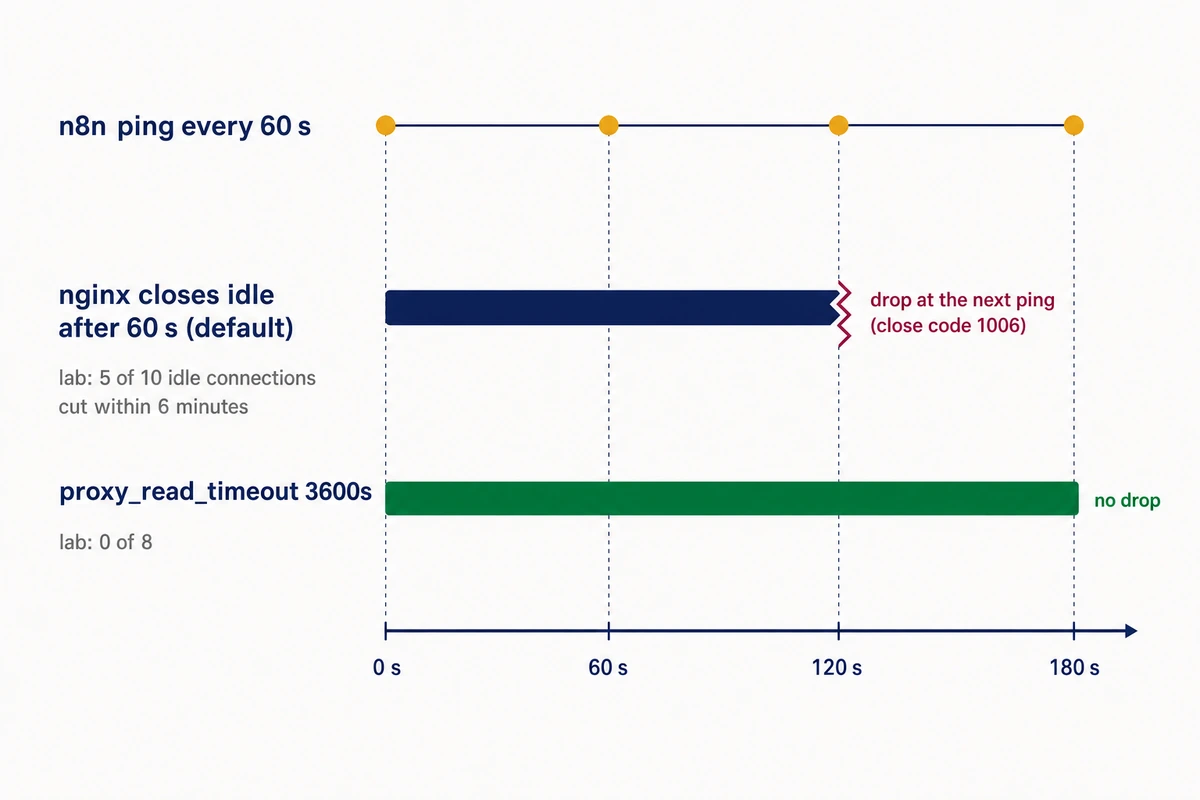
Fix: give the timeout room
proxy_read_timeout 3600s;
proxy_send_timeout 3600s;
With 3600 s on both nginx layers, 0 of 8 connections dropped. The lab set the timeout for the whole site; limiting it to /rest/push was not tested. Caddy 2.6.2 with no timeout settings dropped 0 of 3. With a front proxy, raise its timeout too. The same 60 s default also cuts long webhook calls with a 504, a case covered in the guide to n8n crashes and timeouts on a VPS.
“Invalid origin!” after a 101: fix the Host header
The browser sends an Origin header with every WebSocket request, naming the site that opened it. n8n compares it with the site name the proxy passes on. If the proxy replaces that name, n8n accepts the upgrade and closes the connection a moment later.
Fix: forward the public name, leave Origin alone
proxy_set_header Host             $host;
proxy_set_header X-Forwarded-Host $host;
X-Forwarded-Host alone, with Host still internal, already kept the connection open. Caddy sends both by default. Both lines are in the full nginx file.
A 101 alone proves nothing. In the lab, nginx forwarded the WebSocket headers but sent an internal Host name:
=== nginx vps-hostrewrite.conf (WebSocket headers OK, Host n8n-internal, no X-Forwarded-Host)
0.0s HTTP 101 upgrade=websocket connection=upgrade
0.0s open
0.1s message: Invalid origin!
0.1s closed code=1008 reason=""
n8n log: Origin header does NOT match the expected origin. (Origin: "https://n8n.example.com" -> "n8n.example.com", Expected: "n8n-internal" -> "n8n-internal", Protocol: "https")
n8n takes the expected name from X-Forwarded-Host if present, otherwise from Host. Setting N8N_HOST, N8N_EDITOR_BASE_URL, N8N_WEBHOOK_URL or N8N_PROXY_HOPS did not change the result. Stripping Origin on the proxy failed too, with the same 1008.
The check runs only with NODE_ENV=production. A proxy that rewrites Host can therefore work for months under an npm install and break the day you move to the Docker image. If that move is ahead of you, the n8n 3.0 upgrade notes for self-hosters cover the switch to containers.
Webhook URL shows localhost or :5678 behind a proxy: set N8N_WEBHOOK_URL
The Webhook node shows URLs that n8n builds from its own settings. It does not look at the address in your browser. Until you set a public URL, n8n offers http://localhost:5678/webhook/…, which outside services cannot reach.
The three URL fields from /rest/settings, read as a logged-in user, for different variable sets:
=== a: (no URL variables)
  urlBaseWebhook: http://localhost:5678/   urlBaseWebhookTest: http://localhost:5678/   urlBaseEditor: http://localhost:5678
=== b: N8N_HOST=n8n.example.com N8N_PROTOCOL=https
  urlBaseWebhook: https://n8n.example.com:5678/   urlBaseWebhookTest: https://n8n.example.com:5678/   urlBaseEditor: https://n8n.example.com:5678
=== e: N8N_WEBHOOK_URL=https://n8n.example.com/
  urlBaseWebhook: https://n8n.example.com/   urlBaseWebhookTest: https://n8n.example.com/   urlBaseEditor: https://n8n.example.com   (no WEBHOOK_URL warning)
=== f: WEBHOOK_URL=https://wh.example.net/ N8N_EDITOR_BASE_URL=https://n8n.example.com
  urlBaseWebhook: https://wh.example.net/   urlBaseWebhookTest: https://n8n.example.com/   urlBaseEditor: https://n8n.example.com
=== g: N8N_WEBHOOK_URL=https://wh.example.net/ N8N_EDITOR_BASE_URL=https://n8n.example.com
  urlBaseWebhook: https://wh.example.net/   urlBaseWebhookTest: https://wh.example.net/   urlBaseEditor: https://n8n.example.com
N8N_HOST and N8N_PROTOCOL alone keep the :5678, because the port setting still says 5678. N8N_WEBHOOK_URL alone fixes the production, test and editor URLs.
Many guides still teach the older WEBHOOK_URL. It works, with a startup line telling you to use N8N_WEBHOOK_URL instead, but it is not a pure alias. Combined with N8N_EDITOR_BASE_URL, test webhooks follow the editor URL (run f), while the new name moves both (run g). When both names are set, N8N_WEBHOOK_URL wins.
The n8n endpoints variables page lists WEBHOOK_URL as deprecated from 2.35.0; the new name and the warning already appear in 2.30.0.
A working n8n nginx config and Caddy reverse proxy
Both n8n reverse proxy configs below passed the same end-to-end check: login, the editor’s live connection, production and test webhooks, and no trust-proxy or origin warnings in the n8n log. They do TLS termination: the proxy holds the HTTPS certificate and decrypts traffic, and n8n answers plain HTTP on port 5678, reachable only from the server itself.
For nginx, these are the lines that matter, inside location /:
proxy_set_header Upgrade           $http_upgrade;
proxy_set_header Connection        $connection_upgrade;
proxy_set_header Host              $host;
proxy_set_header X-Forwarded-For   $proxy_add_x_forwarded_for;
proxy_read_timeout 3600s;
Full file: /etc/nginx/conf.d/n8n.conf (35 lines)
# /etc/nginx/conf.d/n8n.conf  (http context). Lab: certificate from a local CA; on a real server
# certbot writes the two ssl_certificate lines.
map $http_upgrade $connection_upgrade {
    default upgrade;
    ''      close;
}

server {
    listen 80;
    server_name n8n.example.com;
    return 301 https://$host$request_uri;
}

server {
    listen 443 ssl;
    server_name n8n.example.com;
    ssl_certificate     /etc/letsencrypt/live/n8n.example.com/fullchain.pem;  # certbot path, not in the lab run
    ssl_certificate_key /etc/letsencrypt/live/n8n.example.com/privkey.pem;    # certbot path, not in the lab run

    client_max_body_size 32m;

    location / {
        proxy_pass http://127.0.0.1:5678;
        proxy_http_version 1.1;
        proxy_set_header Upgrade           $http_upgrade;
        proxy_set_header Connection        $connection_upgrade;
        proxy_set_header Host              $host;
        proxy_set_header X-Forwarded-For   $proxy_add_x_forwarded_for;
        proxy_set_header X-Forwarded-Proto $scheme;
        proxy_set_header X-Forwarded-Host  $host;
        proxy_buffering off;
        proxy_read_timeout 3600s;
        proxy_send_timeout 3600s;
    }
}
The Caddyfile is three lines. On a real server Caddy gets a Let’s Encrypt certificate for the name by itself (not tested in the lab, which had no public DNS):
n8n.example.com {
	reverse_proxy 127.0.0.1:5678
}
Behind a front proxy, give Caddy the front proxy’s address ranges (198.51.100.50 was the lab’s stand-in) and set N8N_PROXY_HOPS=2:
n8n.example.com {
	reverse_proxy 127.0.0.1:5678 {
		trusted_proxies 198.51.100.50/32
	}
}
With the official Docker image, the n8n variables go into the service’s environment: block. The lab set them on an npm install, so this excerpt was not part of the run:
# excerpt for docker-compose.yml, not part of the lab run
services:
  n8n:
    image: docker.n8n.io/n8nio/n8n
    ports:
      - "127.0.0.1:5678:5678"
    environment:
      - N8N_PROXY_HOPS=1          # 2 with a front proxy
      - N8N_HOST=n8n.example.com
      - N8N_PROTOCOL=https
      - N8N_WEBHOOK_URL=https://n8n.example.com/
The 127.0.0.1: prefix keeps port 5678 off the public interface. Docker writes its own firewall rules, so a plain 5678:5678 can stay reachable despite UFW, as our post on AI agents left open on a VPS shows.
All of this assumes root on the server and control over the proxy config. A Hostry Linux VPS on KVM gives you both, with Ubuntu images and a panel firewall that can keep everything except ports 80 and 443 closed.
A quick outside check of the n8n reverse proxy
A loading editor page proves little, since most of these faults do not show there. The commands below are a quick check from your laptop, the way a visitor reaches n8n. They do not test every fault, and the list after them says what each one catches.
Before you run them: the settings call needs the login cookie, because the URL fields only appear for a logged-in user. The rate-limit headers exist only with NODE_ENV=production, which the Docker image sets. Each counter call uses one of the 5 requests per 5 minutes on that endpoint, so wait between runs. Use your own address and owner login.
curl -s -o /dev/null -w '%{http_code} -> %{redirect_url}\n' http://n8n.example.com/healthz
curl -s -w ' %{http_code}\n' https://n8n.example.com/healthz
curl -s -c jar -o /dev/null -w '%{http_code}\n' -X POST https://n8n.example.com/rest/login \
  -H 'Content-Type: application/json' -H 'browser-id: check' \
  -d '{"emailOrLdapLoginId":"you@example.com","password":"..."}'
curl -s -b jar -H 'browser-id: check' https://n8n.example.com/rest/settings | grep -o '"urlBase[A-Za-z]*":"[^"]*"'
curl -s -i -N --http1.1 --max-time 3 -b jar -H 'Connection: Upgrade' -H 'Upgrade: websocket' \
  -H 'Sec-WebSocket-Version: 13' -H 'Sec-WebSocket-Key: dGhlIHNhbXBsZSBub25jZQ==' \
  -H 'Origin: https://n8n.example.com' 'https://n8n.example.com/rest/push?pushRef=check'
curl -s -D - -o /dev/null 'https://n8n.example.com/rest/resolve-password-token?token=x' | grep -i x-ratelimit-remaining
curl -s -D - -o /dev/null -H 'X-Forwarded-For: 198.51.100.66' 'https://n8n.example.com/rest/resolve-password-token?token=x' | grep -i x-ratelimit-remaining- Plain HTTP should redirect to HTTPS: 301 from nginx, 308 from Caddy.
- The health check should answer {“status”:”ok”} 200.
- Login should return 200 and save a cookie in the file jar.
- All three URL fields should start with your public address, with no localhost and no :5678. This catches the webhook URL fault.
- The WebSocket call should print the 101 headers and nothing after them. A 401 means missing upgrade headers; “Invalid origin!” after the 101 means a wrong Host. curl ends with exit code 28, its timeout, which is expected.
- The last two calls compare the rate-limit counter, and they catch only a hop count that is too high: the forged call then shows the same number again. A drop (4 then 3) rules that out only, because the counter also drops with N8N_PROXY_HOPS unset and with one hop too few.
Through the nginx config above with N8N_PROXY_HOPS=1, the lab’s version of this routine printed:
1) plain HTTP redirects:      301 -> https://n8n.example.com/healthz
2) health over HTTPS:         {"status":"ok"} 200
3) login:                     200
4) URLs n8n will show:        "urlBaseWebhook":"https://n8n.example.com/" "urlBaseEditor":"https://n8n.example.com" "urlBaseWebhookTest":"https://n8n.example.com/"
5) editor push WebSocket:     HTTP/1.1 101 Switching Protocols   (no "Invalid origin!")
6) production webhook:        {"message":"Workflow was started"} 200
7) hop count (remaining, plain then forged XFF): 4 then 3
8) test webhook: run: {"data":{"waitingForWebhook":true,"formTestUrls":[]}} ; call: {"message":"Workflow was started"} 200
9) ws client: 0.0s HTTP 101 ... open ... 3.0s still open
10) n8n log: ValidationError lines: 0; 'Origin header does NOT match' lines: 0
On the server, the n8n log should contain neither ERR_ERL_UNEXPECTED_X_FORWARDED_FOR nor Origin header does NOT match. This log check is the only one here that catches N8N_PROXY_HOPS unset or 0.
One hop too few needs a second network. Call the counter endpoint from two client IPs, such as your laptop and a phone on mobile data, and check that each gets its own counter.
What this means for you
The smallest first step is one line, N8N_PROXY_HOPS=1 behind a single nginx or Caddy (2 with a front proxy), and a restart. Then log in once and search the n8n log for ERR_ERL_UNEXPECTED_X_FORWARDED_FOR; no line means n8n now trusts the proxy. That check cannot tell whether the count is too low, so with a front proxy, compare the counter from two networks once. If the editor loses its connection or webhook links show localhost, add the matching line from the table at the top: the two upgrade headers, proxy_read_timeout 3600s, or N8N_WEBHOOK_URL.