

Your MCP server works on localhost, and you want Claude to reach it over HTTPS without leaving it open. To deploy a remote MCP server on a VPS, run it on 127.0.0.1 under systemd, put nginx with a certificate in front on port 443, and add the public name to the SDK's allowed hosts. A bearer token checked by nginx then works for Claude Code. claude.ai custom connectors offer only OAuth or no sign-in unless your organization has the limited Request headers beta, and the Python SDK, used as a resource server, has no authorization server to finish OAuth.
The walkthrough builds the token-protected path for Claude Code on one Linux VPS with root access. For claude.ai it shows what you must add for OAuth, without completing that flow.
Run with a local test CA: the SDK server, nginx, MCP Inspector, the SDK client and the Claude Code CLI. Syntax-checked only: the systemd unit. From documentation only: certbot issuance, the claude.ai connector, the OAuth provider and the panel firewall. Versions: Ubuntu 24.04, Python 3.12.3, mcp 2.3.0 and 1.30.0, uvicorn 0.54.0, nginx 1.24.0, Inspector 2.16.0 on Node 22.23.4, Claude Code 2.1.332.
The name ops-mcp.example.net, the user srvinfo and port 8710 are placeholders. The port appears in four places: twice in server_v2.py (the resource_server_url fallback and run()), in the unit’s ExecStart and in the nginx upstream.
What you will build, and which Claude client can reach it
A self-hosted remote MCP server speaks Streamable HTTP, the MCP transport in which each request is an HTTPS POST to one URL and the answer comes back as JSON or an SSE stream. Here the URL is https://ops-mcp.example.net/mcp. Which Claude client can use it depends on how the client proves who it is.
| Client | Connects from | Static bearer token | OAuth sign-in |
|---|---|---|---|
Claude Code (claude mcp add --transport http) | Your machine | Yes, with --header | Yes |
| claude.ai and the Claude apps (custom connector by URL) | Anthropic’s servers, public IPv4 | Only with the Request headers beta, under No sign-in | Yes, through an authorization server you run or rent |
| MCP Inspector CLI (testing) | Your machine | Yes, with --header | Yes, interactive |
For most solo setups, Claude Code with a token at nginx fits best: it needs no extra service, and only you hold the token. That is the path built below.
The example tools are uptime_and_load, which reads /proc/uptime, and disk_usage for four fixed mount points. Whatever auth you pick, never publish a tool that runs shell commands or accepts a free file path.
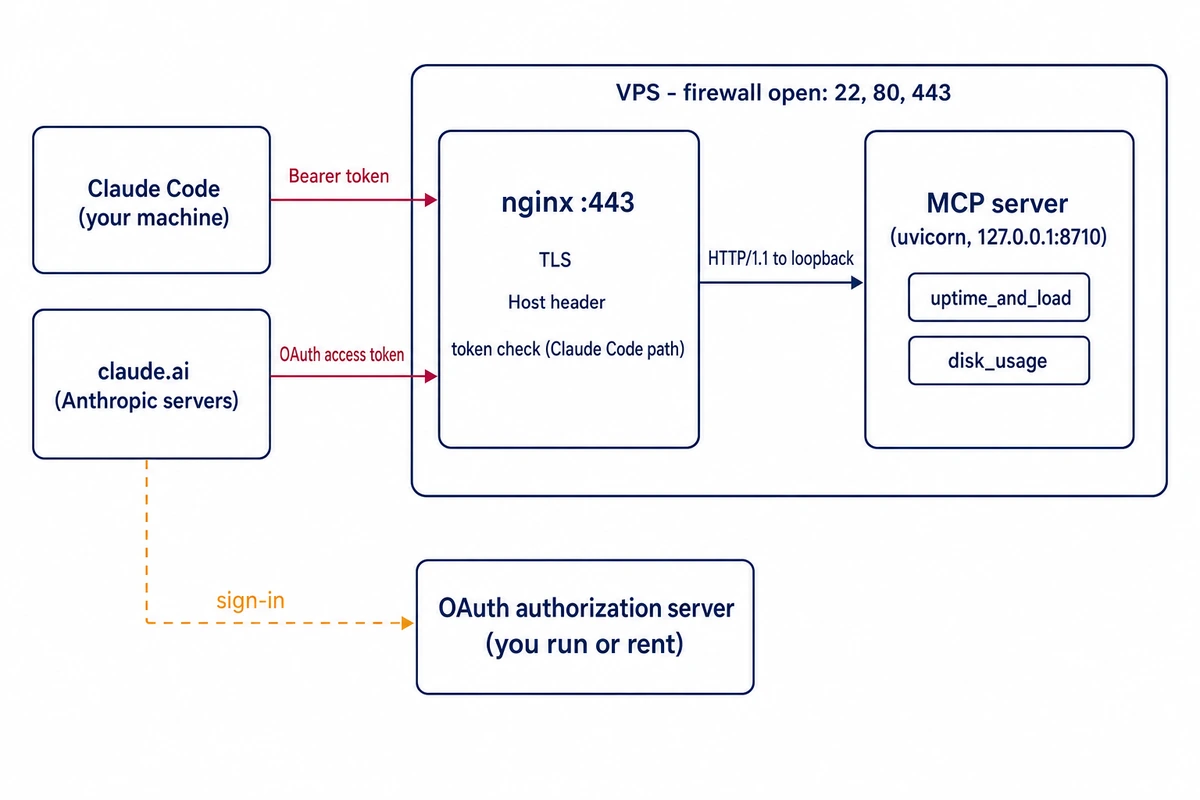
Requirements for a remote MCP server on a VPS
You need a VPS and a hostname you control.
- Ubuntu 24.04 with sudo, SSH already locked down as in the first-half-hour hardening steps for a fresh Ubuntu server.
- A DNS A record from
ops-mcp.example.netto your VPS’s public IPv4 address. claude.ai connectors are IPv4-only. Any DNS host works, including Hostry’s free DNS hosting. - Python 3.12, the Ubuntu 24.04 default (PyPI lists
>=3.10). - Node.js 22.23.4+ or 24.22.1+ for MCP Inspector 2.16.0, on the machine you test from. Ubuntu’s apt Node 18.19.1 fails at run time.
- Inbound 22, 80 and 443 only, set in the built-in firewall of the Hostry VPS control panel (or your provider’s equivalent); 80 serves the certificate check and the HTTPS redirect. Containers can publish ports around UFW, as shown in what UFW does not see when an AI agent runs on a VPS. Not reproduced in the lab.
If you still need a server, a KVM VPS from $6 a month in any of 18+ locations is enough. The MCP process used about 70-77 MB of memory across two runs.
Write the server with the MCP Python SDK 2.x
Version 2.0 of the official Python SDK (July 28, 2026) renamed the main class, so v1 examples no longer import. Write against 2.3.0 and set the allowed host names now, because the default rejects every request that comes through a proxy.
sudo apt update && sudo apt install -y python3.12-venv nginx certbot python3-certbot-nginx
sudo useradd --system --home-dir /opt/srvinfo-mcp --shell /usr/sbin/nologin srvinfo
sudo mkdir -p /opt/srvinfo-mcp /etc/srvinfo-mcp
cd /opt/srvinfo-mcp
sudo python3.12 -m venv venv2
sudo venv2/bin/pip install "mcp==2.3.0"
Save the server as /opt/srvinfo-mcp/server_v2.py. It reads its settings from environment variables, so one file serves every auth path below.
Full file: server_v2.py (109 lines)
"""srvinfo: a read-only MCP server that reports this VPS's uptime, load and disk use.

mcp==2.3.0 (v2 line). Nothing here runs shell commands or reads arbitrary paths.
Settings come from environment variables (set in /etc/srvinfo-mcp/env):
  SRVINFO_ALLOWED_HOSTS   comma list for the Host check, e.g. "ops-mcp.example.net,ops-mcp.example.net:*"
                          empty -> SDK default (localhost-only auto allowlist)
                          "off" -> disable the Host/Origin check (not recommended)
  SRVINFO_STATELESS       "1" -> stateless_http=True
  SRVINFO_TOKEN           if set, a static bearer token is required (TokenVerifier)
  SRVINFO_PUBLIC_URL      public URL of /mcp, used for OAuth protected-resource metadata
  SRVINFO_ISSUER          authorization server URL advertised in that metadata
  SRVINFO_MAX_BODY        max_request_body_size in bytes (SDK default 4 MiB)
"""

import hmac
import os
import shutil
import time

from mcp.server.auth.provider import AccessToken, TokenVerifier
from mcp.server.auth.settings import AuthSettings
from mcp.server.mcpserver import MCPServer
from mcp.server.transport_security import TransportSecuritySettings
from starlette.requests import Request
from starlette.responses import JSONResponse

# Only these mount points can be queried; the caller picks from a fixed list.
ALLOWED_MOUNTS = ("/", "/var", "/home", "/tmp")


class StaticTokenVerifier(TokenVerifier):
    """Accept one long random token. Good for Claude Code / Inspector, not an OAuth flow."""

    def __init__(self, token: str) -> None:
        self._token = token

    async def verify_token(self, token: str) -> AccessToken | None:
        if hmac.compare_digest(token, self._token):
            return AccessToken(token=token, client_id="static", scopes=["srvinfo:read"], expires_at=None)
        return None


token = os.environ.get("SRVINFO_TOKEN", "")
public_url = os.environ.get("SRVINFO_PUBLIC_URL", "")
issuer = os.environ.get("SRVINFO_ISSUER", "https://auth.example.net")

kwargs = {}
if token:
    kwargs["token_verifier"] = StaticTokenVerifier(token)
    kwargs["auth"] = AuthSettings(
        issuer_url=issuer,
        resource_server_url=public_url or "http://127.0.0.1:8710/mcp",
        required_scopes=["srvinfo:read"],
    )

mcp = MCPServer("srvinfo", instructions="Read-only status of this server.", **kwargs)


@mcp.tool()
def uptime_and_load() -> dict:
    """Return uptime in seconds and the 1/5/15-minute load averages."""
    with open("/proc/uptime") as f:
        up = float(f.read().split()[0])
    l1, l5, l15 = os.getloadavg()
    return {"uptime_seconds": round(up), "load": [l1, l5, l15], "cpus": os.cpu_count(), "checked_at": int(time.time())}


@mcp.tool()
def disk_usage(mount: str = "/") -> dict:
    """Disk use for one of the allowed mount points: /, /var, /home, /tmp."""
    if mount not in ALLOWED_MOUNTS:
        raise ValueError(f"mount must be one of {ALLOWED_MOUNTS}")
    u = shutil.disk_usage(mount)
    return {"mount": mount, "total_gb": round(u.total / 1e9, 1), "used_pct": round(100 * u.used / u.total, 1)}


@mcp.custom_route("/health", methods=["GET"])
async def health(_: Request) -> JSONResponse:
    return JSONResponse({"ok": True})


def _security() -> TransportSecuritySettings | None:
    raw = os.environ.get("SRVINFO_ALLOWED_HOSTS", "").strip()
    if not raw:
        return None  # SDK default: auto allowlist for 127.0.0.1/localhost only
    if raw == "off":
        return TransportSecuritySettings(enable_dns_rebinding_protection=False)
    hosts = [h.strip() for h in raw.split(",") if h.strip()]
    origins = [f"https://{h}" for h in hosts if not h.endswith(":*")]
    return TransportSecuritySettings(allowed_hosts=hosts, allowed_origins=origins)


# ASGI app for uvicorn (needed for --workers and --proxy-headers)
app = mcp.streamable_http_app(
    stateless_http=os.environ.get("SRVINFO_STATELESS") == "1",
    transport_security=_security(),
    max_request_body_size=int(os.environ.get("SRVINFO_MAX_BODY", 4 * 1024 * 1024)),
)

if __name__ == "__main__":
    # Simple path without uvicorn CLI flags: host/port only on run() in v2.
    # run() builds its own app, so pass the same settings again (the module-level app is not used here).
    mcp.run(
        transport="streamable-http",
        host="127.0.0.1",
        port=8710,
        stateless_http=os.environ.get("SRVINFO_STATELESS") == "1",
        transport_security=_security(),
    )
mcp.server.mcpserver vs mcp.server.fastmcp
Copy a v1 example into a 2.x install and it stops at the first import:
$ venv2/bin/python -c "from mcp.server.fastmcp import FastMCP"
ModuleNotFoundError: No module named 'mcp.server.fastmcp'. This is mcp 2.x, where FastMCP was renamed to MCPServer (from mcp.server.mcpserver import MCPServer) and other APIs changed; see the migration guide at https://py.sdk.modelcontextprotocol.io/v2/migration/#fastmcp-renamed-to-mcpserver or pin 'mcp<2' to keep running v1 code.
The v1 file (mcp 1.30.0) differs in four places. Besides the import, the v2 constructor takes no host, port or transport options, and transport_security moves from mcp.settings into streamable_http_app(). Host and port go to run(); port= anywhere else raises TypeError. Pin mcp>=2.3,<3 for this file and mcp<2 for unmigrated v1 code.
In v2, python server_v2.py calls run(), which builds a fresh app and ignores settings given to streamable_http_app(). The file passes them twice for that reason; the service uses uvicorn and the module-level app.
Set allowed_hosts before nginx
The SDK checks the Host header to block DNS rebinding and by default accepts only 127.0.0.1, localhost and [::1] with a port. Behind nginx with proxy_set_header Host $host, requests arrive with the bare public name, so the default answers 421. The bare name in allowed_hosts fixes port 443; ops-mcp.example.net:* alone still gets 421, because :* needs a port in the header and $host never has one:
v2 | allowed=[ops-mcp.example.net:*] | Host $host | :443 | HTTP/2 421 | host_sent=ops-mcp.example.net | Invalid Host headerList both forms; mcp 1.30.0 behaved the same. The full matrix sits in the errors section. Do not pass host="0.0.0.0" to the SDK: that switches the check off, and any Host got 200.
Run it as a service on 127.0.0.1
The service runs as the unprivileged srvinfo user and restarts after a crash. It listens on the loopback address only, so nothing outside the VPS can reach port 8710.
sudo install -m 640 -o root -g srvinfo /dev/null /etc/srvinfo-mcp/env
sudoedit /etc/srvinfo-mcp/env
# /etc/srvinfo-mcp/env chown root:srvinfo, chmod 640
SRVINFO_ALLOWED_HOSTS=ops-mcp.example.net,ops-mcp.example.net:*
# SRVINFO_TOKEN=<token from openssl rand -hex 32>
# SRVINFO_PUBLIC_URL=https://ops-mcp.example.net/mcp
# SRVINFO_ISSUER=https://auth.example.net
# SRVINFO_STATELESS=1Save the unit as /etc/systemd/system/srvinfo-mcp.service:
[Unit]
Description=srvinfo MCP server (read-only status tools)
After=network.target

[Service]
User=srvinfo
Group=srvinfo
WorkingDirectory=/opt/srvinfo-mcp
EnvironmentFile=/etc/srvinfo-mcp/env
ExecStart=/opt/srvinfo-mcp/venv2/bin/uvicorn server_v2:app --host 127.0.0.1 --port 8710
Restart=on-failure
RestartSec=3
NoNewPrivileges=true
ProtectSystem=strict
ProtectHome=read-only
PrivateTmp=true

[Install]
WantedBy=multi-user.target
sudo systemctl daemon-reload
sudo systemctl enable --now srvinfo-mcp
curl -s -w " %{http_code}\n" http://127.0.0.1:8710/health{"ok":true} 200After any later change to the env file or the unit, run sudo systemctl daemon-reload && sudo systemctl restart srvinfo-mcp. To confirm the loopback-only bind, sudo ss -ltnp | grep 8710 should list 127.0.0.1:8710 and nothing on 0.0.0.0. The unit passed systemd-analyze verify but was never started: the lab had no systemd, so the same command ran as srvinfo via runuser.
/health is a custom route and skips the Host check. An MCP request to 127.0.0.1 does not, because an explicit allowed_hosts list removes the localhost defaults. For local checks, send the public name:
curl -i http://127.0.0.1:8710/mcp -H "Host: ops-mcp.example.net" \
  -H 'Content-Type: application/json' -H 'Accept: application/json, text/event-stream' \
  -d '{"jsonrpc":"2.0","id":1,"method":"initialize","params":{"protocolVersion":"2025-11-25","capabilities":{},"clientInfo":{"name":"curl","version":"8"}}}'
(without -H "Host: ...")
HTTP/1.1 421 Misdirected Request
Invalid Host header
(with it)
HTTP/1.1 200 OK
content-type: text/event-stream
mcp-session-id: 75df211e02254b089adacd900fa4ef5a
x-accel-buffering: noNginx reverse proxy and TLS for the MCP server
nginx holds the certificate, answers on 443 and passes each request to 127.0.0.1:8710. The site goes live with the token check already on. Get the certificate first, because the site file points at files certbot creates.
sudo certbot certonly --nginx -d ops-mcp.example.net
sudo certbot renew --dry-run
Issuance was not reproduced (no public DNS in the lab); the commands follow the certbot documentation. Next, generate a token with openssl rand -hex 32 and put it in /etc/nginx/conf.d/mcp-token.conf, readable by root only:
# /etc/nginx/conf.d/mcp-token.conf   chmod 600, owner root (nginx master reads it as root)
map_hash_bucket_size 128;
map $http_authorization $mcp_token_ok {
    default 0;
    "Bearer <token from openssl rand -hex 32>" 1;
}
sudo chmod 600 /etc/nginx/conf.d/mcp-token.confSave the site as /etc/nginx/sites-available/srvinfo-mcp and uncomment the if ($mcp_token_ok = 0) line in location /mcp before you enable it. If you chose No sign-in or the OAuth path, leave that line commented and skip the token file.
Full file: srvinfo-mcp nginx site (44 lines)
# /etc/nginx/sites-available/srvinfo-mcp   (nginx 1.24 from Ubuntu 24.04 apt)
# The two ssl_ files are created by "certbot certonly --nginx" before this site is enabled.
upstream srvinfo_mcp {
    server 127.0.0.1:8710;
    keepalive 16;
}

server {
    listen 80;
    server_name ops-mcp.example.net;
    return 301 https://$host$request_uri;
}

server {
    listen 443 ssl http2;              # "http2 on;" needs nginx 1.25.1+, 1.24 rejects it
    server_name ops-mcp.example.net;

    ssl_certificate     /etc/letsencrypt/live/ops-mcp.example.net/fullchain.pem;
    ssl_certificate_key /etc/letsencrypt/live/ops-mcp.example.net/privkey.pem;

    client_max_body_size 4m;           # nginx default is 1m; SDK's own limit is 4 MiB

    location /mcp {
        # optional static token at nginx (map in /etc/nginx/conf.d/mcp-token.conf):
        # if ($mcp_token_ok = 0) { add_header WWW-Authenticate "Bearer" always; return 401; }
        proxy_pass http://srvinfo_mcp;
        proxy_http_version 1.1;
        proxy_set_header Connection "";
        proxy_set_header Host $host;                 # bare name -> matches allowed_hosts "ops-mcp.example.net"
        proxy_set_header X-Forwarded-For $proxy_add_x_forwarded_for;
        proxy_set_header X-Forwarded-Proto $scheme;  # keeps redirects on https; uvicorn trusts the loopback proxy
        proxy_buffering off;                          # SDK SSE responses already send X-Accel-Buffering: no
        proxy_cache off;
        proxy_read_timeout 120s;                      # matters for json_response=True; SSE pings every 15 s
    }

    location = /health { proxy_pass http://srvinfo_mcp; proxy_set_header Host $host; }

    location /.well-known/oauth-protected-resource {
        proxy_pass http://srvinfo_mcp;
        proxy_set_header Host $host;
        proxy_set_header X-Forwarded-Proto $scheme;
    }
}
sudo ln -s /etc/nginx/sites-available/srvinfo-mcp /etc/nginx/sites-enabled/
sudo nginx -t && sudo systemctl reload nginxThree lines in that file answer errors from the lab. listen 443 ssl http2; is there because nginx 1.24 rejects the newer form, which needs 1.25.1:
nginx: [emerg] unknown directive "http2" in /opt/lab/nginx/sites/srvinfo-mcp.conf:10
nginx: configuration file /opt/lab/nginx/nginx.conf test failed
client_max_body_size 4m matches the SDK’s own 4 MiB request limit. At nginx’s default of 1 MiB, a 2 MiB tool call never reached the server:
### nginx client_max_body_size 1m
body 0.5 MiB -> HTTP/2 200
body 2 MiB   -> HTTP/2 413  server: nginx/1.24.0 (Ubuntu) <title>413 Request Entity Too Large</title>
### nginx client_max_body_size 8m
body 2 MiB   -> HTTP/2 200
body 5 MiB   -> HTTP/2 413  Request body too large        (plain text from the SDK)
X-Forwarded-Proto keeps redirects on HTTPS; uvicorn 0.54 trusts it from 127.0.0.1 without flags. If nginx connects from another address (a Docker bridge, another VM), add --forwarded-allow-ips with that address. Otherwise the trailing-slash redirect points to http:// and the SDK client refuses it (seen with a lab variant mounted at /mcp/).
Streaming, buffering and the 60-second timeout
By default the SDK answers tool calls as SSE, a response that stays open and carries messages as they come. On those responses proxy_buffering made no difference, because the SDK sends X-Accel-Buffering: no. A 70-second tool also finished under nginx’s default 60-second proxy_read_timeout, thanks to a ping every 15 seconds. Only json_response=True hit the timeout:
### json_response=True, proxy_read_timeout 60s, slow_check 70 s (with or without progress):
t= 60.1s HTTP/2 504
nginx error log: upstream timed out (110: Connection timed out) while reading response header from upstream
With JSON responses, set the timeout above your slowest tool. The 120 s in the site file is an untested starting value. proxy_buffering off stays because it costs nothing.
Check the result from outside the VPS. The trailing-slash POST should come back as a redirect to /mcp on HTTPS:
curl -sI http://ops-mcp.example.net/mcp
curl -s https://ops-mcp.example.net/health
curl -si https://ops-mcp.example.net/mcp/ -H "Authorization: Bearer <token>" \
  -H 'Content-Type: application/json' -H 'Accept: application/json, text/event-stream' \
  -d '{"jsonrpc":"2.0","id":1,"method":"initialize","params":{"protocolVersion":"2025-11-25","capabilities":{},"clientInfo":{"name":"curl","version":"8"}}}'
$ curl -sI http://ops-mcp.example.net/mcp
HTTP/1.1 301 Moved Permanently
Location: https://ops-mcp.example.net/mcp
$ curl -s https://ops-mcp.example.net/health
{"ok":true}
(POST initialize to /mcp/)
HTTP/2 307
location: https://ops-mcp.example.net/mcpThese lines were recorded with the token check off; with the right header the request passes nginx the same way.
Authentication: a bearer token for Claude Code, OAuth for claude.ai
The token check you just enabled serves Claude Code and the Inspector, which can send a header. claude.ai needs OAuth or No sign-in, each with different settings.
Claude Code only: a token checked by nginx
Keep the map_hash_bucket_size 128 line. At nginx 1.24’s default of 64, any map key over 46 characters fails the config test. “Bearer ” plus a hex token is 71 characters; with a base64 token it is 51:
nginx: [emerg] could not build map_hash, you should increase map_hash_bucket_size: 64
nginx: configuration file /opt/lab/nginx/nginx.conf test failed

key length 46 -> successful
key length 47 -> could not build map_hash
key length 51 ("Bearer " + openssl rand -base64 32) -> could not build map_hash
key length 71 ("Bearer " + openssl rand -hex 32)    -> could not build map_hash
With the line in place, no header got 401 with www-authenticate: Bearer, a wrong token 401, the right one 200. Read the nginx -t output every time: after a failed test the reload is refused and nginx keeps the old config, here one without any token check.
An if ($http_authorization != "Bearer ...") test also works but leaves the token in a world-readable file.
claude.ai: what the SDK gives and what you must add
claude.ai signs in with OAuth, and the SDK covers only the resource-server half. On this path the nginx token check must stay off: with it on, clients get nginx’s bare www-authenticate: Bearer 401 and never see the SDK’s resource_metadata pointer. Set SRVINFO_TOKEN, SRVINFO_PUBLIC_URL and SRVINFO_ISSUER in the env file and restart. SRVINFO_TOKEN switches the SDK’s auth on, and the demo verifier accepts only that value. The SDK then answers:
POST /mcp, no token / wrong token:
HTTP/2 401
www-authenticate: Bearer error="invalid_token", error_description="Authentication required", resource_metadata="https://ops-mcp.example.net/.well-known/oauth-protected-resource/mcp"

GET /.well-known/oauth-protected-resource/mcp -> HTTP/2 200, application/json
{ "resource": "https://ops-mcp.example.net/mcp", "authorization_servers": ["https://auth.example.net"],
  "scopes_supported": ["srvinfo:read"], "bearer_methods_supported": ["header"] }
GET /.well-known/oauth-authorization-server    404
GET /.well-known/openid-configuration          404
GET /register 404   GET /authorize 404   GET /token 404
An OAuth client follows that chain to the advertised authorization server and stops there (the Inspector: getaddrinfo ENOTFOUND auth.example.net). The SDK’s authorization page confirms the server “never issues a token”, and advises new servers against its built-in auth_server_provider.
So claude.ai needs an identity provider you run or rent, such as Keycloak or Auth0. Anthropic’s connector troubleshooting page lists three groups of requirements. For registration, the provider needs Dynamic Client Registration, Client ID Metadata Documents or a pre-registered client. For the token flow, it must advertise S256 PKCE and answer /token within 10 seconds. For the network, it must be reachable from Anthropic’s egress range.
Then replace StaticTokenVerifier with one that checks the provider’s tokens, and change the if token: condition that turns auth on. Set validate_token_resource=True if the provider binds tokens to your URL (otherwise check aud in the verifier); unset, 2.3.0 warns at startup and skips that check. This path was not built in the lab.
No sign-in, and the Request headers beta
With No sign-in, anyone who learns the URL can call the tools. Choose it only if you accept that a stranger can read this server’s uptime, load and disk use. If your organization’s Add custom connector dialog shows a Request headers section, keep the nginx token on instead. Choose No sign-in, pick the authorization header and enter Bearer plus the token, since Claude adds no prefix. That section is a beta “available to a limited set of organizations”.
Test with the Inspector CLI
Run the Inspector from a machine outside the VPS before you add the server to Claude. It performs the MCP handshake and calls the tools through nginx and TLS.
npm i @modelcontextprotocol/inspector@2.16.0
npx mcp-inspector --cli https://ops-mcp.example.net/mcp --transport http \
  --header "Authorization: Bearer <token>" --method tools/list
npx mcp-inspector --cli https://ops-mcp.example.net/mcp --transport http \
  --header "Authorization: Bearer <token>" --protocol-era modern \
  --method tools/call --tool-name disk_usage --tool-arg mount=/var
{ "_meta": { "io.modelcontextprotocol/serverInfo": { "name": "srvinfo", "version": "" } },
"content": [ { "type": "text", "text": "{\n \"mount\": \"/var\",\n \"total_gb\": 270.6,\n \"used_pct\": 14.2\n}" } ], "isError": false }Without the header, the Inspector does not say the token is missing. It prints {"error":{"code":"auth_required","message":"Interactive OAuth requires a TTY on stdin or stderr (or MCP_AUTO_OPEN_ENABLED=true). ..."}}. The lab set NODE_EXTRA_CA_CERTS for its local CA; a Let’s Encrypt certificate needs nothing. A mount outside the allowlist returns "Error executing tool disk_usage". With apt Node 18 the Inspector stops at Error running MCP Inspector: CustomEvent is not defined.
Optional: protocol diagnostics with the SDK client
The SDK client is useful when you need to force a protocol era, as in the workers section. It takes the URL, a mode (legacy, auto or 2026-07-28) and an optional token. Install the SDK in a venv on your own machine (pip install "mcp==2.3.0"), activate it, and run the script with that venv’s python.
Full file: client_v2.py (34 lines)
"""SDK client check (mcp==2.3.0): connect, list tools, call both tools.

usage: client_v2.py URL [legacy|auto|2026-07-28] [TOKEN]
CA file for the lab's local CA: env LAB_CA (on a real VPS with Let's Encrypt you do not need it).
"""

import asyncio
import os
import ssl
import sys

import httpx2
from mcp import Client
from mcp.client.streamable_http import streamable_http_client


async def main() -> None:
    url = sys.argv[1]
    mode = sys.argv[2] if len(sys.argv) > 2 else "auto"
    token = sys.argv[3] if len(sys.argv) > 3 else ""
    ctx = ssl.create_default_context(cafile=os.environ["LAB_CA"]) if os.environ.get("LAB_CA") else True
    headers = {"Authorization": f"Bearer {token}"} if token else {}
    http = httpx2.AsyncClient(verify=ctx, headers=headers, trust_env=False, timeout=httpx2.Timeout(30, read=300))
    async with http:
        async with Client(streamable_http_client(url, http_client=http), mode=mode) as client:
            print("protocol_version:", client.protocol_version)
            tools = await client.list_tools()
            print("tools:", [t.name for t in tools.tools])
            for name, args in (("uptime_and_load", {}), ("disk_usage", {"mount": "/"})):
                r = await client.call_tool(name, args)
                print(name, "->", r.structured_content or r.content[0].text)


asyncio.run(main())
$ python client_v2.py https://ops-mcp.example.net/mcp legacy
protocol_version: 2025-11-25
tools: ['uptime_and_load', 'disk_usage']
uptime_and_load -> { "uptime_seconds": 701, "load": [0.39, 0.25, 0.12], "cpus": 2, "checked_at": 1795682723 }
disk_usage -> { "mount": "/", "total_gb": 270.6, "used_pct": 14.0 }The block is condensed; 2.3.0 prints each result as indented JSON. When something fails, read journalctl -u srvinfo-mcp first: on a 421 the client printed only Server returned an error response, while the server log named the rejected Host.
Connect the remote MCP server to Claude
Claude Code connects from your machine with one command. claude.ai connects from Anthropic’s servers, so the VPS must pass public-reachability checks first.
claude mcp add --transport http srvinfo https://ops-mcp.example.net/mcp \
  --header "Authorization: Bearer <token from openssl rand -hex 32>"
claude mcp list
srvinfo: https://ops-mcp.example.net/mcp (HTTP) - √ ConnectedThat line came from Claude Code 2.1.332 against this setup with the nginx token on. The Claude Code MCP documentation covers the scopes and the /mcp status view. Avoid --scope project with a token, because it writes a shared .mcp.json. If Claude Code itself lives on a headless server, signing in to Claude Code without a browser on the VPS comes first.
claude.ai was not tested; these steps follow Anthropic’s docs. Open Customize > Connectors > Add custom connector, enter the URL without a trailing slash and choose the authentication mode. On Team and Enterprise an Owner adds it under Organization settings > Connectors; Free allows one custom connector. Before you click Add, check:
dig +short ops-mcp.example.netfrom outside returns only your public IPv4; a private, CGNAT or IPv6-only answer fails before nginx sees anything.curl -sI https://ops-mcp.example.net/mcpshows no redirect to another host. Claude drops theAuthorizationheader on such a redirect.- nginx serves MCP on 443. In issue #373 of the claude-ai-mcp tracker, a maintainer said the claude.ai backend only egresses on port 443; the official pages say nothing about ports.
- A CDN, WAF or IP allowlist in front of nginx lets in 160.79.104.0/21 and 153.61.208.0/20, Anthropic’s outbound ranges on its IP address reference page.
- For OAuth,
/.well-known/oauth-protected-resource/mcpreturns 200, and so does the authorization server’s metadata.
When to run more than one MCP worker
Keep one uvicorn worker on a personal server. More workers break older clients, because each worker keeps its sessions in its own memory and a follow-up on another worker is unknown there.
With --workers 2, clients on the 2025-11-25 protocol (the legacy era) failed at random, while 2026-07-28 clients, which send no session ID at all, passed:
mode=legacy runs=10 ok=6 fail=4
  first error: mcp.shared.exceptions.MCPError: Session not found
mode=2026-07-28 runs=10 ok=10 fail=0
server log: Rejected request with unknown or expired session ID: b877bab0f1dd4c1aac9ee4acabdf305a
            INFO:     127.0.0.1:0 - "POST /mcp HTTP/1.1" 404 Not Found
Hashing on the session header in nginx across two processes does not give sticky sessions: initialize carries no Mcp-Session-Id yet, so it lands on any process, and later requests may hash to the other one.
### upstream { hash $http_mcp_session_id consistent; ... }
mode=legacy runs=10 ok=9 fail=1
inspector era=legacy runs=10 ok=4 fail=6
If you do need several workers, stateless mode fixed the error in the lab. It has a price for legacy clients: the SDK deployment page says “the cost is the server-to-client back-channel (sampling, push elicitation, roots/list) and resumability”. These two tools use none of that. Set SRVINFO_STATELESS=1 in the env file, add --workers 2 to ExecStart, then reload and restart the unit:
mode=legacy runs=10 ok=10 fail=0
mode=2026-07-28 runs=5 ok=5 fail=0
inspector era=legacy runs=20 ok=20 fail=0
ip_hash also passed, but only because every test came from one address. Which protocol era claude.ai speaks is not documented, so plan for legacy clients.
Fix MCP 421 and Session not found errors
Each row is a message from the lab with its cause and the fix that worked there.
| Symptom | Cause | Fix |
|---|---|---|
421 Misdirected Request, Invalid Host header | Public name missing from allowed_hosts, only the :* form listed, or no Host line in nginx | List the bare name and name:*; keep proxy_set_header Host $host |
404, -32600 Session not found | Several workers or processes, legacy-era client | One worker, or stateless_http=True; header hashing does not help |
could not build map_hash | Token key over 46 characters at bucket size 64 | map_hash_bucket_size 128; |
HTML 413 Request Entity Too Large | nginx default 1 MiB body limit | client_max_body_size 4m; |
504 Gateway Time-out at 60 s | json_response=True with a slow tool | Keep SSE, or raise proxy_read_timeout |
CustomEvent is not defined | Inspector 2.16.0 on Node 18 | Node 22.23.4+ or 24.22.1+ |
No module named 'mcp.server.fastmcp' | v1 code on mcp 2.x | Port to MCPServer, or pin mcp<2 |
The full 421 matrix below sends initialize through nginx on 443 and on a test listener at 8443; 1.30.0 and 2.3.0 gave identical rows. With no proxy_set_header Host line at all, nginx sends the upstream name and the log prints Invalid Host header: srvinfo_mcp.
allowed_hosts                                Host var     :443          :8443
[] (SDK default, localhost only)             $host        421           421
[]                                           $http_host   421           421   (sent "ops-mcp.example.net:8443")
[ops-mcp.example.net]                        $host        200           200   (port stripped)
[ops-mcp.example.net]                        $http_host   200           421   (sent "ops-mcp.example.net:8443")
[ops-mcp.example.net:*]                      $host        421           421   (":*" needs a port to be present)
[ops-mcp.example.net:*]                      $http_host   421           200
[ops-mcp.example.net, ops-mcp.example.net:*] $host        200           200
[ops-mcp.example.net, ops-mcp.example.net:*] $http_host   200           200
Keep it running
To rotate the token, put a new value in mcp-token.conf, run sudo nginx -t && sudo systemctl reload nginx, then remove and re-add the server in Claude Code with the new header. Keep the SDK pinned to mcp>=2.3,<3. Upgrade inside the venv, restart the unit and repeat the Inspector check before you rely on it again.