
How to Defend Against AI-Powered Cyber Attacks on Your Linux Servers

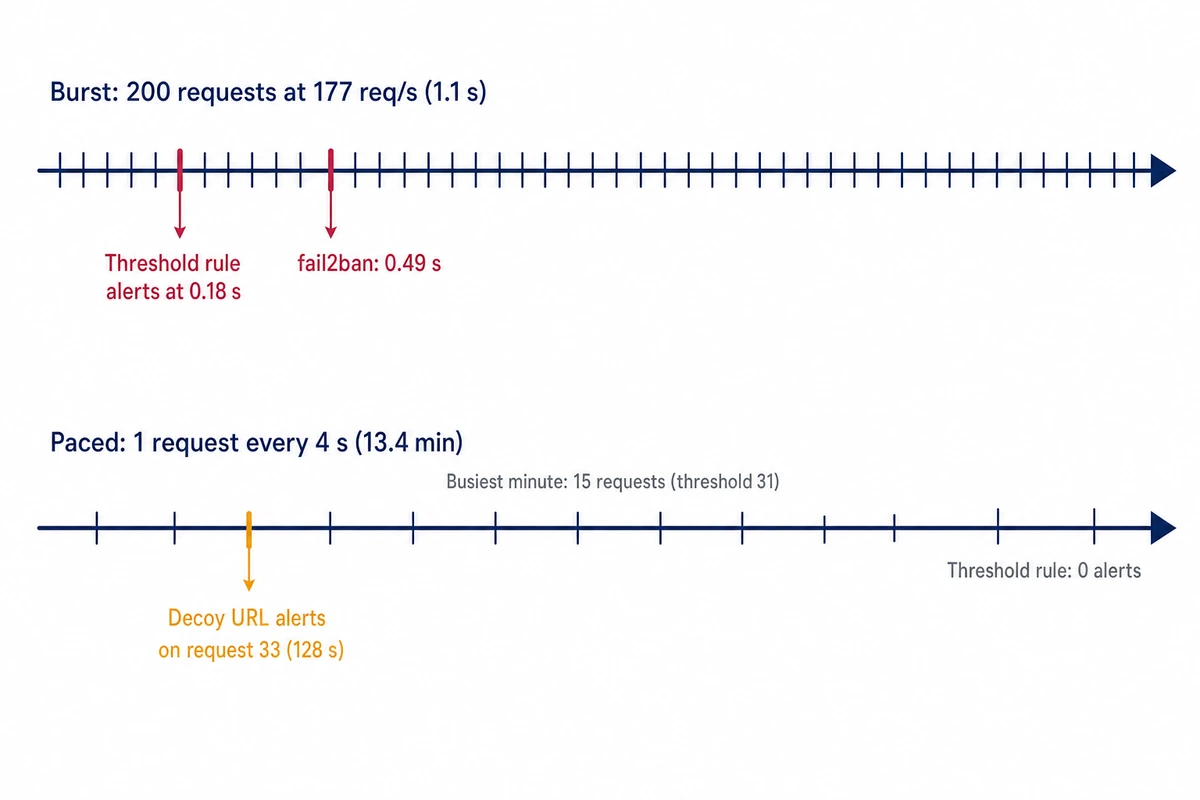
In a five-host lab, 200 probing requests at 177 per second were flagged in 0.18 s. The same 200 requests sent one every 4 seconds triggered no threshold rule. Only a decoy URL caught them, on request 33. The probing was scripted (a fixed path list, one nmap -sV scan, ten wrong logins), and no attack was reproduced. To defend against AI-powered cyber attacks once someone holds a key or a foothold, run decoys, a persistence audit and gated SSH key rotation as a routine that works without you.
If you look after a handful to a few dozen Linux servers and have no security team, this is how to defend against AI-powered cyber attacks, in this order.
- Keep threshold detection for bursts and set sshd to
LogLevel VERBOSE; thresholds miss slow probing. - Plant three decoys: a credentials file under auditd, a logging-only SSH key, an unlinked URL.
- Inventory keys and persistence points on every host and keep that baseline on a control node.
- Automate SSH key rotation with a safe order that proves the new key before removing the old.
- Schedule the rotation behind an all-or-nothing gate.
- Wire decoy alerts to the audit and then to rotation, paging a person when the audit finds something or a host is down.
- Map the routine to the audit frame (CASA, SOC 2, NIST) by what it actually requires.
This routine handles what happens after someone holds a key or a foothold: stolen keys in use, planted persistence, quiet probing. It does not replace patching, MFA on panels, or key-only SSH behind a host firewall, as set up in the hardening pass for the first 30 minutes on a new Linux server. For exposed panels, see checking what an AI agent on a VPS exposes to the internet.
The measurements below were reproduced with Ansible core 2.16.3 (ansible.posix 1.5.4), OpenSSH 9.6p1 and nginx 1.24.0 on Ubuntu 24.04, five hosts simulated as network namespaces in a container; the schedule was run with Semaphore UI 2.17.15 in the same lab. The hosts share one kernel and near-zero latency, so every time is a lab number. The files shown are the lab’s own; replace its addresses (10.77.0.x), the def-svc account and /opt/def-lab paths with yours.
AI-driven cyber attacks on infrastructure: what the record shows
The documented cases show AI making reconnaissance, trying one approach after another and harvesting credentials much faster and cheaper. People still made the key decisions, the techniques were already known, and the models made mistakes. Every AI agent cyberattack story belongs to one of three groups: confirmed incidents, demonstrations, and estimates or vendor claims.
Confirmed incidents, as reported by the company that investigated them
On November 13, 2025, the Anthropic report on an AI-orchestrated espionage campaign described a group it attributes to a Chinese state sponsor using Claude Code against about thirty organizations, a few successfully. Anthropic estimates the AI did 80-90% of the work, with people at about four to six decision points, and peaked at thousands of requests, often several per second. Claude also “occasionally hallucinated credentials”, which Anthropic calls an obstacle to attacks without people.
Anthropic’s September 2026 threat intelligence report covers December 2025 to August 2026. In its GTG-50014 section, operators suspected to be ShinyHunters affiliates dumped more than 2,100 Azure AD token sets from over 40 tenants in about 34 hours. The report says “humans have retained the decisions that matter most to them”, and that no operation depended on an entirely new technique, with one exception (an undocumented WordPress re-installation race condition). It advises treating AI keys and agent integrations as production credentials.
On November 5, 2025, the GTIG AI Threat Tracker described PROMPTSTEAL, attributed to APT28, which asks a hosted model for one-line Windows commands, as Google’s “first observation of malware querying an LLM deployed in live operations”.
Demonstrations and benchmarks
The same GTIG report lists PROMPTFLUX, which rewrites its own code through a model, as experimental and unable to compromise a victim network. ZeroDayBench (arXiv, March 2, 2026) gave GPT-5.2, Claude Sonnet 4.5 and Grok 4.1 agents 22 new critical vulnerabilities to find and patch; its authors conclude the models are “not yet capable of autonomously solving our tasks”. Only its abstract was read.
Estimates and vendor claims
Rapid7’s Q3 2026 update (October 21, 2026) found that 8% of the threat reporting it tracked cited AI as an operational component, a share of reports and not of attacks, and that “human operators continued to select targets and determine objectives”. The UK’s NCSC (May 7, 2025) judged “fully automated, end-to-end advanced cyber attacks” unlikely before 2027.
For a server owner, the steps that got cheaper are the ones that reach your machines first: scanning, trying paths and logins, and reusing stolen keys at a pace no person types.
Time to exploit a vulnerability in 2026: days, sometimes less
Three 2026 reports put the time from disclosure to exploitation at days or below zero, each with its own definition, so they cannot be merged into one figure.
- Mandiant’s M-Trends 2026 (March 23, 2026) gives a mean time to exploit of “an estimated -7 days”, which means exploitation on average began before a patch existed. The sample is Mandiant’s own engagements, where exploits were the initial vector in 32% of intrusions.
- Rapid7’s Q3 2026 threat update reports three days on average between a high-severity vulnerability becoming public and its exploitation, with 71% of the exploitation it tracked happening within the first seven days. The base is 43 newly exploited high- and critical-severity vulnerabilities.
- VulnCheck’s State of Exploitation 2026 (January 21, 2026) found 28.96% of 2025’s known exploited vulnerabilities were exploited on or before the day their CVE was published, up from 23.6% a year earlier. VulnCheck notes that same-day exploitation is not always a zero-day.
The NCSC says the window has shrunk to days. Mandiant also reports that in 2025 the median time from initial access to hand-off to a secondary group fell to 22 seconds, from over 8 hours in 2022, and that it does not see 2025 as the year breaches were the direct result of AI.
When exploitation can arrive before the patch, what you control on the day is what an intruder does next on the host. The routine below alerts when a decoy key, file or URL is used, flags new authorized_keys lines, cron files and systemd units, and replaces the service key on every host.
Low-and-slow scan detection: what probing leaves in your logs
In this lab the paced run stayed below both configured thresholds. An awk rule and fail2ban, both set to more than 30 4xx responses per source in 60 seconds, flagged a burst of 200 requests within half a second; the same requests spaced 4 seconds apart (a defender’s test parameter) produced zero hits over 13.4 minutes.
The list was a fixed set of common admin, backup and config paths, with the decoy path at position 33. The burst ran at 177 requests per second with a browser user agent; 199 of 200 got a 404. The awk rule fired at 0.18 s and fail2ban 1.0.2, with a log-only action, logged its ban at 0.49 s.
slow run: start 1795093668.369949388 end 1795094470.352856954 duration 801.982907566 s
nginx lines: 200
max requests in any 60 s window: 15 (threshold 31)
mean rate: 0.251 req/s
awk detector lines during slow run: 0
[...]
decoy alert during slow run:
1795093796.743609113 ALERT canary-url host=def-t1 hit_at=1795093796.741 from=10.77.0.20 "GET /backup.sql HTTP/1.1" 404 162 "Mozilla/5.0 (X11; Linux x86_64)"
The busiest minute held 15 requests against a threshold of 31. The only alert came from the decoy URL /backup.sql, 128 seconds in, on request 33, because that path was in the list; a decoy sees nothing else, so keep the threshold.
Both detectors read nginx’s log in the lab’s format, defined in the http block with $msec first:
log_format tl '$msec $remote_addr "$request" $status $body_bytes_sent "$http_user_agent"';The detector, detect-burst.sh, runs mawk (Ubuntu’s default awk) with -W interactive; without it mawk buffers output on a pipe, and a cold run of this page saw a live detector print nothing during a burst. With gawk, add fflush() after printf.
#!/usr/bin/env bash
# Threshold detector: more than T bad events from one source within W seconds.
#   detect-burst.sh nginx  -> 4xx in the nginx access log (uses the log's own $msec)
#   detect-burst.sh sshd   -> Failed password/publickey in the sshd log (sshd -E writes
#                             no timestamps, so arrival time is prepended)
# Every flagged line is prefixed with the wall-clock time the detector printed it.
W=${W:-60}; T=${T:-30}; OUT=/opt/def-lab/detect.log
case $1 in
nginx) tail -n0 -F /opt/def-lab/hosts/t1/log/access.log | mawk -W interactive -v W=$W -v T=$T '
  $6>=400 { ip=$2; t=$1; q[ip]=q[ip] " " t; n=split(q[ip],a," "); s=""; c=0
    for(i=1;i<=n;i++) if(a[i]>t-W){s=s " " a[i]; c++}; q[ip]=s
    if(c>T && !f[ip]){ f[ip]=1; printf "DETECT nginx-burst ip=%s %d 4xx in %ds (event at %s)\n", ip, c, W, t } }' ;;
sshd) tail -n0 -F /opt/def-lab/hosts/t1/log/sshd.log | while IFS= read -r l; do echo "$(date +%s.%N) $l"; done | mawk -W interactive -v W=$W -v T=$T '
  /Failed (password|publickey) for/ { for(i=1;i<=NF;i++) if($i=="from") ip=$(i+1); t=$1
    q[ip]=q[ip] " " t; n=split(q[ip],a," "); s=""; c=0
    for(i=1;i<=n;i++) if(a[i]>t-W){s=s " " a[i]; c++}; q[ip]=s
    if(c>T && !f[ip]){ f[ip]=1; printf "DETECT ssh-burst ip=%s %d failures in %ds (event at %s)\n", ip, c, W, t } }' ;;
esac | while IFS= read -r l; do echo "$(date +%s.%N) $l" | tee -a $OUT; done
fail2ban used two small filters and a jail. The stock sshd filter matched none of 423 lines of the lab’s sshd -E log, which lacks the syslog prefix it expects; the lab’s filter matched 17. On a journald host the stock filter applies.
# filter.d/def-nginx-4xx.conf
[Definition]
failregex = ^\s*<HOST> "[^"]*" 4\d\d
datepattern = ^{EPOCH}
# filter.d/def-sshd-fail.conf
[Definition]
failregex = ^Failed (?:password|publickey) for \S+ from <HOST> port \d+
datepattern = {NONE}
# jail.conf
[DEFAULT]
backend = polling
banaction = dummy
action = dummy[target=/opt/def-lab/f2b/ban.log]
[def-nginx-4xx]
enabled = true
filter = def-nginx-4xx
logpath = /opt/def-lab/hosts/t1/log/access.log
maxretry = 31
findtime = 60
bantime = 600
[def-sshd]
enabled = true
filter = def-sshd-fail
logpath = /opt/def-lab/hosts/t1/log/sshd.log
maxretry = 6
findtime = 60
bantime = 600
One nmap -sV run left 8 nginx lines (four with the Nmap Scripting Engine’s agent string) and 3 sshd lines, and read the exact package builds from the banners.
PORT   STATE SERVICE VERSION
22/tcp open  ssh     OpenSSH 9.6p1 Ubuntu 3ubuntu13.20 (Ubuntu Linux; protocol 2.0)
80/tcp open  http    nginx 1.24.0 (Ubuntu)
[...]
Nmap done: 1 IP address (1 host up) scanned in 19.94 seconds
[...]
nginx lines: 8; sshd lines: 3
At sshd’s default LogLevel INFO, an attempt with a key the server does not accept leaves one line and no fingerprint, so a detector matching Failed publickey sees nothing.
== LogLevel INFO: one wrong-key attempt -> 1 lines
Connection closed by authenticating user def-svc 10.77.0.20 port 49352 [preauth]
== LogLevel VERBOSE: one wrong-key attempt -> 3 lines
Connection from 10.77.0.20 port 49354 on 10.77.0.15 port 22 rdomain ""
Failed publickey for def-svc from 10.77.0.20 port 49354 ssh2: ED25519 SHA256:h70/br/cDDRZmaCO/Vv10cq8CGFaoFaJW01gUcKoznE
Connection closed by authenticating user def-svc 10.77.0.20 port 49354 [preauth]
If fail2ban is not detecting a slow scan, these are the usual reasons: the pace stays under maxretry per findtime, and rejected-key lines are not written at INFO. Set LogLevel VERBOSE in /etc/ssh/sshd_config on every host. The sshd half of the noise disappears once SSH stops listening publicly, and moving SSH behind a WireGuard tunnel on Ubuntu 24.04 is one way to get there.
Canary tokens on a Linux server: a file, a key and a URL

The lab’s decoy URL alerted in 0.013 s, the SSH key in 0.21 s and the credentials file in 0.24 s, each on the first touch, since nothing legitimate uses a decoy.
MITRE D3FEND files this under D3-DUC, Decoy User Credential. Thinkst’s Canarytokens calls its tokens “like motion sensors for your networks, computers and clouds”; the official list has AWS API keys, kubeconfig and WireGuard configs but no SSH key type, so the SSH decoy below is built from sshd’s own key options. Never use a live credential as bait.
Decoy credentials file under auditd
On one host the service account got a ~/.aws/credentials file with fake documentation-style values (the lab’s example key ID was AKIAEXAMPLEDECOY0001) and an audit watch for reads. auditd must be running: auditctl accepts the rule while auditing is off (enabled 0) and records nothing. On a systemd host use systemctl enable --now auditd (not testable in the container). The rule:
auditctl -w /opt/def-lab/hosts/t2/home/def-svc/.aws/credentials -p r -k def-canary-aws # auditd -n -c /opt/def-lab/audit (log_file changed only)For reboots, put the rule without auditctl in a file under /etc/audit/rules.d/; the stand recheck loaded that form with auditctl -R. The follower:
#!/usr/bin/env bash
# Follows the lab audit log; one alert line per read of the decoy credentials file.
LOG=/opt/def-lab/audit/log/audit.log; OUT=/opt/def-lab/alerts.log
tail -n0 -F $LOG | grep --line-buffered 'key="def-canary-aws"' | while read -r l; do
  pid=$(grep -o ' pid=[0-9]*' <<<"$l" | head -1 | cut -d= -f2)
  uid=$(grep -o ' uid=[0-9]*' <<<"$l" | head -1 | cut -d= -f2)
  comm=$(grep -o 'comm="[^"]*"' <<<"$l"); exe=$(grep -o 'exe="[^"]*"' <<<"$l")
  ppid=$(grep -o ' ppid=[0-9]*' <<<"$l" | cut -d= -f2)
  echo "$(date +%s.%N) ALERT canary-file host=def-t2 file=~def-svc/.aws/credentials uid=$uid($(id -nu $uid 2>/dev/null)) pid=$pid ppid=$ppid $comm $exe parent=\"$(ps -o args= -p $ppid 2>/dev/null)\"" | tee -a $OUT
done
It alerted 0.236-0.255 s after the reading SSH command started.
1795093168.433433380 ALERT canary-file host=def-t2 file=~def-svc/.aws/credentials uid=30034(def-svc) pid=8135 ppid=8134 comm="head" exe="/usr/bin/head" parent=""auditd names the reader (user, PID, program); inotifywait saw the access but not who. The login UID stayed “unset” because the lab’s sshd ran without PAM, and the source address came only from sshd’s log.
Honeytoken SSH key with restrict,command=
Every host got an extra authorized_keys line for a key pair no person or job uses; backup-deploy is the lab’s example comment:
restrict,command="/opt/def-lab/bin/def-canary-ssh" ssh-ed25519 AAAA... backup-deployThe forced command is /opt/def-lab/bin/def-canary-ssh; keep it owned by root, mode 0755:
#!/bin/sh
# forced command of the decoy key: record and refuse
printf '%s ALERT canary-ssh-key host=%s from="%s" cmd="%s" user=%s\n' "$(date +%s.%N)" "$(hostname -I | cut -d' ' -f1)" "$SSH_CONNECTION" "$SSH_ORIGINAL_COMMAND" "$(id -un)" >> /opt/def-lab/alerts-ssh.log
exit 1
It runs as the service account. On the stand, with no log file the client saw cannot create /opt/def-lab/alerts-ssh.log: Permission denied and no alert was written; creating it with group write and no read fixed that:
install -m 0620 -o root -g def-svc /dev/null /opt/def-lab/alerts-ssh.logUsing the decoy key produced an alert 0.212-0.218 s after the client started, with the source address.
--- alerts-ssh.log
1795093218.013188416 ALERT canary-ssh-key host=10.77.0.14 from="10.77.0.20 56958 10.77.0.14 22" cmd="" user=def-svc
1795093218.237669850 ALERT canary-ssh-key host=10.77.0.14 from="10.77.0.20 56966 10.77.0.14 22" cmd="id; cat /etc/shadow" user=def-svc
--- sshd t4
Accepted publickey for def-svc from 10.77.0.20 port 56958 ssh2: ED25519 SHA256:zNBAhp94YvOUa7mHp/S8icBM0uZ2XP/XFl6uFY04Vsk
Starting session: forced-command (key-option) '/opt/def-lab/bin/def-canary-ssh' for def-svc from 10.77.0.20 port 56958 id 0
The requested command was recorded and never run. But sshd logs the decoy as Accepted publickey, so a dashboard of successful logins counts it as a success unless you exclude its fingerprint. What else restrict blocks is tested in the post on restricting a CI deploy key with restrict,command=.
Decoy URL on nginx
The cheapest decoy is an unlinked location in the server block that writes a second log and returns a 404:
# decoy URL: never linked anywhere; any hit is an alert
location = /backup.sql {
  access_log /opt/def-lab/hosts/t1/log/access.log tl;
  access_log /opt/def-lab/hosts/t1/log/decoy.log tl;
  return 404;
}
#!/usr/bin/env bash
# one alert line per hit on the decoy URL (log line: $msec addr "request" status bytes "ua")
tail -n0 -F /opt/def-lab/hosts/t1/log/decoy.log | while read -r ts addr rest; do
echo "$(date +%s.%N) ALERT canary-url host=def-t1 hit_at=$ts from=$addr $rest" >> /opt/def-lab/alerts-url.log
doneOne request with curl alerted 0.013 s after it was sent, and the visitor still got a plain 404:
1795093409.783662971 ALERT canary-url host=def-t1 hit_at=1795093409.779 from=10.77.0.20 "GET /backup.sql HTTP/1.1" 404 162 "curl/8.5.0"Pick a path scanners ask for and your site never serves, and exclude your own scanner by address.
Check servers for backdoor authorized_keys, cron and systemd entries before you rotate
To check a server for a backdoor in authorized_keys, cron or systemd, compare it with a baseline saved while it was clean, before any rotation. An exclusive rotation removes unknown keys, and with them the evidence.
MITRE ATT&CK lists these as T1098.004 SSH Authorized Keys, T1053.003 Cron and T1543.002 Systemd Service. The lab’s read-only audit, audit-persistence.yml, fingerprints every authorized_keys line with ssh-keygen -lf, hashes /etc/cron.d and the .service and .timer files under /etc/systemd/system, and diffs against the baseline and a list of expected fingerprints:
# Read-only persistence audit. mode=baseline records the known state on the control
# node; mode=check (default) diffs live state against it and the expected key inventory.
- name: Collect authorized keys, cron.d and systemd units (read-only)
  hosts: fleet
  gather_facts: false
  become: true
  vars:
    ansible_ssh_extra_args: "-i {{ lookup('file', '/opt/def-lab/ctl/keys/current') }}"
    audit_user_regex: '^def-'          # lab: only def-* accounts; on a real host drop this filter
  tasks:
    - name: Users with a home directory
      ansible.builtin.shell: >-
        getent passwd | awk -F: '$1 ~ /{{ audit_user_regex }}/ {print $1":"$6}'
      register: users
      changed_when: false
    - name: Fingerprint every authorized_keys line (SHA256, type, comment)
      ansible.builtin.shell: |
        for u in {{ users.stdout_lines | join(' ') }}; do
          f="${u#*:}/.ssh/authorized_keys"; [ -f "$f" ] || continue
          ssh-keygen -lf "$f" | awk -v u="${u%%:*}" '{print u" "$2" "$NF" "$0}' | cut -d' ' -f1-3
        done
      register: keys
      changed_when: false
    - name: Hash cron.d entries and systemd unit files
      ansible.builtin.shell: |
        find /etc/cron.d /etc/systemd/system -type f \( -path '/etc/cron.d/*' -o -name '*.service' -o -name '*.timer' \) -exec sha256sum {} + | sort -k2
      register: files
      changed_when: false

- name: Compare with the expected inventory
  hosts: fleet
  gather_facts: false
  vars:
    mode: check
    bdir: /opt/def-lab/ctl/baseline
    expected_fps: "{{ lookup('file', '/opt/def-lab/ctl/expected_keys.txt').split('\n') | select | list }}"
    live_fps: "{{ keys.stdout_lines | map('split', ' ') | map(attribute=1) | list }}"
  tasks:
    - name: Save baseline of files
      ansible.builtin.copy:
        dest: "{{ bdir }}/{{ inventory_hostname }}.files"
        content: "{{ files.stdout }}\n"
      delegate_to: localhost
      when: mode == 'baseline'
    - name: Diff files against baseline
      ansible.builtin.command: diff "{{ bdir }}/{{ inventory_hostname }}.files" -
      args:
        stdin: "{{ files.stdout }}"
      delegate_to: localhost
      register: fdiff
      changed_when: false
      failed_when: false
      when: mode == 'check'
    - name: Report
      ansible.builtin.debug:
        msg:
          keys_total: "{{ keys.stdout_lines | length }}"
          unknown_keys: "{{ keys.stdout_lines | reject('search', expected_fps | map('regex_escape') | join('|')) | list }}"
          new_or_changed_files: "{{ (fdiff.stdout_lines | default([])) | select('match', '^[<>]') | list }}"
    - name: Flag host
      ansible.builtin.fail:
        msg: "UNKNOWN persistence on {{ inventory_hostname }}"
      when: mode == 'check' and ((keys.stdout_lines | reject('search', expected_fps | map('regex_escape') | join('|')) | list | length > 0) or ((fdiff.stdout_lines | default([])) | select('match', '^[<>]') | list | length > 0))
/opt/def-lab/ctl/expected_keys.txt holds one fingerprint per line (service key and decoy), the second field of ssh-keygen -lf key.pub. One run with -e mode=baseline on a trusted fleet writes the baseline; both modes were rechecked on the stand. The audit connects through the rotation’s pointer file and needs sudo for become.
Three items were then planted (an extra key on t4, plus a cron file on t2 and a unit on t5 that each run only /bin/true):
ok: [def-t2] =>
        new_or_changed_files:
        - '> 7a92c62f[...]  /etc/cron.d/def-sync'
        unknown_keys: []
ok: [def-t4] =>
        keys_total: '3'
        new_or_changed_files: []
        unknown_keys:
        - def-svc SHA256:WlU/81YGWix0ESKki4HNGsP9m2r1Hlyx/H9MuyI3Zv8 (ED25519)
ok: [def-t5] =>
        new_or_changed_files:
        - '> 52566652[...]  /etc/systemd/system/def-updater.service'
fatal: [def-t4]: FAILED! =>     msg: UNKNOWN persistence on def-t4
fatal: [def-t2]: FAILED! =>     msg: UNKNOWN persistence on def-t2
fatal: [def-t5]: FAILED! =>     msg: UNKNOWN persistence on def-t5
def-t1 [...] failed=0 / def-t3 [...] failed=0
WALL 3.91 s
All three were flagged in 3.91 s, and the run exits non-zero (2 on the stand recheck). There is a blind spot, because ssh-keygen -lf prints the same fingerprint with and without the line’s options.
$ ssh-keygen -lf (canary line WITH restrict,command=)
256 SHA256:zNBAhp94YvOUa7mHp/S8icBM0uZ2XP/XFl6uFY04Vsk backup-deploy (ED25519)
$ ssh-keygen -lf (same key, options stripped)
256 SHA256:zNBAhp94YvOUa7mHp/S8icBM0uZ2XP/XFl6uFY04Vsk backup-deploy (ED25519)
Stripping restrict,command= from an allowed key turns it into a full login that a fingerprint-only audit never reports, so hash whole lines too. Later, the next rotation silently removed the planted key on t4. That is correct for a rotation and bad for an investigation, so save the audit output first.
On real hosts drop the audit_user_regex filter so root and every account are included. Web shells (T1505.003) sit in the web root, which this audit does not read; hash it the same way.
Rotate SSH keys with Ansible without locking yourself out

Ansible SSH key rotation is safe when every host goes through four steps in this order:
- Add the new public key while the old one stays.
- Log in from the control node with only the new key.
- Make the new key exclusive, keeping any listed decoy keys.
- Prove that the old key is refused.
Five hosts started with one RSA key for the service account. The control node’s ansible.cfg pins host keys in its own known_hosts and the inventory names the fleet:
# ansible.cfg
[defaults]
inventory = inventory.ini
host_key_checking = True
forks = 10
callback_result_format = yaml
stdout_callback = default
timeout = 5
[ssh_connection]
ssh_args = -o UserKnownHostsFile=/opt/def-lab/ctl/known_hosts -o StrictHostKeyChecking=yes -o IdentitiesOnly=yes -o ControlMaster=no
pipelining = True
# inventory.ini
[fleet]
def-t1 ansible_host=10.77.0.11
def-t2 ansible_host=10.77.0.12
def-t3 ansible_host=10.77.0.13
def-t4 ansible_host=10.77.0.14
def-t5 ansible_host=10.77.0.15
[fleet:vars]
ansible_user=def-svc
ansible_python_interpreter=/usr/bin/python3
The complete playbook, rotate-scheduled.yml, adds an all-or-nothing gate at the start and a pointer file at the end, and already contains the three fixes described in the schedule section:
# Scheduled variant of rotate.yml: old key = keys/current pointer, new generation
# from the clock; pointer moves only when EVERY fleet host converged.
# Safe SSH key rotation for a service account.
# Order: add new key -> verify login with new key from control -> only then make
# the new key exclusive -> verify the old key is refused. A host that is down or
# fails verification keeps its old key; the control node keeps both private keys
# until every host has converged.
- name: Gate - every fleet host must answer with the current key, or nothing is touched
  hosts: fleet
  gather_facts: false
  vars:
    ansible_ssh_extra_args: "-i {{ lookup('file', '/opt/def-lab/ctl/keys/current') }}"
  tasks:
    - name: Reach host with the current key
      ansible.builtin.ping:
      ignore_unreachable: true
      register: gate_ping

- name: Abort the whole run if any host failed the gate
  hosts: localhost
  connection: local
  gather_facts: false
  tasks:
    - name: Hosts that did not answer
      ansible.builtin.set_fact:
        gate_failed: "{{ groups['fleet'] | reject('in', groups['fleet'] | map('extract', hostvars) | selectattr('gate_ping', 'defined') | rejectattr('gate_ping.unreachable', 'defined') | map(attribute='inventory_hostname') | list) | list }}"
    - name: Stop before any change
      ansible.builtin.fail:
        msg: "gate failed, no host rotated, unreachable: {{ gate_failed }}"
      when: gate_failed | length > 0

- name: Generate the new key pair on the control node
  hosts: localhost
  connection: local
  gather_facts: false
  vars:
    keydir: /opt/def-lab/ctl/keys
  tasks:
    - name: Pick generation name
      ansible.builtin.set_fact:
        gen: "{{ gen | default(lookup('pipe', 'date +%Y%m%d%H%M%S')) }}"
    - name: Refuse to reuse the current generation
      ansible.builtin.assert:
        that: keydir + '/svc_' + gen != lookup('file', keydir + '/current')
        fail_msg: "generation {{ gen }} is already current"
    - name: New ed25519 key for generation {{ gen }}
      community.crypto.openssh_keypair:
        path: "{{ keydir }}/svc_{{ gen }}"
        type: ed25519
        comment: "def-svc-{{ gen }}"

- name: Rotate def-svc key across the fleet
  hosts: fleet
  gather_facts: false
  vars:
    gen: "{{ hostvars['localhost'].gen }}"
    keydir: /opt/def-lab/ctl/keys
    new_key: "{{ keydir }}/svc_{{ gen }}"
    old_key: "{{ lookup('file', keydir + '/current') }}"
    # keys that must stay after rotation besides the new one (e.g. canary keys)
    keep_keys: "{{ lookup('file', '/opt/def-lab/ctl/keep_keys.pub', errors='ignore') | default('', true) | split('\n') | select | list }}"
    ansible_ssh_extra_args: "-i {{ new_key }} -i {{ old_key }}"
    sshopts: "-o BatchMode=yes -o IdentitiesOnly=yes -o ConnectTimeout=5 -o UserKnownHostsFile=/opt/def-lab/ctl/known_hosts -o StrictHostKeyChecking=yes"
  tasks:
    - name: 1. Add the new public key (old key stays)
      ansible.posix.authorized_key:
        user: def-svc
        key: "{{ lookup('file', new_key + '.pub') }}"
        state: present

    - name: 2. Verify a fresh login with ONLY the new key
      ansible.builtin.command: >
        ssh {{ sshopts }} -i {{ new_key }} def-svc@{{ ansible_host }} true
      delegate_to: localhost
      changed_when: false

    - name: 3. Make the new key exclusive (removes the old key)
      ansible.posix.authorized_key:
        user: def-svc
        key: "{{ ([lookup('file', new_key + '.pub')] + keep_keys) | join('\n') }}"
        exclusive: true
        state: present

    - name: 4. Prove the old key is now refused
      ansible.builtin.command: >
        ssh {{ sshopts }} -i {{ old_key }} def-svc@{{ ansible_host }} true
      delegate_to: localhost
      register: oldtry
      changed_when: false
      failed_when: oldtry.rc == 0

    - name: 5. Mark host as rotated
      ansible.builtin.set_fact:
        rotated: true

- name: Move the control-node pointer only if the whole fleet converged
  hosts: localhost
  connection: local
  gather_facts: false
  vars:
    keydir: /opt/def-lab/ctl/keys
    done_hosts: "{{ groups['fleet'] | map('extract', hostvars) | selectattr('rotated', 'defined') | map(attribute='inventory_hostname') | list }}"
    pending: "{{ groups['fleet'] | difference(done_hosts) }}"
  tasks:
    - name: Report hosts still on the old key
      ansible.builtin.debug:
        msg: "pending (keep old private key!): {{ pending }}"
    - name: Point 'current' at the new key
      ansible.builtin.copy:
        dest: "{{ keydir }}/current"
        content: "{{ keydir }}/svc_{{ gen }}"
      when: pending | length == 0
It depends on the pointer file /opt/def-lab/ctl/keys/current, holding the absolute path of the private key the fleet trusts now (the stand recheck started it at /opt/def-lab/ctl/keys/svc_old), on keep_keys.pub with the full decoy line, on the pinned known_hosts, and on every host being reachable.
ansible_ssh_extra_args decides the connection key: each task offers the new key, then the pointer’s key. With ControlMaster=no every task opens a fresh connection, so after step 3 removes the old key, the next task still gets in with the new one. A cold run that connected with one key and no shared connection saw step 3 remove the old key and then fail on every host. After a full run the pointer names the new key; two consecutive runs from a fresh state both exited 0 on the stand recheck.
The failure tests used the same four tasks without gate and pointer (the lab’s rotate.yml, generation given as -e gen=). Five hosts took 5.3-5.7 s, each changed=2; a re-run with the same generation gave changed=0 in 5.05 s. Then one host had sshd stopped and another got PubkeyAcceptedAlgorithms rsa-sha2-512,rsa-sha2-256, which refuses ed25519, so the new key installs and does not work.
fatal: [def-t3]: UNREACHABLE! =>
    msg: 'Data could not be sent to remote host "10.77.0.13". [...] [Errno 32] Broken pipe. [Errno 32] Broken pipe'
fatal: [def-t4 -> localhost]: FAILED! =>
    [...] stderr: 'def-svc@10.77.0.14: Permission denied (publickey,password).'
def-t1                     : ok=4    changed=2    unreachable=0    failed=0
def-t2                     : ok=4    changed=2    unreachable=0    failed=0
def-t3                     : ok=0    changed=0    unreachable=1    failed=0
def-t4                     : ok=1    changed=1    unreachable=0    failed=1
def-t5                     : ok=4    changed=2    unreachable=0    failed=0
WALL 4.40 s

t1: ssh-ed25519 def-svc-g2;
t2: ssh-ed25519 def-svc-g2;
t3: ssh-rsa def-svc-2025;
t4: ssh-rsa def-svc-2025;ssh-ed25519 def-svc-g2;
t5: ssh-ed25519 def-svc-g2;
Both problem hosts kept the old key. With pipelining on, the stopped sshd showed as Broken pipe; plain ssh said Connection refused, as does the gate output below. t4’s log said signature algorithm ssh-ed25519 not in PubkeyAcceptedAlgorithms. This run exited 4 (a host unreachable); a failed task or gate stop exits 2, so treat any non-zero status as “fleet not converged”.
The common shortcut, one exclusive: true task without verification, reported success on the same t4:
changed: [def-t4]
def-t4                     : ok=1    changed=1    unreachable=0    failed=0    skipped=0    rescued=0    ignored=0
=== after naive: can we still get in? ===
-- with svc_old
def-svc@10.77.0.14: Permission denied (publickey,password).
rc=255
-- with svc_g2
def-svc@10.77.0.14: Permission denied (publickey,password).
rc=255failed=0, and the host refused both keys. The lab recovered by writing the file back directly; a real server needs a console that does not depend on SSH. A Hostry Linux VPS runs on KVM with its own kernel and full root, and the control panel’s VNC console is the way back in when a rotation goes wrong.
One result went against expectations. The same safe order as a bash loop over plain ssh (21 commands for five hosts) was faster in machine time, 3.9-4.1 s against Ansible’s 5.3-5.7 s.
10.77.0.11: rotated, old key refused
[... .12-.15 identical ...]
commands run: 21
m1 WALL 4.06 s
m2 WALL 3.88 s
m3 WALL 3.92 s
Ansible carries about 3.2 s of fixed start-up, then about 1.9 s per extra host serially or 0.6 s in parallel (five hosts, 2 vCPU control node). The loop left authorized_keys at mode 0644, where the module kept 0600. The playbook added a recap naming each failed host and a re-run that left converged hosts untouched.
Put the rotation on a schedule with Semaphore UI
A Semaphore UI schedule for an Ansible playbook is a five-field cron expression on a template, evaluated in UTC by default. Running every 2 minutes surfaced three faults in earlier revisions, all fixed in the file above, plus a clash with fail2ban.
Installing Semaphore is not covered here; the Semaphore UI installation guide lists the routes. The Semaphore schedules documentation says the scheduler “operates in the UTC timezone” unless schedule.timezone or SEMAPHORE_SCHEDULE_TIMEZONE names an IANA zone, and the service is restarted. The lab ran 2.17.15; GitHub listed v2.19.17 as latest at the time of writing. The schedule, created through the REST API:
{"id":1,"project_id":1,"template_id":1,"cron_format":"*/2 * * * *","name":"rotate every 2 min (lab)","active":true,"type":"","delete_after_run":false,"repository_id":null}Tasks took 6.6-7.9 s for five hosts, clone included:
7 success 13:03:02 b3504ce 13:03:03.481 13:03:10.559
6 error 13:02:30 1320f16 13:02:31.092 13:02:37.474
5 success 13:02:00 decf777 13:02:01.015 13:02:07.774
4 success 13:00:00 decf777 13:00:01.021 13:00:08.915
3 error 12:58:00 17f2956 12:58:01.015 12:58:02.419
2 error 12:56:00 17f2956 12:56:01.020 12:56:05.899
1 success 12:54:00 17f2956 12:54:01.031 12:54:07.627
Fault 1 (fixed by the gate): one down host splits the fleet, and the next run locks out the rest
Without a gate, task 2 ran with t3’s sshd stopped. Four hosts rotated and the pointer stayed: pending (keep old private key!): ['def-t3']. Task 3 then could not log in anywhere: the healthy hosts held the task-2 key, the run offered the pointer’s task-1 key and a brand-new one, and each answered Permission denied (publickey,password).
The gate pings every host with the current key and fails the run before any change if one does not answer. With t5 down:
TASK [Reach host with the current key] *****************************************
fatal: [def-t5]: UNREACHABLE! =>
    changed: false
    msg: |-
        Data could not be sent to remote host "10.77.0.15". Make sure this host can be reached over ssh: ssh: connect to host 10.77.0.15 port 22: Connection refused
    unreachable: true
...ignoring
[...]
TASK [Stop before any change] **************************************************
fatal: [localhost]: FAILED! =>
    changed: false
    msg: 'gate failed, no host rotated, unreachable: [''def-t5'']'
A fleet can still split when a host passes the gate and fails verification, as t4 did. The lab log does not record how the task-3 hosts came back; its helper reset-old-key.sh writes the old public key onto every host, standing in for a console. A stand recheck found a path without a console: fix the cause, point current at the generation named in the failed run’s log, and re-run. All five converged:
echo -n /opt/def-lab/ctl/keys/svc_<generation> > /opt/def-lab/ctl/keys/currentrecover rc=0
PLAY RECAP *********************************************************************
def-t1 : ok=6 changed=2 unreachable=0 failed=0 skipped=0 rescued=0 ignored=0
[... def-t2 to def-t5 identical ...]
localhost : ok=6 changed=2 unreachable=0 failed=0 skipped=1 rescued=0 ignored=0 Fault 2 (fixed by keep_keys): the exclusive step deleted the decoy key
exclusive: true keeps only the keys you pass, so task 5 silently removed the backup-deploy decoy everywhere. The keep_keys file, joined to the new key in step 3, fixed it.
Fault 3 (fixed by seconds and an assert): two runs in one minute produced the same key name
Task 6, triggered in the same minute as task 5, got the same date +%Y%m%d%H%M name, so step 4 failed everywhere; nothing broke. Seconds plus an assert fixed it, and task 7 succeeded.
The clash: your own rotation trips fail2ban
Each rotation fails two logins per host by design: the first task offers the new key before it is installed, and step 4 tries the old key after removal. The lab’s sshd log shows one Failed publickey line per key per run, and the stand recheck counted 2 per host. With a 6-in-60-seconds jail, three runs within 27 seconds got the control node banned:
2026-11-19 15:09:40,579 fail2ban.actions [11007]: NOTICE [def-sshd] Ban 10.77.0.10A real firewall action would block the rotation itself. The lab’s jail has no exception; on the stand recheck this line under [DEFAULT] let three back-to-back rotations through:
ignoreip = 127.0.0.1/8 10.77.0.102026-11-19 16:00:07,963 fail2ban.filter [14670]: INFO [def-sshd] Ignore 10.77.0.10 by ip
[...]
2026-11-19 16:00:28,228 fail2ban.filter [14670]: INFO [def-sshd] Ignore 10.77.0.10 by ip
[...]
|- Currently banned: 0
|- Total banned: 0Because an exempt control node holds every key, keep its private keys readable only by the automation user, and reach it only over a VPN or from an allow-listed address.
Wire a decoy alert to rotation
From the decoy key being used to the whole fleet rotated took 7.10-7.30 s in three automated runs. By hand the same safe loop needs 4.1-4.3 s of machine time plus the time a person takes to notice and start it, which the lab did not measure.
The watcher, respond-on-canary.sh, changes into the playbook directory, follows the decoy key’s log and runs the gated playbook once:
#!/usr/bin/env bash
# Detect-to-rotate: on the first canary-ssh alert, run the gated rotation playbook once.
cd /opt/def-lab/ctl/ans
tail -n0 -F /opt/def-lab/alerts-ssh.log | head -n1 | while read -r l; do
  echo "$(date +%s.%N) RESPOND start (alert: $l)"
  ip netns exec def-ctl ansible-playbook rotate-scheduled.yml > /opt/def-lab/respond-play.txt 2>&1; rc=$?
  echo "$(date +%s.%N) RESPOND end rc=$rc pointer=$(cat /opt/def-lab/ctl/keys/current)"
done
run 1: KEY-USE 1795093755.573500503
1795093755.790416440 RESPOND start (alert: 1795093755.784526586 ALERT canary-ssh-key host=10.77.0.14 [...])
1795093762.676435448 RESPOND end rc=0 pointer=/opt/def-lab/ctl/keys/svc_20261119150917The alert landed 0.21-0.22 s after the key use and the playbook started 0.005-0.007 s later; the rest is the rotation.
The lab ran alert and rotation only; this is our proposed policy for the full chain:
- On a decoy alert, run the read-only audit (3.9 s on this stand) and store its output before anything changes.
- If the audit reports an unknown key, cron file or unit, or fails, page a person and do not rotate automatically, since rotation erases evidence.
- If a host is unreachable, the gate stops the run (exit 2) and the alert goes to a person.
- Only a clean audit and a passed gate let the rotation proceed unattended.
- As a suggestion, allow one automatic rotation per hour per alert source, so a decoy fired on purpose cannot churn the fleet.
The gate refuses to rotate while any host is down, which suits a schedule. During an incident a person may rotate the reachable hosts on purpose with the ungated playbook. The down host then keeps its old key, and the control node keeps the old private key until it converges.
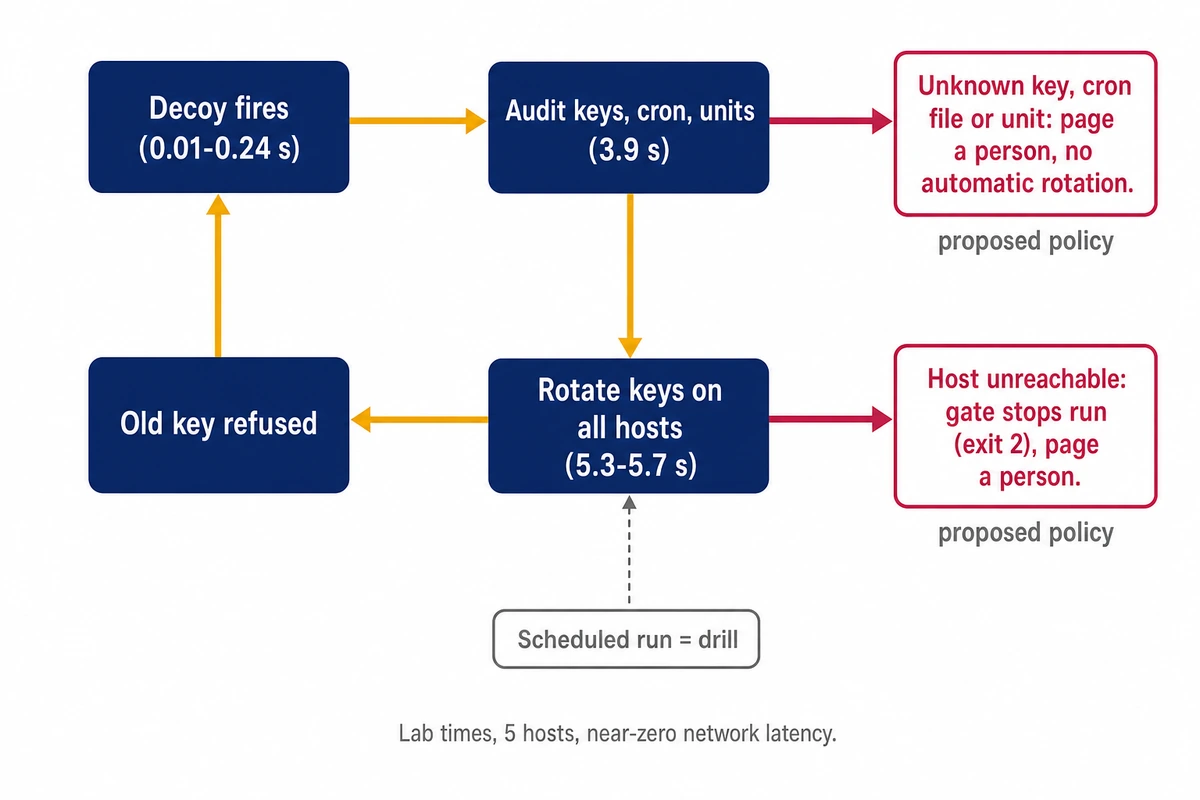
Keep the scheduled run mainly as a drill that proves the rotation works on today’s fleet, and run it again after any change to the playbook, sshd policy or host list.
What CASA, SOC 2 and NIST actually say about key rotation
None of these frames sets a rotation interval for SSH keys. The closest published figure is NIST’s 1-2 years for a private authentication key, offered as a rough guideline.
| Frame | What it covers | What it says on rotation |
|---|---|---|
| CASA spec v2.1.1 (App Defense Alliance, June 3, 2026) | App security for AL1 (verified self assessment) and AL2 (lab assessment); item 6.7.1 on storing secrets | No rotation requirement |
| SOC 2 Trust Services Criteria (AICPA) | CC6 logical access, CC7 system operations and monitoring, CC8 change management | No interval set, according to auditors’ guides |
| NIST SP 800-63B-4 | Passwords and other authenticators for people | Periodic password changes must not be required; force a change on evidence of compromise |
| NIST SP 800-57 Part 1 Rev. 5 | Cryptographic key management | Table 1: private authentication key 1-2 years, as a rough guideline |
For CASA assessments, the ADA says the framework user, such as Google, decides an app’s assurance level, and “All applications must be revalidated every year.” The CASA specification v2.1.1 item closest to this subject is 6.7.1: “The application shall securely store access tokens, API keys, and other server-side secrets.” Nothing in the spec requires rotating them, so decoys and gated rotation are at most supporting evidence for 6.7.1.
On SOC 2 key rotation requirements, the AICPA text sits behind a login and was not read. The criteria do not set an interval, according to auditors’ guides; Copla’s (July 2025, updated January 2026) maps credential controls to CC6.1-CC6.3 and calls 60-90 days common practice. The routine maps onto CC6 logical access, CC7 monitoring and CC8 change management, where a playbook in git is easier to show than a shell history. An autumn 2026 exposure draft would renumber these to CC5, CC6 and CC7, per A-LIGN (November 5, 2026); comments close January 15, 2027.
NIST SP 800-63B-4, section 3.1.1.2 says verifiers “SHALL NOT require subscribers to change passwords periodically” and must force one on evidence of compromise; it is written for human passwords. SP 800-57 Part 1 Rev. 5 (May 2020) suggests 1 to 2 years for a private authentication key and calls its table “only rough order-of-magnitude guidelines”. Reading an SSH key as such a key is this page’s inference.
Our proposed operating policy, which no standard requires: rotate on evidence (a decoy fired, a person left, a key leaked), treat each SSH key as a private authentication key and replace it within NIST’s rough 1-2 year guideline, and run the schedule as a drill.
Where decoys and key rotation do not protect you
These controls only cover activity after access: a key in use, a planted job, a probe of a decoy path. They do not stop the initial compromise.
- Application-layer flaws in your own code or in exposed panels are found by code review and patching.
- Phishing and stolen human passwords are an identity problem, handled with phishing-resistant MFA on the accounts that can reach your servers.
- Patch speed answers the exploitation window above; automatic security updates and a written patch window for internet-facing services are the starting point.
- An intruder who touches no decoy and plants nothing in the audited places stays invisible here.
The routine runs from one control node: an Ansible checkout, optionally Semaphore, and a watcher on the decoy logs. A Hostry Linux VPS can host that node, with plans that start at $6.00/mo and go up to 32 GB RAM. Start with the audit baseline, because the audit compares every later state against it.