
n8n Out of Memory on a VPS: Find Which Process Died and Fix It

A fresh n8n 2.47.5 with SQLite and no workflows uses about 530 MiB of RAM in two Node.js processes, n8n start (main) and the n8n task-runner that executes Code nodes. An n8n out of memory crash means one of them hit its own heap limit or the kernel killed it, and each case has its own fix.
Unless marked otherwise, every status code and log line here was reproduced with n8n 2.47.5 on Node.js 24.22.3, Ubuntu 24.04 (npm install, SQLite, a 2 vCPU / 8 GB VM), the default internal task runner and nginx 1.24; Docker was not covered. Match your symptom:
- HTTP 500 {“message”:”Error in workflow”} within seconds, n8n still up, Node ran out of memory in its log: the task runner’s heap.
- HTTP 502, upstream prematurely closed connection in the nginx error log, executions marked crashed after the restart: the main process’s heap.
- TaskRunnerDisconnectedError, or a 502 with nothing in n8n’s log: a kernel OOM kill, visible only in dmesg.
- HTTP 504 after exactly 60 seconds, execution successful: nginx’s read timeout.
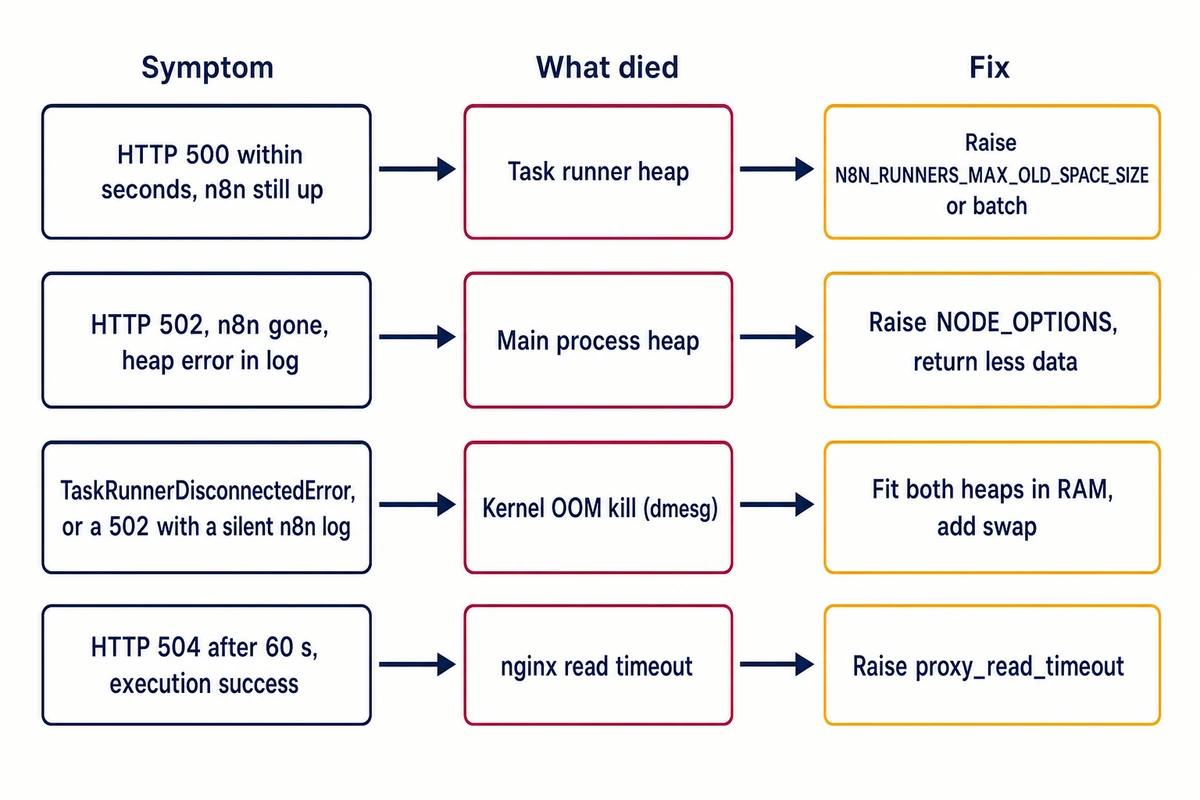
HTTP 500 and “Node ran out of memory”: n8n out of memory in the task runner
Code that exhausts the runner’s heap fails the request with a 500 within seconds; the editor stays up and n8n registers a new runner. A 500 after exactly N8N_RUNNERS_TASK_TIMEOUT seconds (300 by default) is the runner’s other failure, a timeout (Task execution timed out after 15 seconds at a setting of 15).
Search n8n’s log (journalctl -u n8n or docker logs) for JavaScript heap out of memory, which ends both FATAL wordings (Reached heap limit, Ineffective mark-compacts near heap limit). A runner death adds Node ran out of memory and a new Registered runner line, with stack frames ending in [n8n task-runner]; the [runner:js] prefix is not always on the FATAL line. A 50,000,000-row loop at runner heap 128 MB:
[runner:js] FATAL ERROR: Reached heap limit Allocation failed - JavaScript heap out of memory
[runner:js]  2: 0x75f7fa node::OOMErrorHandler(char const*, v8::OOMDetails const&) [n8n task-runner]
Node ran out of memory
Webhook execution failed before a response was sent
Registered runner "JS Task Runner" (RmIuuu855N4goMgPgIjjD)
The execution stores TaskRunnerOomError: Node ran out of memory.
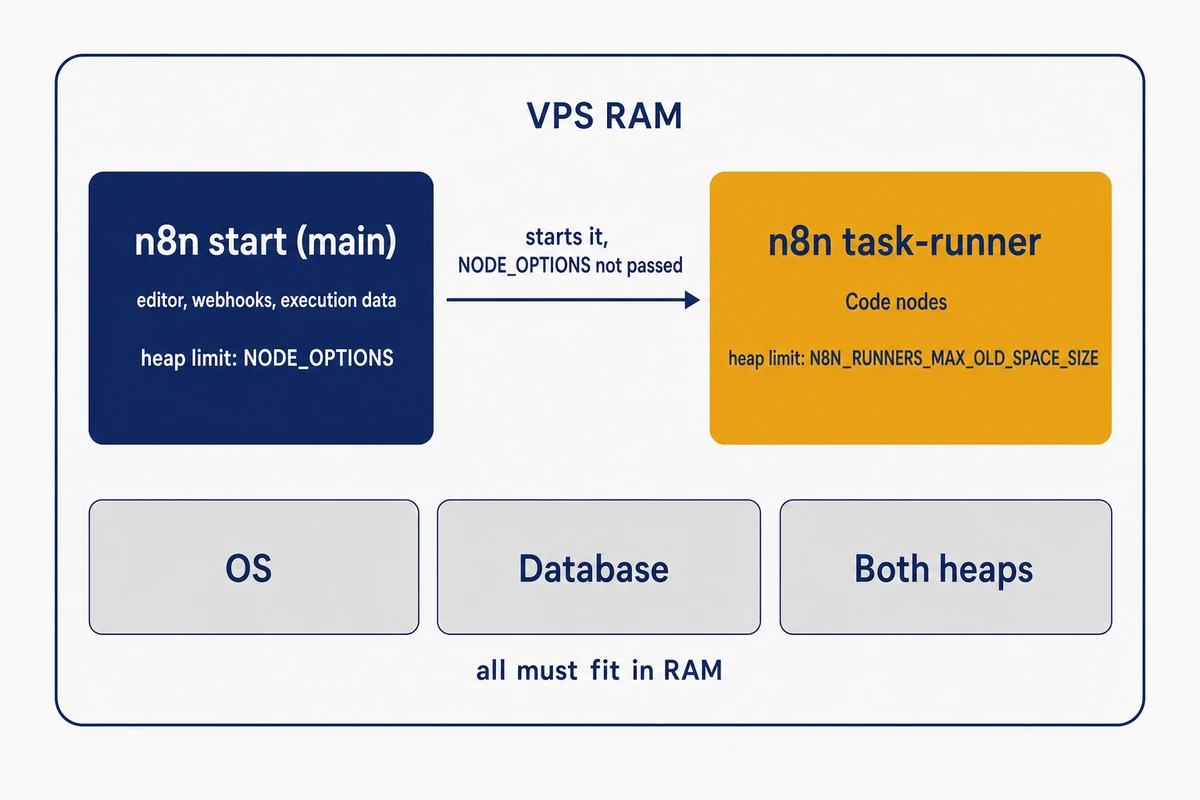
Task runner memory in n8n 2.x has its own limit. Main starts the runner with an allow-list of environment variables that omits NODE_OPTIONS, so NODE_OPTIONS=–max-old-space-size limits the main process only; the runner’s heap comes from N8N_RUNNERS_MAX_OLD_SPACE_SIZE, passed on as NODE_OPTIONS, or from Node’s RAM-based default (2240 MB on the 8 GB VM). The n8n docs page on memory errors names NODE_OPTIONS alone. A Code node building 1,000,000 rows:
runner heap 128,  main 384:   {"message":"Error in workflow"} HTTP 500 in .7630 s
runner heap 1024, main 384:   {"rows":1000000} HTTP 200 in 1.200 s
runner heap 128,  main 2048:  {"message":"Error in workflow"} HTTP 500
Fix: raise the runner heap
Set it in MB in main’s environment. Both heaps must fit in the RAM left after the OS and database; if not, see the kernel section.
# shell start
N8N_RUNNERS_MAX_OLD_SPACE_SIZE=1024 n8n start

# systemd: sudo systemctl edit n8n (your unit name may differ), then restart the unit
[Service]
Environment=N8N_RUNNERS_MAX_OLD_SPACE_SIZE=1024

# Docker env file (--env-file or env_file:), KEY=value, no quotes
N8N_RUNNERS_MAX_OLD_SPACE_SIZE=1024
N8N_RUNNERS_MAX_CONCURRENCY is 10 on 2.47.5 (the task runner variables page says 5), all sharing one heap. If a bigger heap will not fit, put a Loop Over Items (Split in Batches) node before the heavy Code node, as the error’s hint suggests.
Check
sudo cat /proc/$(pgrep -f '^n8n task-runner')/environ | tr '\0' '\n' | grep NODE_OPTIONSIt prints your value (NODE_OPTIONS=–max-old-space-size=128 in the 128 run), or nothing when Node’s default applies; /proc reads need root or n8n’s user.
502 Bad Gateway and “JavaScript heap out of memory”: the main process died
When nginx returns 502 mid-request and n8n is gone afterwards, the main process died and took the runner with it. In n8n’s log, JavaScript heap out of memory with frames ending in [n8n start] and no Node ran out of memory line means main ran out of heap; no error at all points to the next section. Both logs (n8n.example.com stands in for yours):
nginx: upstream prematurely closed connection while reading response header from upstream, client: 127.0.0.1, server: n8n.example.com, request: "GET /webhook/oom?n=300000&ret=1 HTTP/1.1"
n8n:   FATAL ERROR: Reached heap limit Allocation failed - JavaScript heap out of memory
n8n:    2: 0x75f7fa node::OOMErrorHandler(char const*, v8::OOMDetails const&) [n8n start]
The next start reports the interrupted run:
Marked executions as `crashed`
Found unfinished executions: 7
This could be due to a crash of an active workflow or a restart of n8n
connect() failed (111: Connection refused) next to a 502 means nothing listened on port 5678: n8n was stopped, already dead, or in its first 5 seconds of start-up.
With main at –max-old-space-size=384, a Code node returning 300,000 items crashed it 3.46 s in, while one that built 1,000,000 rows and returned only their count passed: main holds every item a node returns.
Fix: raise the heap, return less
Raise NODE_OPTIONS and have Code nodes return a summary or only the fields the next node needs. The lowest value that started 2.47.5 was 320; 256 died about 10 seconds into start-up, twice.
# 1024 is an example, not from these runs; both heaps together must fit in RAM (next section)
# shell start
NODE_OPTIONS=--max-old-space-size=1024 n8n start

# systemd drop-in
[Service]
Environment=NODE_OPTIONS=--max-old-space-size=1024
Restart=on-failure

# Docker env file
NODE_OPTIONS=--max-old-space-size=1024
Restart=on-failure or a Docker restart policy brings n8n back (not reproduced). A NODE_OPTIONS exported in a shell profile also leaks into n8n.
Check
sudo cat /proc/$(pgrep -f '^n8n start')/environ | tr '\0' '\n' | grep NODE_OPTIONS
curl -s -o /dev/null -w '%{http_code}\n' http://127.0.0.1:5678/healthz/readiness
Wait for 200 from /healthz/readiness; plain /healthz answered 200 during migrations, while readiness stayed 503 until the editor was usable (13.8 s into a first start).
TaskRunnerDisconnectedError or a silent 502: the kernel killed the process
An n8n out of memory crash with no heap error in the log points to the kernel’s OOM killer, which ends a process when RAM or a container limit runs out. This section was reproduced inside a 1 GiB memory cgroup, the mechanism behind Docker’s –memory, not on a VPS.
sudo dmesg -T | grep -E 'Killed process [0-9]+ \(n8n'
sudo journalctl -k | grep -i 'killed process'     # same, from the journal
Only the kernel log named the cause:
Memory cgroup out of memory: Killed process 44831 (n8n task-runner) total-vm:10473432kB, anon-rss:616416kB, [...]
Memory cgroup out of memory: Killed process 45598 (n8n start) total-vm:12667724kB, anon-rss:767688kB, [...]
A machine-wide kill on a VPS reads Out of memory: (not reproduced); the grep matches it too.
Killing the runner produced a 500 after 1.77 s and only TaskRunnerDisconnectedError: Node execution failed, whose stored hint recommends raising N8N_RUNNERS_MAX_OLD_SPACE_SIZE, the setting behind this kill (2048 inside 1 GiB). A killed main took the runner along; nginx returned 502 after 3.59 s and n8n’s log stopped.
Node sizes its default heap from the memory limit: 560 MB per process inside 1 GiB. A 5,000,000-row Code node then failed cleanly with Node ran out of memory in the lab run, but two 560 MB heaps exceed 1 GiB, so the first large request can be a kernel kill. With a heap above the RAM limit, the kernel kills the process before V8 reports anything.
Fix: fit both heaps in RAM
If both limits cannot fit in the RAM left after the OS and database (or the container’s –memory value), lower them and batch, add swap, or add RAM. Docker’s docs on container resource constraints confirm the kernel kills processes in an out-of-memory container by default.
What swap fixes and what it does not
Swap for n8n helps against this kind of kill only. With 2 GB of swap, the request that had killed the runner at heap 2048 returned 200 in 15.9 s, against 3.2 s with no memory limit. At runner heap 128, swap changed nothing (JavaScript heap out of memory, 500 after 1.43 s). Swap ran on a virtual disk, so timings will differ.
sudo fallocate -l 2G /swapfile
sudo chmod 600 /swapfile
sudo mkswap /swapfile
sudo swapon /swapfile
echo '/swapfile none swap sw 0 0' | sudo tee -a /etc/fstab
swapon --show
504 Gateway Time-out after 60 seconds: the nginx read timeout
Sixty seconds is the default of nginx’s proxy_read_timeout, so a 504 at that mark means nginx stopped waiting while n8n kept working. A Code node sleeping 75 seconds:
HTTP/1.1 504 Gateway Time-out   after 60.061679 s
[error] upstream timed out (110: Connection timed out) while reading response header from upstream, client: 127.0.0.1, server: n8n.example.com, request: "GET /webhook/sleep?s=75 HTTP/1.1"
n8n side: 10|wfSleep0000001|success|2026-11-12 10:32:18.413|2026-11-12 10:33:33.484
Install the client with sudo apt install sqlite3, then look up the execution (success means nothing crashed) as n8n’s own user, whose home holds ~/.n8n:
sqlite3 -readonly ~/.n8n/database.sqlite "select id, workflowId, status, startedAt, stoppedAt from execution_entity order by id desc limit 5;"Fix: a longer read timeout
Raise the timeout where nginx proxies n8n; with 300s the same request returned 200 after 75.06 s. That matches N8N_RUNNERS_TASK_TIMEOUT, the longest a Code node may run by default, a default 2.47.5 warns will drop to 60 s.
location / {
    proxy_pass http://127.0.0.1:5678;
    proxy_http_version 1.1;
    proxy_set_header Upgrade $http_upgrade;
    proxy_set_header Connection "upgrade";
    proxy_set_header Host $host;
    proxy_set_header X-Forwarded-For $proxy_add_x_forwarded_for;
    proxy_set_header X-Forwarded-Proto $scheme;
    proxy_buffering off;
    proxy_read_timeout 300s;
    proxy_send_timeout 300s;
}
Keep the Upgrade, Connection and Host lines: without the first two the editor’s /rest/push websocket got a 401, and without Host $host n8n rejected it as an invalid origin (NODE_ENV=production). A 70 s Wait node needs no longer timeout (200 in 0.12 s).
Check
sudo nginx -t && sudo systemctl reload nginx
curl -s -o /dev/null -w '%{http_code} %{time_total}\n' https://n8n.example.com/webhook/your-path
n8n SQLite database size: database.sqlite does not shrink after pruning
When database.sqlite keeps growing while nothing crashes, pruning is freeing space inside the file without shrinking it; on 2.47.5 it shrank only after a WAL checkpoint. Each execution of a two-node webhook workflow added about 4.7 KB.
By default n8n 2.47.5 saves every execution and prunes those older than 336 hours or beyond the newest 10,000. Here 990 of 1,000 executions were pruned and the database compacted:
after prune, n8n stopped:          database.sqlite 7540736   page_count=1841 freelist_count=1071
one start with DB_SQLITE_VACUUM_ON_STARTUP=true, then stop:  database.sqlite 7540736   -wal 4202432   page_count=752 freelist_count=0
n8n stopped, PRAGMA wal_checkpoint(TRUNCATE) -> 0|0|0; then database.sqlite 3084288, no -wal/-shm files left
VACUUM on startup compacted the 1,071 free pages (4.39 MB) that pruning left, yet ls -l still showed 7.5 MB across two restarts; only the checkpoint brought it to 3.08 MB.
Fix: store less, then compact once
Main reads these untested values; EXECUTIONS_DATA_SAVE_ON_SUCCESS=none stops storing successful runs, so the 504 lookup would find nothing.
# Docker env file
EXECUTIONS_DATA_SAVE_ON_SUCCESS=none
EXECUTIONS_DATA_MAX_AGE=72
EXECUTIONS_DATA_PRUNE_MAX_COUNT=2000

# systemd drop-in (for a shell start, put the same pairs before n8n start)
[Service]
Environment=EXECUTIONS_DATA_SAVE_ON_SUCCESS=none EXECUTIONS_DATA_MAX_AGE=72 EXECUTIONS_DATA_PRUNE_MAX_COUNT=2000
Then compact once, in ~/.n8n:
- Stop n8n.
- Back up (first command).
- Start n8n once with DB_SQLITE_VACUUM_ON_STARTUP=true.
- Stop it after readiness returns 200.
- Checkpoint (last command).
- Remove the variable; VACUUM rewrites the file on every start.
sqlite3 database.sqlite ".backup database-before-vacuum.sqlite"
# one start with DB_SQLITE_VACUUM_ON_STARTUP=true, then stop n8n
sqlite3 database.sqlite "PRAGMA wal_checkpoint(TRUNCATE);"
Check
sqlite3 -readonly ~/.n8n/database.sqlite "PRAGMA page_count; PRAGMA freelist_count;"
ls -l ~/.n8n/database.sqlite*
Page count times the page size (4096 here) is the size after a checkpoint; count the -wal file too. Binary data is on disk as well: 2.47.5 defaults to filesystem mode (database in queue mode) under ~/.n8n/storage/workflows/<workflow-id>/executions/<execution-id>/binary_data/, though the binary data docs page says memory. Pruning deletes those files; du -sh ~/.n8n/storage shows their size.
n8n exits on start-up: Node 22, the “::” address and old variables
n8n 2.36.0 and later need Node.js 24. On Node 22, npm install n8n quietly installed 2.35.7, the last release allowing Node 22, and 2.47.5 refused to run:
Your Node.js version 22.23.4 is currently not supported by n8n.
Please use a Node.js version that satisfies the following version range: >=24.0.0
Install Node.js 24 first (check node –version), then pin with npm install -g n8n@2.47.5, after adding swap on a 1 GB server. On Node 22 the pin still succeeds with EBADENGINE warnings, and n8n then refuses to start.
The default listen address is ::, and on a host without IPv6 n8n exited after 4.5 s:
n8n's address '::' is not available. Please run n8n with a different address, provide correct address in the environment variables N8N_LISTEN_ADDRESS and/or N8N_WORKER_SERVER_ADDRESS.Set N8N_LISTEN_ADDRESS=127.0.0.1 for the main process, and create the owner account before nginx or an open port exposes n8n, because a never-configured instance gives that role to whoever finishes setup first.
Delete EXECUTIONS_PROCESS=own, left over from pre-1.0 guides: 2.47.5 exits with code 255 right after migrations and prints nothing.
n8n RAM requirements: what 2.47.5 uses per process at idle
Idle n8n 2.47.5 needs about 530 MiB, and main briefly needs about 730 MiB while starting (/proc/<pid>/smaps_rollup after two minutes idle, three starts; peak from VmHWM, seven starts).
| Process (as ps shows it) | What runs there | Heap limit set by | RSS idle | PSS idle | Peak RSS at start-up |
|---|---|---|---|---|---|
| n8n start | Editor, REST API, webhooks, scheduler, execution data | NODE_OPTIONS | 470-480 MiB | 439-449 MiB | 712-735 MiB |
| n8n task-runner | JavaScript Code nodes | N8N_RUNNERS_MAX_OLD_SPACE_SIZE | 116-117 MiB | 88-89 MiB | 148-151 MiB |
| Both together | 527-538 MiB |
PSS splits shared pages between the two, so its sum is the real total. PostgreSQL 16 in place of SQLite added 54-71 MB PSS of its own. To measure yours:
sudo sh -c 'for p in $(pgrep n8n); do echo "$p $(grep "^Pss:" /proc/$p/smaps_rollup)"; done'
grep VmHWM /proc/$(pgrep -f '^n8n start')/status
Our reading of the n8n VPS requirements: idle n8n fits in 1 GB, but npm install n8n@2.47.5 peaked at 1.73 GB RSS (2.8 GB of disk), so 1 GB needs swap to install. We would start at 2 GB with SQLite and plan 4 GB if Code nodes hold millions of rows like the test’s: 5,000,000 rows of an integer and a string of about 76 characters, returned only as a count, took the runner to 1.4 GiB. If an AI agent shares the server, add its RAM from the Hermes Agent and OpenClaw comparison.
The entry-level Hostry KVM VPS, $6.00 a month for 1 vCPU, 1 GB RAM, NVMe storage and full root access, matches the 1 GiB limit of the kernel-kill runs, where two default heaps can outgrow RAM on one large Code node. On that plan, cap both heaps (main no lower than 320) or scale the VPS up; plans go to 32 GB RAM.