
Upgrade Ubuntu 24.04 to 26.04 on a VPS: What Breaks, How to Recover

A stock Ubuntu 24.04 server upgrades in place with sudo do-release-upgrade over SSH once two blockers are cleared: the upgrader refuses to run without cgroup v2, or with MySQL accounts on mysql_native_password while that plugin is disabled. A heavily customized server is usually better rebuilt. Either way, start only with an off-server backup you have restored once.
Canonical enabled upgrades to 26.04.1 LTS on September 29, 2026, and Ubuntu Server users can start whenever they are ready. To upgrade Ubuntu 24.04 to 26.04 safely, the order matters more than the command. The usual way to strand a VPS is to run the upgrader from your only SSH window with port 1022 closed: the connection drops while dpkg is unpacking, and the spare sshd the upgrader started cannot be reached.
For a server with years of hand edits, a fresh KVM VPS with root access and a data migration is often less risk than an in-place upgrade. Commands below were checked on November 2, 2026 against the release notes, the Ubuntu Server docs and the code of the 26.04 upgrader (version 26.04.27).
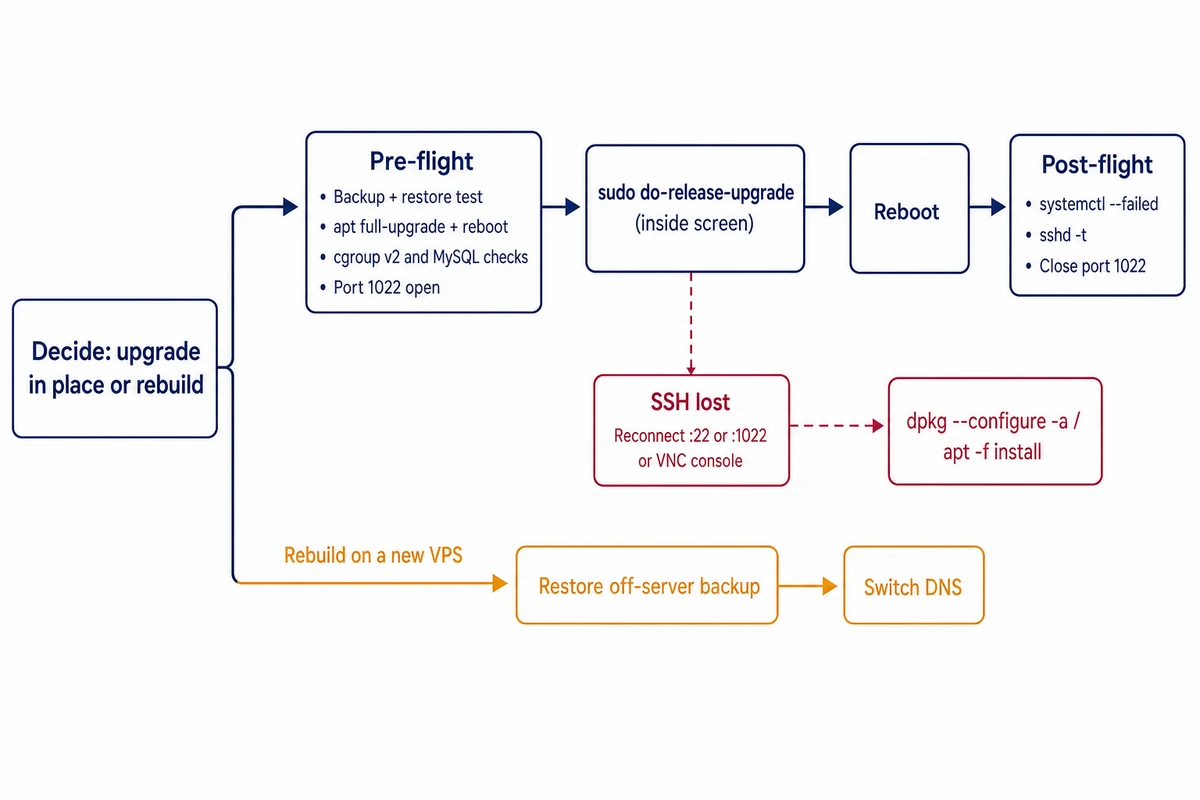
Upgrade Ubuntu 24.04 to 26.04 in place or rebuild on a new VPS
The upgrader can undo very little. Its source shows that an abort before packages install puts your APT sources back, but once dpkg has started, the only recovery it attempts is dpkg –configure -a. do-release-upgrade has no downgrade option; returning to 24.04 means restoring from backup.
| Your server | Upgrade in place | Rebuild and migrate |
|---|---|---|
| Packages only from the Ubuntu archive, a few services | Good fit, one maintenance window | More work than the server needs |
| Docker or LXC host still booted with cgroup v1 or hybrid | Only after switching to cgroup v2 and rebooting; the upgrader refuses otherwise | Starts on cgroup v2 with nothing to switch |
| Several PPAs, vendor repos or keys added with apt-key | Each one needs a 26.04 suite and a signed-by keyring | Add back only the repos you still use |
| MySQL accounts on mysql_native_password, or RabbitMQ | Upgrader stops until you fix them | Fix accounts during the dump and import |
| No restore you have actually tested | Do not start | The old VPS stays untouched as the fallback |
A rebuild means restoring data onto a new VPS and switching DNS once it passes your checks, while the old server stays a working rollback during the overlap.
Ubuntu 26.04 upgrade problems on a server
The list draws on the 26.04 release notes summary for users coming from 24.04 and the upgrader’s own checks. Test your application against the new PHP, Python and MySQL on a copy of the server first.
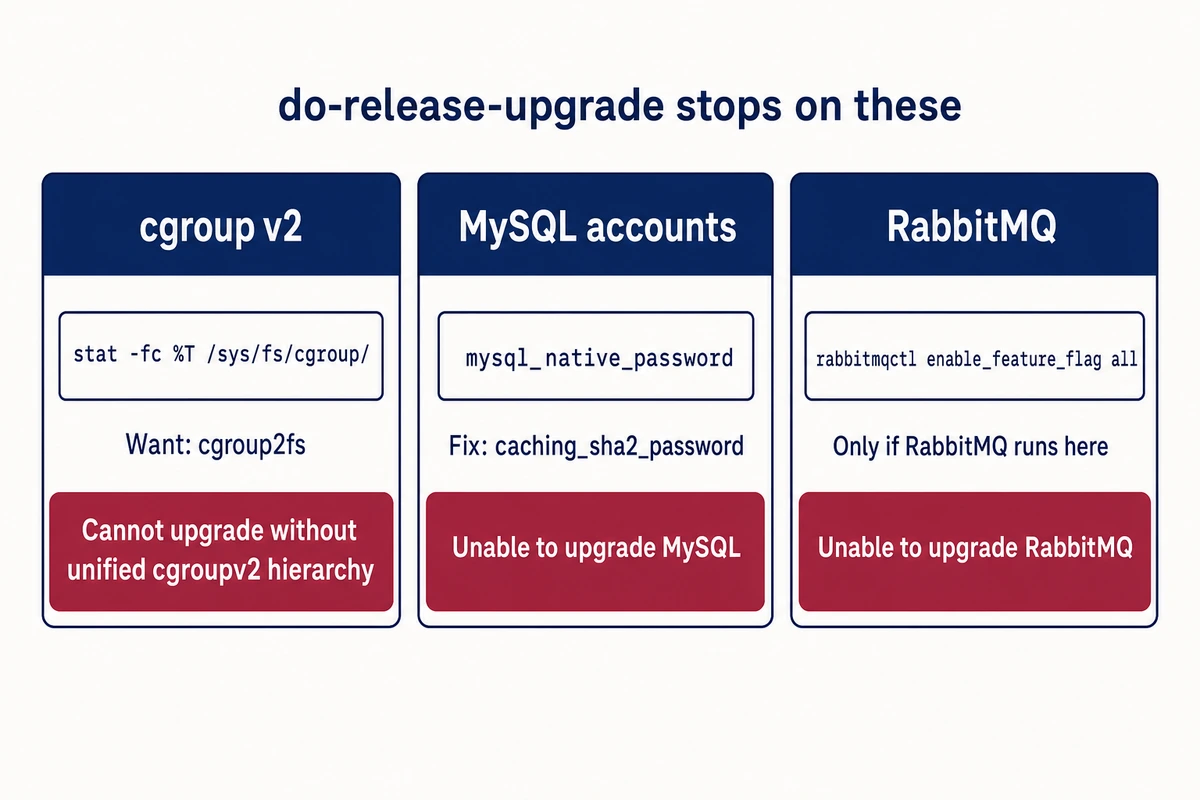
- Ubuntu 26.04 and cgroup v1 with Docker: systemd 259 dropped the legacy and hybrid hierarchies, and the upgrader aborts with “Cannot upgrade without unified cgroupv2 hierarchy” (pre-flight step 5 has the check). The Docker runtime metrics docs list cgroup v2 support from Docker 20.10, with containerd 1.4 and runc 1.0.0-rc91 or later. Monitoring agents reading v1 paths need updates too.
- sudo-rs replaces sudo, the original is renamed sudo.ws, and sudo-ldap is gone, so LDAP users move to PAM. Ubuntu Server’s sudo-rs reference adds that sudoreplay is unsupported and that the PAM password prompt breaks Expect scripts waiting for “[sudo] password for”.
- Core utilities come from rust-coreutils; the GNU tools stay available with a gnu prefix.
- OpenSSH moves from 9.6p1 to 10.2p1. DSA keys stop working, and sshd no longer reads ~/.pam_environment, so variables set there disappear from SSH sessions.
- Scripts and provisioning roles that call apt-key fail, because the command no longer exists.
- Python 3.14 replaces 3.12; rebuild virtual environments.
| Service | 26.04 version | What stops working |
|---|---|---|
| MySQL | 8.4 LTS (from 8.0) | Accounts on mysql_native_password are locked out; the upgrader blocks until you fix them (pre-flight step 6) |
| PHP | 8.5 (from 8.3) | Per PHP’s 8.5 migration guide, the disable_classes INI setting is removed, and zend_extension=opcache.so now emits a warning because OPcache is always built in |
| PostgreSQL | 18 packages | Nothing breaks at once; your cluster stays on version 16 until you migrate it |
| Dovecot | 2.4.2 | The 2.3 configuration format; follow Dovecot’s 2.3 to 2.4 guide |
| Postfix | 3.10, no chroot by default | Chroot settings in master.cf need review, since only limited chroot support remains |
| Squid | 7.7 (7.2 at release) | The proxy will not start while Ident, mcast_miss_* or cache_object:// remain in squid.conf |
| Samba AD DC | new packaging | Domain controller functions, unless samba-ad-dc is installed before the upgrade |
HAProxy 3.2 and OpenLDAP also have listed config changes. For PostgreSQL, pg_lsclusters shows the major version of each cluster. sudo pg_upgradecluster 16 main moves it to the newest installed version, gives the 16 cluster an unused port and keeps it until you drop it. Give that its own window and a fresh dump.
Pre-flight checklist before do-release-upgrade
1. Back up off the server, then prove you can restore
sudo tar czf ~/etc-noble.tar.gz /etc
sudo chown deploy: ~/etc-noble.tar.gz && chmod 600 ~/etc-noble.tar.gz
apt-mark showmanual > ~/manual-packages.txt
sudo -u postgres pg_dumpall > ~/pg-all.sql                       # if PostgreSQL runs here
sudo mysqldump --all-databases --single-transaction > ~/mysql-all.sql   # if MySQL runs here
rsync -a ~/etc-noble.tar.gz ~/manual-packages.txt ~/*.sql deploy@backup.example.net:web1/
(Put your own login and backup host in place of deploy and backup.example.net, and your server’s address wherever 203.0.113.10 appears.) Add application data and uploads to the same copy. The check is a restore: import the dumps into a scratch server and list the tarball with tar tzf.
2. Finish 24.04 updates and reboot
sudo apt update
sudo apt full-upgrade -o APT::Get::Always-Include-Phased-Updates=true
ls /run/reboot-required 2>/dev/null && sudo reboot
apt list --upgradable
The last command should print only “Listing…”. Otherwise the 24.04 upgrader stops with “Please install all available updates for your release before upgrading.” It also refuses to start after an unrebooted kernel or libc update.
3. Free disk space on / and /boot
df -h / /boot
sudo apt autoremove --purge && sudo apt clean
Ubuntu’s server guide warns the download can run to several gigabytes. The upgrader stops before installing anything if / or /boot is short.
4. Third-party repositories and old apt-key keys
grep -rh -E "^(URIs:|deb )" /etc/apt/sources.list /etc/apt/sources.list.d/ 2>/dev/null | sort -u
ls -l /etc/apt/trusted.gpg /etc/apt/trusted.gpg.d/ 2>/dev/null
sudo apt update 2>&1 | grep -i "legacy trusted.gpg"
These commands only inspect; the upgrader itself disables PPAs and vendor repositories, leaves them disabled afterwards and rewrites .list files as deb822 .sources. It carries over a PPA key from trusted.gpg.d when the file names match, but keys in /etc/apt/trusted.gpg stay behind, and 26.04 has no apt-key. Check that each vendor publishes a resolute suite; Docker does.
To fix a flagged repository, follow the DEPRECATION section of the apt-key(8) man page: fetch the vendor’s key again into /etc/apt/keyrings/, the location APT has recommended since 2.4, and point the stanza at it with Signed-By:. With repo.example.com as the vendor:
curl -fsSL https://repo.example.com/key.asc | sudo tee /etc/apt/keyrings/example-repo.asc > /dev/null

# /etc/apt/sources.list.d/example-repo.sources
Types: deb
URIs: https://repo.example.com/ubuntu
Suites: noble
Components: main
Signed-By: /etc/apt/keyrings/example-repo.asc
Keep the file world-readable, since the _apt user has to read it. The step passes when apt update no longer prints “Key is stored in legacy trusted.gpg keyring”.
5. Confirm the server boots on cgroup v2
stat -fc %T /sys/fs/cgroup/
grep -o "systemd.unified_cgroup_hierarchy=[01]" /proc/cmdline
grep -rn unified_cgroup_hierarchy /etc/default/grub /etc/default/grub.d/ 2>/dev/null
You want cgroup2fs from the first command and no output from the other two. tmpfs means a legacy or hybrid hierarchy, usually forced years ago for an old Docker setup. Remove the parameter from GRUB, run sudo update-grub, reboot, and let your containers run on cgroup v2 for a few days first.
6. Find MySQL accounts that would be locked out
sudo mysql -e "SELECT user, host FROM mysql.user WHERE plugin = 'mysql_native_password';"An empty result passes. With MySQL running, any row stops the 26.04 upgrader with “Unable to upgrade MySQL” unless the plugin is enabled in the server config. The release notes fix is ALTER USER ‘app’@’localhost’ IDENTIFIED WITH caching_sha2_password BY ‘new-password’;, which resets the password, so update the app config in the same window. Setting mysql_native_password=ON under [mysqld] in /etc/mysql/mysql.conf.d/mysqld.cnf also passes the check, but only buys time until MySQL 9.7.
7. Only if RabbitMQ runs here: enable its feature flags
sudo rabbitmqctl list_feature_flags
sudo rabbitmqctl enable_feature_flag all
The upgrader reads the same list and stops with “Unable to upgrade RabbitMQ” unless the 3.13 flags RabbitMQ 4 needs, such as stream_filtering, are enabled. 24.04 ships 3.12, so the Ubuntu Server Gazette guide to upgrading RabbitMQ installs 3.13 from a canonical-server PPA first. Run enable_feature_flag all again once 3.13 is running.
8. Prepare a second way in
command -v screen || sudo apt install screen
sudo ufw allow from 198.51.100.7 to any port 1022 proto tcp
sudo ufw status numbered
sudo passwd deploy
sudo sshd -T | grep -i ^passwordauthentication
Here 198.51.100.7 is your workstation’s IP. The upgrader re-runs itself inside GNU screen when screen is installed and starts a spare sshd on port 1022. A firewall in front of the VPS, such as the built-in one in the Hostry control panel, needs the same rule. Then open a second SSH session and leave it idle.
If both SSH paths die, the fallback is the VNC console in the Hostry control panel. It shows the server’s own login, so a key-only account needs the password passwd sets. The sshd -T line should print “passwordauthentication no”, meaning SSH still refuses that password. Log in through the console once before you start the upgrade.
Run do-release-upgrade for Ubuntu 26.04 over SSH
grep ^Prompt /etc/update-manager/release-upgrades
do-release-upgrade -c
sudo do-release-upgrade
The first line should read Prompt=lts, the 24.04 default, and -c only reports whether a release is available. The upgrade itself, as described in the Ubuntu Server guide to release upgrades, is interactive, and its prompts come in this order:
- “Continue running under SSH?” Answer yes. The next screen confirms the additional sshd on port 1022.
- “Foreign Packages Installed” lists packages from outside the Ubuntu archive, such as docker-ce. Continue only if their vendors have 26.04 repositories.
- A summary of packages to install, upgrade and remove. No package has been touched until you accept it.
- Configuration file prompts: Y or I takes the maintainer’s version, N or O keeps yours (the default), D shows the diff. Press D; keep your file when the diff shows only your edits, otherwise take the new one and reapply them.
- “Remove obsolete packages?” Read the list first. PostgreSQL server packages are on the upgrader’s never-remove list, so the old cluster survives.
- The restart prompt. Ubuntu does not treat the system as upgraded until it has rebooted.
Screen keeps a log in /var/log/dist-upgrade/screenlog.0, next to main.log and apt.log; read those first if anything fails.
When do-release-upgrade is not offering the new release
The Ubuntu announcement that 24.04 to 26.04.1 upgrades are enabled rolls out the Update Manager offer progressively, while Ubuntu Server users can start the upgrade at any time. When nothing is found, read the message. With Prompt=lts the 24.04 tool says “There is no development version of an LTS available.” whenever it sees no newer LTS. Prompt=normal gives “No new release found.”, and Prompt=never blocks upgrades outright.
Check the Prompt line and that the server reaches changelogs.ubuntu.com over HTTPS, where the release list lives, then run do-release-upgrade -c again. Leave -d alone: it targets the development release, which the server guide does not recommend for production, and for LTS upgrades it only mattered before the first point release, which is out.
Post-flight checks after the reboot
1. Release and kernel
grep -E "^(VERSION|VERSION_CODENAME)=" /etc/os-release
uname -r
Expect 26.04 (resolute) and a 7.0 kernel. The upgrade does not patch kernel CVEs: on November 2, 2026 the Ubuntu tracker for CVE-2026-98432 showed both releases’ generic kernel as vulnerable, work in progress, so reboot into each kernel fix as it lands.
2. Failed units and boot errors
systemctl --failed
journalctl -b -p err --no-pager | tail -n 40
“0 loaded units listed” is the pass. Match anything else against the service table earlier in the article before you touch configs.
3. sudo and SSH
sudo --version | head -n 1
sudo -l
sudo sshd -t && echo "sshd config OK"
sudo grep -rl ssh-dss /root/.ssh /home/*/.ssh 2>/dev/null
The first line should start with sudo-rs. Log in from a new terminal before closing the old one, then remove the port 1022 rule with sudo ufw delete plus its number, and the matching control panel rule.
4. Third-party repositories
grep -l "Enabled: no" /etc/apt/sources.list.d/*.sources
sudo apt update
For each vendor you still need, change Suites: noble to resolute once the vendor supports it, delete the Enabled: no line and confirm apt update reads it without errors.
5. Containers, databases, runtimes
docker info 2>/dev/null | grep -i cgroup
pg_lsclusters
php -v | head -n 1
python3 --version
Docker should report Cgroup Version: 2. Then load the site, send a test email and run one scheduled job by hand.
Recover a failed upgrade or a lost SSH connection
A dropped connection does not stop the upgrade, which keeps running inside screen. Reconnect on either port and look for the upgrader’s session. If it is listed, reattach to it; do not start do-release-upgrade a second time.
ssh deploy@203.0.113.10 || ssh -p 1022 deploy@203.0.113.10
sudo screen -ls
sudo screen -d -r ubuntu-release-upgrade-screen-window
If screen -ls lists no such session, the upgrader process died. Do not reboot yet. Finish the half-configured packages and check which release APT points at:
sudo dpkg --configure -a
sudo apt -f install
grep ^Suites /etc/apt/sources.list.d/ubuntu.sources
When the Suites line already says resolute, the switch happened: run sudo apt update && sudo apt full-upgrade to complete the move to 26.04. Once package installation has begun, the upgrader deliberately leaves the new sources in place; a comment in its code notes that the system is already part of the way through.
Noble usually means no 26.04 package was installed: an earlier abort copies your sources back from the .distUpgrade backups. Confirm 24.04 in /etc/os-release, find the reason at the end of main.log, fix it and start again from the pre-flight list.
When the repair commands keep failing, read main.log (what the upgrader decided), apt.log (dependency problems) and screenlog.0 (the dpkg errors shown on screen) in /var/log/dist-upgrade/. If the same package still fails after you fix the config file it names, stop forcing dpkg and rebuild from the backup. Reboot only once the commands finish cleanly and sudo sshd -t passes.
With SSH gone on both ports, open the VNC console in the Hostry control panel, log in with the password from step 8 and run the same repair commands. If it will not boot to a login, rebuild on a new VPS from the step 1 backup: reinstall packages with xargs -a manual-packages.txt sudo apt install after deleting names 26.04 no longer ships, and before data goes on, work through SSH keys, UFW and automatic updates for a fresh Ubuntu server.
FAQ
Does a 22.04 server need two upgrades to reach 26.04?
Yes. The 26.04 release notes say you must first reach 24.04 LTS or 25.10, so a 22.04 server goes through two release upgrades and two rounds of config prompts. A rebuild on 26.04 is often less work.
Do I have to switch from systemd-timesyncd to Chrony?
No. Chrony is the default only on new 26.04 installs, and an upgraded server keeps systemd-timesyncd. To move, the release notes give sudo apt-mark auto systemd-timesyncd followed by sudo apt install chrony. If you had edited /etc/chrony/chrony.conf, make sure its servers are not listed again in /etc/chrony/sources.d/ubuntu-ntp-pools.sources.
Whichever way the decision table points, rehearse before you upgrade Ubuntu 24.04 to 26.04 on production: order a spare Hostry KVM VPS, restore your off-server backup onto it and run the same upgrade there. If it passes, repeat it on the live server, or keep the rebuilt server and move DNS to it. Hostry VPS plans by location started at $6 a month when we checked, billed monthly.