

A CAA record for Let's Encrypt is one line at the zone apex: 0 issue "letsencrypt.org". Every name below the apex that has no CAA record of its own inherits it, and other certificate authorities must then refuse to issue. Check it on each nameserver: in a local test, one stale secondary returned the line in only 9 of 20 lookups.
You add the record wherever your zone lives; on Hostry’s free DNS hosting it is a record of type CAA. The DNS outputs below come from a local test container. What a certificate authority accepts or refuses comes from RFC 8659, RFC 8657 and Let’s Encrypt’s documentation, because the local ACME test server does not check CAA. Put your own domain wherever the placeholder shop-north.test appears.
The basic route has three steps:
- Inspect what the zone has with one dig query per name.
- Add the one issue line at the apex.
- Verify it on every nameserver, then retry issuance.
Before you add CAA: decide, then look at what the zone has
CAA is optional. It stops an authority you never use from issuing for your domain through an error or a fooled check. It does not help against someone who already controls your DNS or web server, since they can pass Let’s Encrypt’s own validation.
Add it when you can list every service that requests certificates for the domain: for most small sites, Let’s Encrypt alone. Wait if a CDN or an old panel might issue on its own, because a forgotten issuer stops renewing. With Let’s Encrypt’s move to 64-day and then 45-day certificates, renewals come more often and a wrong record shows up sooner (our reading; the announcement does not mention CAA).
cPanel AutoSSL now uses only Let’s Encrypt, so old advice to add sectigo.com or comodoca.com for it is outdated (dates below).
Step 1: check what the zone has now
Ask one of your authoritative nameservers directly, not your usual resolver. Find their names and addresses first:
dig +short NS shop-north.test
dig +short A ns1.shop-north.test
Then query that address; 127.0.0.11 in the lab output stands for it. +norecurse keeps a resolver cache out of the answer:
$ dig +norecurse CAA blog.shop-north.test @127.0.0.11
;; ->>HEADER<<- opcode: QUERY, status: NOERROR, id: 18258
;; flags: qr aa; QUERY: 1, ANSWER: 0, AUTHORITY: 1, ADDITIONAL: 1
;; AUTHORITY SECTION:
shop-north.test.	30	IN	SOA	ns1.shop-north.test. hostmaster.shop-north.test. 2026112601 300 60 86400 30
status: NOERROR with ANSWER: 0 means no CAA record at this name, which is normal. Repeat for the apex. NOTIMP, REFUSED, SERVFAIL or a timeout means your DNS host mishandles CAA, and Let’s Encrypt’s documentation lists SERVFAIL, NOTIMP and timeouts as reasons issuance fails even with no CAA record. Fix that first (see a DNS host that cannot answer CAA).
The CAA record Let’s Encrypt needs
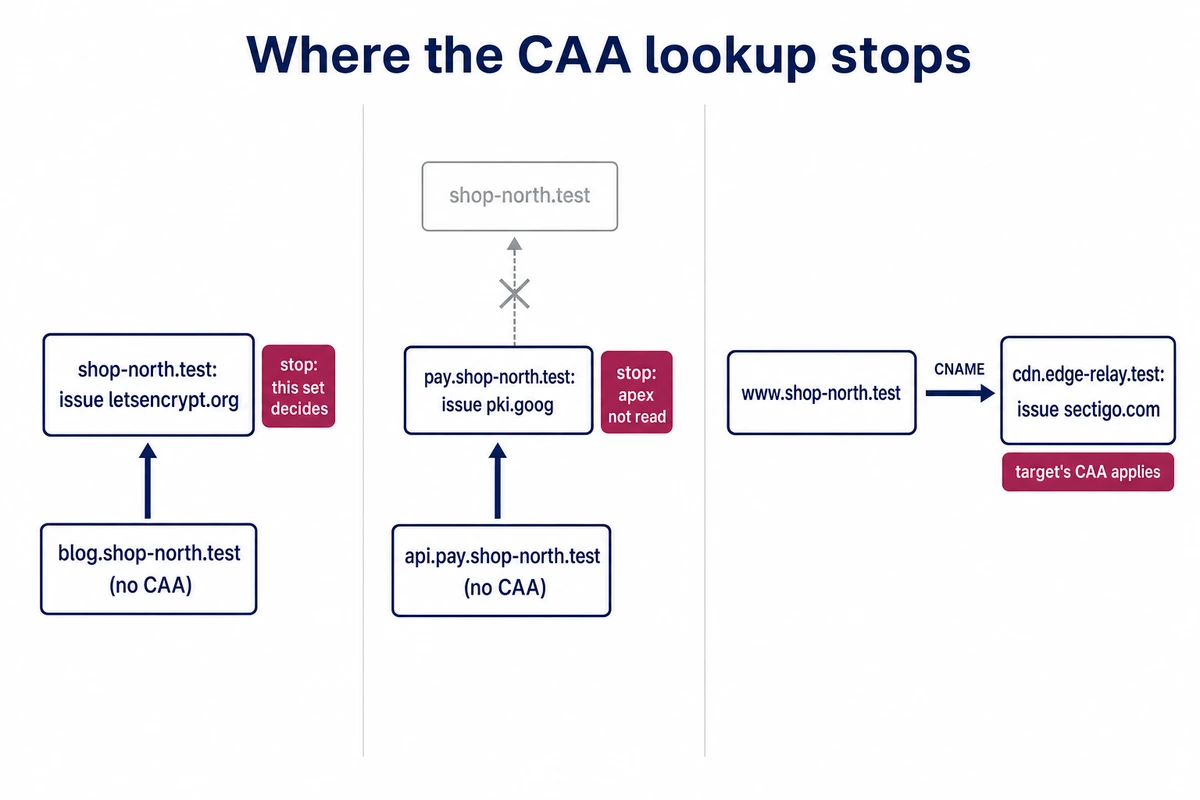
Let’s Encrypt identifies itself in CAA by the name letsencrypt.org. The lookup starts at the exact name on the certificate and moves up one label at a time until it reaches a name that has CAA records; that set decides. One set at the apex therefore covers the whole tree, until a subdomain gets a set of its own.
shop-north.test. 300 IN CAA 0 issue "letsencrypt.org"A second authority gets a second issue line with its own issuer name; lines with the same tag add up. 0 issue “;” forbids issuance for everyone under RFC 8659, the current CAA standard, which replaced RFC 6844 in 2019.
A subdomain with its own set replaces the parent’s set for that branch; the two are never merged. In the lab zone, pay has its own record and blog has none. The output below is an illustration from a lab helper that walks up the labels in the RFC 8659 order; it is not published, and caa-allns.sh shows the same sets per nameserver.
$ scripts/caa-climb.sh blog.shop-north.test
== blog.shop-north.test  status=NOERROR
== shop-north.test  status=NOERROR
shop-north.test.	25	IN	CAA	0 issue "letsencrypt.org"
shop-north.test.	25	IN	CAA	0 issuewild ";"
shop-north.test.	25	IN	CAA	0 iodef "mailto:pki-alerts@shop-north.test"
   -> relevant RRset found at shop-north.test (stop climbing)

$ scripts/caa-climb.sh api.pay.shop-north.test
== api.pay.shop-north.test  status=NOERROR
== pay.shop-north.test  status=NOERROR
pay.shop-north.test.	60	IN	CAA	0 issue "pki.goog"
   -> relevant RRset found at pay.shop-north.test (stop climbing)
For api.pay.shop-north.test the only line that counts is issue "pki.goog". Under RFC 8659 section 3 and Let’s Encrypt’s CAA documentation, Let’s Encrypt must refuse that name although the apex allows it. Add a letsencrypt.org line to the pay set, or remove that set.
How to add a CAA record: zone file, DNS panel, Hostry DNS
A CAA record has three parts: a flag (0 for normal records), a tag (issue, issuewild or iodef) and a value. A zone file takes all three on one line, value in quotes; panels split them into fields and differ on the quotes.
Step 2 needs only the issue line. The lab apex below also carries issuewild ";" and an iodef address; both are optional choices, explained in the wildcards section.
@       IN CAA 0 issue "letsencrypt.org"
@       IN CAA 0 issuewild ";"
@       IN CAA 0 iodef "mailto:pki-alerts@shop-north.test"
In a panel, including Hostry DNS, add a record of type CAA with the host @ or empty for the apex, flag 0, tag issue and value letsencrypt.org. Whatever the panel does with quotes, compare what dig returns with the line above.
Syntax traps: a zone that loads can still block issuance
BIND 9.18.39 and NSD 4.8.0 check that a CAA line parses and do not judge the value. These loaded on both without a warning:
t5.test.  60 IN CAA  0 issue "lets encrypt.org"
-- nsd-checkzone:
zone t5.test is ok

t6.test.  60 IN CAA  0 issue "letsencrypt.org."
-- nsd-checkzone:
zone t6.test is ok

t4.test.  60 IN CAA  128 tbs "unknown"
-- nsd-checkzone:
zone t4.test is ok
RFC 8659 section 4.2 treats an issue value that breaks its grammar, as the space and the trailing dot do, as empty, and an empty value forbids issuance. Flag 128 marks a tag as critical; a CA that does not know a critical tag such as tbs must not issue.
- Upper-case tags split the servers: NSD refused
0 ISSUE "letsencrypt.org"(invalid tag ISSUE: contains invalid char I), BIND kept it. Write tags in lower case. - Two quoted values in one record (
0 issue "letsencrypt.org" "sectigo.com") failed on both, BIND withextra input text. Worse,0 issue "letsencrypt.org; sectigo.com"loaded silently on both in a second test run, yetsectigo.comafter the semicolon is not a valid parameter (it has no=), so under RFC 8659 section 4.2 the whole value is malformed and forbids issuance. Use one line per authority. - The generic
TYPE257 \# 22 ...hex form is only for very old servers; BIND 9.18 readsCAAdirectly. A hex string three bytes short made BIND refuse the zone (unexpected end of input). In the second run, NSD 4.8.0 loaded a truncated value without error and read it as0 issue "letsencrypt.". If you need the form, compute the bytes:
$ python3 -c "v=b'letsencrypt.org';t=b'issue';d=bytes([0,len(t)])+t+v;print(len(d), d.hex())"
22 000569737375656c657473656e63727970742e6f7267
Check the CAA record on every nameserver with dig
A resolver picks one of your nameservers for each lookup. If one holds an old copy of the zone, answers differ at random. The check below complements our guide on running a secondary DNS next to the primary and covers CAA at every parent label.
The test stand for these outputs: BIND 9.18.39 as primary, NSD 4.8.0 as secondary and Unbound 1.19.2 as resolver, all on Ubuntu 24.04. The secondary (NSD) got an older zone copy, serial 2026112501, without the CAA lines. Asking each server directly showed it at once:
ns1.shop-north.test.   127.0.0.11  serial=2026112601 CAA: 0 issuewild ";" 0 issue "letsencrypt.org" 0 iodef "mailto:pki-alerts@shop-north.test"
ns2.shop-north.test.   127.0.0.12  serial=2026112501 CAA:
Through the resolver, cache flushed before each try:
11 of 20 lookups returned 0 CAA records
9 of 20 lookups returned 3 CAA records
After ns2 got the current zone, all 20 lookups returned the 3 records. The script below asks each nameserver for CAA at the name and every parent up to the apex, with the serial it holds. It is based on the lab’s caa-allns.sh, with a public resolver as default; pass another as the second argument. A CNAME shows up with its target name; run the script on the target as well.
#!/bin/sh
# caa-allns.sh <name> [resolver]: ask every authoritative nameserver of the zone directly
# (no recursion, no cache) for CAA at <name> and each parent label up to the apex, with its serial.
name=$(printf '%s' "${1%.}" | tr 'A-Z' 'a-z'); res=${2:-1.1.1.1}
z=$name; zone=
while [ -z "$zone" ]; do
  zone=$(dig +noall +answer SOA "$z" @"$res" | awk -v z="$z." 'tolower($1)==z && $4=="SOA"{print z; exit}')
  [ -n "$zone" ] && break
  case $z in *.*) z=${z#*.} ;; *) echo "no zone found for $name" >&2; exit 1 ;; esac
done
echo "zone: $zone"
for ns in $(dig +short NS "$zone" @"$res" | sort); do
  ip=$(dig +short A "$ns" @"$res" | head -1)
  echo "--- $ns ($ip) serial $(dig +short +norecurse SOA "$zone" @"$ip" | awk '{print $3}')"
  n=$name
  while :; do
    r=$(dig +norecurse +noall +answer +comments CAA "$n" @"$ip")
    st=$(printf '%s\n' "$r" | sed -n 's/.*status: \([A-Z]*\).*/\1/p')
    printf '  %-28s %-8s %s\n' "$n" "$st" "$(printf '%s\n' "$r" | grep -v '^;' | awk '$4=="CNAME"{print "CNAME " $5} $4=="CAA"{$1=$2=$3=$4="";print}' | sed 's/^ *//' | paste -sd'|' -)"
    [ "$n" = "${zone%.}" ] && break; n=${n#*.}
  done
done
If it prints no zone found for ... for a real domain, the resolver is probably unreachable: check that dig @1.1.1.1 shop-north.test SOA answers, or pass another. Run right after two quick changes on the primary, it caught the secondary one update behind:
$ scripts/caa-allns.sh blog.shop-north.test
zone: shop-north.test.
--- ns1.shop-north.test. (127.0.0.11) serial 2026112622
  blog.shop-north.test         NOERROR
  shop-north.test              NOERROR  0 issue "letsencrypt.org"
--- ns2.shop-north.test. (127.0.0.12) serial 2026112621
  blog.shop-north.test         NOERROR
  shop-north.test              NOERROR  0 issue "sectigo.com"
A single change reached the secondary in 22 ms; back-to-back changes took about 5 s, because BIND spaces out its change notices. Retry issuance only when every serial matches. One exception: a nameserver that also hosts the CNAME target’s zone may print the target’s CAA after the CNAME. Different output with equal serials then does not mean a stale copy. When you move to a new DNS host, copy the CAA lines before you switch nameservers without a gap in service.
Resolver caches add a second delay. After the apex record changed, the resolver served the old line for 61 s at TTL 60 and 302 s at TTL 300. A CAA TTL of 300 lets resolvers see a correction within about five minutes. Let’s Encrypt does not document how long it caches CAA. After a fix, wait at least one TTL before you retry or change the record again.
A local ACME test server cannot prove a CAA record right. The Pebble 2.4.0 package in Ubuntu 24.04 sent no CAA query and issued even under 0 issue ";".
Wildcards and reporting: CAA issuewild and iodef
A wildcard certificate covers every name one level below a domain, such as *.shop-north.test. The issuewild tag sets a separate rule for those; without it, issue lines apply to wildcards too. iodef names an address for reports.
RFC 8659 section 4.3 gives issuewild priority for wildcard requests. Once any issuewild line exists in the set, issue lines are ignored for wildcards, and issuewild is ignored for normal names. The lab apex therefore allows blog.shop-north.test and blocks *.shop-north.test for everyone. To allow Let’s Encrypt wildcards:
@ IN CAA 0 issuewild "letsencrypt.org"Do not count on iodef with Let’s Encrypt. Its CAA page does not mention the tag. On November 5, 2023 a Let’s Encrypt engineer wrote on the community forum that such reports were not worth the implementation effort. To see what was issued for your names, search the Certificate Transparency logs, for example on crt.sh, or use a CT monitoring service that alerts you to new certificates. Browsers require trusted certificates to appear in these public logs.
Lock issuance to your ACME account: accounturi and validationmethods
ACME is the protocol that certbot and similar clients use to talk to Let’s Encrypt, and each client registers an account there. RFC 8657 adds two parameters to an issue line. accounturi allows one account only, and validationmethods allows only the listed ways of proving control. Someone who passes a validation from a different account is then refused.
Do not add accounturi when:
- cPanel AutoSSL issues the certificates (see the AutoSSL section).
- Another ACME client or account issues for the same names, such as a hosting panel’s built-in issuer or a browser-based tool. A line that names only your certbot account would refuse it.
Otherwise, get the exact URL from certbot (version 1.23.0 or newer) with sudo certbot show_account. The output below is from certbot 5.10.0 against the Pebble test CA:
Account details for server https://127.0.0.1:14000/dir:
  Account URL: https://127.0.0.1:14000/my-account/742ba85b666e54cc
  Account Thumbprint: W1Yv40hsF6FeHsTLe3bU4obGAMmtMAe3SZsd3njJ0Tc
  Email contact: pki-alerts@shop-north.test
The URL above is Pebble’s shape; for production Let’s Encrypt documents https://acme-v02.api.letsencrypt.org/acme/acct/<number>. The command needs an existing account for that server. Without one it prints Could not find an existing account for server ... and exits with status 1. Do not copy the folder name from the accounts directory:
certbot/etc/accounts/127.0.0.1:14000/dir/acb36d9b72ffe7dbbe4c7cfa5276a8e2/regr.json
{"body": {}, "uri": "https://127.0.0.1:14000/my-account/742ba85b666e54cc"}
The folder name is a local hash, not the account ID; the URL sits in the uri field. On production servers Let’s Encrypt’s account ID page puts that file under /etc/letsencrypt/accounts/acme-v02.api.letsencrypt.org/directory/. This one-liner builds the record (lab output):
$ sudo certbot show_account 2>/dev/null | sed -n 's/^ *Account URL: //p' | awk '{print "shop-north.test. 60 IN CAA 0 issue \"letsencrypt.org; accounturi=" $1 "\""}'
shop-north.test. 60 IN CAA 0 issue "letsencrypt.org; accounturi=https://127.0.0.1:14000/my-account/742ba85b666e54cc"
A production line with both parameters:
@ IN CAA 0 issue "letsencrypt.org; accounturi=https://acme-v02.api.letsencrypt.org/acme/acct/<number>; validationmethods=http-01"Bindings need upkeep. Each server with its own certbot account needs its own issue line, or all servers share one account. Staging accounts differ from production ones. A reinstalled server registers a fresh account, so update the record before its next renewal. validationmethods=http-01 also rules out Let’s Encrypt wildcards, which require dns-01. RFC 8657 section 5.2 warns against relying on either parameter with an authority that has not said it supports them.
Let’s Encrypt has enforced both parameters in production since December 2022, per its API announcement on the Let’s Encrypt community forum on December 16, 2022. CA/Browser Forum ballot SC098v2 (22 of 23 issuer votes) requires every public CA to process them from March 15, 2027; it binds CAs and asks nothing new of domain owners.
CAA records and cPanel AutoSSL
AutoSSL is the cPanel feature that requests and renews certificates for every site on a server. Since the end of 2024 it uses only Let’s Encrypt, so it needs the same single line.
The cPanel deprecation plan lists the Sectigo AutoSSL provider as deprecated in version 118 and removed in version 120. cPanel moved Sectigo AutoSSL users to Let’s Encrypt in November 2024, and since December 31, 2024 that provider runs on no version. Delete sectigo.com or comodoca.com lines added only for AutoSSL; keep them if you buy Sectigo certificates separately.
@ IN CAA 0 issue "letsencrypt.org"Leave accounturi out on cPanel servers; this advice rests on user reports, which the lab could not reproduce without cPanel. In April 2025 a Let’s Encrypt community thread about AutoSSL and accounturi reported cPanel 126.0.14 failing with “DNS CAA records forbid “Let’s Encrypt” from issuing certificates” once the record carried accounturi. A Let’s Encrypt engineer said no Let’s Encrypt error looks like that and suspected AutoSSL runs its own CAA check first. Removing the CAA record let issuance through. In a cPanel forum thread on AutoSSL and accounturi, staff said the parameter is not supported and opened case CPANEL-47037; on November 26, 2026 the thread had no later update.
When issuance still fails
When a CAA record prevents issuance, either the set Let’s Encrypt found has no line that allows it, or the CAA lookup itself failed. Match what you see to a row.
| What you see | Likely cause | Fix |
|---|---|---|
| Apex works, one subdomain fails | The subdomain or a parent between has its own CAA set | Add letsencrypt.org to that set, or remove it |
Only www or a CNAME name fails | The CNAME target’s CAA decides | Ask the target’s operator, or issue there |
| Normal names work, wildcard fails | An issuewild line without letsencrypt.org | Change the issuewild line |
| Works from one server, fails from another | accounturi lists one account only | One issue line per account |
| Record looks right in the panel | Stale nameserver or malformed value | Run caa-allns.sh, retype the value |
| CAA query returns SERVFAIL | DNSSEC broken, or the DNS host fails CAA | Test with dig +cd, then fix signing or the host |
| CAA query gets no answer | A firewall drops unknown query types (named in Let’s Encrypt’s CAA docs) | Allow type CAA (257) through |
The CNAME row, from the same lab helper: www points to a third-party host with its own CAA.
$ scripts/caa-climb.sh www.shop-north.test
== www.shop-north.test  status=NOERROR
www.shop-north.test.	60	IN	CNAME	cdn.edge-relay.test.
cdn.edge-relay.test.	60	IN	CAA	0 issue "sectigo.com"
   -> relevant RRset found at www.shop-north.test (stop climbing)
Per Let’s Encrypt’s documentation, CAA checks follow the CNAME, so the target’s sectigo.com line applies to www and Let’s Encrypt would refuse it.
A DNS host that cannot answer CAA
A test nameserver answered A queries normally and failed only CAA. Through Unbound:
empty.test    status: NOERROR  ANSWER: 0   wall .029 s   (A still 127.0.0.1)
notimp.test   status: SERVFAIL             wall .016 s   (A still 127.0.0.1)
refused.test  status: SERVFAIL             wall .030 s   (A still 127.0.0.1)
servfail.test status: SERVFAIL             wall .024 s   (A still 127.0.0.1)
timeout.test  ;; communications error to 127.0.0.20#53: timed out   wall: 30.05 s
The A record resolved every time, so the site loads while the CAA check alone fails. NOTIMP, REFUSED and SERVFAIL all reached the client as one SERVFAIL; only Unbound’s log named the real code. A dropped query got no reply at all. Unbound 1.19.2 with Ubuntu’s defaults (discard-timeout 1900 ms) stayed silent for 120 s; with that option at 0 it returned SERVFAIL after 4.7 s. Query the authoritative server with dig +norecurse to see the real code; an empty NOERROR is the answer Let’s Encrypt’s documentation asks for.
If your DNS host answers CAA queries with NOTIMP or REFUSED, or drops them, move the zone. Free DNS hosting from Hostry supports the CAA record type, works with domains at any registrar, and can also run as the secondary beside your current provider.
Broken DNSSEC
DNSSEC signs DNS answers; an expired signature makes validating resolvers return SERVFAIL. +cd (checking disabled) tells a missing record apart from a signing problem. Use a validating resolver such as 1.1.1.1; 127.0.0.20 below is the lab’s validating Unbound. A resolver that does not validate would be expected to return NOERROR to both queries, so the test would show nothing.
$ dig CAA signed-broken.test @127.0.0.20
;; ->>HEADER<<- opcode: QUERY, status: SERVFAIL, id: 59667
; EDE: 7 (Signature Expired): (validation failure <signed-broken.test. CAA IN>: signature expired from 127.0.0.11 for trust anchor signed-broken.test. while building chain of trust)

$ dig CAA signed-broken.test @127.0.0.20 +cd
;; ->>HEADER<<- opcode: QUERY, status: NOERROR, id: 32229
;; flags: qr rd ra cd; [...]
signed-broken.test.	60	IN	CAA	0 issue "letsencrypt.org"
The record is there; the signatures are not valid, and the A lookup failed too. Re-sign the zone with your DNS host or signing tool. If the keys changed, the DS record also has to match: that is the record at the registrar that points to your zone’s signing key.