
n8n Queue Mode Workers Not Picking Up Jobs: Fixes and Sizing on a VPS

n8n queue mode workers not picking up jobs, and executions stuck in Queued, usually mean that main and the workers see a different Redis, encryption key or database. Run the six checks below in order, from queue mode on main through worker health, Redis, key and Postgres; the last one, concurrency, explains jobs that start but run one at a time.
The commands assume Docker Compose on a Hostry KVM VPS or any server where you have root, with Postgres and Redis on the Compose network only, and n8n 2.46.6, the stable tag on November 5, 2026.
Workers not picking up jobs: checks in order
Run everything next to compose.yaml; service names match the file further down, and log lines are quoted from the 2.46.6 source. This helper prints a container’s environment from the host, so no tools in the image are needed:
envof() { docker inspect --format '{{range .Config.Env}}{{println .}}{{end}}' "$(docker compose ps -q "$1")"; }1. Confirm that main enqueues the execution
Test with a production execution, such as a webhook call. In 2.x, editor runs stay on main unless OFFLOAD_MANUAL_EXECUTIONS_TO_WORKERS=true, so a silent worker during a manual test is normal. Then look at main:
envof n8n | grep '^EXECUTIONS_MODE'
docker compose logs n8n | grep 'Enqueued execution'
In queue mode, main logs Enqueued execution <id> (job <id>) for every production run it hands over. If the variable is missing or the log never shows an Enqueued line, main is executing workflows in its own process and nothing reaches Redis. The worker command forces its own process into queue mode, so main’s setting is the one that decides; keep it on both, as the docs ask.
2. Check that the worker is running and ready
docker compose ps
docker compose logs --tail=40 n8n-worker-1
docker compose exec n8n-worker-1 node -e "fetch('http://127.0.0.1:5678/healthz/readiness').then(r=>console.log(r.status))"
A worker that started cleanly logs n8n worker is now ready, followed by its Version, Concurrency, Pool and Queue; the queue should read jobs. The readiness call answers 200 only when both the database and Redis connections are up, and 503 otherwise. It needs QUEUE_HEALTH_CHECK_ACTIVE=true; without it, and with metrics off, the worker opens no HTTP server at all.
If docker compose ps shows the worker restarting, the end of its log names the reason. A Redis problem shows as Unable to connect to Redis after trying to connect for 10s and then Exiting process due to Redis connection error; the 10 seconds are QUEUE_BULL_REDIS_TIMEOUT_THRESHOLD (10000 ms). A worker with no key at all refuses to start with Failed to start worker because of missing encryption key.
3. Compare Redis and database settings across containers
QUEUE_BULL_REDIS_HOST defaults to localhost, and inside a container that means the container itself. A worker without the variable reaches no Redis and restarts as in check 2. The quieter failure is a worker on the right server with a different QUEUE_BULL_REDIS_DB (default 0) or QUEUE_BULL_PREFIX (default bull in the source). It starts cleanly and waits on a queue nobody writes to, without an error.
for s in n8n n8n-worker-1; do
  printf '%-14s ' "$s"
  envof "$s" | grep -E '^(EXECUTIONS_MODE|QUEUE_BULL_|DB_|N8N_ENCRYPTION_KEY)' | sort | sha256sum
done
docker compose exec redis redis-cli LLEN bull:jobs:wait
docker compose exec redis redis-cli LLEN bull:jobs:active
Matching hashes mean main and worker agree, with no secret printed. Otherwise, compare the names alone with envof n8n-worker-1 | grep -E ‘^(QUEUE_BULL_|DB_)’ | cut -d= -f1, then read those values on both sides in your own terminal, such as envof n8n | grep ‘^QUEUE_BULL_REDIS_DB’. Fix .env and run docker compose up -d, which per the Docker docs recreates containers whose configuration changed, keeping volumes. Then repeat check 1.
A wait count that keeps growing while active stays at 0 means jobs reach Redis and no worker consumes them from that database and prefix.
4. Use one N8N_ENCRYPTION_KEY everywhere
When the worker’s key differs from main’s, jobs are picked up and then fail with Credentials could not be decrypted. The likely reason is that a different "encryptionKey" was used to encrypt the data. A key also lives in /home/node/.n8n/config, where main stores a random one on first start if N8N_ENCRYPTION_KEY was never set. Adding the variable later with a fresh value makes n8n stop with Mismatching encryption keys. Read the existing key out instead:
docker compose exec n8n node -e "console.log(JSON.parse(require('fs').readFileSync('/home/node/.n8n/config','utf8')).encryptionKey)"Put that value in .env for main and every worker, and store a copy away from the server; a database restored without it has every credential unreadable.
5. Point main and workers at the same Postgres database
A worker without DB_TYPE=postgresdb falls back to a private SQLite file, which the docs do not support for distributed setups. At startup it warns Scaling mode is not officially supported with sqlite. Please use PostgreSQL instead. Later it dequeues jobs it cannot find and logs Worker failed to find data for execution <id> (job <id>). A different DB_POSTGRESDB_DATABASE or DB_POSTGRESDB_SCHEMA on the worker ends the same way; the hash loop catches both.
6. Find out what caps concurrency
N8N_CONCURRENCY_PRODUCTION_LIMIT also governs queue mode, per the concurrency control docs; on a worker, any value other than -1 replaces the –concurrency flag. A leftover limit of 1 makes each worker take one job at a time while the rest wait as Queued. The ready banner prints the effective number, and below 5 the worker adds Concurrency is set to less than 5. THIS CAN LEAD TO AN UNSTABLE ENVIRONMENT.
Executions stuck in Queued or Running after a worker dies
Bull leases each job to one worker. In the queue mode environment variables reference, QUEUE_WORKER_LOCK_DURATION sets that lease to 60000 ms, renewed every 10000 ms, and QUEUE_WORKER_STALLED_INTERVAL looks for lapsed leases every 30000 ms. A worker killed mid-run stops renewing, and its jobs count as stalled within about 90 seconds.
n8n 2.0 dropped the automatic retry of stalled jobs (QUEUE_WORKER_MAX_STALLED_COUNT has no effect), so the execution never runs again on its own, though Postgres may still list it as running. Main’s queue recovery check marks it crashed once Redis no longer holds the job, every 180 minutes in the source (N8N_EXECUTIONS_QUEUE_RECOVERY_INTERVAL, in minutes), so a dead run can show Running for hours.
docker inspect --format '{{.Name}} oom={{.State.OOMKilled}} restarts={{.RestartCount}}' $(docker compose ps -q)
sudo journalctl -k --since today | grep -i -E 'oom|killed process'
The first line flags containers that hit their own limit; the kernel log shows kills when the whole VPS ran out.
After a Redis restart without persistence, waiting jobs vanish while their executions stay in Postgres until the recovery check. The compose file below turns on AOF with –appendonly yes on a volume.
Give workers time to stop
On SIGTERM, n8n waits N8N_GRACEFUL_SHUTDOWN_TIMEOUT (30 seconds by default) for running executions. docker stop sends SIGKILL after 10 seconds unless the service sets stop_grace_period, so updates would kill active jobs. The file below allows 45 seconds; longer workflows need a longer timeout on both sides.
Find and retry the lost execution
A worker restart does not bring that execution back. Open the Executions tab on the Overview page, filter by workflow and by status Running or Failed, and find the run from the time of the crash. Confirm that Worker started execution <id> (job <id>) has no matching Worker finished execution <id> (job <id>) line in any worker’s log.
Then choose Retry execution in its options menu, then Retry with currently saved workflow or Retry with original workflow. The n8n docs warn that a retry reprocesses every item of the failed node, including items handled before the failure, so check the target system first: an email sent before the crash can go out again. An execution that never left the queue cannot be retried; the source answers Execution is queued to run (not yet started) so it cannot be retried.
JavaScript heap out of memory on a worker
The n8n page on memory errors lists Allocation failed - JavaScript heap out of memory in the server log and Execution stopped at this node (n8n may have run out of memory while executing it) in the editor. Large items are the usual cause on a worker. Our levers, in order:
- Shrink the peak: split big inputs into sub-workflows that return small results, as the docs suggest, or lower –concurrency on the worker.
- Raise the heap and the container limit together. NODE_OPTIONS=–max-old-space-size=SIZE (in MiB) lifts V8’s ceiling, and the Node.js docs suggest 1536 on a 2 GiB machine. Apply the same ratio to the worker’s mem_limit.
- If the VPS has free RAM for a second Node.js heap (see the sizing section), add a worker rather than growing one. Two workers at concurrency 5 give the same 10 slots as one at 10; the gain is isolation, as a runaway job crashes only its own process.
  n8n-worker-1:
    # ...as in the file below, plus:
    mem_limit: 2g
    environment:
      <<: *n8n-env
      QUEUE_HEALTH_CHECK_ACTIVE: "true"
      NODE_OPTIONS: --max-old-space-size=1536
With external runners, Code node memory is used in the runner sidecar, not in the worker, so watch both containers when you measure.
How n8n queue mode splits the work
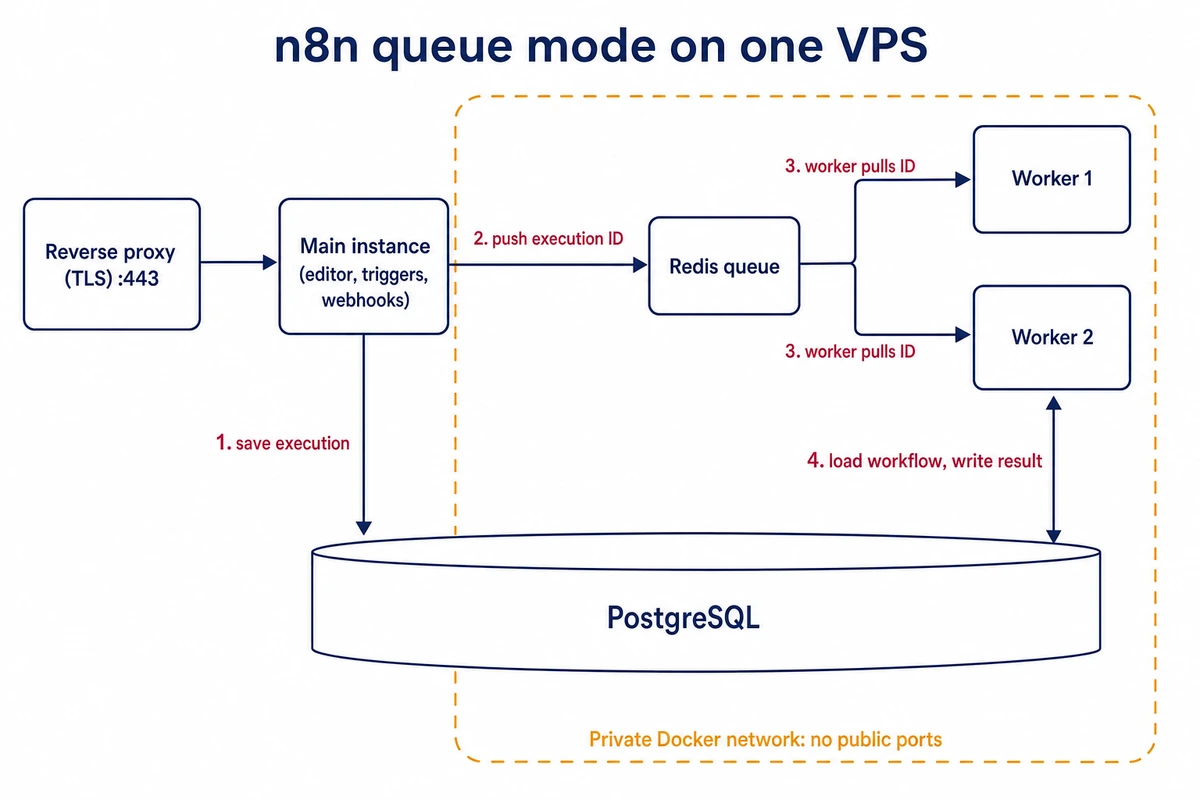
In queue mode the main instance serves the editor, listens for triggers and webhooks, saves each new execution to Postgres and pushes only its ID into a Bull queue in Redis. A worker takes the ID, loads the workflow from Postgres, runs it, writes the result back and reports through Redis.
Every worker needs the same Redis and the same database as main, since the queue message carries an ID and nothing else; the n8n queue mode documentation lists both requirements. Every worker also needs main’s encryption key, because it decrypts credentials itself.
Since 2.0, Code node scripts run in task runners. The task runner documentation recommends external mode for production, where each worker gets its own n8nio/runners sidecar at the same version tag.
An n8n queue mode Docker Compose file for one VPS
This file runs Postgres 18, Redis 8, main, one worker and its runner on a single host. Only main publishes a port, on 127.0.0.1, for a reverse proxy such as Caddy or nginx that terminates TLS. Postgres and Redis have no ports: entry and stay on the Compose network. Published on the public interface, both could be reached from anywhere on the internet and their passwords brute-forced.
The file passes docker compose config. Its variable names and defaults, like the log strings quoted above, were checked against docs.n8n.io and the n8n 2.46.6 source on November 5, 2026; the stack itself was not started.
Existing instance: run check 4 first and put its key into .env as N8N_ENCRYPTION_KEY before the first start; generate only the other three secrets.
Fresh install: generate four secrets and paste one into each placeholder of .env, along with your real host name in place of n8n.example.com:
for i in 1 2 3 4; do openssl rand -hex 32; done# .env (chmod 600; keep a copy off the server)
N8N_VERSION=2.46.6
N8N_HOST=n8n.example.com
POSTGRES_PASSWORD=first-openssl-value
REDIS_PASSWORD=second-openssl-value
N8N_ENCRYPTION_KEY=third-openssl-value-or-your-existing-key
N8N_RUNNERS_AUTH_TOKEN=fourth-openssl-value# compose.yaml
x-n8n-env: &n8n-env
DB_TYPE: postgresdb
DB_POSTGRESDB_HOST: postgres
DB_POSTGRESDB_DATABASE: n8n
DB_POSTGRESDB_USER: n8n
DB_POSTGRESDB_PASSWORD: ${POSTGRES_PASSWORD}
EXECUTIONS_MODE: queue
QUEUE_BULL_REDIS_HOST: redis
QUEUE_BULL_REDIS_PASSWORD: ${REDIS_PASSWORD}
N8N_ENCRYPTION_KEY: ${N8N_ENCRYPTION_KEY}
OFFLOAD_MANUAL_EXECUTIONS_TO_WORKERS: "true"
N8N_RUNNERS_MODE: external
N8N_RUNNERS_AUTH_TOKEN: ${N8N_RUNNERS_AUTH_TOKEN}
N8N_RUNNERS_BROKER_LISTEN_ADDRESS: 0.0.0.0
N8N_GRACEFUL_SHUTDOWN_TIMEOUT: "30"
GENERIC_TIMEZONE: UTC
x-n8n: &n8n
image: docker.n8n.io/n8nio/n8n:${N8N_VERSION}
restart: unless-stopped
stop_grace_period: 45s
volumes:
- n8n_data:/home/node/.n8n
services:
postgres:
image: postgres:18
restart: unless-stopped
environment:
POSTGRES_USER: n8n
POSTGRES_PASSWORD: ${POSTGRES_PASSWORD}
POSTGRES_DB: n8n
PGDATA: /var/lib/postgresql/data
volumes:
- pg_data:/var/lib/postgresql/data
healthcheck:
test: ["CMD-SHELL", "pg_isready -U n8n -d n8n"]
interval: 10s
timeout: 5s
retries: 10
redis:
image: redis:8-alpine
restart: unless-stopped
command: ["redis-server", "--requirepass", "${REDIS_PASSWORD}", "--appendonly", "yes"]
environment:
REDISCLI_AUTH: ${REDIS_PASSWORD}
volumes:
- redis_data:/data
healthcheck:
test: ["CMD-SHELL", "redis-cli ping | grep -q PONG"]
interval: 10s
timeout: 5s
retries: 10
n8n:
<<: *n8n
environment:
<<: *n8n-env
N8N_HOST: ${N8N_HOST}
N8N_PROTOCOL: https
N8N_WEBHOOK_URL: https://${N8N_HOST}/
N8N_PROXY_HOPS: "1"
ports:
- "127.0.0.1:5678:5678"
depends_on:
postgres:
condition: service_healthy
redis:
condition: service_healthy
healthcheck:
test: ["CMD", "node", "-e", "fetch('http://127.0.0.1:5678/healthz/readiness').then(r=>process.exit(r.ok?0:1)).catch(()=>process.exit(1))"]
interval: 15s
timeout: 5s
retries: 10
start_period: 60s
n8n-worker-1:
<<: *n8n
command: worker --concurrency=10
environment:
<<: *n8n-env
QUEUE_HEALTH_CHECK_ACTIVE: "true"
depends_on:
n8n:
condition: service_healthy
healthcheck:
test: ["CMD", "node", "-e", "fetch('http://127.0.0.1:5678/healthz/readiness').then(r=>process.exit(r.ok?0:1)).catch(()=>process.exit(1))"]
interval: 15s
timeout: 5s
retries: 10
start_period: 60s
n8n-worker-1-runner:
image: n8nio/runners:${N8N_VERSION}
restart: unless-stopped
environment:
N8N_RUNNERS_AUTH_TOKEN: ${N8N_RUNNERS_AUTH_TOKEN}
N8N_RUNNERS_TASK_BROKER_URI: http://n8n-worker-1:5679
depends_on:
- n8n-worker-1
volumes:
pg_data:
redis_data:
n8n_data:docker compose config --quiet && docker compose up -d
docker compose ps
docker compose logs -f n8n-worker-1One N8N_VERSION feeds both the n8n and runner images, which must match. OFFLOAD_MANUAL_EXECUTIONS_TO_WORKERS=true sends editor runs to workers now, as 3.0 will anyway, so main needs no runner sidecar. The worker waits for main’s readiness check, so migrations finish before it connects.
N8N_WEBHOOK_URL exists from 2.30.0; older releases use WEBHOOK_URL, an alias deprecated since 2.35.0.
For a second worker, copy the n8n-worker-1 and n8n-worker-1-runner blocks as n8n-worker-2 and n8n-worker-2-runner, pointing the new runner at http://n8n-worker-2:5679; –scale does not fit, since each runner must reach one specific worker.
On the host firewall, allow only SSH, 80 and 443, as in our first-day hardening steps for an Ubuntu server, with the Hostry control panel firewall as a second layer.
To run n8n from a git-push panel instead, the Coolify, Dokploy and CapRover comparison covers what each panel needs from the server.
How many workers, and at what concurrency
We would start with one worker at concurrency 10 beside main and measure for a week before adding anything. Parallel production executions equal workers times concurrency; the docs recommend 5 or higher per worker.
CPU
Each worker is one Node.js process whose JavaScript runs on one thread, so a second worker on the same server helps when the first sits near 100% (one full core) in CPUPerc while other cores idle.
Memory
During the busiest hour of a normal week, run this a few times and note the highest MEM USAGE for each worker and runner:
docker stats --no-stream --format 'table {{.Name}}\t{{.CPUPerc}}\t{{.MemUsage}}'We would add about a quarter on top of each peak for that container’s mem_limit, a rule of thumb rather than a measured figure. When memory runs short, scale the VPS up rather than adding workers, since each extra worker brings its own Node.js heap.
Pick the server from that budget. Add those limits to what main, Postgres, Redis and the operating system use, and choose a Hostry KVM VPS plan with that much RAM. Pricing begins at $6 per month as of November 2026, billed monthly, and resources can be raised later when a second worker needs room.
Database connections
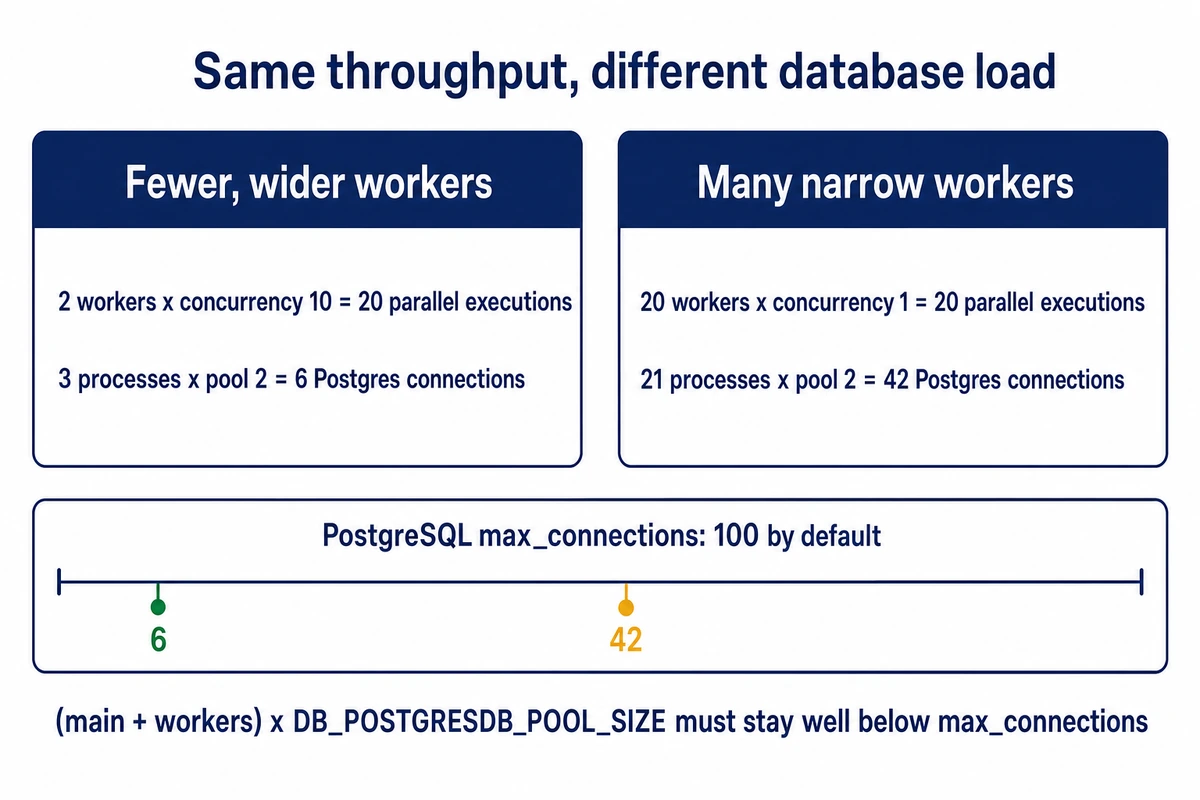
Each n8n process, main or worker, keeps its own pool of up to DB_POSTGRESDB_POOL_SIZE connections, 2 by default, while PostgreSQL’s max_connections is typically 100, three of them reserved for superusers. With the default pool, two layouts with the same capacity compare like this:
| Workers | Concurrency | Parallel executions | n8n processes (with main) | Postgres connections |
|---|---|---|---|---|
| 2 | 10 | 20 | 3 | 6 |
| 20 | 1 | 20 | 21 | 42 |
The second row is the pool exhaustion the docs warn about, plus twenty Node.js heaps. Raise the pool size only if executions wait for connections under load, and redo the sum: DB_POSTGRESDB_POOL_SIZE=4 on two workers and main is 3 × 4 = 12 connections.
Optional: workers on a second server
Workers on another VPS reach Redis and Postgres over WireGuard or an SSH tunnel, with both bound to the tunnel address and the firewall open only to the peer (say 203.0.113.10).
Updating a queue-mode stack and what n8n 3.0 changes for workers
Main, workers and runners should always run one release. n8n patches often: the n8n security advisories on GitHub list ten published on October 14, 2026 alone, three of them rated High. Keep the version pinned in N8N_VERSION in .env and change it only when you choose to update:
docker compose exec -T postgres pg_dump -U n8n -Fc n8n > n8n-$(date +%F).dump
# edit N8N_VERSION in .env, then:
docker compose pull
docker compose stop n8n-worker-1-runner n8n-worker-1
docker compose up -d
The worker finishes its jobs within the grace period; main migrates on start, and the worker rejoins once main is ready.
n8n 3.0.0 shipped as a beta on October 27, 2026; the stable release is planned for early December, after which 2.x receives security and critical bug fixes for 12 months. The n8n 3.0 breaking changes that touch a queue-mode stack:
- OFFLOAD_MANUAL_EXECUTIONS_TO_WORKERS is removed and manual runs always go to workers, so review worker memory.
- Self-hosting is Docker only; npm and npx n8n installs are no longer supported.
- On first start, ~/.n8n/binaryData is renamed to ~/.n8n/storage; if both exist, n8n stops with an error, and N8N_STORAGE_PATH keeps the old path.
- The N8N_RUNNERS_TASK_TIMEOUT default drops from 300 to 60 seconds.
- Encryption key rotation is on by default; older data stays readable and is re-encrypted on its next update.
Internal runner mode is deprecated in 3.0, which the file above already avoids. Before upgrading, open Settings > Migration Report on the 2.x instance, then try 3.0 on a copy restored from the dump.