
Let’s Encrypt 45-Day Certificates: Automate Renewal Before 2027

Let's Encrypt cuts its default certificate lifetime from 90 to 64 days on February 10, 2027, and to 45 days on February 16, 2028. If certbot or acme.sh already renews on its own, test it and add an expiry alert. Manual renewals, fixed 60-day cron jobs and certificates copied to other machines need fixing now.
You do not have to wait for 2028 to see how your servers handle Let’s Encrypt 45-day certificates: an opt-in profile has issued them since May 13, 2026, and the staging environment has issued 64-day certificates since October 14, 2026. On cPanel web hosting with free automatic SSL, the panel handles renewal and you have nothing to change.
When Let’s Encrypt 45-day certificates become the default
Let’s Encrypt announced the schedule in its December 2025 post on moving from 90 to 45 days. The change runs through ACME profiles: classic is what every client gets unless it asks for something else, and tlsserver is the opt-in profile for early adopters.
| Date | Profile | Certificate lifetime | Authorization reuse |
|---|---|---|---|
| Until February 9, 2027 | classic (default) | 90 days | 30 days |
| Since May 13, 2026 | tlsserver (opt-in) | 45 days | 7 hours |
| February 10, 2027 | classic (default) | 64 days | 10 days |
| February 16, 2028 | classic (default) | 45 days | 7 hours |
Authorization reuse shrinks too, and that matters as much as the lifetime: today a client can often renew on a validation done weeks earlier. At 7 hours, almost every renewal has to pass a fresh HTTP-01 or DNS-01 challenge, so a broken validation path shows up at the next renewal instead of hiding behind an old authorization.
The new lifetimes apply to newly issued certificates, so you meet each one at your first renewal after the date. Existing certificates are not revoked. According to the Let’s Encrypt announcement of 64-day certificates, the last 90-day certificate should expire around May 11, 2027.
CA/Browser Forum ballot SC-081v3, passed in April 2025, reduces the maximum validity of every publicly trusted TLS certificate from 398 days to 47 days in steps between March 2026 and March 2029, so a shorter SSL certificate lifetime reaches paid certificates too.
Who needs to do something?
- cPanel hosting customers: nothing. Hostry cPanel hosting includes free automatic Let’s Encrypt SSL, and you do not run certbot yourself.
- On a VPS where certbot or acme.sh runs on its default schedule, check the client version, run a dry run and confirm the web server reloads after renewal.
- Manual renewals, custom cron jobs, certificates copied to other machines and DNS-01 with hand-typed TXT records fail first, so fix them before February 10, 2027.
How to check Certbot and acme.sh renewal on a VPS
Log in over SSH and work through the four checks in order. Replace example.com with your own domain in every command.
1. Find the client and its version
certbot --version
snap list certbot
ls -d ~/.acme.sh 2>/dev/null && ~/.acme.sh/acme.sh --version
The Certbot user guide and changelog record three changes that matter here. Certbot 4.0 added the –preferred-profile and –required-profile flags. The same release moved renewal to the point where one third of the lifetime remains. Certbot 4.1 added ACME Renewal Information (ARI), which lets Let’s Encrypt tell the client when to renew.
Ubuntu 24.04 ships certbot 2.9.0 in its apt repository. That version renews 30 days before expiry, which still works for 64- and 45-day certificates, but it cannot follow ARI or request a profile. The snap tracks current releases, which is a good reason to prefer it on Ubuntu.
For acme.sh renewal, version 3.1.2 added certificate profiles, and 3.1.4 turned on ARI by default and moved the installed cron job to every 6 hours. Builds older than 3.1.3 schedule renewal 60 days after issuance by default, which leaves about five days on a 64-day certificate and comes after a 45-day one has expired, so run acme.sh –upgrade on anything older. Also note that acme.sh uses ZeroSSL unless you chose Let’s Encrypt; the CA column in acme.sh –list shows which one issued each certificate.
2. Find what triggers renewal
systemctl list-timers | grep -i certbot
crontab -l | grep -i -E "certbot|acme"
grep -rn -E "certbot|acme" /etc/crontab /etc/cron.d/ 2>/dev/null
An apt install normally shows certbot.timer, a snap install shows snap.certbot.renew.timer, and acme.sh adds a line with acme.sh –cron to the crontab of the user who installed it. The apt package also ships /etc/cron.d/certbot, but that entry skips itself on systemd hosts, so it is not a second scheduler. Two schedulers for the same certificates, or none, both need fixing.
3. Run a dry run
sudo certbot certificates
sudo certbot renew --dry-run
acme.sh --list
With certbot, certbot certificates lists each certificate with its expiry date and days left. The dry run requests staging certificates without saving them, so every lineage passes a real challenge. Since staging already issues 64-day certificates, a clean dry run today also tests the lifetime arriving in February.
acme.sh has no dry-run mode, so use the staging test further down to exercise it end to end. After a real renewal, the dates in acme.sh –list and Le_NextRenewTime in the certificate’s .conf file move forward. With –log enabled, a root install logs to /root/.acme.sh/acme.sh.log.
4. Compare the file with what visitors get
sudo openssl x509 -enddate -noout -in /etc/letsencrypt/live/example.com/cert.pem
echo | openssl s_client -connect example.com:443 -servername example.com 2>/dev/null | openssl x509 -noout -dates
If the expiry date visitors get is older than the expiry date of the file on disk, the web server is still serving the previous certificate. That points straight at a missing reload, covered in the next section.
Fix what breaks first
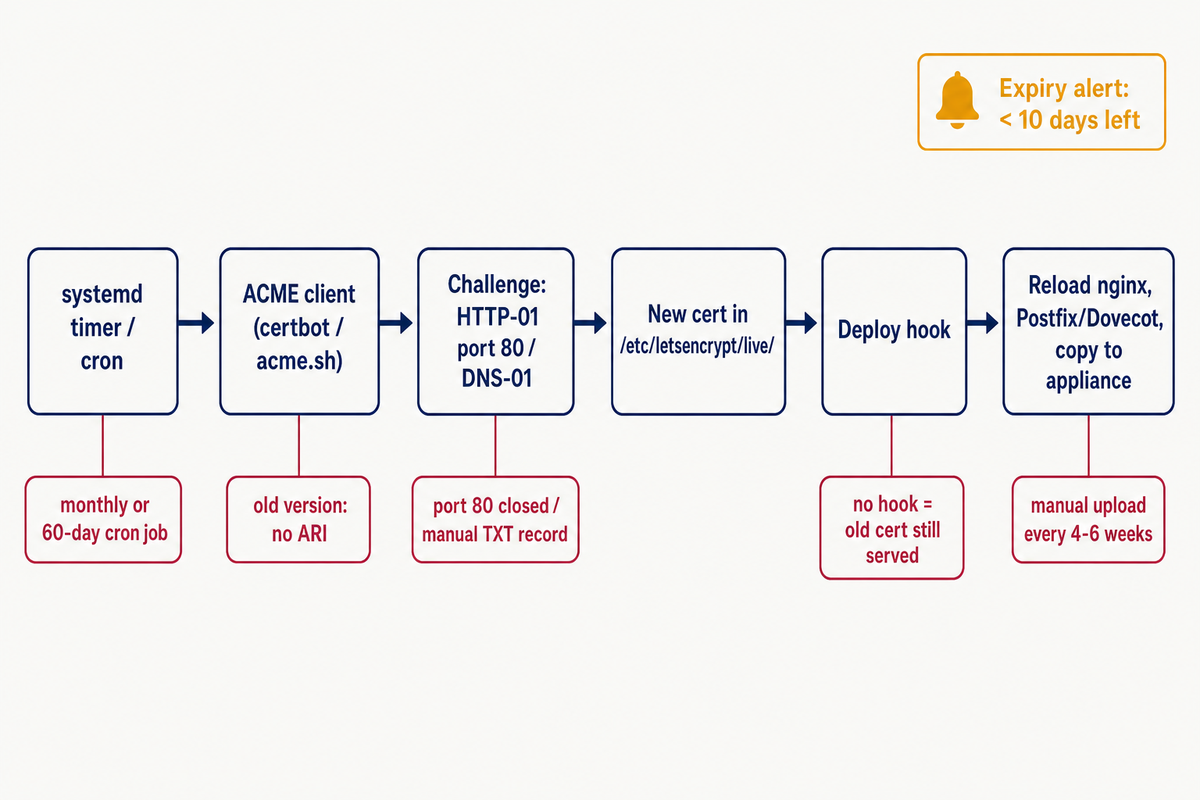
Fixed intervals and monthly jobs
Let’s Encrypt says a hardcoded 60-day renewal interval will no longer be enough, and its 64-day post suggests searching cron jobs, shell scripts and runbooks for values such as 83, 80 or 60. The rule of thumb for clients without ARI is to renew at about two thirds of the certificate’s lifetime.
grep -rn renew_before_expiry /etc/letsencrypt/renewal/
grep -rn Le_RenewalDays ~/.acme.sh/*/*.conf 2>/dev/null
grep -rn -E "days|60|80|83" /etc/cron.d/ /usr/local/bin/ 2>/dev/null | grep -i -E "cert|acme|ssl"
In acme.sh, a Le_RenewalDays line means the certificate was issued with a fixed –days value, and since 3.1.5 that value takes priority over ARI. Watch out for cron jobs that run certbot renew once a month. A 45-day certificate becomes due around day 30. If the job runs on day 28 the certificate is not due yet, and the next run on day 58 comes after it has expired. Delete the custom job and let the packaged timer run, since it checks twice a day.
No reload after renewal
When certbot uses the nginx or Apache installer plugin, it reloads the server itself. With certonly, webroot or standalone, nobody does unless you add a deploy hook. Scripts in /etc/letsencrypt/renewal-hooks/deploy/ run after every successful renewal:
sudo tee /etc/letsencrypt/renewal-hooks/deploy/reload-web.sh >/dev/null <<'EOF'
#!/bin/sh
systemctl reload nginx
EOF
sudo chmod +x /etc/letsencrypt/renewal-hooks/deploy/reload-web.sh
sudo certbot renew --dry-run --run-deploy-hooks
Use systemctl reload apache2 on Debian or Ubuntu with Apache. A plain dry run skips deploy hooks. –run-deploy-hooks, available since certbot 2.3 and so also in the 2.9.0 apt package, runs them against the current certificate once the dry run succeeds. With acme.sh, the reload lives in the –install-cert step:
acme.sh --install-cert -d example.com \
  --key-file /etc/nginx/ssl/example.com.key \
  --fullchain-file /etc/nginx/ssl/example.com.fullchain.pem \
  --reloadcmd "systemctl reload nginx"
Certificates copied to other services
Mail servers such as Postfix and Dovecot often read the same files from /etc/letsencrypt/live/ and need a reload to pick up a renewed certificate reliably. Certbot sets $RENEWED_LINEAGE for deploy hooks, so one hook can react to a specific certificate:
#!/bin/sh
# /etc/letsencrypt/renewal-hooks/deploy/reload-mail.sh
case "$RENEWED_LINEAGE" in
  */mail.example.com) systemctl reload postfix dovecot ;;
esac
Load balancers, NAS boxes and appliances that get a certificate uploaded by hand are harder. At two thirds of the lifetime, a 64-day certificate means an upload roughly every six weeks and a 45-day one every 30 days. Where the device has an API, push the certificate from a deploy hook. Where it can run its own ACME client, let it.
When a device has no API and cannot run any ACME client, the free SSL certificate generator is a manual exception, not a renewal solution: it issues Let’s Encrypt certificates in the browser, with up to 100 names per certificate and your own CSR if you need one. Add every such certificate to the expiry check below and plan uploads at the cadence above.
Port 80 closed for HTTP-01
The HTTP-01 challenge can only be done on port 80. If someone closed port 80 after the first issuance, or opens it by hand before each renewal, renewals fail. If you followed our checklist to secure a new Linux VPS, the UFW rule for 80,443/tcp already covers this. Also check the firewall in your provider’s control panel. You can keep port 80 as a redirect to HTTPS, because the challenge follows redirects.
DNS-01 with hand-edited TXT records
Wildcard certificates need DNS-01. If you issued one with certbot’s –manual mode and pasted the TXT record into a DNS panel, certbot renew cannot renew it without an auth hook. Switch to a DNS plugin for certbot, or one of the DNS API integrations in acme.sh, which need an API token from your DNS provider. Limit that token to DNS edits on only the zones you need certificates for, and make certbot’s credentials file readable only by its owner with chmod 600; the certbot-dns-cloudflare docs give the same advice.
Let’s Encrypt’s planned DNS-PERSIST-01 challenge uses a static TXT record you set once. It was expected in 2026, but as of late October 2026 Let’s Encrypt had not announced production availability, so do not plan around it yet.
Test 45-day certificates now
Both the staging and production ACME directories already list the tlsserver profile, so you can try Let’s Encrypt 45-day certificates today. The safest first test uses staging and a throwaway name such as test.example.com that already points at the server:
sudo certbot certonly --staging --nginx -d test.example.com --required-profile tlsserver
sudo openssl x509 -noout -dates -in /etc/letsencrypt/live/test.example.com/cert.pem
sudo certbot delete --cert-name test.example.com
Use –required-profile for the test: –preferred-profile quietly falls back to the default if the profile is unavailable, while the required form fails, so you know what you got. The dates should be 45 days apart. With acme.sh 3.1.2 or later, the equivalent is acme.sh –issue –staging -d test.example.com -w /var/www/html –cert-profile tlsserver.
To move a production site to 45 days, re-issue it with the command you originally used plus –preferred-profile tlsserver –force-renewal. Certbot 4.1 and later stores the profile in /etc/letsencrypt/renewal/example.com.conf, so later renewals keep it.
Do not opt in everywhere: a tlsserver certificate holds at most 25 names and has no Common Name, which matters if anything in your stack still reads the CN. Leave certificates you still copy by hand on classic until that copy is automated.
SSL certificate expiry monitoring that catches failed renewals
Let’s Encrypt recommends monitoring alongside automation. Check the certificate each service actually serves, which also catches the “renewed but not reloaded” case:
sudo tee /usr/local/bin/check-cert-expiry.sh >/dev/null <<'EOF'
#!/bin/sh
DAYS=10
for target in example.com:443 www.example.com:443 mail.example.com:993; do
  host=${target%:*}
  if ! echo | openssl s_client -connect "$target" -servername "$host" 2>/dev/null \
       | openssl x509 -noout -checkend $((DAYS * 86400)) >/dev/null 2>&1; then
    echo "Certificate on $target expires within $DAYS days or could not be read" \
      | mail -s "TLS certificate alert: $target" admin@example.com
  fi
done
EOF
sudo chmod +x /usr/local/bin/check-cert-expiry.sh
echo "17 7 * * * root /usr/local/bin/check-cert-expiry.sh" | sudo tee /etc/cron.d/cert-expiry
Replace the targets and the address with your own. The mail command needs a local mail setup such as the mailutils package, or you can swap that line for a call to your chat or alerting webhook. To prove the alert path works, set DAYS=90 in the script for a moment, run it by hand, confirm the message arrives, then set it back to 10.
Why 10 days? A client renewing at two thirds of the lifetime starts trying with about 21 days left on a 64-day certificate and 15 days on a 45-day one. An alert at 10 days stays quiet while normal retries run, then leaves you a week and a half to fix the problem. The 30-day thresholds many people set for 90-day certificates would fire on every healthy 45-day certificate.
A check on the same server shares its failures: if the VPS is down or cron is broken, nothing reports. Add at least one outside view of the expiry date:
- An uptime monitoring service that also checks certificate expiry.
- The same script running from a second machine, pointed at your public hostnames.
A Certificate Transparency monitor adds a separate signal: it shows what CAs issued for your domains, including certificates you did not request, while the served-certificate check shows what your services present. A new CT entry with no change on the server means a renewal never got deployed.
Renewal timing at a glance
The margin for a failed renewal shrinks with every step. Figures assume renewal at two thirds of the lifetime and a 10-day alert:
| Lifetime | Default for | Renewal starts around | Days left at that point | Days of failed retries before the alert |
|---|---|---|---|---|
| 90 days | Certificates issued until February 9, 2027 | Day 60 | 30 | 20 |
| 64 days | Certificates issued from February 10, 2027 | Day 43 | 21 | 11 |
| 45 days | tlsserver now; default from February 16, 2028 | Day 30 | 15 | 5 |
What to do next
- Set a reminder for the week after February 10, 2027 to confirm that every server has picked up a 64-day certificate, and another after February 16, 2028.
- Add the expiry check to your server build notes, so a new site or mail host is monitored from its first certificate.
- Inventory every certificate that is copied off the server where it renews, such as to a mail server, a load balancer or an appliance, and note for each one how the renewed file gets there.
FAQ
Why is Let’s Encrypt shortening certificate lifetimes?
The CA/Browser Forum Baseline Requirements now demand it. Let’s Encrypt also points to two security benefits: a shorter lifetime limits how long a compromised certificate can be misused, and it makes revocation technologies more efficient.
Will I hit rate limits by renewing more often?
Let’s Encrypt says rate limits will not be impacted by this change. Renewals of the same set of names are exempt from the per-domain and per-account limits, and renewals timed by ARI are exempt from all of them, so the higher renewal frequency of 64- and 45-day certificates does not count against you.
Can I keep 90-day certificates?
Not from Let’s Encrypt. The default profile itself moves to 64 days on February 10, 2027, and the opt-in profiles are shorter, not longer. Paid certificates will not help for long either, because the CA/Browser Forum limits apply to every public CA.
Do I need to change my web server configuration?
Usually not. Nginx or Apache keeps reading the same files under /etc/letsencrypt/live/, and Let’s Encrypt 45-day certificates only replace them more often. Whether the server reloads after each replacement depends on the installer-plugin and deploy-hook cases described under “No reload after renewal”.
Setting up a new server for your sites? A Hostry KVM VPS gives you full root access in 18+ locations and is ready in seconds. Renewal setup and testing on it stay with you as the server owner.