
Python 3.10 End of Life: What It Means on an Ubuntu 22.04 VPS

You run an Ubuntu 22.04 VPS, python3 --version prints Python 3.10.12, and a scanner or a library changelog now flags Python 3.10 end of life. The interpreter Ubuntu installed keeps getting Canonical security fixes until May 2027 (Ubuntu Pro stretches that to 2032), but upstream support ended on October 1, 2026, and your own virtualenvs and pip dependencies are the part that ages from here.
That 3.10.12 does not mean ten missed releases. Canonical keeps the version string it shipped and backports fixes into it. What needs checking is each of your applications: where its interpreter comes from, and which pip dependencies it pins. On a Hostry KVM VPS you have root, so you run that check and the move to 3.12 yourself.
Paths below such as /srv/app, the user deploy and the unit app.service are placeholders for your own. On November 5, 2026, package versions and dates were checked against the Ubuntu archive and python.org. The uv commands ran with uv 0.13.7 on a clean Ubuntu test system, and the python3-minimal repair in a minimal 22.04 chroot.
Python 3.10 end of life: what ended on October 1 and what did not
PEP 619, the Python 3.10 release schedule, promised source-only security releases until October 1, 2026, five years after 3.10.0. Python 3.10.22 came out that day and was the final one. The core team now accepts no 3.10 issues on the bug tracker, so a CPython flaw found in November is patched on 3.11 and newer and stays open on 3.10 upstream.
Upstream, Python 3.10 is no longer supported in any form. The Python developer guide’s version table shows where the newer lines stand:
| Version | Upstream status (November 5, 2026) | Upstream end of life | Default python3 on |
|---|---|---|---|
| 3.10 | End of life, last release 3.10.22 | October 1, 2026 | Ubuntu 22.04 |
| 3.11 | Security fixes only | October 2027 | None of the LTS releases |
| 3.12 | Security fixes only | October 2028 | Ubuntu 24.04 |
| 3.13 | Security fixes only | October 2029 | None of the LTS releases |
| 3.14 | Bug fixes | October 2030 | Ubuntu 26.04 |
| 3.15 | Bug fixes, first released October 9, 2026 | October 2031 | None yet |
The packaged /usr/bin/python3.10 keeps receiving Canonical fixes through apt, as the patching breakdown below shows.
Python 3.10 security updates on Ubuntu 22.04: who patches what
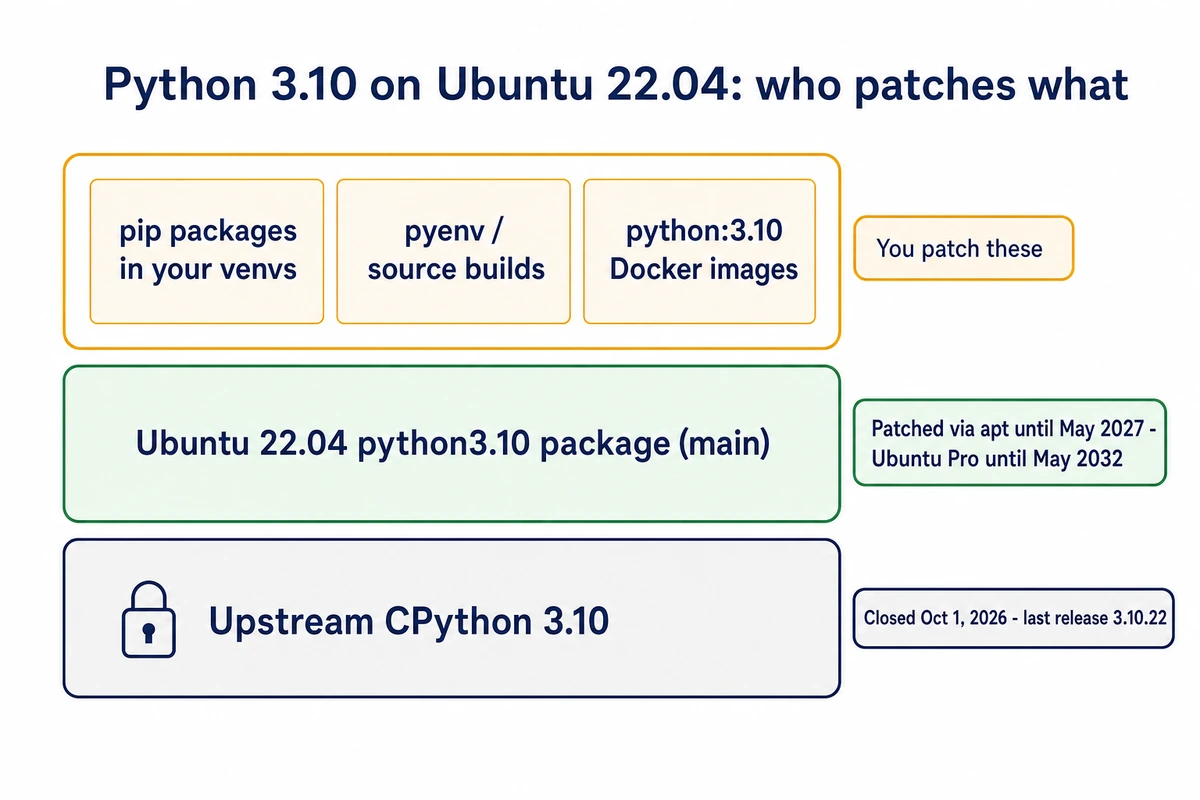
On 22.04, python3.10 lives in the main component. According to the Ubuntu release cycle page, packages in main get standard security maintenance on 22.04 until May 2027, and Expanded Security Maintenance through Ubuntu Pro runs to May 2032. Canonical is still doing that work. The current jammy-security build, 3.10.12-1~22.04.18, reached the archive in September 2026 with fixes for CVE-2026-4360 in tarfile extraction and CVE-2026-15308 in the HTML parser.
Those updates stop at the package itself. Everything else Python-related on the server is a separate installation or dependency to inspect:
- pip packages inside each virtualenv. A venv whose pyvenv.cfg says home = /usr/bin runs on Ubuntu’s patched interpreter, yet its libraries stay at whatever pip installed. When a project stops supporting 3.10, its fixes ship in releases that venv cannot install.
- Interpreters built by pyenv or from source under /usr/local. A venv whose home points at .pyenv or /usr/local runs on one of these, and with upstream 3.10 closed, nobody patches it now.
- Container images built on python:3.10, whose interpreter comes from the image, never from the host.
Python libraries installed with apt follow their component. A python3-* package from main is patched like the interpreter; many come from universe, which gets security coverage only through ESM under Ubuntu Pro.
Pip dependencies age quietly. These projects already require a newer interpreter, per the Requires-Python field of their current releases on PyPI:
- NumPy 2.3.0 (June 2025) needs 3.11 or later, and the current 2.5.4 needs 3.12. The last line for 3.10 is 2.2.x.
- pandas 3.0.0 (January 2026) and SciPy 1.16.0 both need 3.11.
- Django 6.0 needs 3.12. Django 5.2 LTS still supports 3.10 and gets security releases until April 2028; 5.2.19 shipped on November 3, 2026.
Inventory first: find which apps use Python 3.10
1. Confirm the system interpreter is untouched
python3 --version
readlink -f /usr/bin/python3
apt-cache policy python3.10 | head -n 3
update-alternatives --list python3
A healthy 22.04 server prints Python 3.10.12, resolves the link to /usr/bin/python3.10, shows the installed and candidate versions as equal, and answers the last command with “no alternatives for python3”.
If /usr/bin/python3 already points at something else, someone repointed it in the past, and restoring it comes before anything else here. The link belongs to the python3-minimal package, so a reinstall puts it back:
sudo update-alternatives --remove-all python3   # only if step 1 listed alternatives
sudo apt install --reinstall python3-minimal
readlink -f /usr/bin/python3
Run the first two lines back to back, since the link is missing between them. The check passes when readlink prints /usr/bin/python3.10 again.
2. List every virtualenv and its base interpreter
sudo find / -xdev -name pyvenv.cfg 2>/dev/null | while read -r f; do
  echo "== $f"; sudo grep -E '^(home|version|version_info) ' "$f"
done
Each venv carries a pyvenv.cfg. version = 3.10.12 next to home = /usr/bin marks a venv on the Ubuntu package; a home under .pyenv or /usr/local is one of the unpatched interpreters listed earlier. Add the mount points to the command if /srv or /home sits on a separate disk, since -xdev stays on the root filesystem.
3. Find what starts them
grep -rlE 'python|venv' /etc/systemd/system/ 2>/dev/null
systemctl cat app.service | grep -E '^(User|WorkingDirectory|ExecStart)='
sudo grep -rnE 'python|venv' /etc/crontab /etc/cron.d/ /var/spool/cron/crontabs/ 2>/dev/null
ps -eo user,pid,args | grep -E '[p]ython'
Write down every unit, cron line and process with its interpreter path; that list is your work plan for the switch.
4. Freeze the dependencies and see what is stuck
/srv/app/.venv/bin/python -m pip freeze > /srv/app/requirements-310.lock
/srv/app/.venv/bin/python -m pip list --outdated
Read the second list with care. pip only offers releases whose Requires-Python accepts the running interpreter, so a 3.10 venv never shows the versions that dropped 3.10. In a 3.10.22 venv on November 5, pip named NumPy 2.2.6 as the newest release, while PyPI’s actual latest was 2.5.4. Treat “up to date” there as “up to date for 3.10”.
5. Check containers
docker ps --format '{{.Image}}  {{.Names}}'
grep -rn '^FROM python:3\.10' /srv --include='Dockerfile*' 2>/dev/null
If every Python app on the server runs in containers, skip ahead to the section on python:3.10 images. Steps 6 and 7 cover apps in host virtualenvs.
Upgrade Python 3.10 to 3.12 on Ubuntu 22.04 without touching /usr/bin/python3
Never repoint /usr/bin/python3 with update-alternatives or a manual symlink. unattended-upgrade, add-apt-repository, cloud-init and do-release-upgrade are Python scripts whose shebang line names /usr/bin/python3, and the apt bindings they import ship as apt_pkg.cpython-310-x86_64-linux-gnu.so, a module built for 3.10 only. Under another interpreter that import fails, and the tools that install your security updates stop working. Leave python3.10 installed, too; python3, ubuntu-minimal and netplan.io depend on it.
Two shortcuts also look tempting. apt install python3.11 on 22.04 brings in 3.11.0~rc1-1~22.04.1 from universe, a release candidate. The deadsnakes PPA states on its own page that there is no guarantee of timely security updates, so we leave it out of production plans. That leaves four routes.
| Route | Fits when | What you take on |
|---|---|---|
| Keep 3.10 for now | The app uses only apt packages from main, or a dated move is already planned before May 2027 | pip dependencies frozen at their last 3.10 releases; the OS deadline still arrives |
| uv-managed 3.12 on the same 22.04 server | A library or auditor needs 3.12 soon and the server cannot move yet | You update the interpreter yourself; the 22.04 standard support date stays |
| New Ubuntu 24.04 VPS | Most production servers | Data migration and a DNS switch; python3.12 then comes from main, patched until May 2029 |
| In-place do-release-upgrade to 24.04 | A simple server with a backup you have restored once | Every venv built on python3.10 breaks, since noble has no python3.10 package; rollback means restore |
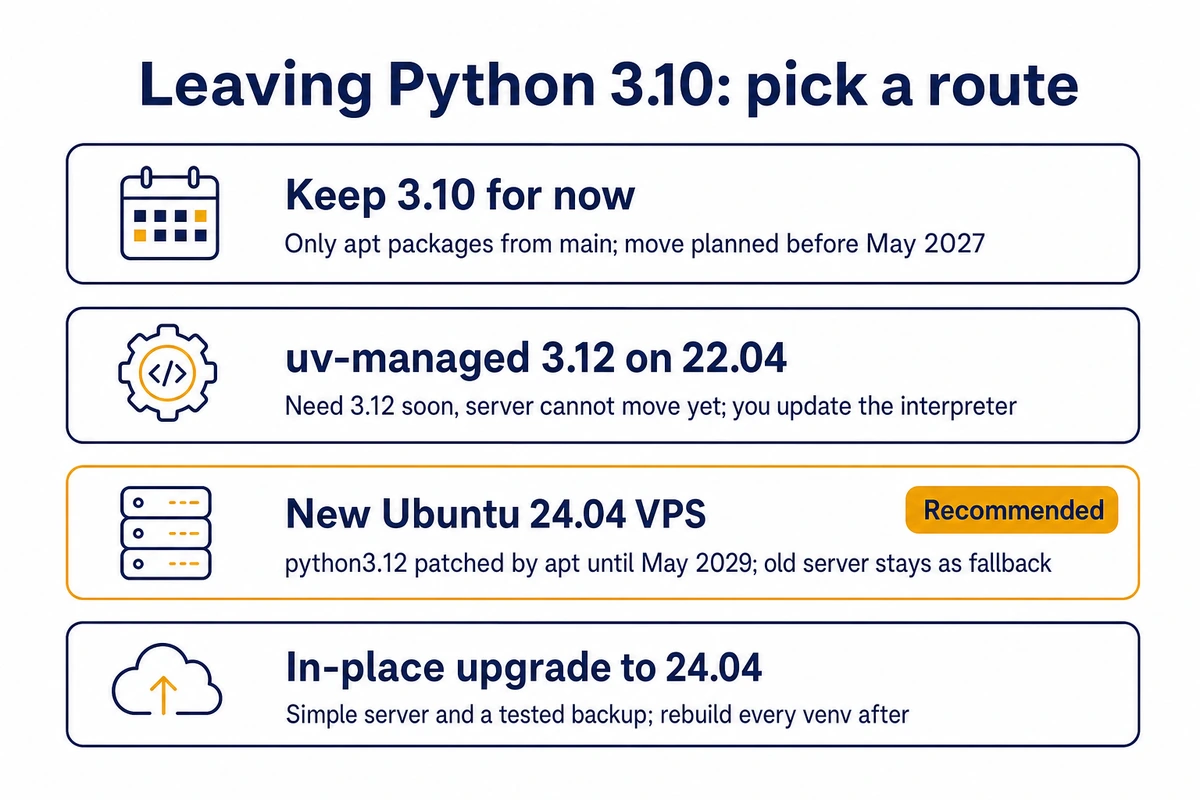
We would build a fresh 24.04 server for anything in production, such as a KVM VPS deployed from the Ubuntu 24.04 image. It settles the Python question and the May 2027 OS deadline in one migration, the 22.04 machine stays live as the fallback, and apt keeps patching python3.12 afterwards. Use uv on the old server when an application has to move before you can schedule that migration.
For the in-place route, first confirm that /etc/update-manager/release-upgrades contains Prompt=lts, the 22.04 default. Then start the upgrade with sudo do-release-upgrade. If SSH drops while it runs, log in through the VNC console in your Hostry VPS control panel and run sudo do-release-upgrade again; it reattaches to the upgrade’s running screen session.
Recreate the virtualenv with the new Python version
A venv cannot move to another minor version in place, so build a new one beside the old one and install the frozen pins. Use 6a for the uv route and 6b for a new 24.04 VPS. After an in-place do-release-upgrade, rebuild each venv with the venv commands from 6b.
6a. On the 22.04 server, with uv
# as deploy, the user app.service runs as
curl -LsSf https://astral.sh/uv/install.sh | sh
source $HOME/.local/bin/env
uv python install 3.12
uv venv --python 3.12 /srv/app/.venv-312
uv pip install --python /srv/app/.venv-312/bin/python --only-binary :all: -r /srv/app/requirements-310.lock
/srv/app/.venv-312/bin/python --version
uv downloads a CPython build from Astral’s python-build-standalone project and keeps it in ~/.local/share/uv/python, so install it as the account the service runs under. If the service runs as another user, such as www-data, create a shared directory first with sudo install -d -o deploy -g deploy -m 755 /opt/uv/python and put export UV_PYTHON_INSTALL_DIR=/opt/uv/python in deploy’s profile, so installs and later upgrades land there. It produced Python 3.12.16 on uv 0.13.7. The new venv has no pip inside; use uv pip, or create it with –seed if your deploy scripts call pip.
–only-binary :all: makes old pins fail fast. NumPy 1.24.4, for example, has no 3.12 wheels, and uv stops with “has no usable wheels” before it attempts a long source build. Raise only those pins to the first release with cp312 wheels, and leave the general upgrade for a later change.
6b. On a new Ubuntu 24.04 VPS
Harden the new server (203.0.113.10 here) first, then copy the application code and step 4’s lock file to it. Leave the old venvs behind, since they only work on the original interpreter, and restore a fresh database dump separately:
ssh -t deploy@203.0.113.10 'sudo install -d -o deploy -g deploy /srv/app'
rsync -a --exclude '.venv*' /srv/app/ deploy@203.0.113.10:/srv/app/
sudo apt update && sudo apt install -y python3-venv
python3 --version
python3 -m venv /srv/app/.venv-312
/srv/app/.venv-312/bin/pip install --only-binary :all: -r /srv/app/requirements-310.lockExpect Python 3.12.3; Ubuntu patches it under that number the same way it does 3.10.12. On 24.04 a plain sudo pip install outside a venv fails with “externally-managed-environment” because of the EXTERNALLY-MANAGED marker in /usr/lib/python3.12. That protects the system interpreter, so keep –break-system-packages out of your scripts. Before copying anything over, start with the first 30 minutes of hardening on a fresh VPS.
6c. Test before anything switches
cd /srv/app
/srv/app/.venv-312/bin/python -m pytest -q
Swap in your own test runner if it is not pytest. On a new VPS, also start the app and use it under a staging hostname while 22.04 keeps serving. Move on to step 7 once the tests pass and, on a new VPS, the staging check too.
7. Point the systemd unit and cron at the new venv
sudo systemctl edit app.service
# in the editor:
[Service]
ExecStart=
ExecStart=/srv/app/.venv-312/bin/gunicorn --bind 127.0.0.1:8000 app.wsgi:application

sudo systemctl restart app.service
An empty ExecStart= line clears the original command; without it systemd refuses a second ExecStart for a normal service. The drop-in lands in /etc/systemd/system/app.service.d/override.conf, and systemctl edit reloads the daemon when you save. Console scripts such as gunicorn carry the absolute path of their own venv in the first line, which is why renaming .venv-312 to .venv later would break them.
For cron, open the deploy user’s table with crontab -e, or the file under /etc/cron.d/ from step 3, and change each /srv/app/.venv/bin/python to the new path. Then run one of those jobs by hand as deploy, because cron mails its errors to an address nobody may be reading.
Check the switch, then retire the old environment
systemctl is-active app.service
sudo readlink -f /proc/$(systemctl show -p MainPID --value app.service)/exe
journalctl -u app.service --since "-15min" -p warning --no-pager
curl -fsS http://127.0.0.1:8000/healthz
The second line names the binary the main process really runs: /usr/bin/python3.12 on 24.04, or a path ending in cpython-3.12.16-linux-x86_64-gnu/bin/python3.12 under uv. A 3.10 path means the unit still starts the old venv; check the override with systemctl cat app.service. Use a URL that touches the database in place of /healthz.
Keep the way back open for a week. How you roll back depends on the route:
- Same server with uv: the old /srv/app/.venv is still there. Run sudo rm /etc/systemd/system/app.service.d/override.conf, sudo systemctl daemon-reload and a restart, then change the cron path back. Delete the old venv once nothing has needed it.
- New 24.04 VPS: the 22.04 server is still running, so point DNS or the reverse proxy back at it.
- In-place upgrade: restore from the backup you took before running do-release-upgrade.
Under the uv route, interpreter updates are your job. Python 3.12 gets security releases until October 2028; the uv documentation on managed Python versions says each uv release carries a fixed list of available builds. Run uv self update first, then uv python upgrade 3.12, then restart the service. Venvs created with –python 3.12 follow the new patch release through uv’s minor-version link; one pinned to an exact patch such as 3.12.16 stays where it is. On 24.04 apt does the updating: apt list –upgradable 2>/dev/null | grep python3.12 shows a pending build, and sudo systemctl restart app.service after it installs loads the patched binary.
Related maintenance on the same server
A 24.04 server is also where the later move from 24.04 to 26.04 and its pre-flight checks begins. If the same 22.04 box hosts PostgreSQL 14, its PostgreSQL 14 deadline on November 12 falls in this window too; give each upgrade its own maintenance slot.
python:3.10 Docker images after end of life
On November 5, 2026 the official image’s supported tags on Docker Hub ran from 3.11 to 3.15 plus a 3.16 pre-release, with no 3.10 among them. The docker-library FAQ explains what that means: a dropped tag stays available to pull and is never rebuilt again. python:3.10-slim is frozen with its last interpreter and its last Debian base, and docker build –pull changes nothing.
Change the FROM line to python:3.12-slim, rebuild, run the tests inside the container and redeploy. Name the minor version in the tag. A bare python:3 moves to the next minor whenever upstream ships one, and Ubuntu’s fixes on the host never reach the interpreter inside the image.
Build the 24.04 environment on a Hostry VPS with the Ubuntu 24.04 image and test the migration there before you switch anything. When the checks above pass, move DNS and keep the old server until the week is out. Plans in the VPS catalog began at $6 per month on November 5, 2026, with monthly billing and resources you can scale later.